-
v1.4.0 Stable
kerem released this
2026-01-15 01:12:54 +03:00 | -221 commits to develop since this release📅 Originally published on GitHub: Wed, 14 Jan 2026 22:14:37 GMT
🏷️ Git tag created: Wed, 14 Jan 2026 22:12:54 GMTChangelog
-
Dashboard loading performance has been significantly improved, particularly on instances with a high number of agents. Initial dashboard load times should now be 3–4× faster, while cached requests see approximately a 2× speed improvement, resulting in a much more responsive web interface overall.
-
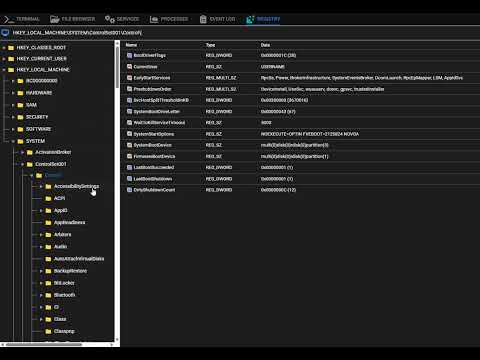
#1452 A new Registry Editor has been added to Remote Background that mimics the functionality of the Windows Registry Editor. You can now browse and edit the Windows registry directly from the web interface. Check out the video below for a demo:
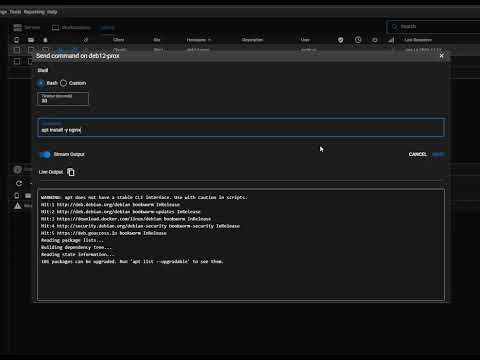
- The Send Command feature now includes a Live Stream mode that streams command output in real time, allowing you to see results as they are produced instead of waiting for completion. This improvement makes troubleshooting and long-running commands more transparent and responsive, and represents the first step toward a larger initiative to bring native terminal and file browser support to the Tactical RMM agent. Check out the video below for a demo:
-
The optional
--proxyparameter for agent installation has been fixed. This option had not been functioning correctly for some time, but now works as intended, allowing agents to be installed behind a http proxy as expected. -
Support has been added for configuring a custom temporary directory on Unix-based agents. This introduces a new installer flag
--tmpdirallowing scripts and runtime files to be executed from a writable location. It is particularly useful on systems such as NixOS, where binaries reside on a read-only filesystem and scripts previously failed to execute as a result. Many thanks to @SoarinFerret for the implementation. -
A race condition was resolved that could cause Windows tasks configured with the 'Manual' scheduling option to run unexpectedly.
-
The agent’s Nushell installer has been updated to match the newer Nushell release naming schemes. This ensures that Nushell can be correctly downloaded and installed when using more recent Nushell versions, where the upstream asset names have changed. Many thanks to @joshrandall8478 for identifying the problem and providing the fix.
-
[#1936] Fixed an issue where the hostname appeared twice in alert email subjects and bodies. Many thanks to @BuddiesD for providing the fix.
-
[#2359] Docker deployments now allow explicit overrides for session and CSRF domains, preventing incorrect automatic domain detection in complex or non-wildcard subdomain configurations. Many thanks to @Thalagyrt for providing the fix.
NOTE: This update includes a new agent version. While extensive work has been done with antivirus vendors to reduce false positives, AV software is not perfect and the agent may still be flagged in some environments.
If you have not already set exclusions: to avoid potential issues, it is recommended to follow this process when updating:
- Before updating your instance, disable Automatic Agent Update: (Web UI: Settings > Global Settings > Enable agent automatic self update)
- Update your Tactical RMM instance as usual.
- Manually update a small number of agents (Web UI: Agents > Update Agents) and confirm they successfully update to agent version 2.10.0 (wait a few minutes after triggering the update and refresh the summary tab of the agent and check the version).
- Once confirmed, re-enable Automatic Agent Update from step 1.
Downloads
-
Source code (ZIP)
0 downloads
-
Source code (TAR.GZ)
0 downloads
-
-
v1.3.1 Stable
2025-10-15 18:55:58 +03:00 | -148 commits to develop since this release📅 Originally published on GitHub: Wed, 15 Oct 2025 15:59:50 GMT
🏷️ Git tag created: Wed, 15 Oct 2025 15:55:58 GMT🚀 New Features
-
Scheduled Reporting [#846]
You can now schedule reports to run automatically at specified intervals. Each run is saved to the report history, and reports can also be automatically emailed to selected recipients.
🎥 Watch Video Walkthrough -
Improved Template Data Access (Model Property Querying)
Report templates now support querying model properties directly. This is a major quality-of-life improvement that makes it much easier to access the data you need without relying on complex or hacky logic inside templates.
🎥 Watch Video Walkthrough -
Software Uninstall Support [#1973]
You can now uninstall software directly from the web interface.
🎥 Watch Video Walkthrough -
Script Manager Preferences [#1996]
The Script Manager now remembers user preferences, such as which columns are visible and which folders are expanded or collapsed.
🎥 Watch Video Walkthrough -
Global Schedule Management
You can now create and manage reusable schedules (Global Settings > Schedules) that can be applied across different features. Currently, this is used for scheduled reporting, but support for automated tasks and the upcoming patching rework is planned.
🛠️ Fixes & Improvements
- v1.3.1: fixed a bug in where scheduled reports weren't being sent if a timezone was explicitly set in the report schedule
- Fixed a race condition in the web UI that could prevent Favorited Scripts and URL Actions from loading properly.
- Fixed a problem with file downloads occasionally failing in Remote Background > File Browser.
- Resolved an issue where dropdown search did not function in certain menus.
- Username Editing [#2265]
Fixed an issue preventing editing of usernames that contain spaces. - Policy Exclusions [#2269]
Policies now correctly exclude agents when applied to a Site if those agents are listed in the policy exclusions. - Various bug fixes and dependency updates.
New Contributors
- @P6g9YHK6 made their first contribution in https://github.com/amidaware/tacticalrmm/pull/2258
Full Changelog:
https://github.com/amidaware/tacticalrmm/compare/v1.2.0...v1.3.1
https://github.com/amidaware/tacticalrmm-web/compare/v0.101.55...v0.101.56Downloads
-
Source code (ZIP)
0 downloads
-
Source code (TAR.GZ)
0 downloads
-
-
v1.3.0 Stable
2025-10-15 17:42:03 +03:00 | -144 commits to develop since this release📅 Originally published on GitHub: Wed, 15 Oct 2025 14:50:22 GMT
🏷️ Git tag created: Wed, 15 Oct 2025 14:42:03 GMT🚀 New Features
-
Scheduled Reporting [#846]
You can now schedule reports to run automatically at specified intervals. Each run is saved to the report history, and reports can also be automatically emailed to selected recipients.
🎥 Watch Video Walkthrough -
Improved Template Data Access (Model Property Querying)
Report templates now support querying model properties directly. This is a major quality-of-life improvement that makes it much easier to access the data you need without relying on complex or hacky logic inside templates.
🎥 Watch Video Walkthrough -
Software Uninstall Support [#1973]
You can now uninstall software directly from the web interface.
🎥 Watch Video Walkthrough -
Script Manager Preferences [#1996]
The Script Manager now remembers user preferences, such as which columns are visible and which folders are expanded or collapsed.
🎥 Watch Video Walkthrough -
Global Schedule Management
You can now create and manage reusable schedules (Global Settings > Schedules) that can be applied across different features. Currently, this is used for scheduled reporting, but support for automated tasks and the upcoming patching rework is planned.
🛠️ Fixes & Improvements
- Fixed a race condition in the web UI that could prevent Favorited Scripts and URL Actions from loading properly.
- Fixed a problem with file downloads occasionally failing in Remote Background > File Browser.
- Resolved an issue where dropdown search did not function in certain menus.
- Username Editing [#2265]
Fixed an issue preventing editing of usernames that contain spaces. - Policy Exclusions [#2269]
Policies now correctly exclude agents when applied to a Site if those agents are listed in the policy exclusions. - Various bug fixes and dependency updates.
New Contributors
- @P6g9YHK6 made their first contribution in https://github.com/amidaware/tacticalrmm/pull/2258
Full Changelog:
https://github.com/amidaware/tacticalrmm/compare/v1.2.0...v1.3.0
https://github.com/amidaware/tacticalrmm-web/compare/v0.101.55...v0.101.56Downloads
-
Source code (ZIP)
0 downloads
-
Source code (TAR.GZ)
0 downloads
-
-
v1.2.0 Stable
2025-04-29 02:03:14 +03:00 | -84 commits to develop since this release📅 Originally published on GitHub: Mon, 28 Apr 2025 23:06:29 GMT
🏷️ Git tag created: Mon, 28 Apr 2025 23:03:14 GMTChangelog
- Added a new field for "Success Return Codes" in script checks, allowing additional return codes (besides the default of
0) to be treated as success. Return code98can be added to reduce false alerts caused by script timeouts. Check out the updated docs here - Fixed #828 Resolved an issue where, if Google Drive was installed on an agent, the disk list would appear empty. This caused the Disks section in the Summary tab to be blank and prevented disk space checks from running. Note: This fix requires agent version 2.9.1, which has been released as part of this update.
- Added #2060 "Test script" details are now logged in the audit log.
- Added #2205 When right-clicking on a task and selecting "Run Task Now," an "Are you sure?" confirmation prompt now appears to help prevent accidental task execution.
- Added #2085 Users are now redirected to the page they originally attempted to access after logging in, instead of being sent to the home screen. This also applies if a user is logged out due to session expiration — after logging back in, they will return to the page they were previously on. This improves workflows such as accessing specific report pages directly.
- Fixed #2196 Resolved an issue where "Installing Windows Updates" log messages were incorrectly appearing in the Debug Log on Linux and macOS agents.
- Various dependency updates
New Contributors
- @nativeit made their first contribution in https://github.com/amidaware/tacticalrmm/pull/2164
Full Changelog:
https://github.com/amidaware/tacticalrmm/compare/v1.1.0...v1.2.0
https://github.com/amidaware/tacticalrmm-web/compare/v0.101.54...v0.101.55Downloads
-
Source code (ZIP)
0 downloads
-
Source code (TAR.GZ)
0 downloads
- Added a new field for "Success Return Codes" in script checks, allowing additional return codes (besides the default of
-
v1.1.0 Stable
2025-04-07 00:54:47 +03:00 | -69 commits to develop since this release📅 Originally published on GitHub: Sun, 06 Apr 2025 21:57:45 GMT
🏷️ Git tag created: Sun, 06 Apr 2025 21:54:47 GMTChangelog
- Added VNC Support for Screen Control: You can now connect to an agent running a VNC server and control its screen directly via VNC. To use this feature, right-click on an agent and select VNC. This provides an alternative remote control method and can serve as a workaround for the current issues with screen control on macOS 15 devices.
https://github.com/user-attachments/assets/04df5c34-ea83-4d47-8dc6-655d861fb99e
- Resolved an issue that could occasionally cause the Mesh sync feature to crash, which resulted in a blank screen when attempting to Take Control.
- #2184 The agent's hostname is now shown in the confirmation prompt when shutting down or deleting an agent, providing better clarity and preventing accidental actions.
- Various dependency updates
Full Changelog:
https://github.com/amidaware/tacticalrmm/compare/v1.0.0...v1.1.0
https://github.com/amidaware/tacticalrmm-web/compare/v0.101.53...v0.101.54Downloads
-
Source code (ZIP)
0 downloads
-
Source code (TAR.GZ)
0 downloads
mirror of
https://github.com/amidaware/tacticalrmm.git
synced 2026-04-25 22:45:53 +03:00