[GH-ISSUE #808] Script Check and Task Issues #509

Closed
opened 2026-03-02 02:16:54 +03:00 by kerem · 7 comments
Owner

Originally created by @Layer-3s on GitHub (Nov 18, 2021).
Original GitHub issue: https://github.com/amidaware/tacticalrmm/issues/808

Server Info (please complete the following information):

  • OS: Ubuntu 20.04
  • Browser: Chrome
  • RMM Version 0.9.2

Installation Method:

  • Standard
  • Docker

Agent Info (please complete the following information):

  • Agent version: Agent v1.6.2
  • Agent OS: Win 11

Describe the bug
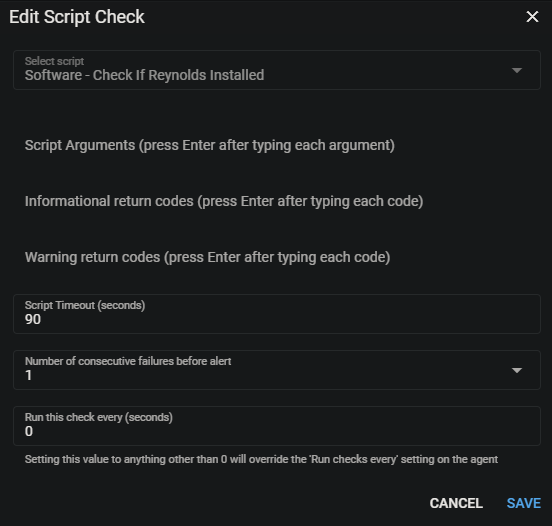
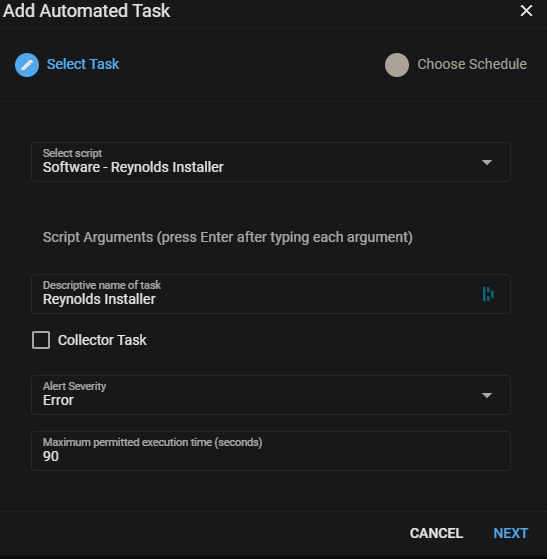
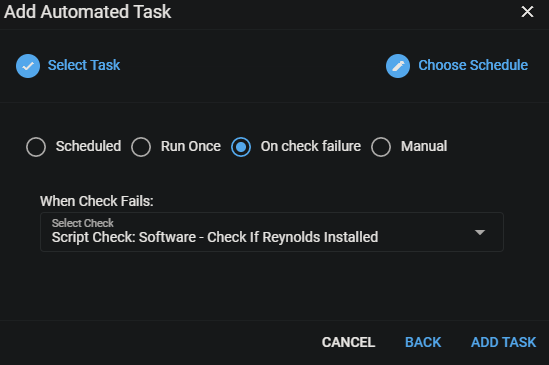
Not sure if bug, or I'm misunderstanding the "Script Checks" option. Currently I have a Powershell script check that looks for installed software, if the software is installed it exit's with code 0 (success, as I want the software to be installed), if the software is not installed it exit's with code 1. Under my test device that check shows "Error" which is the result I want, as the software is not installed on the test machine. If the check fails, I have a task set to run that will install the software, that task just sits with "Synced with Agent", "Awaiting output", "Has not run yet" even though the schedule is set to "Every time check fails" and the "Assigned Check" is the script check that is in failed status. My script check for the software is here: https://ghostbin.com/QdWNE ("Software Name Here" is the name of my program in Programs and Features, verified it returns codes correctly depending on whether software is installed)

The "Script Output" returns 1 as expected, just the task never executes:
Last Run: Nov-18-2021 - 09:38
Run Time: 0.5215 seconds
Return Code: 1

To Reproduce
Steps to reproduce the behavior:

  1. Go to '...'
  2. Click on '....'
  3. Scroll down to '....'
  4. See error

Expected behavior
If the script check returns code 1, then the task will execute installing the software

Screenshots
image
image
image
image
image

Originally created by @Layer-3s on GitHub (Nov 18, 2021). Original GitHub issue: https://github.com/amidaware/tacticalrmm/issues/808 **Server Info (please complete the following information):** - OS: Ubuntu 20.04 - Browser: Chrome - RMM Version 0.9.2 **Installation Method:** - [x] Standard - [ ] Docker **Agent Info (please complete the following information):** - Agent version: Agent v1.6.2 - Agent OS: Win 11 **Describe the bug** Not sure if bug, or I'm misunderstanding the "Script Checks" option. Currently I have a Powershell script check that looks for installed software, if the software is installed it exit's with code 0 (success, as I want the software to be installed), if the software is not installed it exit's with code 1. Under my test device that check shows "Error" which is the result I want, as the software is not installed on the test machine. If the check fails, I have a task set to run that will install the software, that task just sits with "Synced with Agent", "Awaiting output", "Has not run yet" even though the schedule is set to "Every time check fails" and the "Assigned Check" is the script check that is in failed status. My script check for the software is here: https://ghostbin.com/QdWNE ("Software Name Here" is the name of my program in Programs and Features, verified it returns codes correctly depending on whether software is installed) The "Script Output" returns 1 as expected, just the task never executes: Last Run: Nov-18-2021 - 09:38 Run Time: 0.5215 seconds Return Code: 1 **To Reproduce** Steps to reproduce the behavior: 1. Go to '...' 2. Click on '....' 3. Scroll down to '....' 4. See error **Expected behavior** If the script check returns code 1, then the task will execute installing the software **Screenshots** ![image](https://user-images.githubusercontent.com/67111712/142436334-86964660-b6a1-465f-ab65-4ce40be6cff1.png) ![image](https://user-images.githubusercontent.com/67111712/142439788-9f392f97-f706-4bd1-a904-b6a8d0346650.png) ![image](https://user-images.githubusercontent.com/67111712/142436383-b1c1b37e-3605-474b-b1bc-924059a70751.png) ![image](https://user-images.githubusercontent.com/67111712/142439925-0cc28654-62df-4fb3-a32c-1ed7fef13c40.png) ![image](https://user-images.githubusercontent.com/67111712/142439974-fc8ffce6-3d0f-4cd2-b736-e93d922d9b6f.png)
kerem closed this issue 2026-03-02 02:16:54 +03:00
Author
Owner

@dinger1986 commented on GitHub (Nov 18, 2021):

was the check already in the failed state before you created the task?

<!-- gh-comment-id:972946832 --> @dinger1986 commented on GitHub (Nov 18, 2021): was the check already in the failed state before you created the task?
Author
Owner

@Layer-3s commented on GitHub (Nov 18, 2021):

was the check already in the failed state before you created the task?

It is possible, I created the task right after creating the check though and I'm not sure how to wait for the task before the check?

The check is set to go every "0" seconds which seems to be every minute, wouldn't the task have to run after every failed check?

Maybe 1 minute isn't long enough for the task to run?

<!-- gh-comment-id:972948617 --> @Layer-3s commented on GitHub (Nov 18, 2021): > was the check already in the failed state before you created the task? It is possible, I created the task right after creating the check though and I'm not sure how to wait for the task before the check? The check is set to go every "0" seconds which seems to be every minute, wouldn't the task have to run after every failed check? Maybe 1 minute isn't long enough for the task to run?
Author
Owner

@dinger1986 commented on GitHub (Nov 18, 2021):

I dont know but I cant replicate it.

I created a ping test going to 10.11.11.11 (which doesn't exist) and a task runs to check defender status if that fails,

I have done that and then changed the ping to another ip so it passes and then make it fail again and it works fine.

I also tried adding a task after it was already in a failed state and it ran fine.

Can you try it with a ping test? Maybe its the script check? Can you add the task into the check?

<!-- gh-comment-id:972955535 --> @dinger1986 commented on GitHub (Nov 18, 2021): I dont know but I cant replicate it. I created a ping test going to 10.11.11.11 (which doesn't exist) and a task runs to check defender status if that fails, I have done that and then changed the ping to another ip so it passes and then make it fail again and it works fine. I also tried adding a task after it was already in a failed state and it ran fine. Can you try it with a ping test? Maybe its the script check? Can you add the task into the check?
Author
Owner

@Layer-3s commented on GitHub (Nov 18, 2021):

Can you try it with a ping test? Maybe its the script check?

I'm able to run the built-in checks and tasks execute successfully on those, it appears to only be the script checks that are not working for me.

Can you add the task into the check?

Are you saying can I add the software install into the check script? If so, I can and I'm sure that would work. Just was thinking this way might be more bullet proof as I can see if the task ran or not, but I guess I could script that part as well...

The task sits with "Awaiting Output", is there something else that's missing from my screenshots for the task to run?

<!-- gh-comment-id:972959599 --> @Layer-3s commented on GitHub (Nov 18, 2021): > Can you try it with a ping test? Maybe its the script check? I'm able to run the built-in checks and tasks execute successfully on those, it appears to only be the script checks that are not working for me. > Can you add the task into the check? Are you saying can I add the software install into the check script? If so, I can and I'm sure that would work. Just was thinking this way might be more bullet proof as I can see if the task ran or not, but I guess I could script that part as well... The task sits with "Awaiting Output", is there something else that's missing from my screenshots for the task to run?
Author
Owner

@dinger1986 commented on GitHub (Nov 18, 2021):

I'll try script checks later on when I am back in front of my machine and see if I can replicate the bug then.

<!-- gh-comment-id:972962980 --> @dinger1986 commented on GitHub (Nov 18, 2021): I'll try script checks later on when I am back in front of my machine and see if I can replicate the bug then.
Author
Owner

@Layer-3s commented on GitHub (Nov 18, 2021):

I'll try script checks later on when I am back in front of my machine and see if I can replicate the bug then.

This was my fault... When copy-pasting my task script it looks like either myself or the computer removed a space in one of the arguments, adding the space resolved this.

Figured this out by trying to run the task manually (not through a script check, by right clicking the task and selecting "Run task now") in TacticalRMM, it still did not run successfully and said "Awaiting Output" after 10 minutes. Then tried running the script in PowerShell on my machine and received an error about the bad argument

Sorry for the false bug report lol, btw I'm loving this RMM, currently have it for testing for my company.

<!-- gh-comment-id:972981705 --> @Layer-3s commented on GitHub (Nov 18, 2021): > I'll try script checks later on when I am back in front of my machine and see if I can replicate the bug then. This was my fault... When copy-pasting my task script it looks like either myself or the computer removed a space in one of the arguments, adding the space resolved this. Figured this out by trying to run the task manually (not through a script check, by right clicking the task and selecting "Run task now") in TacticalRMM, it still did not run successfully and said "Awaiting Output" after 10 minutes. Then tried running the script in PowerShell on my machine and received an error about the bad argument Sorry for the false bug report lol, btw I'm loving this RMM, currently have it for testing for my company.
Author
Owner

@dinger1986 commented on GitHub (Nov 18, 2021):

No worries.

Glad it's sorted!

<!-- gh-comment-id:972996363 --> @dinger1986 commented on GitHub (Nov 18, 2021): No worries. Glad it's sorted!
Sign in to join this conversation.
No milestone
No project
No assignees
1 participant
Notifications
Due date
The due date is invalid or out of range. Please use the format "yyyy-mm-dd".

No due date set.

Dependencies

No dependencies set.

Reference
starred/tacticalrmm#509
No description provided.