mirror of
https://github.com/NginxProxyManager/nginx-proxy-manager.git
synced 2026-04-25 17:35:52 +03:00
[GH-ISSUE #482] Error running compose file #407
Labels
No labels
awaiting feedback
bug
cannot reproduce
dns provider request
duplicate
enhancement
enhancement
enhancement
good first issue
help wanted
invalid
need more info
no certbot plugin available
product-support
pull-request
question
stale
troll
upstream issue
v2
v2
v2
v3
wontfix
No milestone
No project
No assignees
1 participant

Notifications
Due date
No due date set.
Dependencies
No dependencies set.
Reference
starred/nginx-proxy-manager-NginxProxyManager#407
Loading…
Add table
Add a link
Reference in a new issue
No description provided.
Delete branch "%!s()"
Deleting a branch is permanent. Although the deleted branch may continue to exist for a short time before it actually gets removed, it CANNOT be undone in most cases. Continue?
Originally created by @whisperdancer on GitHub (Jun 30, 2020).
Original GitHub issue: https://github.com/NginxProxyManager/nginx-proxy-manager/issues/482
RaspberryPi 3B+ running latest Rasp Pi OS
Followed your instructions to a t, then run docker-compose up -d and get this error:
ERROR: The Compose file './docker-compose.yml' is invalid because:
services.app.environment contains an invalid type, it should be an object, or an array
Googled it and found nothing helpful.
@sqsmike commented on GitHub (Oct 28, 2020):
I came across to the same issue and it was because of a blank line at the end of the docker-compose.yml file.
@neb1426 commented on GitHub (Nov 17, 2020):
Running in to the exact same issue!
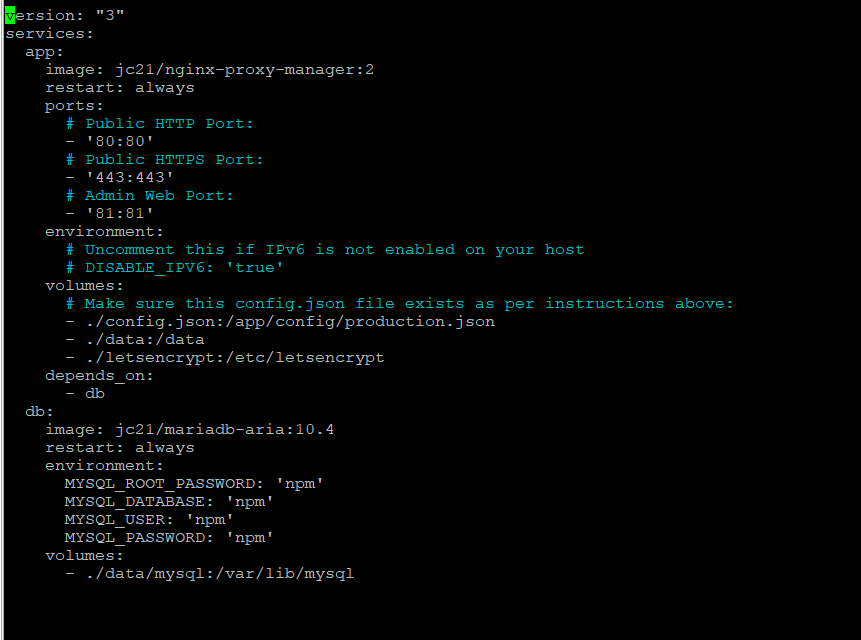
@neb1426 commented on GitHub (Nov 17, 2020):
No empty spaces at the end line either
@sqsmike commented on GitHub (Nov 17, 2020):
Then an another issue maybe the database image, try to change your db line to this:
db:
image: 'yobasystems/alpine-mariadb'
also keep your mind on the single quotes around some strings ' ' try them also.
My working docker-compose.yml file
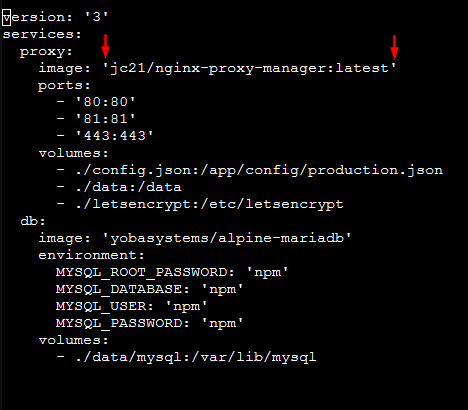
version: '3'
services:
proxy:
image: 'jc21/nginx-proxy-manager:latest'
ports:
- '80:80'
- '81:81'
- '443:443'
volumes:
- ./config.json:/app/config/production.json
- ./data:/data
- ./letsencrypt:/etc/letsencrypt
db:
image: 'yobasystems/alpine-mariadb'
environment:
MYSQL_ROOT_PASSWORD: 'npm'
MYSQL_DATABASE: 'npm'
MYSQL_USER: 'npm'
MYSQL_PASSWORD: 'npm'
volumes:
- ./data/mysql:/var/lib/mysql