mirror of
https://github.com/NginxProxyManager/nginx-proxy-manager.git
synced 2026-04-25 17:35:52 +03:00
[GH-ISSUE #573] Problem getting SSL Cert #482
Labels
No labels
awaiting feedback
bug
cannot reproduce
dns provider request
duplicate
enhancement
enhancement
enhancement
good first issue
help wanted
invalid
need more info
no certbot plugin available
product-support
pull-request
question
stale
troll
upstream issue
v2
v2
v2
v3
wontfix
No milestone
No project
No assignees
1 participant

Notifications
Due date
No due date set.
Dependencies
No dependencies set.
Reference
starred/nginx-proxy-manager-NginxProxyManager#482
Loading…
Add table
Add a link
Reference in a new issue
No description provided.
Delete branch "%!s()"
Deleting a branch is permanent. Although the deleted branch may continue to exist for a short time before it actually gets removed, it CANNOT be undone in most cases. Continue?
Originally created by @QuantiumDev on GitHub (Aug 24, 2020).
Original GitHub issue: https://github.com/NginxProxyManager/nginx-proxy-manager/issues/573
Checklist
What is troubling you?
Edit Proxy Host/SSL - when I try to request an SSL cert and I click Save, the save button gets washed out for several seconds but then it comes back to the normal color - but the dialog never goes away. If I get out of Edit Proxy Host and go to the SSL Certificates tab, I see the new cert there, but if I go back to Edit Proxy Host and select it (along with Force SSL and HTTP/2 Support) and click Save, the status for the proxy host changes to OFFLINE.
@QuantiumDev commented on GitHub (Aug 24, 2020):
I just noticed this when I moused over the red dot next to "OFFLINE"

@jorgeg73 commented on GitHub (Aug 24, 2020):
I just posted something similar, using docker i get on the log the same error. hope someone can help. I think maybe a clean install may help
@QuantiumDev commented on GitHub (Aug 24, 2020):
If you try that and it works for you, please let me know.
@gregfr commented on GitHub (Aug 24, 2020):
Please try this: https://github.com/jc21/nginx-proxy-manager/issues/574#issuecomment-679078420
@QuantiumDev commented on GitHub (Aug 26, 2020):
I checked and it does have that. Here's my docker-compose file:
And here's a tree of my npm directory:
@gregfr commented on GitHub (Aug 26, 2020):
Let's Encrypt uses port 80 to check the website, you have to forward your host port 80 to NPM
@QuantiumDev commented on GitHub (Aug 26, 2020):
Thanks for the help, gregfr! When I tried to use port 80 in my docker-compose file, I got an error about it being in use so I randomly picked 8220 and configured Docker to connect port 8220 on the host to port 80 on the container. The A record points to port 8220 and when I use http:// instead of https:// everything works. Doesn’t that indicate that I have things configured correctly and the Let’s Encrypt traffic should be getting through? Or is something hard-coded for port 80 in Let’s Encrypt?
@gregfr commented on GitHub (Aug 26, 2020):
Yes, Let's Encrypt always use port 80 for this mode, so you have to figure out what is using it.
Alternatively, you can use DNS challenge with a CLI tool and upload it into NPM.
@QuantiumDev commented on GitHub (Aug 26, 2020):
Ok. I’ll figure out what’s grabbing port 80 and configure it to use another port. Thanks!
@QuantiumDev commented on GitHub (Aug 26, 2020):
I tried to reconfigure npm and I got the attached error message.
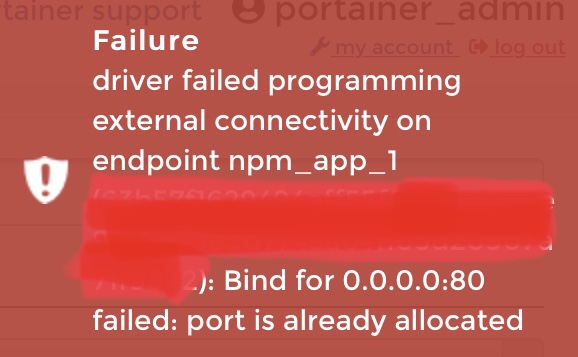
I looked in Portainer and the only thing using port 80 is Nginx. Surely I don’t want to reconfigure that, do I? Won’t that break **everything **? If I do need to reconfigure it, (let’s say I use 8220), would I need to change npm so that it talks to Nginx on 8220?
@gregfr commented on GitHub (Aug 26, 2020):
Only one process can bind to a given port on a given IP. So there should be a process, inside a container or outside, which is bind to port 80 before you try to start NPM.
@QuantiumDev commented on GitHub (Aug 26, 2020):
There is. It's Nginx. Am I supposed to configure it for a different port? If so, how do I tell NPM what port it's using?
@QuantiumDev commented on GitHub (Aug 26, 2020):
Well, I tried configuring Nginx and it did, in fact, break everything. Now when I try to go to my website, I get a 403 error.
@QuantiumDev commented on GitHub (Aug 26, 2020):
Nothing is working. At all. I went and deleted all the DNS records, then recreated them - one A record using "@" and my public IP address, and another A record using "www" and my public IP address. I removed my NPM container and all the containers in my web server stack, then edited the docker-compose files for the proper port mappings...
portainer screen
I'm now using all the default port mappings for NPM and Nginx is setup to listen on port 8801. My proxy host is setup for port 8801 with no SSL. When I ping my domain, responses come from my public IP address - but when I try to go to the website, it times out with:
What in the heck am I doing wrong here?
@jorgeg73 commented on GitHub (Aug 27, 2020):
@gregfr, i have a question regarding ports. In my case i tried Nginx because I also what to use nextcloud. I have come to the conclusion that my problem as what i am reading @QuantiumDev is also having problem because of the ports. Do you know were can i find more information on docker, portainer, containers, i what to know if i can run different apps, and manage the ports and other things that probably have problems between apps? example i have delete Nginx from my docker, i try installing nexcloud again that was already working before. then had problems almost exactly as @QuantiumDev is describing here. I install it whit different ports and it install correctly but i can not make it work because i know in nextcloud there is reference to port 80 and 8080 that i need to change. still reading on were to change that information.
Thanks
@gregfr commented on GitHub (Aug 27, 2020):
This is a broad issue, but I'll try to summarize: a given IP can only bind a single app to a given port. So it should be NPM on public IP.
Docker is creating "virtual", "private" IP networks which are internal to your server, so each container can have its own ports (each container has a separate IP).
When you specify ports in docker-compose (or use -p in CLI), Docker creates a tunnel from this port on the PUBLIC IP to the container, so you should NOT do that for the webserver, because it would conflict with NPM. The webserver should stay hidden inside docker's private networks (the one starting with 172).
In NPM, you configure a "proxy host" pointing to this internal address (in Portainer, it's at the bottom of the container page, under "connected networks"). The webserver should serve http only (not https) because NPM is handling the certificates. It can use port 80 (default for most installations) since it's on its own private 172.x IP.
So when installing a server software beside NPM, you should remove the "ports" part of docker-compose for this software, and take note of the private IP docker is giving it, so you can give this IP to NPM.
@jorgeg73 commented on GitHub (Aug 28, 2020):
I thought it is something like you say. I need to read a lot to understand better this issue. I am implementing docker under open media vault-Docker-portainer.The problem i saw and what is @QuantiumDev and i now whit nextcloud is the port if there are identical ports the problem exist. I manage to install nextcloud whit port 8095-95, but in the ports.conf still points to 80 and also sites-available. And now i stole @QuantiumDev thunder on the post, sorry @QuantiumDev for talking other that the original tread post.
Now i looking how to change that
@QuantiumDev commented on GitHub (Aug 29, 2020):
@gregfr - Thanks so much for your patience on this! All of this makes sense but I still can't seem to get things working...
I had messed up previously because I stopped using port 8220 for NPM and switched back to 80 - but my router was still forwarding port 80 to port 8220. So I fixed that. NOW I have...
And the above does NOT work. When I ping mydomain.foo I get responses form 2.2.2.2 - but when I try to go to http://mydomain.foo in a browser, I get "504 Gateway Time-out". And all of that is without even trying to use https/443.
Would you mind posting an example of your setup (with bogus IP addresses) so I can try to see where I'm going wrong? Please? Many thanks for your ongoing help and patience!
@QuantiumDev commented on GitHub (Aug 31, 2020):
Can anyone else help? Please review my previous post and tell me if I've got that configured properly.
@jorgeg73 commented on GitHub (Sep 2, 2020):
@QuantiumDev , I have manage to install and have a owncloud working on mi rasPI, docker- portainer. (Finally), accessing whit internal ip address. Have not have time to look at the external access(DNS). Just in case you are interested i can tall you what i did to have it working. Or wait until i have dns access.
@chaptergy commented on GitHub (May 12, 2021):
A lot concerning the certificates has changed since the last activity in this issue, so I will close this for now.