mirror of
https://github.com/dani-garcia/vaultwarden.git
synced 2026-04-25 17:25:57 +03:00
[GH-ISSUE #861] Not prompted for 2FA with duo #611
Labels
No labels
SSO
Third party
better for forum
bug
bug
documentation
duplicate
enhancement
future Vault
future Vault
future Vault
good first issue
help wanted
low priority
notes
pull-request
question
troubleshooting
wontfix
No milestone
No project
No assignees
1 participant

Notifications
Due date
No due date set.
Dependencies
No dependencies set.
Reference
starred/vaultwarden#611
Loading…
Add table
Add a link
Reference in a new issue
No description provided.
Delete branch "%!s()"
Deleting a branch is permanent. Although the deleted branch may continue to exist for a short time before it actually gets removed, it CANNOT be undone in most cases. Continue?
Originally created by @deja-geek on GitHub (Feb 13, 2020).
Original GitHub issue: https://github.com/dani-garcia/vaultwarden/issues/861
Subject of the issue
Enabled Duo 2FA. Logging in shows a DUO box briefly with "Logging you in..".
Your environment
Other info:
*DUO is configured to use YubiKey for the token
Steps to reproduce
Configured DUO info in the ADMIN page and in the docker-compose.yml file
Expected behaviour
Be prompted to enter token
Actual behaviour
Not prompted to enter token, logged in successfully
Relevant logs
Snippet of log file when logging in:
[2020-02-13 15:41:22][request][INFO] POST /api/accounts/prelogin
[2020-02-13 15:41:22][response][INFO] POST /api/accounts/prelogin (prelogin) => 200 OK
[2020-02-13 15:41:23][request][INFO] POST /identity/connect/token
[2020-02-13 15:41:23][error][ERROR] 2FA token not provided
[2020-02-13 15:41:23][response][INFO] POST /identity/connect/token (login) => 400 Bad Request
[2020-02-13 15:41:24][request][INFO] POST /identity/connect/token
[2020-02-13 15:41:24][bitwarden_rs::api::identity][INFO] User xxxx@xxxxxxxxx.com logged in successfully. IP: XXX.XXX.XXX.XXX
[2020-02-13 15:41:24][response][INFO] POST /identity/connect/token (login) => 200 OK
[2020-02-13 15:41:24][request][INFO] POST /notifications/hub/negotiate
[2020-02-13 15:41:24][response][INFO] POST /notifications/hub/negotiate (negotiate) => 200 OK
[2020-02-13 15:41:24][request][INFO] GET /api/sync?excludeDomains=true
[2020-02-13 15:41:24][response][INFO] GET /api/sync?<data..> (sync) => 200 OK
@subhamagr commented on GitHub (Jul 21, 2020):
Any update on this issue? I am facing the same issue. I deployed a bitwarden_rs instance using the latest
bitwardenrs/server-postgresqlimage.My DUO is configured to use Duo Push and TOTP.
Bitwarden_RS Access logs:
@subhamagr commented on GitHub (Jul 21, 2020):
Found the solution. According to the guide here - The steps to enable DUO globally are:
Just click "Enable" and your DUO is setup correctly. I guess you would need to do this for each and every user manually.
I really feel that there must be a Wiki page for DUO as well!
@Malakii commented on GitHub (Sep 11, 2020):
@subhamagr Could you share your docker-compose? I've configured the Integration Key, Secret Key, and API Hostname in my docker-compose and on the admin page, yet I'm not getting a Duo prompt on login.
@subhamagr commented on GitHub (Sep 12, 2020):
Yup. like I mentioned above:
You need to manually enable DUO for each and every user.
Let me know if you still face the issue.
@misilot commented on GitHub (Oct 14, 2020):
Is there a way to enable Duo for the users globally? Or a way to do it on the back end, so the user does not have to complete this extra step? Since Duo can be setup to bypass users who are not enrolled in user automatically?
@chielos24 commented on GitHub (Feb 5, 2021):
I tried this too. Running from a docker on a Unraid box.
Added a bitwarden application in duo.
Added a user with the same username/emailadress, and added 2fa.
Enabled DUO and set the settings via variables, and edited them on the /admin page on bitwarden.
Enabled on the use as described above '<global_secret>'
Still no prompt.
In DUO i see that the "Universal Prompt progress" hangs at "Waiting on App Provider". No idea to go forward.
Edit:
Seems to work now! Outside of my network it works, inside it probably skips the 2FA, which is fine!
@bryanjhv commented on GitHub (Feb 9, 2021):
I haven't tested it but... wouldn't this work?
Of course you would need to rebuild the Docker image instead of using the one on DockerHub, which shouldn't be hard to do so.
@BlackDex commented on GitHub (Feb 9, 2021):
If that would/could work. Then you can just add
-e _ENABLE_DUO=trueinstead of doing sed and other magical ✨ stuff.@misilot commented on GitHub (Feb 9, 2021):
Well looking at the Admin Panel, _ENABLE_DUO=true is enabled by default, so I am not sure what this would do?
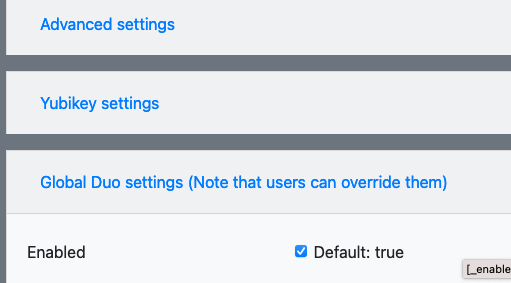
I still had to go and enable Duo on the user level, I did add it to my docker-compose file, but it does say that I have to modify that in the Admin panel since it uses a config file and not environmental files.
@BlackDex commented on GitHub (Jun 21, 2021):
@deja-geek, is this currently still an issue? Are things different with a newer version?
Can we close/convert-2-discussion this item?