mirror of
https://github.com/amidaware/tacticalrmm.git
synced 2026-04-26 06:55:52 +03:00
[GH-ISSUE #564] Interactive script from interface #358
Labels
No labels
In Process
bug
bug
dev-triage
documentation
duplicate
enhancement
fixed
good first issue
help wanted
integration
invalid
pull-request
question
requires agent update
security
ui tweak
wontfix
No milestone
No project
No assignees
1 participant

Notifications
Due date
No due date set.
Dependencies
No dependencies set.
Reference
starred/tacticalrmm#358
Loading…
Add table
Add a link
Reference in a new issue
No description provided.
Delete branch "%!s()"
Deleting a branch is permanent. Although the deleted branch may continue to exist for a short time before it actually gets removed, it CANNOT be undone in most cases. Continue?
Originally created by @vmasseron on GitHub (Jun 8, 2021).
Original GitHub issue: https://github.com/amidaware/tacticalrmm/issues/564
Originally assigned to: @sadnub on GitHub.
I searched a way to interactively run a script and i'ts complicated. I have to first upload the script and after connect to a remote terminal to finally execute my interactive script.
The idea is to create a functionality to do that automatically with a new menu like that:
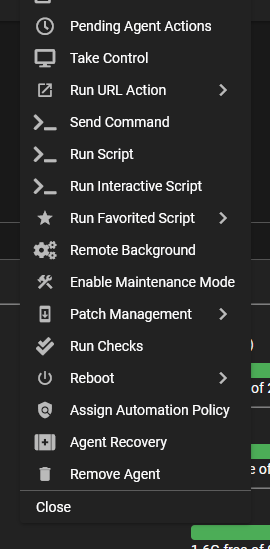
@dinger1986 commented on GitHub (Jun 8, 2021):
If it's a run once script would you not just use remote background with mesh?
@silversword411 commented on GitHub (Jun 8, 2021):
Agree with @dinger1986 but I guess if remote background you could "pull" a script from the library that might be a nice Feature Request :)
@vmasseron commented on GitHub (Jun 8, 2021):
@dinger1986 It's what I use for now but it's messy to manage many scripts among many pc, as the scripts manager is good.
@vmasseron commented on GitHub (Jun 8, 2021):
@silversword411 I haven't think in this way but it could absolutley fit in
@dinger1986 commented on GitHub (Jun 8, 2021):
To pull set scripts into remote background that would be a mesh feature.
Guess there's so many ways to do it.
Are you adding in variables or something?
@sadnub commented on GitHub (Jun 8, 2021):
Are you looking for an experience similar to powershell ise?
@vmasseron commented on GitHub (Jun 8, 2021):
I'm not sure to understand what do you mean. The script editor integrated to TacticalRMM is ok. My issue is to manage and run interactive scripts (What I mean by interactive is it require me to type something) on agents.
@vmasseron commented on GitHub (Jun 8, 2021):
I agree
Porbably, I havn't look in detail about script sync but have you an example ?
One more no really sure to understand, Are you talking about customs fields or PowerShell varables ?
@wh1te909 commented on GitHub (Jun 11, 2021):
is this a duplicate of #502 ?
@vmasseron commented on GitHub (Jun 13, 2021):
I don't think so. #502 is about running script from script editor.
Me, I want to be able to interact with a script, type things, without having to manually transfer the script, connect to remote shell to run it.
@wh1te909 commented on GitHub (Jun 17, 2021):
still not understanding. can you give me an example of how you would do this without an rmm (like if you're just on the pc) so we can understand what you want us to implement
@vmasseron commented on GitHub (Jun 19, 2021):
I mean anaything that expect input like:
$ping = Read-Host -Prompt "What host do you want to ping?"ping $ping@wh1te909 commented on GitHub (Jun 24, 2021):
start menu > search for "windows powershell ISE" open that and let me know if you're looking for something like that but in a web interface
otherwise you can just use the remote shell feature to interactively run powershell, see screenshot below (right click on the connect button)
@vmasseron commented on GitHub (Jun 24, 2021):
I'm not looking for an editor.
Let's take the example of my script:
I create a new script in the script manager, the script is
$ping = Read-Host -Prompt "What host do you want to ping?"ping $pingAfter that, I right clic on a desktop, click 'Run script', I choose my newly created script but i get
Read-Host : Windows PowerShell n'est pas en mode interactif. La fonctionnalit de lecture et d'invite n'est pas disponible.In english this is something like 'Powershell is not in interactive mode. The fonctionalitiy of input reading is not available'
@silversword411 commented on GitHub (Sep 21, 2021):
I understand what's asked for, but this seems like a script that should either be based on parameters, or you should run it interactively with background.
I'm going to mark as closed/wontfix and that can be revised in future if necessary.