mirror of
https://github.com/amidaware/tacticalrmm.git
synced 2026-04-26 15:05:57 +03:00
[GH-ISSUE #551] Patches Perpetually Show "No Patches" #350
Labels
No labels
In Process
bug
bug
dev-triage
documentation
duplicate
enhancement
fixed
good first issue
help wanted
integration
invalid
pull-request
question
requires agent update
security
ui tweak
wontfix
No milestone
No project
No assignees
1 participant

Notifications
Due date
No due date set.
Dependencies
No dependencies set.
Reference
starred/tacticalrmm#350
Loading…
Add table
Add a link
Reference in a new issue
No description provided.
Delete branch "%!s()"
Deleting a branch is permanent. Although the deleted branch may continue to exist for a short time before it actually gets removed, it CANNOT be undone in most cases. Continue?
Originally created by @bleglord on GitHub (Jun 2, 2021).
Original GitHub issue: https://github.com/amidaware/tacticalrmm/issues/551
Server Info:
Installation Method:
Agent Info (please complete the following information):
Describe the bug
Regardless of either automated patch scheduling, or attempting to scan/install patches manually, the patch level/history never updates and patches do not install or download.
Within the OS, Windows reports updates as managed by the organization as expected.
To Reproduce
Steps to reproduce the behavior:
Expected behavior
Patches downloading/updating when manually or automatically triggered.
@silversword411 commented on GitHub (Jun 2, 2021):
...was about to write this one up too :)
Either I used the wrong value {{ summary.patches_last_installed }} or the value isn't being updated when patches run
@wh1te909 commented on GitHub (Jun 2, 2021):
@bleglord follow the instructions here to run the
tacticalrpcservice in debug mode (stop the service first) https://wh1te909.github.io/tacticalrmm/troubleshooting/#agents-not-checking-in-or-showing-up-general-agent-issuesthen from the ui, right click agent > run patch scan now
you should see what's happening in real time in the cmd window on the agent. paste any errors here
@silversword411 is your issue just that it's showing "Never" or do you also see the "No patches" where the list of windows updates should show up
@silversword411 commented on GitHub (Jun 2, 2021):
@wh1te909 Issue is all agents I've checked show Never, and there is an automation policy that should be:
Doesn't green check mean installed (and probably installed by TRMM?)
@wh1te909 commented on GitHub (Jun 2, 2021):
@silversword411 no, green check means it's already installed not necessarily by tactical
the ones installed by tactical will have a datetime in the "Installed On" column
also the grey circle means no policy has been applied so maybe try deleting/recreating and re-apply the automation policy
try right clicking on one of the rows in the patch table and see how it changes color to blue and pending
then try installing patches and see how it updates
@bleglord commented on GitHub (Jun 2, 2021):
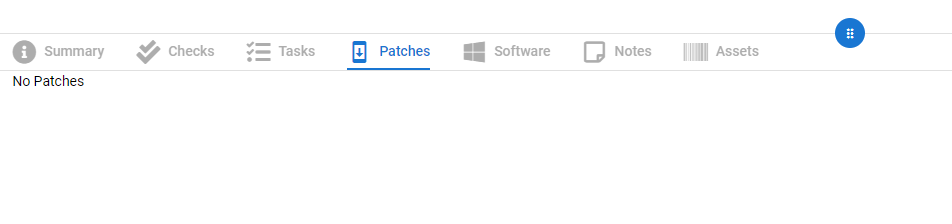
The issue I'm seeing is actually different, here is a picture of what I'm seeing:
I'll run through the debug mode process and see what happens.
@bleglord commented on GitHub (Jun 2, 2021):
This makes me think it is not a tacticalrmm error at all and I'm pretty sure it's related to the test environment I'm using.
The DNS records for mesh/rmm/api.company.com are technically no longer publicly available (They were set up temporarily to get tacticalrmm installed in the sandbox environment for testing, then nuked while the sandbox environment uses hosts file hackery to function with it).
It seems all other tacticalrmm components have no issue with this setup, but is it possible that the non-existent public facing DNS records are interfering with the update request since they hit externally?
Output:
@silversword411 commented on GitHub (Jun 2, 2021):
@wh1te909 Here's one with all the checks-checked showing bug :)
@silversword411 commented on GitHub (Jun 3, 2021):
I've deleted, and recreated the automation policy, and applied to all new client batch. Took a while to update, but finally see the blue check/pending. Will check for updated dates tomorrow.
@wh1te909 commented on GitHub (Jun 4, 2021):
@bleglord no, if ure getting a 500 error that means u are hitting trmm endpoint but the reason it's giving u 500 is cuz of
"wua_updates": nullin the post body that should not be null (trmm is expecting a list of updates) so the issue is with the windows computers, probably windows update is corrupted on them. the trmm agent just uses the windows update api to call updates. try running in debug again and see if there are any other errors, not the http stuffedit: also remember someone had this problem and the windows update service was not running or something
@bleglord commented on GitHub (Jun 4, 2021):
Figured it out.
Old broken WSUS configuration was being applied in the environment even though the WSUS server itself was no longer there.
Issue doesn't exist in fresh environment that never touched the broken WSUS setup
@silversword411 commented on GitHub (Jun 4, 2021):
Looks like the 2 marked patches by automation policy did install. The date did update at the top.
The two patches that installed dropped to close to the bottom of the list though when they were previously at the top, so I get that "patches" list has no rhyme or reason for where they are/sort order.