mirror of
https://github.com/amidaware/tacticalrmm.git
synced 2026-04-26 06:55:52 +03:00
[GH-ISSUE #504] Existing MeshCentral server - Invalid Mesh Token #315
Labels
No labels
In Process
bug
bug
dev-triage
documentation
duplicate
enhancement
fixed
good first issue
help wanted
integration
invalid
pull-request
question
requires agent update
security
ui tweak
wontfix
No milestone
No project
No assignees
1 participant

Notifications
Due date
No due date set.
Dependencies
No dependencies set.
Reference
starred/tacticalrmm#315
Loading…
Add table
Add a link
Reference in a new issue
No description provided.
Delete branch "%!s()"
Deleting a branch is permanent. Although the deleted branch may continue to exist for a short time before it actually gets removed, it CANNOT be undone in most cases. Continue?
Originally created by @PathfinderNetworks on GitHub (May 13, 2021).
Original GitHub issue: https://github.com/amidaware/tacticalrmm/issues/504
Server Info (please complete the following information):
Installation Method:
Agent Info (please complete the following information):
Describe the bug
Not sure if this is a bug or if I'm just not configuring TacticalRMM correctly. I have an existing MeshCentral server (running version 0.8.33) that I am attempting to connect a new install of TacticalRMM to. I have generated the login token on the MeshCentral server and have entered the token information in to the MeshCentral table under Global Settings.
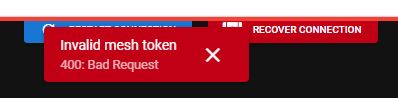
The TacticalRMM agent installer (when used with the new -meshdir argument) does go out and downloads the Mesh agent and installs it correctly. However, when I try to take control of a device through TacticalRMM I am getting a 'Invalid mesh token 400: bad request" error (as shown in the attached screen grab).
To Reproduce
Steps to reproduce the behavior:
Expected behavior
Remote control of the device should initiate.
Screenshots
If applicable, add screenshots to help explain your problem.
Additional context
As mentioned, I'm not certain if this is a bug or if I'm just not configuring something correctly. I looked through the documentation and searched Github but wasn't able to find any mention of this error.
@wh1te909 commented on GitHub (May 13, 2021):
what command did you run to generate the login token?
should be
node /meshcentral/node_modules/meshcentral --logintokenkeyjust replace with your path to your mesh installalso check the
install.shscript for the config.json that is generated, there are a few settings there you need to have enabled for framing to work, make sure those are in your config.jsonif still not working then read through the install script and see how im setting up mesh users etc and try to replicate on your setup. lmk if need exact commands to run