mirror of
https://github.com/amidaware/tacticalrmm.git
synced 2026-04-26 23:15:57 +03:00
[GH-ISSUE #487] Existing MeshCentral server utilizing custom branding/custom MeshAgent.exe file path #303
Labels
No labels
In Process
bug
bug
dev-triage
documentation
duplicate
enhancement
fixed
good first issue
help wanted
integration
invalid
pull-request
question
requires agent update
security
ui tweak
wontfix
No milestone
No project
No assignees
1 participant

Notifications
Due date
No due date set.
Dependencies
No dependencies set.
Reference
starred/tacticalrmm#303
Loading…
Add table
Add a link
Reference in a new issue
No description provided.
Delete branch "%!s()"
Deleting a branch is permanent. Although the deleted branch may continue to exist for a short time before it actually gets removed, it CANNOT be undone in most cases. Continue?
Originally created by @PathfinderNetworks on GitHub (May 9, 2021).
Original GitHub issue: https://github.com/amidaware/tacticalrmm/issues/487
Originally assigned to: @wh1te909 on GitHub.
Server Info (please complete the following information):
Installation Method:
Agent Info (please complete the following information):
Describe the bug
We are a long time MeshCentral user with our own existing MeshCentral server containing hundreds of devices. We are trying to do a trial run of TactialRMM connected to our existing MeshCentral server. We are able to connect TacticalRMM to the existing MeshCentral server without issue. However, the TacticalRMM agent install fails (or rather never progresses) due to it not being able to locate the MeshCentral agent on the device. Our existing MeshCentral server is configured with custom branding and the MeshCentral agent uses a non-standard install path (C:\Program Files\Pathfinder Networks\Mesh Agent). Because the TacticalRMM agent installer ONLY looks for the MeshAgent at C:\Program Files\Mesh Agent\ it never progresses past the MeshCentral agent installer due to it not be able to locate the MeshAgent.exe file. The installer continuously throws the message 'level=error msg="exec: "C:\\Program Files\\Mesh Agent\\MeshAgent.exe": file does not exit:'
To Reproduce
Steps to reproduce the behavior:
Configure TacticalRMM to utilize an existing MeshCentral server installation that uses custom branding/custom MeshAgent installer location.
Expected behavior
The TacticalRMM agent should be able to be configured to look for the MeshAgent.exe in a non-standard folder. Such as entering the file path info in the same Global Settings tab along with the MeshCentral username, Mesh Site, and Mesh Token.
Screenshots
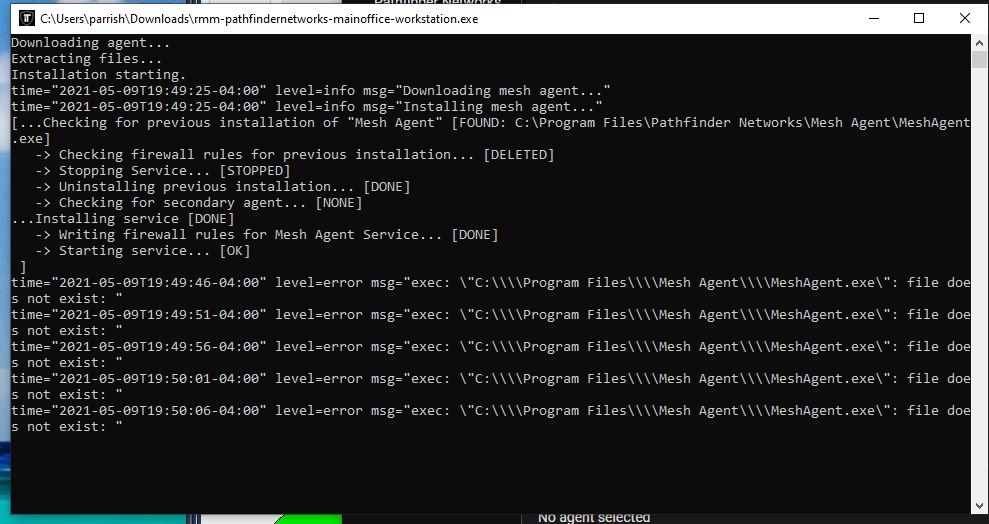
Additional context
Add any other context about the problem here.
@wh1te909 commented on GitHub (May 10, 2021):
i'll add an optional installer flag to the agent for this
atm you can pass
-local-mesh="C:\path\to\meshagent.exe"but this is just to avoid the installer downloading the mesh agent from the rmm (the one you uploaded during install). it's still hardcoded to look inprogram files\mesh agentafter the initial install.if you want to use your own meshcentral instance and not the one tactical installs then you'll need to create a mesh user that has access to all agents and device groups
@wh1te909 commented on GitHub (May 12, 2021):
Added, please update to rmm v0.6.9 and generate a new exe (agent v1.5.6)
you can pass the directory containing
MeshAgent.exeto the installer e.g.rmm-trmm-client-site-server.exe -meshdir "C:\Program Files\Your Company Name\Mesh Agent"see https://wh1te909.github.io/tacticalrmm/install_agent/#optional-installer-args for all optional installer args
@PathfinderNetworks commented on GitHub (May 12, 2021):
Thank you, I will give this a try. I appreciate the quick response!
@PathfinderNetworks commented on GitHub (May 13, 2021):
I tested this update this evening. Works perfectly. Thank you.
@ioscanner commented on GitHub (Apr 16, 2023):
This path doesn't work.
@dinger1986 commented on GitHub (Apr 16, 2023):
URL is now https://docs.tacticalrmm.com/install_agent/#optional-installer-args