[GH-ISSUE #1445] Remote Background > Processes > sort by CPU descending doesn't work in Firefox #2847

Open
opened 2026-03-14 05:41:04 +03:00 by kerem · 0 comments
Owner

Originally created by @NiceGuyIT on GitHub (Mar 1, 2023).
Original GitHub issue: https://github.com/amidaware/tacticalrmm/issues/1445

Server Info (please complete the following information):

  • OS: Ubuntu 20.04.4 LTS
  • Browser: Firefox 64-bit v110.0
  • RMM Version (as shown in top left of web UI): v0.15.6

Installation Method:

  • Standard
  • Docker

Agent Info (please complete the following information):

  • Agent version (as shown in the 'Summary' tab of the agent from web UI): Agent v2.4.4
  • Agent OS: Windows 10 Pro, 64 bit v21H2 (build 19044.2604)

Describe the bug
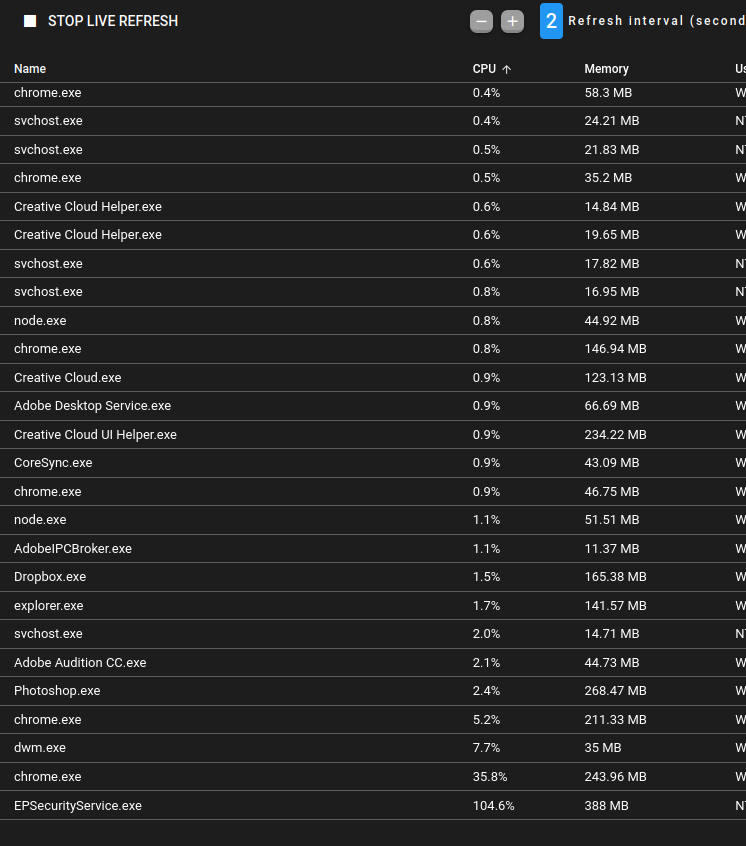
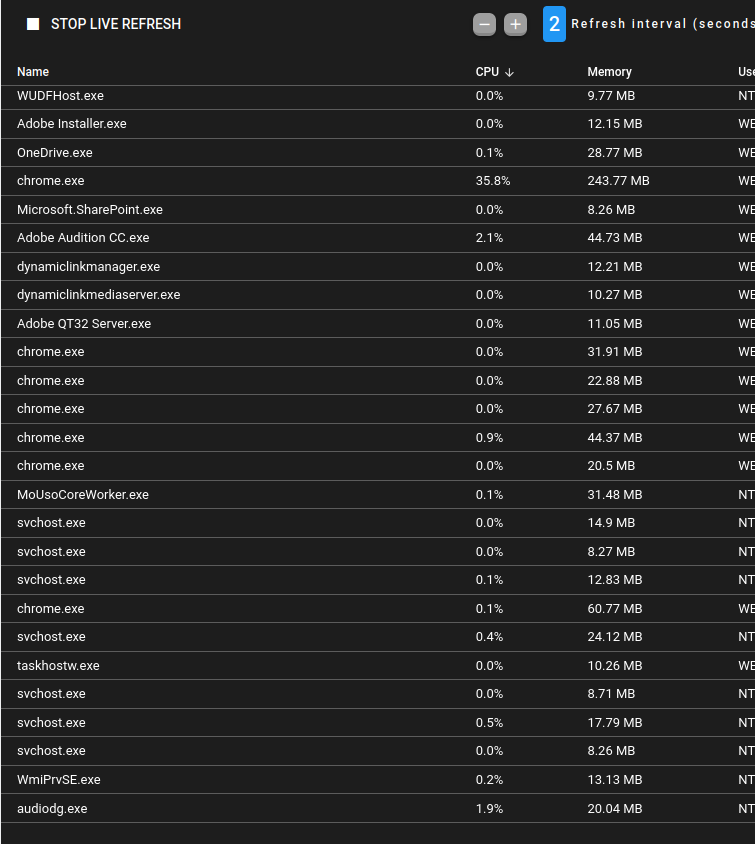
Going to Remote Background > Processes tab > sorting by CPU descending does not sort by CPU. Sorting by CPU ascending seems to work. See screenshot below.

This affects only Firefox; Chrome sorts correctly. All other fields sort correctly in Firefox.

To Reproduce
Steps to reproduce the behavior:

  1. Open Firefox and login to Tactical
  2. Right click on an agent > Remote Background
  3. Click on Processes tab
  4. Click on CPU header to sort by CPU.
  5. The CPU does not display in a sorted manor.

Expected behavior
The CPU column will sort by CPU when clicking on the CPU heading.

Screenshots
Sort ascending seems to work.
image

Sort descending doesn't work.
image

Additional context
Similar to issue #831: Remote Background > Processes. Sort by CPU doesn't seem to sort in any order.

Originally created by @NiceGuyIT on GitHub (Mar 1, 2023). Original GitHub issue: https://github.com/amidaware/tacticalrmm/issues/1445 **Server Info (please complete the following information):** - OS: Ubuntu 20.04.4 LTS - Browser: Firefox 64-bit v110.0 - RMM Version (as shown in top left of web UI): v0.15.6 **Installation Method:** - [x] Standard - [ ] Docker **Agent Info (please complete the following information):** - Agent version (as shown in the 'Summary' tab of the agent from web UI): Agent v2.4.4 - Agent OS: Windows 10 Pro, 64 bit v21H2 (build 19044.2604) **Describe the bug** Going to Remote Background > Processes tab > sorting by CPU descending does not sort by CPU. Sorting by CPU ascending seems to work. See screenshot below. This affects only Firefox; Chrome sorts correctly. All other fields sort correctly in Firefox. **To Reproduce** Steps to reproduce the behavior: 1. Open Firefox and login to Tactical 2. Right click on an agent > Remote Background 3. Click on Processes tab 4. Click on CPU header to sort by CPU. 5. The CPU does not display in a sorted manor. **Expected behavior** The CPU column will sort by CPU when clicking on the CPU heading. **Screenshots** Sort ascending seems to work. ![image](https://user-images.githubusercontent.com/7763429/222152934-5091d9c9-9656-4a91-83c4-8778f22f1fcc.png) Sort descending doesn't work. ![image](https://user-images.githubusercontent.com/7763429/222153056-a723587e-efb7-465b-ba0b-ebbd3d7f37ba.png) **Additional context** Similar to issue #831: Remote Background > Processes. Sort by CPU doesn't seem to sort in any order.
Sign in to join this conversation.
No milestone
No project
No assignees
1 participant
Notifications
Due date
The due date is invalid or out of range. Please use the format "yyyy-mm-dd".

No due date set.

Dependencies

No dependencies set.

Reference
starred/tacticalrmm#2847
No description provided.