mirror of
https://github.com/amidaware/tacticalrmm.git
synced 2026-04-27 07:25:56 +03:00
[GH-ISSUE #1427] silent still shows CMD window #2838
Labels
No labels
In Process
bug
bug
dev-triage
documentation
duplicate
enhancement
fixed
good first issue
help wanted
integration
invalid
pull-request
question
requires agent update
security
ui tweak
wontfix
No milestone
No project
No assignees
1 participant

Notifications
Due date
No due date set.
Dependencies
No dependencies set.
Reference
starred/tacticalrmm#2838
Loading…
Add table
Add a link
Reference in a new issue
No description provided.
Delete branch "%!s()"
Deleting a branch is permanent. Although the deleted branch may continue to exist for a short time before it actually gets removed, it CANNOT be undone in most cases. Continue?
Originally created by @lolcakes69 on GitHub (Feb 5, 2023).
Original GitHub issue: https://github.com/amidaware/tacticalrmm/issues/1427
Server Info (please complete the following information):
Installation Method:
Describe the bug
running agent installer with -silent argument still pops up CMD window. not sure if this is expected behavior or not even with the -silent argument. the message that says installation was successful doesn't pop up, but i was expecting the -silent argument to hide the CMD window as well
this happens if i run it through CMD or powershell
CMD: C:\Users\temp\Desktop>trmm.exe -silent
powershell: Start-Process "C:\Users\temp\Desktop\trmm.exe" -ArgumentList '-silent' -PassThru
To Reproduce
Steps to reproduce the behavior:
Expected behavior
again, not sure if the CMD window popping up with the below info is still expected even with -silent argument, but i was expecting it to be truly silent/invisible
Screenshots
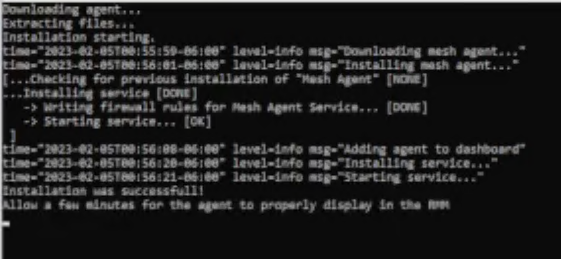
little blurry sorry
@wh1te909 commented on GitHub (Feb 5, 2023):
This is the expected behavior. Only message boxes are suppressed. If you want truly silent then run it from system via gpo or something, not from an interactive session.