[GH-ISSUE #977] Automation Policies wont apply #2537

Closed
opened 2026-03-14 04:25:02 +03:00 by kerem · 19 comments
Owner

Originally created by @guillaumebottollier on GitHub (Feb 18, 2022).
Original GitHub issue: https://github.com/amidaware/tacticalrmm/issues/977

Server Info (please complete the following information):

  • OS: Debian 10
  • Browser: chrome/firefox
  • RMM Version (as shown in top left of web UI): 0.11.3

Installation Method:

  • Standard

Agent Info (please complete the following information):

  • Agent version (as shown in the 'Summary' tab of the agent from web UI): 1.8.0
  • Agent OS: Win10

Describe the bug
Hello,
Since upgraded to 0.11.3 automation policies does not applied anymore to agents.
i try to remove the policy, this will wype all the tasks and checks on agents correctly.
then i do all the server maintenances, restart the whole machine
but still the same : assignement of Automation policy has no effect on agents

To Reproduce
Steps to reproduce the behavior:
apply an automation policy to a client or site, no checks and no task will appear on agents

Expected behavior
application of policies build in the automation manager

Screenshots
If applicable, add screenshots to help explain your problem.

Additional context
Add any other context about the problem here.

Originally created by @guillaumebottollier on GitHub (Feb 18, 2022). Original GitHub issue: https://github.com/amidaware/tacticalrmm/issues/977 **Server Info (please complete the following information):** - OS: Debian 10 - Browser: chrome/firefox - RMM Version (as shown in top left of web UI): 0.11.3 **Installation Method:** - [X] Standard **Agent Info (please complete the following information):** - Agent version (as shown in the 'Summary' tab of the agent from web UI): 1.8.0 - Agent OS: Win10 **Describe the bug** Hello, Since upgraded to 0.11.3 automation policies does not applied anymore to agents. i try to remove the policy, this will wype all the tasks and checks on agents correctly. then i do all the server maintenances, restart the whole machine but still the same : assignement of Automation policy has no effect on agents **To Reproduce** Steps to reproduce the behavior: apply an automation policy to a client or site, no checks and no task will appear on agents **Expected behavior** application of policies build in the automation manager **Screenshots** If applicable, add screenshots to help explain your problem. **Additional context** Add any other context about the problem here.
kerem 2026-03-14 04:25:02 +03:00
  • closed this issue
  • added the
    question
    label
Author
Owner

@ssteeltm commented on GitHub (Feb 18, 2022):

Same issue here, problem:
apply an automation policy to a client or site, no checks and no task will appear on agents

Steps to reproduce:
Install new Agent;
Agent wont inherit default policy or applied policy on itself,client or site.

Under the Setting>Automation , the policies also seens to had lost relations, only a few devices/clients/sites are related.

<!-- gh-comment-id:1045020512 --> @ssteeltm commented on GitHub (Feb 18, 2022): Same issue here, problem: apply an automation policy to a client or site, no checks and no task will appear on agents Steps to reproduce: Install new Agent; Agent wont inherit default policy or applied policy on itself,client or site. Under the Setting>Automation , the policies also seens to had lost relations, only a few devices/clients/sites are related.
Author
Owner

@wh1te909 commented on GitHub (Feb 18, 2022):

can you all please paste output of redis-server --version and cat /etc/*release* thanks

<!-- gh-comment-id:1045072652 --> @wh1te909 commented on GitHub (Feb 18, 2022): can you all please paste output of `redis-server --version` and `cat /etc/*release*` thanks
Author
Owner

@guillaumebottollier commented on GitHub (Feb 18, 2022):

Hello Dan, here are the outputs :

redis-server --version Redis server v=5.0.3 sha=00000000:0 malloc=jemalloc-5.1.0 bits=64 build=94145a25ce04923
cat /etc/*release* PRETTY_NAME="Debian GNU/Linux 10 (buster)" NAME="Debian GNU/Linux" VERSION_ID="10" VERSION="10 (buster)" VERSION_CODENAME=buster ID=debian HOME_URL="https://www.debian.org/" SUPPORT_URL="https://www.debian.org/support" BUG_REPORT_URL="https://bugs.debian.org/"
Thank's for investigate on this.

<!-- gh-comment-id:1045087589 --> @guillaumebottollier commented on GitHub (Feb 18, 2022): Hello Dan, here are the outputs : `redis-server --version Redis server v=5.0.3 sha=00000000:0 malloc=jemalloc-5.1.0 bits=64 build=94145a25ce04923 ` ` cat /etc/*release* PRETTY_NAME="Debian GNU/Linux 10 (buster)" NAME="Debian GNU/Linux" VERSION_ID="10" VERSION="10 (buster)" VERSION_CODENAME=buster ID=debian HOME_URL="https://www.debian.org/" SUPPORT_URL="https://www.debian.org/support" BUG_REPORT_URL="https://bugs.debian.org/" ` Thank's for investigate on this.
Author
Owner

@wh1te909 commented on GitHub (Feb 18, 2022):

thanks. so far am unable to reproduce.
can you provide steps to reproduce from a blank state.
see below gif. might be easier for you to screen record the steps like I did here
https://imgur.com/M8YYhSF

<!-- gh-comment-id:1045122310 --> @wh1te909 commented on GitHub (Feb 18, 2022): thanks. so far am unable to reproduce. can you provide steps to reproduce from a blank state. see below gif. might be easier for you to screen record the steps like I did here https://imgur.com/M8YYhSF
Author
Owner

@guillaumebottollier commented on GitHub (Feb 18, 2022):

mmm problem seems to be more tricky, i create a new client/site with a new agent, and assignement of a newly created automation policy test works.
But it does partially works on a site containing 100 agents, some online some offline, with the same automation policy test.
the numbers of agents in the site seems to really impact.
I recreat my policy from scratch and applied on this 100 agents site, and i have duplicated tasks :

image

<!-- gh-comment-id:1045194737 --> @guillaumebottollier commented on GitHub (Feb 18, 2022): mmm problem seems to be more tricky, i create a new client/site with a new agent, and assignement of a newly created automation policy test works. But it does partially works on a site containing 100 agents, some online some offline, with the same automation policy test. the numbers of agents in the site seems to really impact. I recreat my policy from scratch and applied on this 100 agents site, and i have duplicated tasks : ![image](https://user-images.githubusercontent.com/84961534/154761347-b287a2f3-e161-47e9-b874-1829c1e113b2.png)
Author
Owner

@wh1te909 commented on GitHub (Feb 18, 2022):

ok can you still record yourself creating the policy and we will test with a couple hundred agents
but need to see how you are creating the policy/checks/tasks etc and all their settings

<!-- gh-comment-id:1045332598 --> @wh1te909 commented on GitHub (Feb 18, 2022): ok can you still record yourself creating the policy and we will test with a couple hundred agents but need to see how you are creating the policy/checks/tasks etc and all their settings
Author
Owner

@silversword411 commented on GitHub (Feb 21, 2022):

You're only getting partial duplication of tasks...there was an old bug with old version that had this issue. Also have you checked all your automation policies and confirmed you're not applying multiple policies at the different levels: default TRMM workstation, client, site, agent.

Remove all your policies and make sure agents see all policies unapplied (resync if necessary - and wait/confirm it applies if you're applying to hundreds of agents)

Your screenshot also cut off

2022-02-21_113539 - trmm policies

<!-- gh-comment-id:1047058581 --> @silversword411 commented on GitHub (Feb 21, 2022): You're only getting partial duplication of tasks...there was an old bug with old version that had this issue. Also have you checked all your automation policies and confirmed you're not applying multiple policies at the different levels: default TRMM workstation, client, site, agent. Remove all your policies and make sure agents see all policies unapplied (resync if necessary - and wait/confirm it applies if you're applying to hundreds of agents) Your screenshot also cut off ![2022-02-21_113539 - trmm policies](https://user-images.githubusercontent.com/13395348/154995617-f4d6dc19-325a-4cb0-8ebd-e4faf9a34bd1.png)
Author
Owner

@DavidAamcomp commented on GitHub (Feb 21, 2022):

Same thing is happening to me.

New clients are not applying the default Server,Workstation policy.
I am unable to add the policy manually with right click on server.
I've restarted the VM.

Redis server v=5.0.7 sha=00000000:0 malloc=jemalloc-5.2.1 bits=64 build=636cde3b5c7a3923

DISTRIB_ID=Ubuntu DISTRIB_RELEASE=20.04 DISTRIB_CODENAME=focal DISTRIB_DESCRIPTION="Ubuntu 20.04.4 LTS" NAME="Ubuntu" VERSION="20.04.4 LTS (Focal Fossa)" ID=ubuntu ID_LIKE=debian PRETTY_NAME="Ubuntu 20.04.4 LTS" VERSION_ID="20.04" HOME_URL="https://www.ubuntu.com/" SUPPORT_URL="https://help.ubuntu.com/" BUG_REPORT_URL="https://bugs.launchpad.net/ubuntu/" PRIVACY_POLICY_URL="https://www.ubuntu.com/legal/terms-and-policies/privacy-policy" VERSION_CODENAME=focal UBUNTU_CODENAME=focal

<!-- gh-comment-id:1047143063 --> @DavidAamcomp commented on GitHub (Feb 21, 2022): Same thing is happening to me. New clients are not applying the default Server,Workstation policy. I am unable to add the policy manually with right click on server. I've restarted the VM. `Redis server v=5.0.7 sha=00000000:0 malloc=jemalloc-5.2.1 bits=64 build=636cde3b5c7a3923` `DISTRIB_ID=Ubuntu DISTRIB_RELEASE=20.04 DISTRIB_CODENAME=focal DISTRIB_DESCRIPTION="Ubuntu 20.04.4 LTS" NAME="Ubuntu" VERSION="20.04.4 LTS (Focal Fossa)" ID=ubuntu ID_LIKE=debian PRETTY_NAME="Ubuntu 20.04.4 LTS" VERSION_ID="20.04" HOME_URL="https://www.ubuntu.com/" SUPPORT_URL="https://help.ubuntu.com/" BUG_REPORT_URL="https://bugs.launchpad.net/ubuntu/" PRIVACY_POLICY_URL="https://www.ubuntu.com/legal/terms-and-policies/privacy-policy" VERSION_CODENAME=focal UBUNTU_CODENAME=focal`
Author
Owner

@guillaumebottollier commented on GitHub (Feb 22, 2022):

Hello
after 1. clean all the automation policies on the impacted site/client 2. recreate the policy from srcatch 3. apply the new policy
this seems to be better, but i still have task that never runs, agent that never updates...

image

<!-- gh-comment-id:1047889518 --> @guillaumebottollier commented on GitHub (Feb 22, 2022): Hello after 1. clean all the automation policies on the impacted site/client 2. recreate the policy from srcatch 3. apply the new policy this seems to be better, but i still have task that never runs, agent that never updates... ![image](https://user-images.githubusercontent.com/84961534/155160179-1c52bd26-1b5e-4b7d-afb6-798073016e21.png)
Author
Owner

@silversword411 commented on GitHub (Feb 22, 2022):

but i still have task that never runs, agent that never updates...

I had a VERY small number (like 4) that wouldn't update to 1.8.0 (they were frequently offline/rarely rebooted). Please provide debug logs of problems, with more details.

I think I just workaround it by uninstalling and then reinstalling.

<!-- gh-comment-id:1048183410 --> @silversword411 commented on GitHub (Feb 22, 2022): > but i still have task that never runs, agent that never updates... I had a VERY small number (like 4) that wouldn't update to 1.8.0 (they were frequently offline/rarely rebooted). Please provide debug logs of problems, with more details. I think I just workaround it by uninstalling and then reinstalling.
Author
Owner

@volkjohn commented on GitHub (Mar 4, 2022):

A scheduled task for my automation policy looked like it was being run on agents that have had the agent installed for over 2 months, but the output of the scheduled task was showing that nothing was being run. On agents that had just been recently added to tacticalrmm (younger than 2 months), the scheduled task would modulate between "Waiting for task creation on agent" and something about waiting for next agent check-in.

I ended up creating a new automation policy with a new scheduled task and the scheduled task is now running correctly on all agents.

I dug into the autotasks_automatedtask table in postgres. It looks like initial scheduled task (Update All Chocolatey Apps) I setup last year now has an empty actions field, simply showing {}. The previous failed scheduled tasks, if they ran at all on agents, all have an empty actions field as well.

There are minute differences in the scheduled task that I created last year and the new one I created today. I am attaching the two scheduled tasks.

Thank you @wh1te909 and all other contributors for your work on tacticalrmm!

autotasks_EmptyActions.csv

<!-- gh-comment-id:1059379102 --> @volkjohn commented on GitHub (Mar 4, 2022): A scheduled task for my automation policy looked like it was being run on agents that have had the agent installed for over 2 months, but the output of the scheduled task was showing that nothing was being run. On agents that had just been recently added to tacticalrmm (younger than 2 months), the scheduled task would modulate between "Waiting for task creation on agent" and something about waiting for next agent check-in. I ended up creating a new automation policy with a new scheduled task and the scheduled task is now running correctly on all agents. I dug into the autotasks_automatedtask table in postgres. It looks like initial scheduled task (Update All Chocolatey Apps) I setup last year now has an empty actions field, simply showing {}. The previous failed scheduled tasks, if they ran at all on agents, all have an empty actions field as well. There are minute differences in the scheduled task that I created last year and the new one I created today. I am attaching the two scheduled tasks. Thank you @wh1te909 and all other contributors for your work on tacticalrmm! [autotasks_EmptyActions.csv](https://github.com/wh1te909/tacticalrmm/files/8187789/autotasks_EmptyActions.csv)
Author
Owner

@silversword411 commented on GitHub (Mar 4, 2022):

Sounds like this is a closed issue? Post if it needs re-opening

<!-- gh-comment-id:1059599606 --> @silversword411 commented on GitHub (Mar 4, 2022): Sounds like this is a closed issue? Post if it needs re-opening
Author
Owner

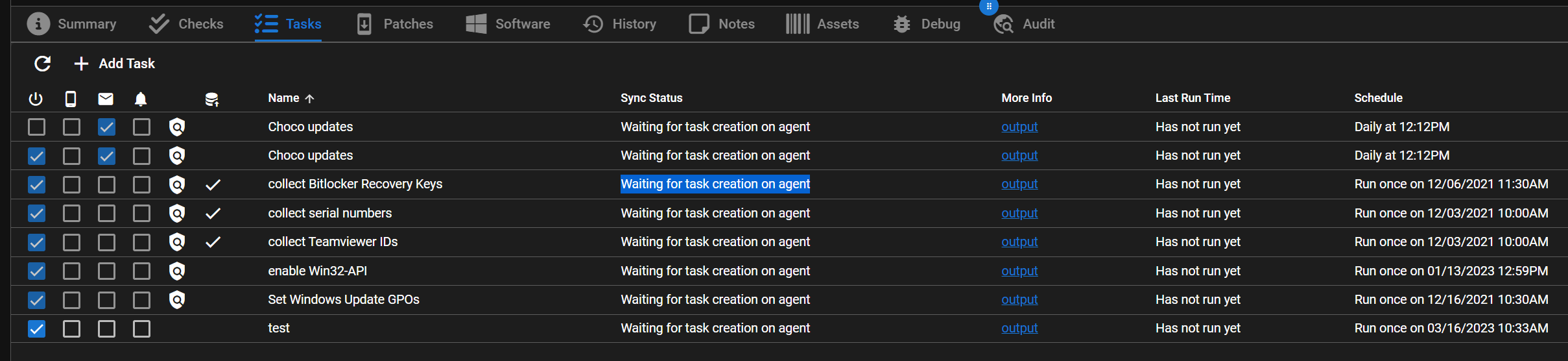
@schmm commented on GitHub (Mar 16, 2023):

Tasks are never applied. The status always remains on "Waiting for task creation on agent"
Tactical_RMM_-_2023-03-16_12 17 38

<!-- gh-comment-id:1471764247 --> @schmm commented on GitHub (Mar 16, 2023): Tasks are never applied. The status always remains on "Waiting for task creation on agent" ![Tactical_RMM_-_2023-03-16_12 17 38](https://user-images.githubusercontent.com/92079487/225601296-80ea0bc0-c73b-4d95-9685-218ad8d5f711.png)
Author
Owner

@silversword411 commented on GitHub (Mar 16, 2023):

...and the agent is online, and it's running latest TRMM version?

<!-- gh-comment-id:1471881277 --> @silversword411 commented on GitHub (Mar 16, 2023): ...and the agent is online, and it's running latest TRMM version?
Author
Owner

@schmm commented on GitHub (Mar 16, 2023):

up to date and online

<!-- gh-comment-id:1471957941 --> @schmm commented on GitHub (Mar 16, 2023): up to date and online
Author
Owner
<!-- gh-comment-id:1473576739 --> @schmm commented on GitHub (Mar 17, 2023): [https://discord.com/channels/736478043522072608/1006426744267477053/threads/1069354059921899520](url) and wget -N https://raw.githubusercontent.com/amidaware/tacticalrmm/master/update.sh ./update.sh --force solved my problem
Author
Owner

@schmm commented on GitHub (Mar 17, 2023):

Tactical_RMM_-_2023-03-17_14 38 50
???

<!-- gh-comment-id:1473860561 --> @schmm commented on GitHub (Mar 17, 2023): ![Tactical_RMM_-_2023-03-17_14 38 50](https://user-images.githubusercontent.com/92079487/225920853-e1c2e5a0-454b-46b7-893d-5ecf664319a1.png) ???
Author
Owner

@schmm commented on GitHub (Mar 20, 2023):

The error "Unable to create scheduled task" occurs when a task already exists.
After deleting the existing task on the client, the agent was able to create the task without any problems.

How can I force the task to be overwritten on the other clients?

<!-- gh-comment-id:1475942825 --> @schmm commented on GitHub (Mar 20, 2023): The error "Unable to create scheduled task" occurs when a task already exists. After deleting the existing task on the client, the agent was able to create the task without any problems. How can I force the task to be overwritten on the other clients?
Author
Owner

@silversword411 commented on GitHub (Mar 20, 2023):

@schmm this is a year old issue that's closed and fixed. You need to open a new issue if you think you have a bug.

<!-- gh-comment-id:1476342680 --> @silversword411 commented on GitHub (Mar 20, 2023): @schmm this is a year old issue that's closed and fixed. You need to open a new issue if you think you have a bug.
Sign in to join this conversation.
No milestone
No project
No assignees
1 participant
Notifications
Due date
The due date is invalid or out of range. Please use the format "yyyy-mm-dd".

No due date set.

Dependencies

No dependencies set.

Reference
starred/tacticalrmm#2537
No description provided.