[GH-ISSUE #675] BUG: Save results to Agent Notes only recording "NULL" in audit log details #2373

Closed
opened 2026-03-14 03:44:57 +03:00 by kerem · 4 comments
Owner

Originally created by @manc74 on GitHub (Aug 31, 2021).
Original GitHub issue: https://github.com/amidaware/tacticalrmm/issues/675

Server Info (please complete the following information):

  • OS: Ubuntu 20.04.3
  • Browser: Chrome
  • RMM Version (as shown in top left of web UI): 0.8.1

Installation Method:

  • Standard
  • Docker

Agent Info (please complete the following information):

  • Agent version (as shown in the 'Summary' tab of the agent from web UI):1.60
  • Agent OS: Windows 10

Describe the bug
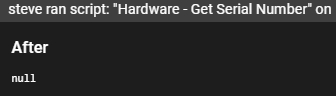
When executing a script, the new option to save results to agent notes only records "NULL" in the details panel.

To Reproduce
Steps to reproduce the behavior:

  1. Right click on a workstation
  2. Click on "run script"
  3. Select a script that give an output such as "get serial number"
  4. Select "Save results to Agent Notes"
  5. Run script. Script executes and results show at bottom of the pane.
  6. Click on audit tab
  7. click on the line for the script ran
  8. the detail pane shows "After NULL"

Expected behavior
The same output on the run pane should be displayed in the audit details pane.

Screenshots
f0eb40276566baa0917bc0cff1a3ab2c

Additional context
Add any other context about the problem here.

Originally created by @manc74 on GitHub (Aug 31, 2021). Original GitHub issue: https://github.com/amidaware/tacticalrmm/issues/675 **Server Info (please complete the following information):** - OS: Ubuntu 20.04.3 - Browser: Chrome - RMM Version (as shown in top left of web UI): 0.8.1 **Installation Method:** - [x] Standard - [ ] Docker **Agent Info (please complete the following information):** - Agent version (as shown in the 'Summary' tab of the agent from web UI):1.60 - Agent OS: Windows 10 **Describe the bug** When executing a script, the new option to save results to agent notes only records "NULL" in the details panel. **To Reproduce** Steps to reproduce the behavior: 1. Right click on a workstation 2. Click on "run script" 3. Select a script that give an output such as "get serial number" 4. Select "Save results to Agent Notes" 5. Run script. Script executes and results show at bottom of the pane. 6. Click on audit tab 7. click on the line for the script ran 8. the detail pane shows "After NULL" **Expected behavior** The same output on the run pane should be displayed in the audit details pane. **Screenshots** ![f0eb40276566baa0917bc0cff1a3ab2c](https://user-images.githubusercontent.com/68019920/131463697-4e340220-1cd0-4289-92bd-ea8a977ca2bc.png) **Additional context** Add any other context about the problem here.
kerem closed this issue 2026-03-14 03:45:02 +03:00
Author
Owner

@wh1te909 commented on GitHub (Sep 1, 2021):

I don't think the script output is meant to be stored in the audit log, so this really isn't a bug more like a feature request. @sadnub will correct me if i'm wrong
it's already stored in the "History" tab which we added so that there is always a history of every script/cmd that was run and it's output
And if you are saving it to Notes then it will be stored there as well
adding it to audit log is overkill IMO

<!-- gh-comment-id:909848506 --> @wh1te909 commented on GitHub (Sep 1, 2021): I don't think the script output is meant to be stored in the audit log, so this really isn't a bug more like a feature request. @sadnub will correct me if i'm wrong it's already stored in the "History" tab which we added so that there is always a history of every script/cmd that was run and it's output And if you are saving it to Notes then it will be stored there as well adding it to audit log is overkill IMO
Author
Owner

@subzdev commented on GitHub (Sep 1, 2021):

I would agree it does seem to be overkill, but if everything is null in the modal window probably no need to even have the ability to click at all for audit log entries?

<!-- gh-comment-id:909854029 --> @subzdev commented on GitHub (Sep 1, 2021): I would agree it does seem to be overkill, but if everything is null in the modal window probably no need to even have the ability to click at all for audit log entries?
Author
Owner

@wh1te909 commented on GitHub (Sep 1, 2021):

there are still use cases for clicking, like if you edit an agent you can see the before and after values to see what changed. maybe if it's null we can make it not clickable

<!-- gh-comment-id:909858504 --> @wh1te909 commented on GitHub (Sep 1, 2021): there are still use cases for clicking, like if you edit an agent you can see the before and after values to see what changed. maybe if it's null we can make it not clickable
Author
Owner

@manc74 commented on GitHub (Sep 1, 2021):

Ah ok, I was looking in the wrong tab for the output, just assumed it would be in the audit tab - I can see the history output fine in the history tab now.

<!-- gh-comment-id:909918068 --> @manc74 commented on GitHub (Sep 1, 2021): Ah ok, I was looking in the wrong tab for the output, just assumed it would be in the audit tab - I can see the history output fine in the history tab now.
Sign in to join this conversation.
No milestone
No project
No assignees
1 participant
Notifications
Due date
The due date is invalid or out of range. Please use the format "yyyy-mm-dd".

No due date set.

Dependencies

No dependencies set.

Reference
starred/tacticalrmm#2373
No description provided.