[GH-ISSUE #485] Bug: Agents do not update on Windows domain controllers #2244

Closed
opened 2026-03-14 03:11:51 +03:00 by kerem · 8 comments
Owner

Originally created by @tnewton1 on GitHub (May 7, 2021).
Original GitHub issue: https://github.com/amidaware/tacticalrmm/issues/485

Server Info (please complete the following information):

  • OS: Ubuntu 20.04.2 LTS
  • Browser: Firefox 88
  • RMM Version (as shown in top left of web UI): 0.6.8

Installation Method:

  • Standard
  • Docker

Agent Info (please complete the following information):

  • Agent version (as shown in the 'Summary' tab of the agent from web UI): 1.5.2
  • Agent OS: Server 2016, Server 2019

Describe the bug
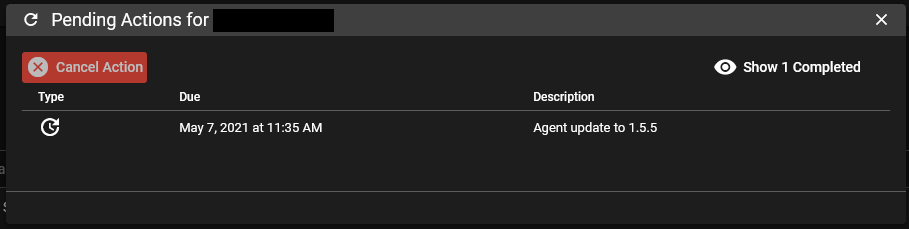
Agents that are installed on Windows domain controllers do not automatically update. The upgrade task shows as a pending task indefinitely until the agent is manually updated.

To Reproduce
Steps to reproduce the behavior:

  1. Install an older version agent on a Windows Server that is an active domain controller (PDC or secondary, doesn't matter).
  2. Update Tactical RMM to a version that has an agent update.
  3. Observe that agents on non-domain controller Windows Server and Windows clients will update within their next update cycle.
  4. Domain controllers will have a pending update task indefinitely until the agent is manually updated.

Expected behavior
The agent should update automatically.

Screenshots
image
image

Additional context
This is only observed on Windows servers acting as a domain controller. The following events are observed during an update attempt:

1013 Program C:\Program Files\TacticalAgent\tacticalrmm.exe for service tacticalrpc exited with return code 0.
1023 Killing process tree of process 4320 for service tacticalrpc with exit code 0
1027 Killing PID 4320 in process tree of PID 4320 because service tacticalrpc is stopping.
1023 Killing process tree of process 4948 for service tacticalrpc with exit code 0
1027 Killing PID 4948 in process tree of PID 4320 because service tacticalrpc is stopping.
1014 Service tacticalrpc action for exit code 0 is Restart. Attempting to restart C:\Program Files\TacticalAgent\tacticalrmm.exe.
1034 Service tacticalrpc ran for less than 1500 milliseconds. Restart will be delayed by 5000 milliseconds.
1008 Started C:\Program Files\TacticalAgent\tacticalrmm.exe -m rpc for service tacticalrpc in C:\Program Files\TacticalAgent.

This will then continue in an hour when the agent attempts to update again.

Originally created by @tnewton1 on GitHub (May 7, 2021). Original GitHub issue: https://github.com/amidaware/tacticalrmm/issues/485 **Server Info (please complete the following information):** - OS: Ubuntu 20.04.2 LTS - Browser: Firefox 88 - RMM Version (as shown in top left of web UI): 0.6.8 **Installation Method:** - [X] Standard - [ ] Docker **Agent Info (please complete the following information):** - Agent version (as shown in the 'Summary' tab of the agent from web UI): 1.5.2 - Agent OS: Server 2016, Server 2019 **Describe the bug** Agents that are installed on Windows domain controllers do not automatically update. The upgrade task shows as a pending task indefinitely until the agent is manually updated. **To Reproduce** Steps to reproduce the behavior: 1. Install an older version agent on a Windows Server that is an active domain controller (PDC or secondary, doesn't matter). 2. Update Tactical RMM to a version that has an agent update. 3. Observe that agents on non-domain controller Windows Server and Windows clients will update within their next update cycle. 4. Domain controllers will have a pending update task indefinitely until the agent is manually updated. **Expected behavior** The agent should update automatically. **Screenshots** ![image](https://user-images.githubusercontent.com/3200699/117466053-4f595180-af20-11eb-873e-6bba75acd257.png) ![image](https://user-images.githubusercontent.com/3200699/117466171-68620280-af20-11eb-8eeb-27da5c7f7033.png) **Additional context** This is only observed on Windows servers acting as a domain controller. The following events are observed during an update attempt: 1013 Program C:\Program Files\TacticalAgent\tacticalrmm.exe for service tacticalrpc exited with return code 0. 1023 Killing process tree of process 4320 for service tacticalrpc with exit code 0 1027 Killing PID 4320 in process tree of PID 4320 because service tacticalrpc is stopping. 1023 Killing process tree of process 4948 for service tacticalrpc with exit code 0 1027 Killing PID 4948 in process tree of PID 4320 because service tacticalrpc is stopping. 1014 Service tacticalrpc action for exit code 0 is Restart. Attempting to restart C:\Program Files\TacticalAgent\tacticalrmm.exe. 1034 Service tacticalrpc ran for less than 1500 milliseconds. Restart will be delayed by 5000 milliseconds. 1008 Started C:\Program Files\TacticalAgent\tacticalrmm.exe -m rpc for service tacticalrpc in C:\Program Files\TacticalAgent. This will then continue in an hour when the agent attempts to update again.
kerem closed this issue 2026-03-14 03:11:56 +03:00
Author
Owner

@wh1te909 commented on GitHub (May 7, 2021):

hmm, DC not the issue cuz i have around 30 DC's ranging from server 2008 r2 to server 2019 and all of them auto update fine

plz run agent update with logging and then paste output of the log file
https://wh1te909.github.io/tacticalrmm/update_agents/#manually-updating-from-the-command-line-on-the-agent

<!-- gh-comment-id:834556127 --> @wh1te909 commented on GitHub (May 7, 2021): hmm, DC not the issue cuz i have around 30 DC's ranging from server 2008 r2 to server 2019 and all of them auto update fine plz run agent update with logging and then paste output of the log file https://wh1te909.github.io/tacticalrmm/update_agents/#manually-updating-from-the-command-line-on-the-agent
Author
Owner

@tnewton1 commented on GitHub (May 8, 2021):

Here you go:

2021-05-07 23:51:41.445   Setup version: Inno Setup version 6.1.2
2021-05-07 23:51:41.445   Original Setup EXE: C:\Users\[SNIP]\Desktop\winagent-v1.5.5.exe
2021-05-07 23:51:41.445   Setup command line: /SL5="$2043E,3483315,824832,C:\Users\[SNIP]\Desktop\winagent-v1.5.5.exe" /VERYSILENT /LOG=agentupdate.txt
2021-05-07 23:51:41.445   Windows version: 10.0.17763  (NT platform: Yes)
2021-05-07 23:51:41.445   64-bit Windows: Yes
2021-05-07 23:51:41.445   Processor architecture: x64
2021-05-07 23:51:41.445   User privileges: Administrative
2021-05-07 23:51:41.460   Administrative install mode: Yes
2021-05-07 23:51:41.460   Install mode root key: HKEY_LOCAL_MACHINE
2021-05-07 23:51:41.460   64-bit install mode: No
2021-05-07 23:51:41.710   Created temporary directory: C:\Users\[SNIP]\AppData\Local\Temp\2\is-UK6QK.tmp
2021-05-07 23:51:45.086   Stop tacticalagent: 0
2021-05-07 23:51:48.054   Stop tacticalrpc: 0
2021-05-07 23:51:51.726   taskkill: 128
2021-05-07 23:51:55.304   Starting the installation process.
2021-05-07 23:51:55.460   Directory for uninstall files: C:\Program Files\TacticalAgent
2021-05-07 23:51:55.804   Will append to existing uninstall log: C:\Program Files\TacticalAgent\unins000.dat
2021-05-07 23:51:56.617   -- File entry --
2021-05-07 23:51:56.617   Dest filename: C:\Program Files\TacticalAgent\unins000.exe
2021-05-07 23:51:56.882   Time stamp of our file: 2021-05-07 23:51:37.632
2021-05-07 23:51:56.882   Dest file exists.
2021-05-07 23:51:56.882   Time stamp of existing file: 2021-04-27 23:16:31.964
2021-05-07 23:51:56.882   Version of our file: 51.1052.0.0
2021-05-07 23:51:57.976   Version of existing file: 51.1052.0.0
2021-05-07 23:51:57.976   Installing the file.
2021-05-07 23:51:57.992   Leaving temporary file in place for now.
2021-05-07 23:51:57.992   -- File entry --
2021-05-07 23:51:57.992   Dest filename: C:\Program Files\TacticalAgent\tacticalrmm.exe
2021-05-07 23:51:58.007   Time stamp of our file: 2021-05-05 09:52:32.000
2021-05-07 23:51:58.007   Dest file exists.
2021-05-07 23:51:58.007   Time stamp of existing file: 2021-04-22 22:32:56.000
2021-05-07 23:51:58.007   Installing the file.
2021-05-07 23:51:58.648   Successfully installed the file.
2021-05-07 23:51:58.648   -- File entry --
2021-05-07 23:51:58.648   Dest filename: C:\Program Files\TacticalAgent\nssm.exe
2021-05-07 23:51:58.648   Time stamp of our file: 2021-04-24 01:16:28.000
2021-05-07 23:51:58.648   Dest file exists.
2021-05-07 23:51:58.648   Time stamp of existing file: 2020-12-15 02:27:00.000
2021-05-07 23:51:58.648   Version of our file: 2.24.101.101
2021-05-07 23:51:58.648   Version of existing file: 2.24.101.101
2021-05-07 23:51:58.648   Same version. Skipping.
2021-05-07 23:51:58.648   -- Icon entry --
2021-05-07 23:51:58.648   Dest filename: C:\ProgramData\Microsoft\Windows\Start Menu\Programs\Tactical RMM Agent.lnk
2021-05-07 23:51:58.648   Creating the icon.
2021-05-07 23:52:02.773   Successfully created the icon.
2021-05-07 23:52:02.804   Saving uninstall information.
2021-05-07 23:52:02.820   Renaming uninstaller.
2021-05-07 23:52:02.820   Deleting uninstall key left over from previous administrative 32-bit install.
2021-05-07 23:52:02.820   Creating new uninstall key: HKEY_LOCAL_MACHINE\Software\Microsoft\Windows\CurrentVersion\Uninstall\{0D34D278-5FAF-4159-A4A0-4E2D2C08139D}_is1
2021-05-07 23:52:02.820   Writing uninstall key values.
2021-05-07 23:52:02.820   Detected previous non administrative install? No
2021-05-07 23:52:02.820   Detected previous administrative 64-bit install? No
2021-05-07 23:52:03.226   Installation process succeeded.
2021-05-07 23:52:03.226   Need to restart Windows? No
2021-05-07 23:52:03.242   Deinitializing Setup.
2021-05-07 23:52:09.978   Start tacticalagent: 0
2021-05-07 23:52:12.210   Start tacticalrpc: 0
2021-05-07 23:52:12.241   Log closed.
<!-- gh-comment-id:835062809 --> @tnewton1 commented on GitHub (May 8, 2021): Here you go: ```2021-05-07 23:51:41.445 Log opened. (Time zone: UTC-04:00) 2021-05-07 23:51:41.445 Setup version: Inno Setup version 6.1.2 2021-05-07 23:51:41.445 Original Setup EXE: C:\Users\[SNIP]\Desktop\winagent-v1.5.5.exe 2021-05-07 23:51:41.445 Setup command line: /SL5="$2043E,3483315,824832,C:\Users\[SNIP]\Desktop\winagent-v1.5.5.exe" /VERYSILENT /LOG=agentupdate.txt 2021-05-07 23:51:41.445 Windows version: 10.0.17763 (NT platform: Yes) 2021-05-07 23:51:41.445 64-bit Windows: Yes 2021-05-07 23:51:41.445 Processor architecture: x64 2021-05-07 23:51:41.445 User privileges: Administrative 2021-05-07 23:51:41.460 Administrative install mode: Yes 2021-05-07 23:51:41.460 Install mode root key: HKEY_LOCAL_MACHINE 2021-05-07 23:51:41.460 64-bit install mode: No 2021-05-07 23:51:41.710 Created temporary directory: C:\Users\[SNIP]\AppData\Local\Temp\2\is-UK6QK.tmp 2021-05-07 23:51:45.086 Stop tacticalagent: 0 2021-05-07 23:51:48.054 Stop tacticalrpc: 0 2021-05-07 23:51:51.726 taskkill: 128 2021-05-07 23:51:55.304 Starting the installation process. 2021-05-07 23:51:55.460 Directory for uninstall files: C:\Program Files\TacticalAgent 2021-05-07 23:51:55.804 Will append to existing uninstall log: C:\Program Files\TacticalAgent\unins000.dat 2021-05-07 23:51:56.617 -- File entry -- 2021-05-07 23:51:56.617 Dest filename: C:\Program Files\TacticalAgent\unins000.exe 2021-05-07 23:51:56.882 Time stamp of our file: 2021-05-07 23:51:37.632 2021-05-07 23:51:56.882 Dest file exists. 2021-05-07 23:51:56.882 Time stamp of existing file: 2021-04-27 23:16:31.964 2021-05-07 23:51:56.882 Version of our file: 51.1052.0.0 2021-05-07 23:51:57.976 Version of existing file: 51.1052.0.0 2021-05-07 23:51:57.976 Installing the file. 2021-05-07 23:51:57.992 Leaving temporary file in place for now. 2021-05-07 23:51:57.992 -- File entry -- 2021-05-07 23:51:57.992 Dest filename: C:\Program Files\TacticalAgent\tacticalrmm.exe 2021-05-07 23:51:58.007 Time stamp of our file: 2021-05-05 09:52:32.000 2021-05-07 23:51:58.007 Dest file exists. 2021-05-07 23:51:58.007 Time stamp of existing file: 2021-04-22 22:32:56.000 2021-05-07 23:51:58.007 Installing the file. 2021-05-07 23:51:58.648 Successfully installed the file. 2021-05-07 23:51:58.648 -- File entry -- 2021-05-07 23:51:58.648 Dest filename: C:\Program Files\TacticalAgent\nssm.exe 2021-05-07 23:51:58.648 Time stamp of our file: 2021-04-24 01:16:28.000 2021-05-07 23:51:58.648 Dest file exists. 2021-05-07 23:51:58.648 Time stamp of existing file: 2020-12-15 02:27:00.000 2021-05-07 23:51:58.648 Version of our file: 2.24.101.101 2021-05-07 23:51:58.648 Version of existing file: 2.24.101.101 2021-05-07 23:51:58.648 Same version. Skipping. 2021-05-07 23:51:58.648 -- Icon entry -- 2021-05-07 23:51:58.648 Dest filename: C:\ProgramData\Microsoft\Windows\Start Menu\Programs\Tactical RMM Agent.lnk 2021-05-07 23:51:58.648 Creating the icon. 2021-05-07 23:52:02.773 Successfully created the icon. 2021-05-07 23:52:02.804 Saving uninstall information. 2021-05-07 23:52:02.820 Renaming uninstaller. 2021-05-07 23:52:02.820 Deleting uninstall key left over from previous administrative 32-bit install. 2021-05-07 23:52:02.820 Creating new uninstall key: HKEY_LOCAL_MACHINE\Software\Microsoft\Windows\CurrentVersion\Uninstall\{0D34D278-5FAF-4159-A4A0-4E2D2C08139D}_is1 2021-05-07 23:52:02.820 Writing uninstall key values. 2021-05-07 23:52:02.820 Detected previous non administrative install? No 2021-05-07 23:52:02.820 Detected previous administrative 64-bit install? No 2021-05-07 23:52:03.226 Installation process succeeded. 2021-05-07 23:52:03.226 Need to restart Windows? No 2021-05-07 23:52:03.242 Deinitializing Setup. 2021-05-07 23:52:09.978 Start tacticalagent: 0 2021-05-07 23:52:12.210 Start tacticalrpc: 0 2021-05-07 23:52:12.241 Log closed. ```
Author
Owner

@wh1te909 commented on GitHub (May 8, 2021):

Thanks, looks good to me. The command you ran manually is the same exact command the agent does for self update.
On an agent that's failing to auto update, please check in c:\windows\temp\tacticalrmmXXXXX where XXX are random numbers for a text file. That folder is where the agent saves the /LOG=xxxx.txt file, it's randomly generated every agent update and overwritten but it will always be the last self update attempt log. Anyway that folder should contain a text file with a log similar to the out you posted above, curious to see what the difference is, can you please post the contents of the text file in c:\windows\temp\tacticalrmmXXXXX?

<!-- gh-comment-id:835144718 --> @wh1te909 commented on GitHub (May 8, 2021): Thanks, looks good to me. The command you ran manually is the same exact command the agent does for self update. On an agent that's failing to auto update, please check in `c:\windows\temp\tacticalrmmXXXXX` where XXX are random numbers for a text file. That folder is where the agent saves the `/LOG=xxxx.txt` file, it's randomly generated every agent update and overwritten but it will always be the last self update attempt log. Anyway that folder should contain a text file with a log similar to the out you posted above, curious to see what the difference is, can you please post the contents of the text file in `c:\windows\temp\tacticalrmmXXXXX`?
Author
Owner

@tnewton1 commented on GitHub (May 10, 2021):

I'll have to wait until the next release as I don't have anything in that directory right now.

<!-- gh-comment-id:836104558 --> @tnewton1 commented on GitHub (May 10, 2021): I'll have to wait until the next release as I don't have anything in that directory right now.
Author
Owner

@wh1te909 commented on GitHub (May 12, 2021):

new release it out please update and lmk

<!-- gh-comment-id:839527850 --> @wh1te909 commented on GitHub (May 12, 2021): new release it out please update and lmk
Author
Owner

@tnewton1 commented on GitHub (May 13, 2021):

Hi, I've updated my Tactical RMM server and I have been monitoring the C:\Windows\Temp\tacticalrmmXXXXX directories on my servers but I have not seen any log files appear in there. Do you have any suggestions I can try to get the logs to populate? Should I try completely uninstalling the client and then reinstalling?

<!-- gh-comment-id:840751266 --> @tnewton1 commented on GitHub (May 13, 2021): Hi, I've updated my Tactical RMM server and I have been monitoring the `C:\Windows\Temp\tacticalrmmXXXXX` directories on my servers but I have not seen any log files appear in there. Do you have any suggestions I can try to get the logs to populate? Should I try completely uninstalling the client and then reinstalling?
Author
Owner

@wh1te909 commented on GitHub (May 13, 2021):

if the log file is not being created that means something is blocking the updater from running
i've seen this exact behavior before due to antivirus blocking it so make sure to add exclusions to your AV, checks the agent installation docs for what to exclude

<!-- gh-comment-id:840775197 --> @wh1te909 commented on GitHub (May 13, 2021): if the log file is not being created that means something is blocking the updater from running i've seen this exact behavior before due to antivirus blocking it so make sure to add exclusions to your AV, checks the agent installation docs for what to exclude
Author
Owner

@tnewton1 commented on GitHub (May 13, 2021):

Thanks - that was it. For some reason on these 3 servers, the installer didn't set the exclusions automatically. I checked my other servers and the installer did properly set the exclusions.

<!-- gh-comment-id:840781943 --> @tnewton1 commented on GitHub (May 13, 2021): Thanks - that was it. For some reason on these 3 servers, the installer didn't set the exclusions automatically. I checked my other servers and the installer did properly set the exclusions.
Sign in to join this conversation.
No milestone
No project
No assignees
1 participant
Notifications
Due date
The due date is invalid or out of range. Please use the format "yyyy-mm-dd".

No due date set.

Dependencies

No dependencies set.

Reference
starred/tacticalrmm#2244
No description provided.