[GH-ISSUE #442] Agents working behind a proxy #2212

Closed
opened 2026-03-14 03:01:40 +03:00 by kerem · 21 comments
Owner

Originally created by @fred5632 on GitHub (Apr 27, 2021).
Original GitHub issue: https://github.com/amidaware/tacticalrmm/issues/442

Originally assigned to: @wh1te909 on GitHub.

Is your feature request related to a problem? Please describe.
I have 3 sites which are connected to the internet via a Squid proxy, via wpad. Unfortunately I cant remove the proxy.
When trying to install the agent on a host on these networks, it flashes up the installer screen, says "Downloading Agent..." for a few seconds, then goes away. Nothing else happens, and the agent doesn't install.

Describe the solution you'd like
Proxy support for the agent - either automatic based on system proxy settings, or a wpad address or host:port address embedded into the agent, customizable per site or agent deployment/file.

Describe alternatives you've considered
N/A

Additional context
N/A

Thank you for your consideration.

Originally created by @fred5632 on GitHub (Apr 27, 2021). Original GitHub issue: https://github.com/amidaware/tacticalrmm/issues/442 Originally assigned to: @wh1te909 on GitHub. **Is your feature request related to a problem? Please describe.** I have 3 sites which are connected to the internet via a Squid proxy, via wpad. Unfortunately I cant remove the proxy. When trying to install the agent on a host on these networks, it flashes up the installer screen, says "Downloading Agent..." for a few seconds, then goes away. Nothing else happens, and the agent doesn't install. **Describe the solution you'd like** Proxy support for the agent - either automatic based on system proxy settings, or a wpad address or host:port address embedded into the agent, customizable per site or agent deployment/file. **Describe alternatives you've considered** N/A **Additional context** N/A Thank you for your consideration.
kerem 2026-03-14 03:01:40 +03:00
Author
Owner

@subzdev commented on GitHub (Apr 28, 2021):

Personally I have experienced this exact behavior due to antivirus protection.

<!-- gh-comment-id:828074557 --> @subzdev commented on GitHub (Apr 28, 2021): Personally I have experienced this exact behavior due to antivirus protection.
Author
Owner

@fred5632 commented on GitHub (Apr 28, 2021):

Hi Subzdev, the computers i have tried this on are running Windows Server, and only Windows Defender.
I also have the agent on my laptop, and while connected to one of these networks, it shows as offline in the RMM web interface, whereas it normally shows as online.
So in my case, I dont think its related to AV, but I am admittedly only guessing that its the proxy causing it.

<!-- gh-comment-id:828079664 --> @fred5632 commented on GitHub (Apr 28, 2021): Hi Subzdev, the computers i have tried this on are running Windows Server, and only Windows Defender. I also have the agent on my laptop, and while connected to one of these networks, it shows as offline in the RMM web interface, whereas it normally shows as online. So in my case, I dont think its related to AV, but I am admittedly only guessing that its the proxy causing it.
Author
Owner

@subzdev commented on GitHub (Apr 28, 2021):

Have you made the recommended exclusions?

https://wh1te909.github.io/tacticalrmm/install_agent/

<!-- gh-comment-id:828082505 --> @subzdev commented on GitHub (Apr 28, 2021): Have you made the recommended exclusions? https://wh1te909.github.io/tacticalrmm/install_agent/
Author
Owner

@fred5632 commented on GitHub (Apr 28, 2021):

I hadnt made the exclusions, but i just did it now, and no change, it still fails at the same point.

However as I said, the agent is installed on my laptop and works fine on other networks, but wont connect to the server on these networks where there is a proxy. So there is some sort of network connectivity issue - I assume proxy, but I dont know for sure.

<!-- gh-comment-id:828086417 --> @fred5632 commented on GitHub (Apr 28, 2021): I hadnt made the exclusions, but i just did it now, and no change, it still fails at the same point. However as I said, the agent is installed on my laptop and works fine on other networks, but wont connect to the server on these networks where there is a proxy. So there is some sort of network connectivity issue - I assume proxy, but I dont know for sure.
Author
Owner

@fred5632 commented on GitHub (Apr 28, 2021):

i also just tried disabling Defender, it doesnt help

<!-- gh-comment-id:828090159 --> @fred5632 commented on GitHub (Apr 28, 2021): i also just tried disabling Defender, it doesnt help
Author
Owner

@AndreaChiaramonte commented on GitHub (May 3, 2021):

I confirm that in my test site that performs HTTP and HTTPS browsing only with the non-transparent proxy server, the agent does not install and stops downloading and then immediately exits. If I remove the proxy and enable HTTP and HTTPS direct browsing and I enable outgoing port 4222 then the agent installs correctly. The test was performed with Windows 10 pro and opnsense as a firewall. I hope it will be useful.

<!-- gh-comment-id:831445605 --> @AndreaChiaramonte commented on GitHub (May 3, 2021): I confirm that in my test site that performs HTTP and HTTPS browsing only with the non-transparent proxy server, the agent does not install and stops downloading and then immediately exits. If I remove the proxy and enable HTTP and HTTPS direct browsing and I enable outgoing port 4222 then the agent installs correctly. The test was performed with Windows 10 pro and opnsense as a firewall. I hope it will be useful.
Author
Owner

@wh1te909 commented on GitHub (May 4, 2021):

https://github.com/go-resty/resty#proxy-settings---client-as-well-as-at-request-level
this is the http client im using in the agent, appears to have proxy support, does the above look right?
if so i can add optional args to the installer to set the proxy

<!-- gh-comment-id:831733783 --> @wh1te909 commented on GitHub (May 4, 2021): https://github.com/go-resty/resty#proxy-settings---client-as-well-as-at-request-level this is the http client im using in the agent, appears to have proxy support, does the above look right? if so i can add optional args to the installer to set the proxy
Author
Owner

@fred5632 commented on GitHub (May 4, 2021):

Yeah that looks perfect thanks

<!-- gh-comment-id:831737644 --> @fred5632 commented on GitHub (May 4, 2021): Yeah that looks perfect thanks
Author
Owner

@wh1te909 commented on GitHub (May 4, 2021):

ok I added the changes in the agent, will be in the next release. will update this ticket with a link to the docs when released

<!-- gh-comment-id:831744406 --> @wh1te909 commented on GitHub (May 4, 2021): ok I added the changes in the agent, will be in the next release. will update this ticket with a link to the docs when released
Author
Owner

@fred5632 commented on GitHub (May 4, 2021):

Thanks that is great, look forward to testing it out, and I will let
you know how it goes
On Tue, 2021-05-04 at 00:40 -0700, Dan wrote:

ok I added the changes in the agent, will be in the next release.
will update this ticket with a link to the docs when released

You are receiving this because you authored the thread.
Reply to this email directly, view it on GitHub, or unsubscribe.

<!-- gh-comment-id:831874966 --> @fred5632 commented on GitHub (May 4, 2021): Thanks that is great, look forward to testing it out, and I will let you know how it goes On Tue, 2021-05-04 at 00:40 -0700, Dan wrote: > ok I added the changes in the agent, will be in the next release. > will update this ticket with a link to the docs when released > — > You are receiving this because you authored the thread. > Reply to this email directly, view it on GitHub, or unsubscribe.
Author
Owner

@wh1te909 commented on GitHub (May 5, 2021):

Released in 0.6.7

Requires agent 1.5.4, see bottom of https://wh1te909.github.io/tacticalrmm/install_agent/#optional-installer-args for the -proxy flag to pass to the installer

Please try it out and lmk how it goes

<!-- gh-comment-id:832480149 --> @wh1te909 commented on GitHub (May 5, 2021): Released in 0.6.7 Requires agent 1.5.4, see bottom of https://wh1te909.github.io/tacticalrmm/install_agent/#optional-installer-args for the `-proxy` flag to pass to the installer Please try it out and lmk how it goes
Author
Owner

@AndreaChiaramonte commented on GitHub (May 5, 2021):

test win10pro HTTP and HTTPS via proxy, nat only icmp, dns and TCP Port 4222 (why this port??), TRMM v0.6.7, windows proxy configured and netsh winhttp proxy configured: internet browsing OK.

Installation method: Dynamically generated EXE:

`C:\Users\utente\Downloads>rmm-test128-reteesxi-workstation.exe -proxy "http://192.168.128.254:8080"
Downloading agent...
ERROR: unable to download agent from https://github.com/wh1te909/rmmagent/releases/download/v1.5.4/winagent-v1.5.4.exe
Get "https://github.com/wh1te909/rmmagent/releases/download/v1.5.4/winagent-v1.5.4.exe": dial tcp 140.82.121.3:443: i/o timeout

C:\Users\utente\Downloads>rmm-test128-reteesxi-workstation.exe -proxy "https://192.168.128.254:8080"
Downloading agent...
ERROR: unable to download agent from https://github.com/wh1te909/rmmagent/releases/download/v1.5.4/winagent-v1.5.4.exe
Get "https://github.com/wh1te909/rmmagent/releases/download/v1.5.4/winagent-v1.5.4.exe": dial tcp 140.82.121.3:443: i/o timeout

C:\Users\utente\Downloads>rmm-test128-reteesxi-workstation.exe -proxy "https://192.168.128.254:8081"
Downloading agent...
ERROR: unable to download agent from https://github.com/wh1te909/rmmagent/releases/download/v1.5.4/winagent-v1.5.4.exe
Get "https://github.com/wh1te909/rmmagent/releases/download/v1.5.4/winagent-v1.5.4.exe": dial tcp 140.82.121.3:443: i/o timeout`

Installation method: Manual:

`C:\Users\utente\Downloads>winagent-v1.5.4.exe /VERYSILENT /SUPPRESSMSGBOXES && ping 127.0.0.1 -n 5 && "C:\Program Files\TacticalAgent\tacticalrmm.exe" -m install --api https://<aaa.bbb.ccc> --client-id 6 --site-id 6 --agent-type workstation --auth xxxxxxxxxxxxxxxxxxxxxxxx --rdp --ping -proxy "http://192.168.128.254:8080"

Esecuzione di Ping 127.0.0.1 con 32 byte di dati:
Risposta da 127.0.0.1: byte=32 durata<1ms TTL=128

Statistiche Ping per 127.0.0.1:
Pacchetti: Trasmessi = 5, Ricevuti = 5,
Persi = 0 (0% persi),
Tempo approssimativo percorsi andata/ritorno in millisecondi:
Minimo = 0ms, Massimo = 0ms, Medio = 0ms
time="2021-05-05T10:41:37+02:00" level=info msg="Using proxy: http://192.168.128.254:8080"
time="2021-05-05T10:41:38+02:00" level=info msg="Downloading mesh agent..."
time="2021-05-05T10:41:39+02:00" level=info msg="Installing mesh agent..."
[...Checking for previous installation of "Mesh Agent" [NONE]
...Installing service [DONE]
-> Writing firewall rules for Mesh Agent Service... [DONE]
-> Starting service... [OK]
]
time="2021-05-05T10:41:54+02:00" level=info msg="Adding agent to dashboard"
time="2021-05-05T10:44:12+02:00" level=info msg="Installing services..."
time="2021-05-05T10:44:17+02:00" level=info msg="Adding windows defender exclusions"
time="2021-05-05T10:44:18+02:00" level=info msg="Enabling ping..."
time="2021-05-05T10:44:18+02:00" level=info msg="Enabling RDP..."
exit status 1`

OK, agent and mesh installed on client, agent is on TRMM dashboard in correct Client/Site, but "Agent overdue"

thanks

<!-- gh-comment-id:832557271 --> @AndreaChiaramonte commented on GitHub (May 5, 2021): test win10pro HTTP and HTTPS via proxy, nat only icmp, dns and TCP Port 4222 (why this port??), TRMM v0.6.7, windows proxy configured and netsh winhttp proxy configured: internet browsing OK. Installation method: Dynamically generated EXE: `C:\Users\utente\Downloads>rmm-test128-reteesxi-workstation.exe -proxy "**http**://192.168.128.254:8080" Downloading agent... ERROR: unable to download agent from https://github.com/wh1te909/rmmagent/releases/download/v1.5.4/winagent-v1.5.4.exe Get "https://github.com/wh1te909/rmmagent/releases/download/v1.5.4/winagent-v1.5.4.exe": dial tcp 140.82.121.3:443: i/o timeout C:\Users\utente\Downloads>rmm-test128-reteesxi-workstation.exe -proxy "**https**://192.168.128.254:8080" Downloading agent... ERROR: unable to download agent from https://github.com/wh1te909/rmmagent/releases/download/v1.5.4/winagent-v1.5.4.exe Get "https://github.com/wh1te909/rmmagent/releases/download/v1.5.4/winagent-v1.5.4.exe": dial tcp 140.82.121.3:443: i/o timeout C:\Users\utente\Downloads>rmm-test128-reteesxi-workstation.exe -proxy "https://192.168.128.254:8081" Downloading agent... ERROR: unable to download agent from https://github.com/wh1te909/rmmagent/releases/download/v1.5.4/winagent-v1.5.4.exe Get "https://github.com/wh1te909/rmmagent/releases/download/v1.5.4/winagent-v1.5.4.exe": dial tcp 140.82.121.3:443: i/o timeout` Installation method: Manual: `C:\Users\utente\Downloads>winagent-v1.5.4.exe /VERYSILENT /SUPPRESSMSGBOXES && ping 127.0.0.1 -n 5 && "C:\Program Files\TacticalAgent\tacticalrmm.exe" -m install --api https://<aaa.bbb.ccc> --client-id 6 --site-id 6 --agent-type workstation --auth xxxxxxxxxxxxxxxxxxxxxxxx --rdp --ping -proxy "http://192.168.128.254:8080" Esecuzione di Ping 127.0.0.1 con 32 byte di dati: Risposta da 127.0.0.1: byte=32 durata<1ms TTL=128 Risposta da 127.0.0.1: byte=32 durata<1ms TTL=128 Risposta da 127.0.0.1: byte=32 durata<1ms TTL=128 Risposta da 127.0.0.1: byte=32 durata<1ms TTL=128 Risposta da 127.0.0.1: byte=32 durata<1ms TTL=128 Statistiche Ping per 127.0.0.1: Pacchetti: Trasmessi = 5, Ricevuti = 5, Persi = 0 (0% persi), Tempo approssimativo percorsi andata/ritorno in millisecondi: Minimo = 0ms, Massimo = 0ms, Medio = 0ms time="2021-05-05T10:41:37+02:00" level=info msg="Using proxy: http://192.168.128.254:8080" time="2021-05-05T10:41:38+02:00" level=info msg="Downloading mesh agent..." time="2021-05-05T10:41:39+02:00" level=info msg="Installing mesh agent..." [...Checking for previous installation of "Mesh Agent" [NONE] ...Installing service [DONE] -> Writing firewall rules for Mesh Agent Service... [DONE] -> Starting service... [OK] ] time="2021-05-05T10:41:54+02:00" level=info msg="Adding agent to dashboard" time="2021-05-05T10:44:12+02:00" level=info msg="Installing services..." time="2021-05-05T10:44:17+02:00" level=info msg="Adding windows defender exclusions" time="2021-05-05T10:44:18+02:00" level=info msg="Enabling ping..." time="2021-05-05T10:44:18+02:00" level=info msg="Enabling RDP..." exit status 1` OK, agent and mesh installed on client, agent is on TRMM dashboard in correct Client/Site, but "Agent overdue" thanks
Author
Owner

@wh1te909 commented on GitHub (May 5, 2021):

Hi @AndreaChiaramonte thanks, I will release a new agent shortly with the proxy fix for agent overdue (forgot to set the proxy after the agent installs 🤦‍♂️ )

I will also fix the dynamic exe to use proxy, atm it only works with manual method

<!-- gh-comment-id:832803992 --> @wh1te909 commented on GitHub (May 5, 2021): Hi @AndreaChiaramonte thanks, I will release a new agent shortly with the proxy fix for agent overdue (forgot to set the proxy after the agent installs :man_facepalming: ) I will also fix the dynamic exe to use proxy, atm it only works with manual method
Author
Owner

@wh1te909 commented on GitHub (May 5, 2021):

Fixed in agent v1.5.5, please update your RMM to 0.6.8, uninstall old agent and then generate a new agent and try now

<!-- gh-comment-id:832863364 --> @wh1te909 commented on GitHub (May 5, 2021): Fixed in agent v1.5.5, please update your RMM to 0.6.8, uninstall old agent and then generate a new agent and try now
Author
Owner

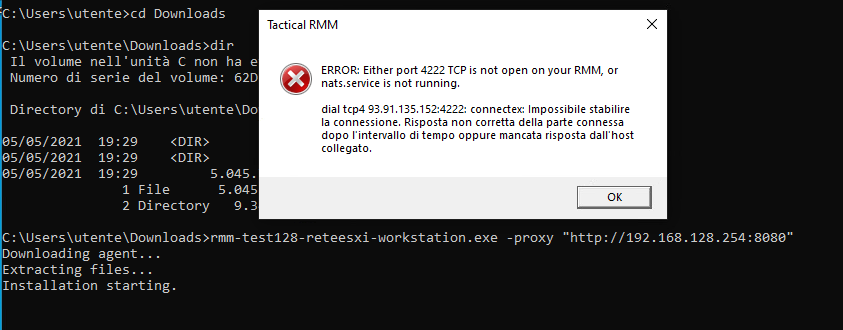
@AndreaChiaramonte commented on GitHub (May 5, 2021):

Thank you @wh1te909 , now installation work, but is necessary outbound NAT of TCP port 4222, as in attached image
image
after install i have disabled outbound nat of port 4222

in TRMM there are these problems:
"Take control" agent status: online but "Connect" do not work
"Send command" work
"Run Script" work
"Remote Background"
-- Terminal not work
-- File Browser not work
-- Services work
-- processes work
-- event log work

thank you

<!-- gh-comment-id:832924753 --> @AndreaChiaramonte commented on GitHub (May 5, 2021): Thank you @wh1te909 , now installation work, but is necessary outbound NAT of TCP port 4222, as in attached image ![image](https://user-images.githubusercontent.com/47893426/117191188-90e2e300-ade0-11eb-8d14-965b86e5a98c.png) after install i have disabled outbound nat of port 4222 in TRMM there are these problems: "Take control" agent status: online but "Connect" do not work "Send command" work "Run Script" work "Remote Background" -- Terminal not work -- File Browser not work -- Services work -- processes work -- event log work thank you
Author
Owner

@wh1te909 commented on GitHub (May 5, 2021):

@AndreaChiaramonte yes 4222 tcp is necessary for like 90% of the agent's functions lol so that needs to be open

take control, terminal and file browser all use meshcentral and the mesh agent which is a separate product
it looks like the mesh agent also supports using a proxy

as a test can you try the following on the agent that needs the proxy?
open cmd as admin

"C:\Program Files\TacticalAgent\meshagent.exe" -fulluninstall
"C:\Program Files\TacticalAgent\meshagent.exe" -fullinstall --WebProxy="http://192.168.128.254:8080"

then right click on the agent from TRMM's web UI > Agent Recovery > Mesh Agent
then try doing a take control / terminal / file browser and see if it works
if it does then i can add the --WebProxy line to the installer

<!-- gh-comment-id:832976169 --> @wh1te909 commented on GitHub (May 5, 2021): @AndreaChiaramonte yes 4222 tcp is necessary for like 90% of the agent's functions lol so that needs to be open take control, terminal and file browser all use meshcentral and the mesh agent which is a separate product it looks like the mesh agent also supports using a proxy as a test can you try the following on the agent that needs the proxy? open cmd as admin ``` "C:\Program Files\TacticalAgent\meshagent.exe" -fulluninstall "C:\Program Files\TacticalAgent\meshagent.exe" -fullinstall --WebProxy="http://192.168.128.254:8080" ``` then right click on the agent from TRMM's web UI > Agent Recovery > Mesh Agent then try doing a take control / terminal / file browser and see if it works if it does then i can add the `--WebProxy` line to the installer
Author
Owner

@AndreaChiaramonte commented on GitHub (May 5, 2021):

i have made some tests: i have created a file "C:\Program Files\Mesh Agent\MeshAgent.proxy" with one text line like 192.168.128.254:8080 i have restarted MeshAgent service and now work fine.
tomorrow i will try your solution and give feedback to you. Thank you.

<!-- gh-comment-id:832987098 --> @AndreaChiaramonte commented on GitHub (May 5, 2021): i have made some tests: i have created a file "C:\Program Files\Mesh Agent\MeshAgent.proxy" with one text line like 192.168.128.254:8080 i have restarted MeshAgent service and now work fine. tomorrow i will try your solution and give feedback to you. Thank you.
Author
Owner

@AndreaChiaramonte commented on GitHub (May 6, 2021):

@wh1te909 your solution works perfectly.
It is necessary to perform the outgoing NAT for the TCP port 4222 and also for the DNS resolver (TCP / UDP port 53) otherwise the agent does not install and then does not work.
This is a "mixed" situation where the site is subject to proxy rules for internet browsing only, but must also have external name resolutions to install the agent. (and maybe even to upgrade the agent?).
Excellent solution for me, but it should be documented to avoid misunderstandings.
@fred5632 What does the author of the issue think?
Thank's for your job.

<!-- gh-comment-id:833524267 --> @AndreaChiaramonte commented on GitHub (May 6, 2021): @wh1te909 your solution works perfectly. It is necessary to perform the outgoing NAT for the TCP port 4222 and also for the DNS resolver (TCP / UDP port 53) otherwise the agent does not install and then does not work. This is a "mixed" situation where the site is subject to proxy rules for internet browsing only, but must also have external name resolutions to install the agent. (and maybe even to upgrade the agent?). Excellent solution for me, but it should be documented to avoid misunderstandings. @fred5632 What does the author of the issue think? Thank's for your job.
Author
Owner

@fred5632 commented on GitHub (May 6, 2021):

@wh1te909 yes that is fantastic, it seems to work perfectly, after doing the reinstall of the meshagent, then the recover connection button.
well done

<!-- gh-comment-id:833927450 --> @fred5632 commented on GitHub (May 6, 2021): @wh1te909 yes that is fantastic, it seems to work perfectly, after doing the reinstall of the meshagent, then the recover connection button. well done
Author
Owner

@wh1te909 commented on GitHub (May 6, 2021):

ok awesome, im adding the following code to the agent's installer, will be in next agent release. for now you'll need to manually uninstall/reinstall mesh and do the recover.

meshInstallArgs := []string{"-fullinstall"}
if len(i.Proxy) > 0 {
    meshProxy := fmt.Sprintf("--WebProxy=%s", i.Proxy)
    meshInstallArgs = append(meshInstallArgs, meshProxy)
}
<!-- gh-comment-id:833940783 --> @wh1te909 commented on GitHub (May 6, 2021): ok awesome, im adding the following code to the agent's installer, will be in next agent release. for now you'll need to manually uninstall/reinstall mesh and do the recover. ```golang meshInstallArgs := []string{"-fullinstall"} if len(i.Proxy) > 0 { meshProxy := fmt.Sprintf("--WebProxy=%s", i.Proxy) meshInstallArgs = append(meshInstallArgs, meshProxy) } ```
Author
Owner

@wh1te909 commented on GitHub (May 12, 2021):

fixed in rmm v0.6.9 (requires agent v1.5.6)

<!-- gh-comment-id:839527380 --> @wh1te909 commented on GitHub (May 12, 2021): fixed in rmm v0.6.9 (requires agent v1.5.6)
Sign in to join this conversation.
No milestone
No project
No assignees
1 participant
Notifications
Due date
The due date is invalid or out of range. Please use the format "yyyy-mm-dd".

No due date set.

Dependencies

No dependencies set.

Reference
starred/tacticalrmm#2212
No description provided.