mirror of
https://github.com/amidaware/tacticalrmm.git
synced 2026-04-26 06:55:52 +03:00
[GH-ISSUE #239] Ram use of tacticalrmm.exe changed - now has absurd commit charge #2094
Labels
No labels
In Process
bug
bug
dev-triage
documentation
duplicate
enhancement
fixed
good first issue
help wanted
integration
invalid
pull-request
question
requires agent update
security
ui tweak
wontfix
No milestone
No project
No assignees
1 participant

Notifications
Due date
No due date set.
Dependencies
No dependencies set.
Reference
starred/tacticalrmm#2094
Loading…
Add table
Add a link
Reference in a new issue
No description provided.
Delete branch "%!s()"
Deleting a branch is permanent. Although the deleted branch may continue to exist for a short time before it actually gets removed, it CANNOT be undone in most cases. Continue?
Originally created by @trs998 on GitHub (Jan 8, 2021).
Original GitHub issue: https://github.com/amidaware/tacticalrmm/issues/239
Originally assigned to: @wh1te909 on GitHub.
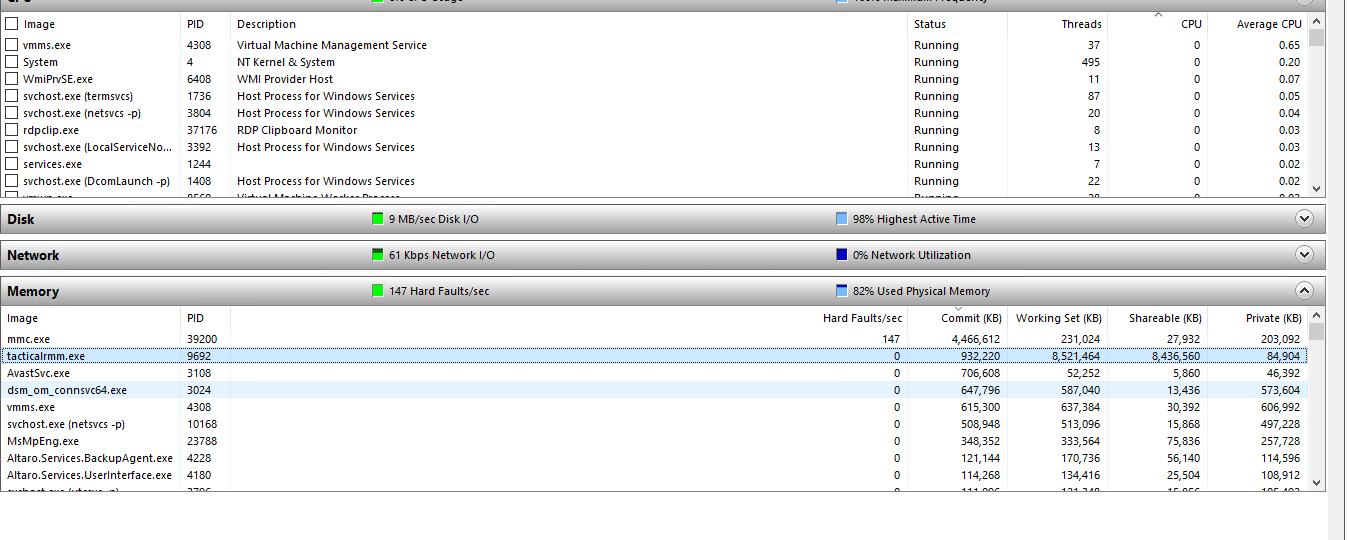
This server has 32 gb of ram - multiple servers with this issue. agent added approx close of business yesterday, server rebooted today (red circle) due to OOM failures of several services. Server typically runs around 50% ram:

Here's a different server when it had the agent updated, again massive ram allocations.

Note all these servers are Hyper-v VMs. They are running windows server from 2008r2 through to 2019. This only seems to occur on a recent agent update as of about two weeks ago (I think 0.2.18, but i would have to poke through logs to be certain, ad we do not update to each version immediately, so it may not be a bug introduced then anyway)
@trs998 commented on GitHub (Jan 8, 2021):
Blue for ram percentage, red for cpu (aggregate) percentage.
@trs998 commented on GitHub (Jan 8, 2021):
Ah, sorry, looks like 0.2.22 would fix it - I'll try that.
@rtwright68 commented on GitHub (Jan 8, 2021):
It has fixed our issues!
@trs998 commented on GitHub (Jan 9, 2021):
It doesn't seem to have helped with ours - I rebooted one server (generally reboots are maintenance window jobs so I can't test many) and it's now back to normal ram - but it took about 30 hours to run out of ram last time, so not sure yet.
Either the agent has not updated on the others, not restarted to run the new version, or is still leaking ram.
@trs998 commented on GitHub (Jan 9, 2021):
Same server, rebooted this evening approx 30 mins after tacticalrmm server was updated (I don't know how quickly it pushes updated clients to the managed servers though)
@trs998 commented on GitHub (Jan 9, 2021):
It seems not to have changed much - still runaway ram allocations on servers.
@trs998 commented on GitHub (Jan 9, 2021):
Hmm, looks like this exe was not updated when memory leak was fixed in 0.2.22 - local tacticalrmm.exe is v 1.1.12.0
Requesting the agent uninstall via the rmm did not have any effect - process did not stop, uninstall or even drop ram use. Manually uninstalling tectical rmm agent from "apps and features" ran through without errors, but failed to remove tacticalrmm.exe or stop the process:
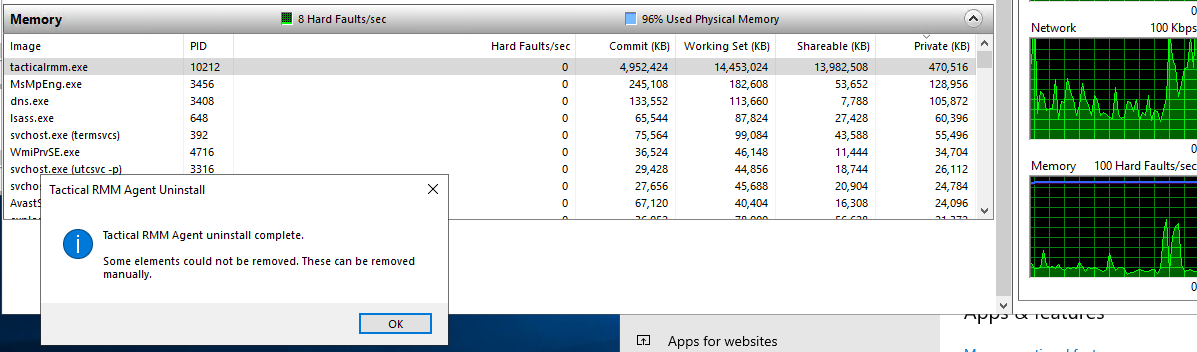
At this point tacticalrmm.exe would not due when given an "end task" signal by task manager either. At this point the test server was rebooted, tacticalrmm.exe did not launch on boot but C:\Program Files\TacticalAgent\tacticalrmm.exe remained on disk (should have been deleted by uninstall, but as process would not shut down, this is likely reason this file remains on disk. In this situation, the file should be flagged for removal on reboot using PendingFileRenameOperations by the uninstaller as follows:
HKLM\SYSTEM\CurrentControlSet\Control\Session Manager
multi-string value PendingFileRenameOperations
value: ??\C:\C:\Program Files\TacticalAgent\tacticalrmm.exe followed by 0x0000 as per:
https://qtechbabble.wordpress.com/2020/06/26/use-pendingfilerenameoperations-registry-key-to-automatically-delete-a-file-on-reboot/
@dinger1986 commented on GitHub (Jan 9, 2021):
I don't believe the update was meant to stop this on windows computers rather on the tactical host.
The newest agent version is 1.1.12
Regards,
Daniel
@trs998 commented on GitHub (Jan 9, 2021):
ah, so the catastrophic ram use of the agent on windows hosts is an outstanding bug, by the looks of it. I've started pulling the agent off hosts until we can get this stable again.
@wh1te909 commented on GitHub (Jan 9, 2021):
yes the recent release was to fix memory leak on the rmm, not agent.
this is the first im hearing of a memory leak in the agent, i have around 700 agents, also server 2008r2 thru 2019 and all our vms are on hyper-v and have not had any memory leaks so am not able to reproduce
can you pick one VM that was having the issue and give me steps to set it up as close to yours as possible like OS, vcpus ram server roles and installed software. and then whatever checks or tasks you had on that agent so i can try to reproduce
@trs998 commented on GitHub (Jan 9, 2021):
We have a variety of servers with this issue. Mostly, they're hyper-v hosts, but at least four are physical servers - one with no hyper-v installed. So it is likely not that.
I think it correlates to having avast cloudcare business edition installed. This false-positived the winagent and we then excluded "C:\Program Files\TacticalAgent*"
There's nothing complicated in the checks (on a server with Sophos not avast, no problem)

and another server (32gb ram, 6 vcpus, hyper-v server 2019 AD DC, running DNS, DHCP)
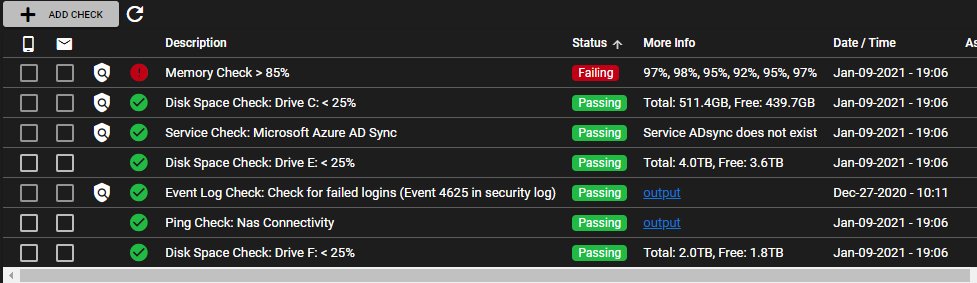
another server (8gb ram, 4vcpu, hyper-v guest 2019 AD DC, DNS AND DHCP, Avast but file shield disabled
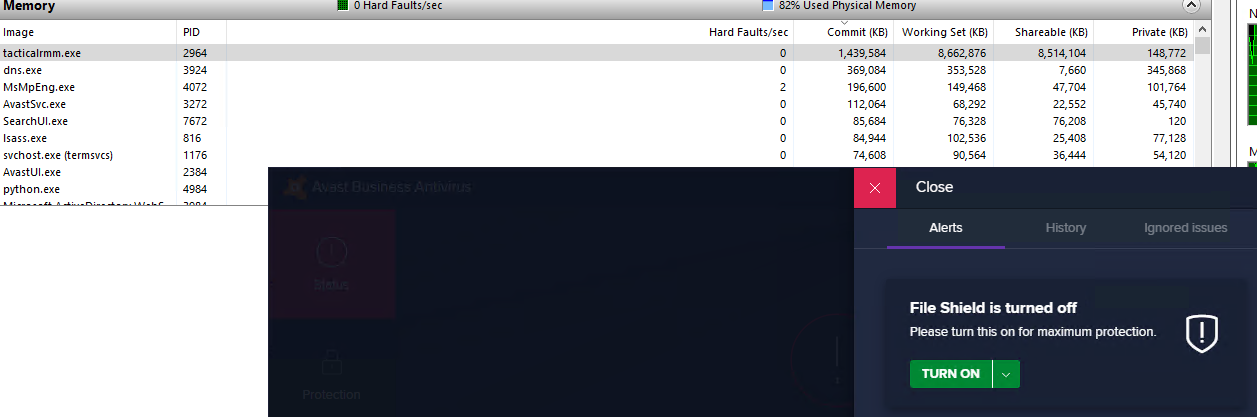
Because I've stripped tacticalagent from most troublesome servers I can't see many. It's not just hyper-v guests. Not just 2019 or 2008r2 (sbs2k11). Not just avast. the only thing I can think of is that the check for security log events might be cpu intensive, but this all changed a couple of weeks ago and that check has been there for months.
@trs998 commented on GitHub (Jan 9, 2021):
This is a server with Sophos not avast, same problem, so not just avast. Also, high cpu use from tacticalrmm.exe
@trs998 commented on GitHub (Jan 9, 2021):
Must admit it looks like possibly it's doing the event log scan, and failing to complete before trying it again too aggressively?
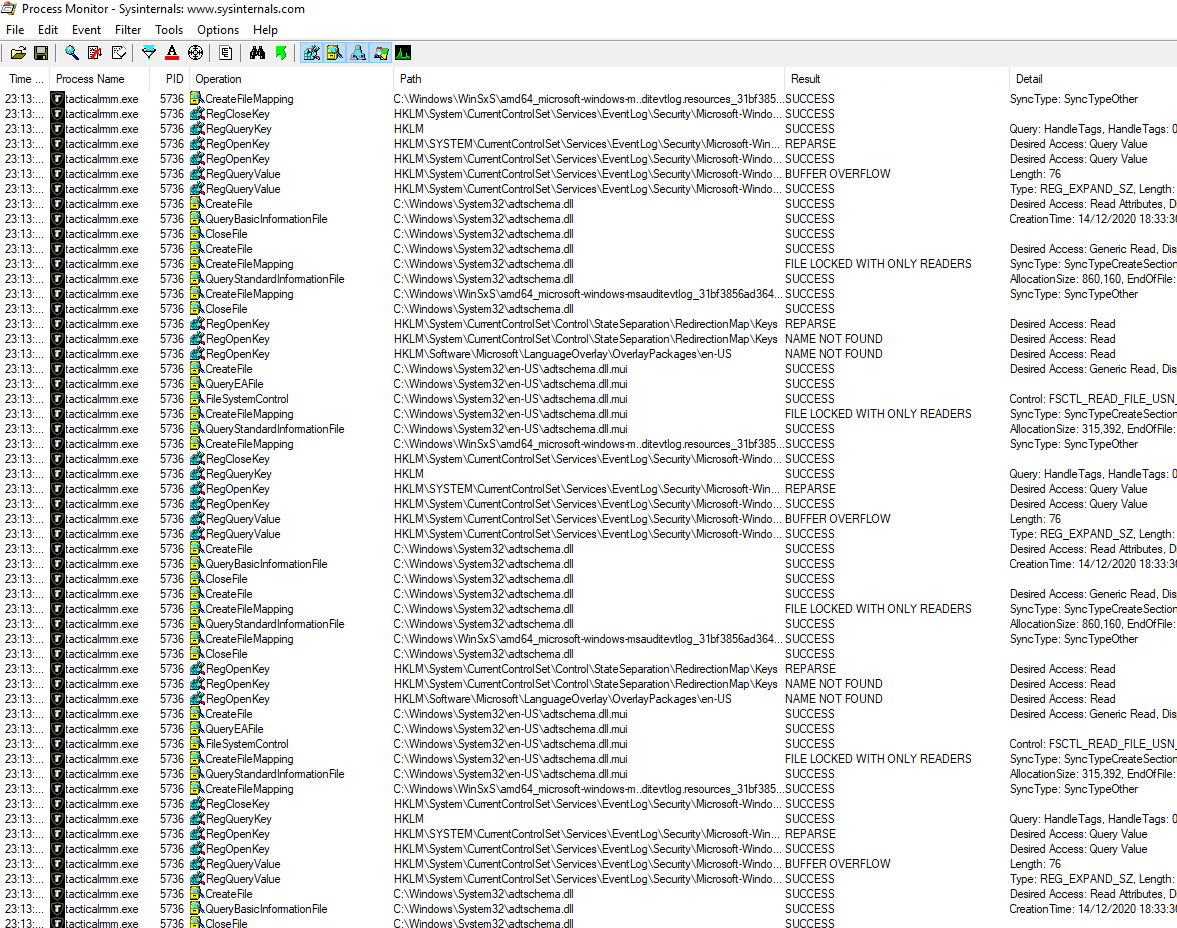
I have deleted the offending event log check and will see what happens tomorrow.
@trs998 commented on GitHub (Jan 10, 2021):
Removing the event log check seems to have helped - it's dropped from tens of gigabytes of ram to merely gigabytes on hosts with sophos, and without sophos has dropped back to normal.
One thing - when a check is being performed, it does not seem possible to select the frequency, or configure if a new check should start if the previous one has not completed - so I suspect this was a overload due to slow and then overlapping memory-intensive checks running. Interestingly, much affected by avast but not the root cause. Maybe avast makes searching event logs much slower?
(physical server with avast)
(hyper-v guest with avast)

(hyper-v guest without avast - ram use seems reasonable, was previously massive)

@trs998 commented on GitHub (Jan 10, 2021):
ramuse stopped growing on a host when the event log check was removed - but did not drop, so whatever was doing the event log check and eating ram never timed out, finished or was killed.
I tried rebooting a host with avast and a multi-gb ram footprint on tacticalrmm after this, and ram use resumed at normal levels and so far has not grown - so at the moment, I think the event log check is run too aggressively, and if it fails it just sticks using the ram, and never clears it.
Is it possible to add some capability to the checks to give a task run timeout, max frequency (eg for event log scan I only need to know once a day if someone's trying to brute force it, but might want to know quickly for successful admin logins) . Also a "do not start if previous already running" option as per scheduled tasks would be excellent.
@sadnub commented on GitHub (Jan 11, 2021):
@trs998 Currently, you can set the check run interval by editing the agent options. By default I think it is set to 90sec, but you can increase this for testing. Also, what is the max size of your agent event log?
On the Event Log check, try setting the search days really high (like 100) and see if that helps. You can add the Event Log check directly on the agent you are testing on to avoid any issues elsewhere.
Thanks!
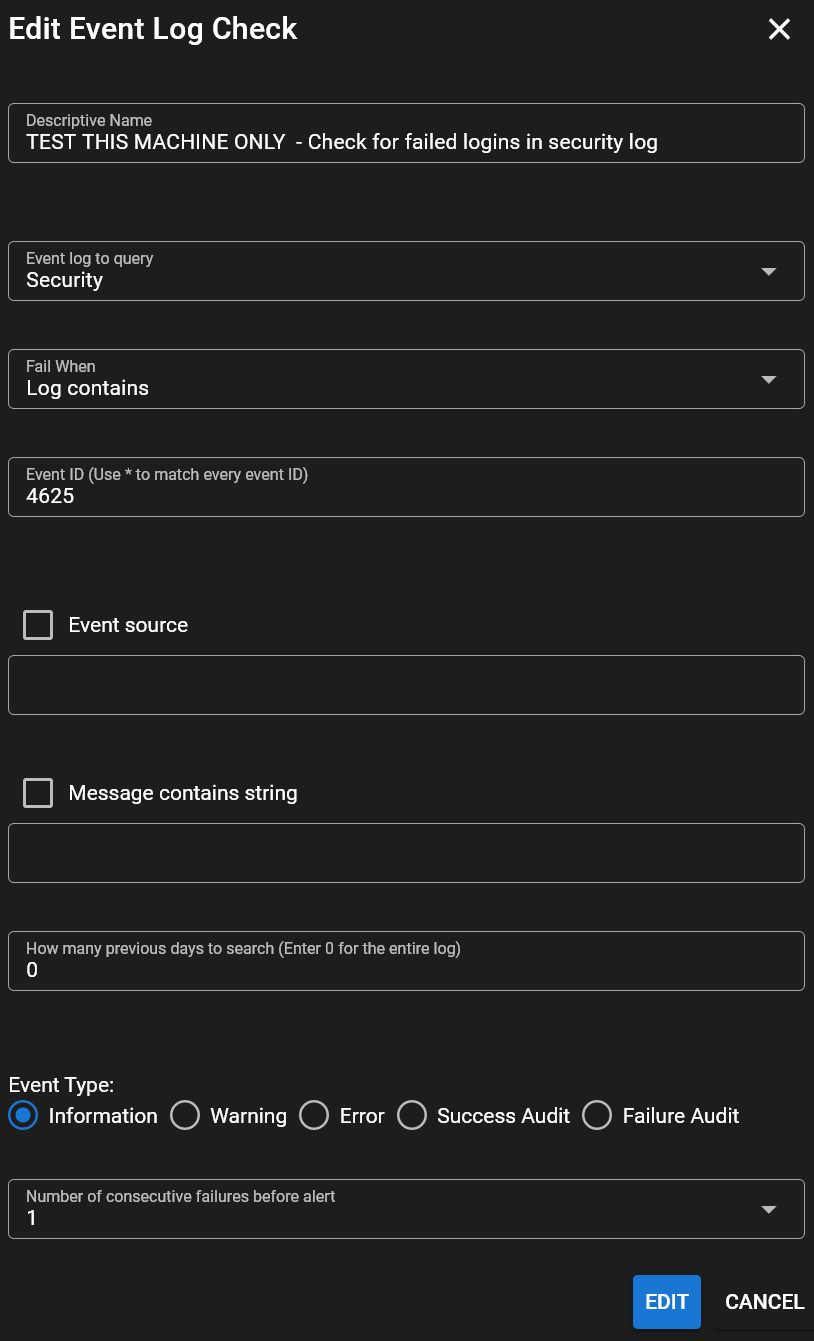
@trs998 commented on GitHub (Jan 12, 2021):
I changed the check frequency on my sacrificial host to 3600 seconds, and added an event log search back in. this is the result:

The security log is 186k events (128mb limit) so even if you seperately loaded and ran queries against the db file instead of just querying the service you'd still only need a few hundred mb of ram.
Something is definitely wrong with the event log check here, even if it's run on a 128mb log once per hour.
@sadnub commented on GitHub (Jan 12, 2021):
@trs998 Try setting the search days on the check to 0 so that it searches the entire log. I have a theory on what could be going on
@trs998 commented on GitHub (Jan 12, 2021):
done - now "0" it was previously "1". I will update after another few hours to see how that changes things.
@sadnub commented on GitHub (Jan 12, 2021):
How is the memory usage on that host?
@trs998 commented on GitHub (Jan 13, 2021):
The "days to search" was changes approx 2pm yesterday and did not make any different to the ram use.
Approx 9pm last night there was a spike down in ram use as I sent a "end process" command - which did not end it but probably killed the current running log search?
Since the check was set to hourly and "0 days" search for all the log the ram use has still been excessive, but more variable.
The is an identical server, the only difference is that it's running a DHCP Server (negligible ram use) and does NOT have the log search check in the agent.
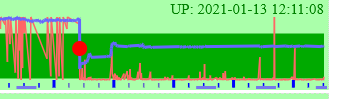
You can see the removal the log check and reboot causing the drop in ram on saturday midday.
@trs998 commented on GitHub (Jan 15, 2021):
Hmmmm it looks like the revised check hasn't worked at all. I don't know why.

@wh1te909 commented on GitHub (Jan 16, 2021):
am able to reproduce, need to do more work on the event log module to fix some bugs
@bradhawkins85 commented on GitHub (Jan 24, 2021):
Just did some testing and it appears that if a machine does have high memory usage on tacticalrmm.exe clearing the event logs causes the process to release most of the RAM it is using and bring the server back to normal.
Might save someone a server reboot.
@wh1te909 commented on GitHub (Jan 27, 2021):
k so seems to be this https://community.spiceworks.com/topic/2177761-why-does-windows-load-the-entire-security-log-into-ram
will eventually move to the new evtx log format to fix this, but for now agent 1.4.0 which will be released soon will run event log checks in a separate process with a timeout of 10 minutes, after which the proc will be forcefully killed to prevent memory leaks. I would avoid adding any event log checks for the Security logs especially on domain controllers which have millions of log entries for now till I rewrite it to use the new evtx format
@dinger1986 commented on GitHub (Feb 21, 2021):
@trs998 please confirm if this is still an issue
@trs998 commented on GitHub (Mar 7, 2021):
Seems much better. Will test it on a server and report back. Testing on windows 10 desktop seems to have no issues.
@dinger1986 commented on GitHub (Apr 11, 2021):
@trs998 can we close?
@trs998 commented on GitHub (Apr 11, 2021):
Yes, I believe this is fixed, to thanks.