[GH-ISSUE #215] Bad Credential after upgrade #2074

Closed
opened 2026-03-14 02:22:17 +03:00 by kerem · 10 comments
Owner

Originally created by @CarFla on GitHub (Dec 18, 2020).
Original GitHub issue: https://github.com/amidaware/tacticalrmm/issues/215

Hi

I upgrade Tactical RMM from 0.2.2 to 0.2.17

Upgrade seem to be ok, If i re-execute ./upgrade it tell me Already on latest version. Current version: 0.2.17 Latest version: 0.2.17.

But after that when i try to login, I recive the Bad Credential window.

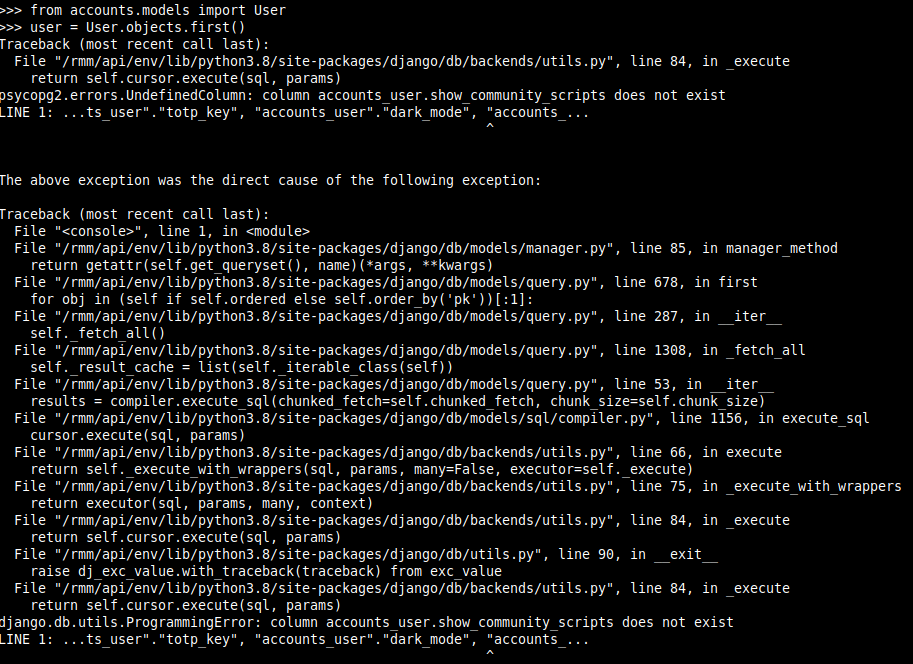
Ok I try to change my password, so I try to do procedure for that, but when i execute user = User.objects.first() This is the error:
immagine

What can I do?

Thank you

Originally created by @CarFla on GitHub (Dec 18, 2020). Original GitHub issue: https://github.com/amidaware/tacticalrmm/issues/215 Hi I upgrade Tactical RMM from 0.2.2 to 0.2.17 Upgrade seem to be ok, If i re-execute ./upgrade it tell me Already on latest version. Current version: 0.2.17 Latest version: 0.2.17. But after that when i try to login, I recive the Bad Credential window. Ok I try to change my password, so I try to do procedure for that, but when i execute user = User.objects.first() This is the error: ![immagine](https://user-images.githubusercontent.com/58566341/102599897-6b4d8980-411e-11eb-9991-1ab5dfaa7977.png) What can I do? Thank you
kerem closed this issue 2026-03-14 02:22:22 +03:00
Author
Owner

@bradhawkins85 commented on GitHub (Dec 18, 2020):

I've had this too on an earlier version.
First up, chest your browser cache and cookies then try and log in again. Also open the browsers console and post any errors in there that you receive.
I don't know if wh1te909 is available now to help but I'll try and help until he can get back. I'm tied up for a bit too but will check back later if I get a chance and see how you went.

<!-- gh-comment-id:747993525 --> @bradhawkins85 commented on GitHub (Dec 18, 2020): I've had this too on an earlier version. First up, chest your browser cache and cookies then try and log in again. Also open the browsers console and post any errors in there that you receive. I don't know if wh1te909 is available now to help but I'll try and help until he can get back. I'm tied up for a bit too but will check back later if I get a chance and see how you went.
Author
Owner

@CarFla commented on GitHub (Dec 18, 2020):

Thank you

I try with a different Browser to don't have cache problem.

The problem is that api website is not found:

immagine

Damn me that want to upgrade! :(

<!-- gh-comment-id:747997616 --> @CarFla commented on GitHub (Dec 18, 2020): Thank you I try with a different Browser to don't have cache problem. The problem is that api website is not found: ![immagine](https://user-images.githubusercontent.com/58566341/102601386-64277b00-4120-11eb-8c7a-1b8b91b70865.png) Damn me that want to upgrade! :(
Author
Owner

@bradhawkins85 commented on GitHub (Dec 18, 2020):

Can you run the commands below on your server and post the output:
systemctl status rmm
service postgresql status
df -kh

<!-- gh-comment-id:748000652 --> @bradhawkins85 commented on GitHub (Dec 18, 2020): Can you run the commands below on your server and post the output: systemctl status rmm service postgresql status df -kh
Author
Owner

@CarFla commented on GitHub (Dec 18, 2020):

immagine
immagine
immagine

<!-- gh-comment-id:748002694 --> @CarFla commented on GitHub (Dec 18, 2020): ![immagine](https://user-images.githubusercontent.com/58566341/102602526-efedd700-4121-11eb-9754-b2cc0d9c5d15.png) ![immagine](https://user-images.githubusercontent.com/58566341/102602550-fb410280-4121-11eb-904f-04cf372fb6b1.png) ![immagine](https://user-images.githubusercontent.com/58566341/102602599-0c8a0f00-4122-11eb-8d29-db5ec5944a93.png)
Author
Owner

@bradhawkins85 commented on GitHub (Dec 18, 2020):

The only other fix I have is to restart the services, try:

for i in celery celerybeat celery-winupdate rmm
do
sudo systemctl restart $i
done

Let me know if that helps

<!-- gh-comment-id:748053336 --> @bradhawkins85 commented on GitHub (Dec 18, 2020): The only other fix I have is to restart the services, try: for i in celery celerybeat celery-winupdate rmm do sudo systemctl restart $i done Let me know if that helps
Author
Owner

@CarFla commented on GitHub (Dec 18, 2020):

Not help.

I try to force the upgrade removing from script version control.
I send Log of upgrade.sh

log-upgrade.txt

I hope that someone can understand the problem.

<!-- gh-comment-id:748077730 --> @CarFla commented on GitHub (Dec 18, 2020): Not help. I try to force the upgrade removing from script version control. I send Log of upgrade.sh [log-upgrade.txt](https://github.com/wh1te909/tacticalrmm/files/5715852/log-upgrade.txt) I hope that someone can understand the problem.
Author
Owner

@sadnub commented on GitHub (Dec 18, 2020):

@CarFla Looks like the frontend build didn't work. Try running this:

cd /rmm/web
npm install
npm run build

If that works without error run this to restart nginx sudo systemctl restart nginx

<!-- gh-comment-id:748113668 --> @sadnub commented on GitHub (Dec 18, 2020): @CarFla Looks like the frontend build didn't work. Try running this: ``` cd /rmm/web npm install npm run build ``` If that works without error run this to restart nginx `sudo systemctl restart nginx`
Author
Owner

@sadnub commented on GitHub (Dec 18, 2020):

I edited the above. Try npm install first

<!-- gh-comment-id:748116168 --> @sadnub commented on GitHub (Dec 18, 2020): I edited the above. Try npm install first
Author
Owner

@CarFla commented on GitHub (Dec 18, 2020):

EUREKA!!

Ok, this is my step:

npm install tell me that found 9 low severity vulnerabilities,
so i run npm audit fix.
After that
npm audit fix --force to resolve another 1 vulnerability
npm run build
Restart Nginx and ... no run RMM.
Reboot system and... no run RMM

so i try to run upgrade.
Upgrade tshi time run without error, and ... boom, RMM is OK! username and password accepted!!

THANK YOU!!!!

<!-- gh-comment-id:748130940 --> @CarFla commented on GitHub (Dec 18, 2020): EUREKA!! Ok, this is my step: npm install tell me that found 9 low severity vulnerabilities, so i run npm audit fix. After that npm audit fix --force to resolve another 1 vulnerability npm run build Restart Nginx and ... no run RMM. Reboot system and... no run RMM so i try to run upgrade. Upgrade tshi time run without error, and ... boom, RMM is OK! username and password accepted!! THANK YOU!!!!
Author
Owner

@sadnub commented on GitHub (Dec 18, 2020):

Awesome! Glad that worked out.

<!-- gh-comment-id:748178074 --> @sadnub commented on GitHub (Dec 18, 2020): Awesome! Glad that worked out.
Sign in to join this conversation.
No milestone
No project
No assignees
1 participant
Notifications
Due date
The due date is invalid or out of range. Please use the format "yyyy-mm-dd".

No due date set.

Dependencies

No dependencies set.

Reference
starred/tacticalrmm#2074
No description provided.