mirror of
https://github.com/amidaware/tacticalrmm.git
synced 2026-04-26 15:05:57 +03:00
[GH-ISSUE #284] Event viewer does not show messages if they're above a certain length (I think) #185
Labels
No labels
In Process
bug
bug
dev-triage
documentation
duplicate
enhancement
fixed
good first issue
help wanted
integration
invalid
pull-request
question
requires agent update
security
ui tweak
wontfix
No milestone
No project
No assignees
1 participant

Notifications
Due date
No due date set.
Dependencies
No dependencies set.
Reference
starred/tacticalrmm#185
Loading…
Add table
Add a link
Reference in a new issue
No description provided.
Delete branch "%!s()"
Deleting a branch is permanent. Although the deleted branch may continue to exist for a short time before it actually gets removed, it CANNOT be undone in most cases. Continue?
Originally created by @knk90 on GitHub (Feb 18, 2021).
Original GitHub issue: https://github.com/amidaware/tacticalrmm/issues/284
This issue affects both the event viewer and the event viewer / log checks.
This is running the community disk check script
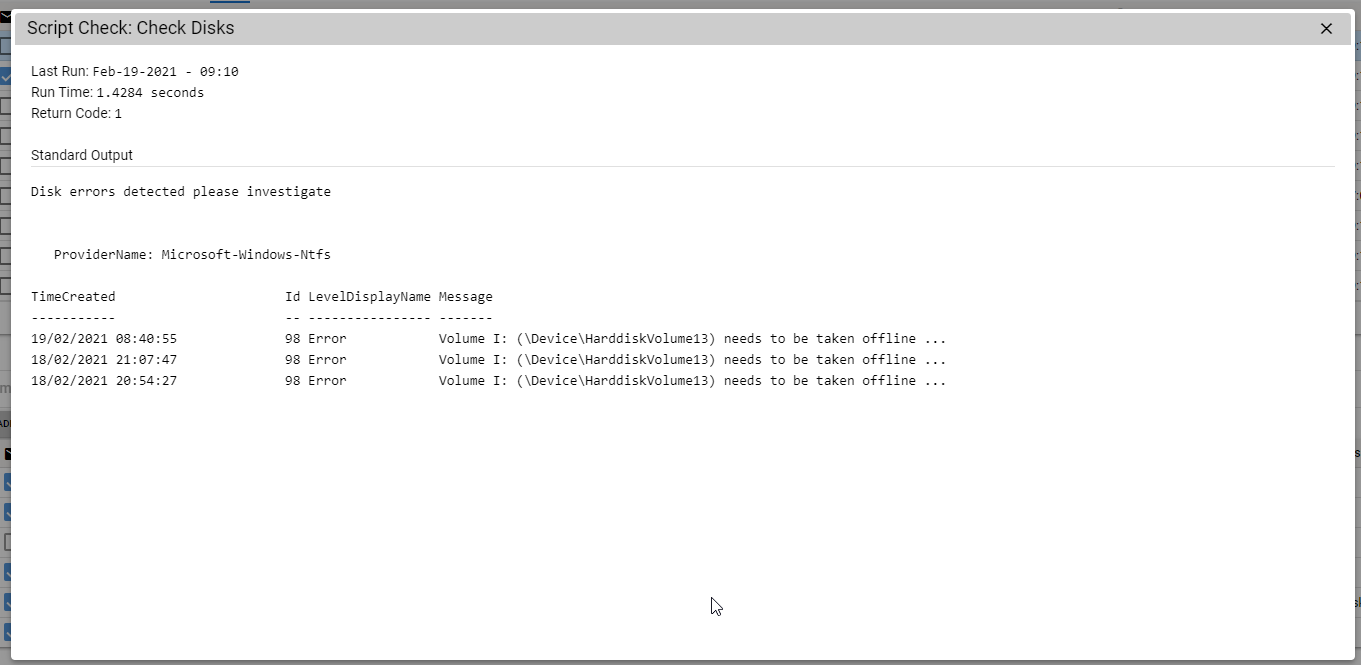


However, if we look for this in the log we get this:
I have tested trying to run a check for this event and filter by message and it doesn't find anything either.
Thanks
@dinger1986 commented on GitHub (Feb 18, 2021):
Hello, I wrote this script, do you have a drive with the letter I:? If so it needs to be taken offline and scanned for defects.
Tactical doesn't always show the complete messages but you should be able to find it on event viewer, if you edit the script you will see where it is searching for the IDs and types and should be able to check that on the local machine. That's how I normally do it. Or you can check eventid.net and put in the ID and check the sources and it should fill in the blanks. http://www.eventid.net/display-eventid-98-source-Microsoft-Windows-Ntfs-eventno-11503-phase-1.htm
@knk90 commented on GitHub (Feb 18, 2021):
Yeah this clients plugged in what I can only assume is a 10 year old external harddrive he's dropped on the ground 30 times.
There's nothing wrong with the script. I was using that as an example to show the message was present - sorry I should have been more specific.
What I wanted to do is put multiple event log checks in however on the NTFS ones filter out anything but C:\ using the event log string check.
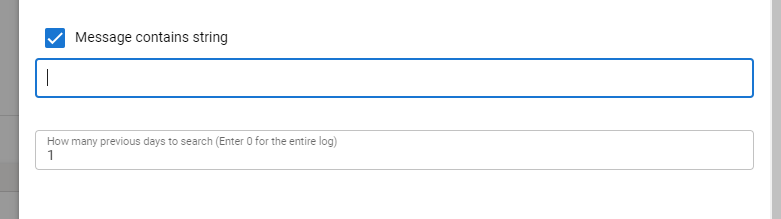
Reasoning for this is that I don't really care if someone's flashdrive/external harddrive is showing issues only system disks. So I was going to have one check for each of the event providers / IDs as required to avoid generating unnecessary noise.
Probably a low priority issue I can work around with scripting in all honesty, just thought I'd put it in here so you guys were aware.
@dinger1986 commented on GitHub (Feb 19, 2021):
Ok yes that makes sense now.
I'll see if we can filter out drives with it, if you want to see diy the script feel free. Do a pull request and share it or you can always discuss this further on the discord channel.
@dinger1986 commented on GitHub (Feb 21, 2021):
@knk90 do you want to change this to a feature request? Or shall we close it? I guess the only request from this could be to allow the full error to show is that what you want?
Community scripts aren't really directly to do with tactical but there's loads of us who can help you on discord with any scripts.
@knk90 commented on GitHub (Feb 21, 2021):
Yeah so I don't consider this a feature request, more of a low priority bug. I mustn't have explained myself properly
The script was only intended to highlight that the error differs in tactical vs the actual error, I can sort out the script side on my end to obtain the visibility I'm after, with a bit of googling :).
What I think is a large issue though, is that due to this the event log checks give a false sense of security. I'd be disabling message contains string functionality or at least putting a disclaimer that events in excess of X characters are not filterable.
So if I were filtering based on a string I know indicates problematic behavior, but the filter (message contains string) doesn't pick anything up because the "message" from the event log is blank. In this situation I think everything is working without issue, but in reality my backups / raid / service etc is failing.
@dinger1986 commented on GitHub (Apr 11, 2021):
I see what you mean here, I personally would use powershell for log querying as thats all done at the client side.
Also filtered the disk check to only show messages related to drives with a letter
@sadnub commented on GitHub (May 29, 2021):
Are you able to run the event checks through a powershell script instead? That would be the easiest way. We aren't adding or expanding current functionality with checks since a script check already does everything. I believe there might be event check examples in the community scripts