[GH-ISSUE #858] Searching by Track & Artist Sometimes Fails #527

Closed
opened 2026-02-27 23:23:08 +03:00 by kerem · 5 comments
Owner

Originally created by @BluntBSE on GitHub (Sep 20, 2022).
Original GitHub issue: https://github.com/spotipy-dev/spotipy/issues/858

Describe the bug
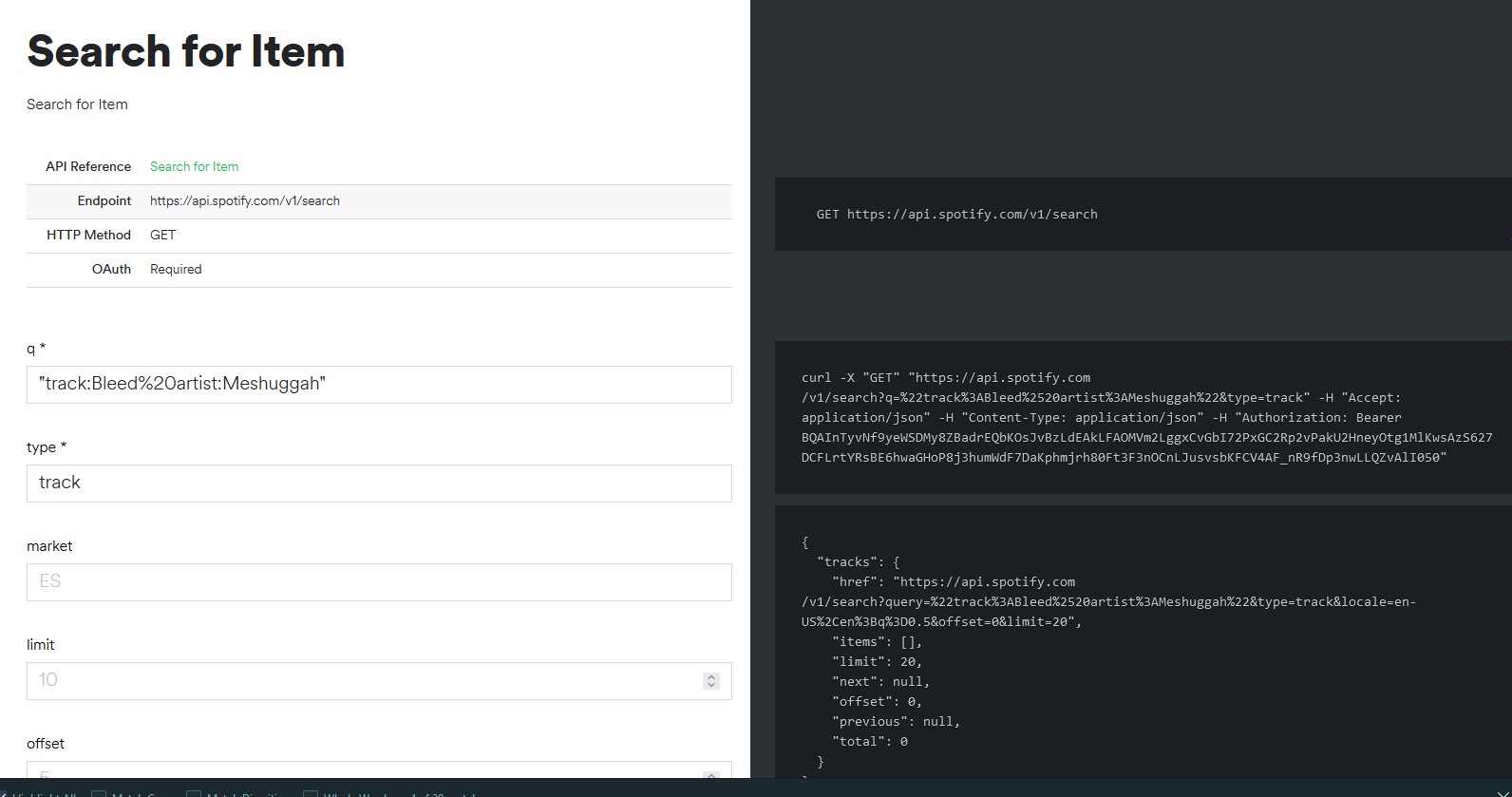
When attempting to execute .search(), the 'tracks' list in the response object is sometimes completely empty for some artists, even though the query seems identical to the one provided by Spotify's URL query builder. The below example uses "Meshuggah", but this also occurred with "Sequoia" (track) and "Protest the Hero" (artist).

"Track results" is also basically empty for Meshuggah, though not necessary for the code below to run, it seems to be where things go wrong.

Your code

client_credentials_manager = SpotifyClientCredentials(client_id=cid, client_secret=cscr)

sp = spotipy.Spotify(client_credentials_manager = client_credentials_manager)

def search_meshuggah():
##THIS FAILS
    track_tuples = []
    track_results = sp.search(q="name:Bleed,artist:Meshuggah")
    print(track_results)
    for t in track_results['tracks']['items']:
        track_tuples.append((t['name'],t['id']))
    return track_tuples
    

print(search_meshuggah())


def search_rosalia():
##THIS WORKS
    track_tuples = []
    track_results = sp.search(q="name:La Noche,artist:Rosalia")
    print(track_results)
    for t in track_results['tracks']['items']:
        track_tuples.append((t['name'],t['id']))
    return track_tuples
    

print(search_rosalia())
##Returns [('LA NOCHE DE ANOCHE', '2XIc1pqjXV3Cr2BQUGNBck'), ('La Noche Mas Linda', '3scW7pt0vlhkCCgCNv5YR9'), ('La ##Noche', '2uyCcoHiRGttV0uXaNXGB1'), ('La Noche (La Notte)', '1woNBYgY4IComLtG2poiAX'), ('MALAMENTE - Cap.1: Augurio', ##'5zOAudPQIs5U8zP6LQGHmH'), ('La noche', '7LHpqa8PDLGUI5sj7FXIrv'), ('La Noche', '1WWXstIGQnp5MrxDnPZpme'), ('La ##Noche Te Trae Sorpresas', '7nIDpnsrS4wTyJ3vGZSa37'), ('La Noche', '1U6OvmjM4Y1AL7zBd5TtgK'), ('La Noche - Radio Edit', ##'307oEvhTk4EyOUY6f08Y5c')]

Environment:

  • OS: Windows 11
  • Python version 3.9.13
    -Spotipy latest as of September 11

Additional context
WhatOnEarth

WhatOnEarth2
WhatOnEarth3

Originally created by @BluntBSE on GitHub (Sep 20, 2022). Original GitHub issue: https://github.com/spotipy-dev/spotipy/issues/858 **Describe the bug** When attempting to execute .search(), the 'tracks' list in the response object is sometimes completely empty for some artists, even though the query seems identical to the one provided by Spotify's URL query builder. The below example uses "Meshuggah", but this also occurred with "Sequoia" (track) and "Protest the Hero" (artist). "Track results" is also basically empty for Meshuggah, though not necessary for the code below to run, it seems to be where things go wrong. **Your code** ``` client_credentials_manager = SpotifyClientCredentials(client_id=cid, client_secret=cscr) sp = spotipy.Spotify(client_credentials_manager = client_credentials_manager) def search_meshuggah(): ##THIS FAILS track_tuples = [] track_results = sp.search(q="name:Bleed,artist:Meshuggah") print(track_results) for t in track_results['tracks']['items']: track_tuples.append((t['name'],t['id'])) return track_tuples print(search_meshuggah()) def search_rosalia(): ##THIS WORKS track_tuples = [] track_results = sp.search(q="name:La Noche,artist:Rosalia") print(track_results) for t in track_results['tracks']['items']: track_tuples.append((t['name'],t['id'])) return track_tuples print(search_rosalia()) ##Returns [('LA NOCHE DE ANOCHE', '2XIc1pqjXV3Cr2BQUGNBck'), ('La Noche Mas Linda', '3scW7pt0vlhkCCgCNv5YR9'), ('La ##Noche', '2uyCcoHiRGttV0uXaNXGB1'), ('La Noche (La Notte)', '1woNBYgY4IComLtG2poiAX'), ('MALAMENTE - Cap.1: Augurio', ##'5zOAudPQIs5U8zP6LQGHmH'), ('La noche', '7LHpqa8PDLGUI5sj7FXIrv'), ('La Noche', '1WWXstIGQnp5MrxDnPZpme'), ('La ##Noche Te Trae Sorpresas', '7nIDpnsrS4wTyJ3vGZSa37'), ('La Noche', '1U6OvmjM4Y1AL7zBd5TtgK'), ('La Noche - Radio Edit', ##'307oEvhTk4EyOUY6f08Y5c')] ``` **Environment:** - OS: Windows 11 - Python version 3.9.13 -Spotipy latest as of September 11 **Additional context** ![WhatOnEarth](https://user-images.githubusercontent.com/31498420/191374435-259f1c1d-1b63-4d4e-adc4-23d94b10709f.jpg) ![WhatOnEarth2](https://user-images.githubusercontent.com/31498420/191374460-616efd48-4589-4bfd-b778-ff51b54830d1.jpg) ![WhatOnEarth3](https://user-images.githubusercontent.com/31498420/191374474-022898bc-8591-478d-a5b1-3ac3c39c66b9.jpg)
kerem 2026-02-27 23:23:08 +03:00
  • closed this issue
  • added the
    bug
    label
Author
Owner

@dpnem commented on GitHub (Sep 25, 2022):

I was able to see the inconsistencies as well. Sometimes the first function would not return data, and sometimes the second function would not return data.

When I changed the search strings from:

track_results = sp.search(q="name:Bleed,artist:Meshuggah")
track_results = sp.search(q="name:La Noche,artist:Rosalia")

to:

track_results = sp.search(q="name:Bleed, Meshuggah")
track_results = sp.search(q="name:La Noche, Rosalia")

Now the program ALWAYS returns data for both functions.

If you search through Spotify developer boards for "search endpoint", Spotify seems to be have lots of issues that may be getting addressed.

<!-- gh-comment-id:1257246659 --> @dpnem commented on GitHub (Sep 25, 2022): I was able to see the inconsistencies as well. Sometimes the first function would not return data, and sometimes the second function would not return data. When I changed the search strings from: track_results = sp.search(q="name:Bleed,artist:Meshuggah") track_results = sp.search(q="name:La Noche,artist:Rosalia") to: track_results = sp.search(q="name:Bleed, Meshuggah") track_results = sp.search(q="name:La Noche, Rosalia") Now the program ALWAYS returns data for both functions. If you search through Spotify developer boards for "search endpoint", Spotify seems to be have lots of issues that may be getting addressed.
Author
Owner

@BluntBSE commented on GitHub (Sep 25, 2022):

For anyone who stumbles upon this, I was curiously able to get an improvement with an f-string and swapping 'name' for 'track.'


def search_by_name_and_artist(name,artist):
    track_tuples = []
    track_results = sp.search(q=f"track:{name}, artist:{artist}", limit=1,offset=0)
    for t in track_results['tracks']['items']:
        track_tuples.append((t['name'],t['id']))
    return track_tuples

<!-- gh-comment-id:1257300296 --> @BluntBSE commented on GitHub (Sep 25, 2022): For anyone who stumbles upon this, I was curiously able to get an improvement with an f-string and swapping 'name' for 'track.' ``` def search_by_name_and_artist(name,artist): track_tuples = [] track_results = sp.search(q=f"track:{name}, artist:{artist}", limit=1,offset=0) for t in track_results['tracks']['items']: track_tuples.append((t['name'],t['id'])) return track_tuples ```
Author
Owner

@Peter-Schorn commented on GitHub (Oct 5, 2022):

This may not resolve the issue, but please note that there shouldn't be commas in the query unless you're trying to search for them literally.

<!-- gh-comment-id:1268732668 --> @Peter-Schorn commented on GitHub (Oct 5, 2022): This may not resolve the issue, but please note that there shouldn't be commas in the query unless you're trying to search for them literally.
Author
Owner

@WestheadJ commented on GitHub (Feb 5, 2023):

Comment -

For anyone who stumbles upon this, I was curiously able to get an improvement with an f-string and swapping 'name' for 'track.'


def search_by_name_and_artist(name,artist):
    track_tuples = []
    track_results = sp.search(q=f"track:{name}, artist:{artist}", limit=1,offset=0)
    for t in track_results['tracks']['items']:
        track_tuples.append((t['name'],t['id']))
    return track_tuples

For searching for a song, using track: is the way to go, this is the way that the SpotifyAPI documentation states to use it I'm pretty sure either that or Spotipy. You also should state the type of thing you are looking for my example below is looking for tracks. This just helps narrow down your search.

Screenshot 2023-02-04 at 11 24 30 pm
<!-- gh-comment-id:1418281413 --> @WestheadJ commented on GitHub (Feb 5, 2023): ### Comment - > For anyone who stumbles upon this, I was curiously able to get an improvement with an f-string and swapping 'name' for 'track.' > > ``` > > def search_by_name_and_artist(name,artist): > track_tuples = [] > track_results = sp.search(q=f"track:{name}, artist:{artist}", limit=1,offset=0) > for t in track_results['tracks']['items']: > track_tuples.append((t['name'],t['id'])) > return track_tuples > ``` For searching for a song, using `track:` is the way to go, this is the way that the SpotifyAPI documentation states to use it I'm pretty sure either that or Spotipy. You also should state the type of thing you are looking for my example below is looking for tracks. This just helps narrow down your search. <img width="811" alt="Screenshot 2023-02-04 at 11 24 30 pm" src="https://user-images.githubusercontent.com/57768613/216793715-b5c151b1-116a-488f-9026-87a1ad654e49.png">
Author
Owner

@stephanebruckert commented on GitHub (Jul 9, 2024):

Yes, for consistent results it's preferable to split name into artist and track

<!-- gh-comment-id:2218397490 --> @stephanebruckert commented on GitHub (Jul 9, 2024): Yes, for consistent results it's preferable to split `name` into `artist` and `track`
Sign in to join this conversation.
No milestone
No project
No assignees
1 participant
Notifications
Due date
The due date is invalid or out of range. Please use the format "yyyy-mm-dd".

No due date set.

Dependencies

No dependencies set.

Reference
starred/spotipy#527
No description provided.