mirror of
https://github.com/s3fs-fuse/s3fs-fuse.git
synced 2026-04-25 13:26:00 +03:00
[GH-ISSUE #1542] Writing large files with "-o nomultipart" fails #813
Labels
No labels
bug
bug
dataloss
duplicate
enhancement
feature request
help wanted
invalid
need info
performance
pull-request
question
question
testing
No milestone
No project
No assignees
1 participant

Notifications
Due date
No due date set.
Dependencies
No dependencies set.
Reference
starred/s3fs-fuse#813
Loading…
Add table
Add a link
Reference in a new issue
No description provided.
Delete branch "%!s()"
Deleting a branch is permanent. Although the deleted branch may continue to exist for a short time before it actually gets removed, it CANNOT be undone in most cases. Continue?
Originally created by @CarstenGrohmann on GitHub (Feb 1, 2021).
Original GitHub issue: https://github.com/s3fs-fuse/s3fs-fuse/issues/1542
Hello,
I tried to copy a large file into a bucket via
s2fs -o nomultipart. The result is unexpected.My expectations for "nomultipart" are that the upload uses a single object upload request, stops at the 5GB limit and the application exits with an error.
In contrast, the command
cpcopied a complete 7GB file and only failed as expected atchown. For this, the checksum of the file in the S3 bucket does not match the local one.There are two other issues I am currently struggling with:
The full debug log is 270M, thereby I don't attach it. I can share it on demand.
Debug output s3fs:
s3fs starts writing to the S3 bucket using multipart requests:
But at 5GB (
[start=5181210624][size=187498496]) s3fs finalised the multipart request and even if it still got write requests from the application side:the application continue writing till
utimens()is called:after that
chown()is called and failing:a final flush writes all data from cache to the S3 bucket:
Regards,
Carsten
@gaul commented on GitHub (Feb 2, 2021):
This inconsistent behavior is unexpected and I suspect that there is more than one bug here. s3fs tries to be helpful by enforcing a client-size 5 GB check since AWS enforces this, probably to make the error-handling easier. However other services like GCS support larger single-part objects (and currently do not support multi-part objects) so s3fs should not artificially limit them. We need to improve our tests in this area which might require a few fixes to reach the ideal state. You can try removing the 5 GB check in
put_headersin the mean time. Thanks for the detailed bug report!@DasMagischeToastbrot commented on GitHub (Feb 3, 2021):
By using s3fs I wrote a small test file which writes a file between the local disk and a s3 bucket.
Usually this works great, but now big files (for example 10 GB) fails with the following error code.

I ran this script with smaller files (1GB, 5GB) and it still works. @gaul could you please verify whether this has the same error background? If you need further information feel free to ask.
@gaul commented on GitHub (Feb 3, 2021):
Please let me know if the proposed fix resolves your symptoms. Which S3 implementation do you use that lacks multipart support? s3fs generally performs better with this feature.
@DasMagischeToastbrot commented on GitHub (Feb 4, 2021):
@gaul Unfortunatly this didn't solve my problem. I still get the same error even though I build away from the latest commit
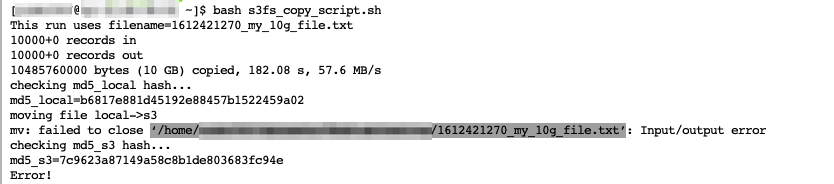
My s3fs configuration looks like:
s3fs#${S3PATH} ${LOCALPATH} fuse rw,_netdev,allow_other,endpoint=eu-central-1,iam_role=auto,use_cache=/tmp/s3fs-cache/,ensure_diskfree=5000,uid=,gid=sshusers,umask=002 0 0
@CarstenGrohmann commented on GitHub (Feb 4, 2021):
@DasMagischeToastbrot Can you simplify your test a little bit and just copying a bit file to the bucket?
I personally find it better if the output of a terminal appears as text in the bug report and not as an image, as images are not searchable.
From my experience I would say that errors in
close()are more related to theflushoperation and less to the attribute changes input_header().@gaul commented on GitHub (Feb 4, 2021):
@CarstenGrohmann Could you verify whether master resolves your symptoms? I successfully wrote and
chmod +xa 5 GB + 1 file without multipart upload.@DasMagischeToastbrot If the original symptom is resolved, can you open a new issue with the minimal steps to reproduce your symptoms?
As I said in https://github.com/s3fs-fuse/s3fs-fuse/issues/1542#issuecomment-771678881, I suspect there are multiple bugs with large single-part objects and the referenced PR is only the first fix. I will work on better testing in #1543 but these need several improvements to handle larger files.
@CarstenGrohmann commented on GitHub (Feb 4, 2021):
@gaul
chownworks now. I have also successfully checked the PUT request in the debug log.Thanks for your help.
@CarstenGrohmann commented on GitHub (Feb 5, 2021):
I don't know how far you are with the subject. At the same time, I don't want to be rude and impatient. I was just curious and looked again where the zeros could come from.
I think the zeros are from one of the many
ftruncatecalls.For example, in
FdEntity::Writeafter uploading the data,ftruncateis always called to free disk space.github.com/s3fs-fuse/s3fs-fuse@4c6690f5f0/src/fdcache_entity.cpp (L1521-L1536)or
github.com/s3fs-fuse/s3fs-fuse@4c6690f5f0/src/fdcache_entity.cpp (L1319-L1342)This works well as long as you stay under the 5GB limit. With larger files, however, the final
flushthen misses the data that are under the 5GB limit. This results in files that have only zeros in the first bytes.Take Monday's files and check 32 bytes before and 32 bytes after the 5GB limit to verify the idea:
@gaul commented on GitHub (Feb 5, 2021):
Sorry I think I misunderstood this issue. Reopening to investigate the data corruption.
@gaul commented on GitHub (Feb 8, 2021):
@CarstenGrohmann Sorry I am still confused -- what steps do I need to perform to reproduce the unexpected zeros?
@CarstenGrohmann commented on GitHub (Feb 8, 2021):
@gaul Start
s3fs -o nomultipartand copy a big file (e.g. 7GB) to the mounted share and back. Calculate the checksum after that or use e.g.xxdto show the hex dump.Steps to reproduce:
In https://github.com/s3fs-fuse/s3fs-fuse/issues/1542#issuecomment-773929550 just wanted to show that the zeros stop exactly at the 5GB limit. The first multipart upload wrote the data up to this limit.
@gaul commented on GitHub (Feb 9, 2021):
Sorry I cannot reproduce these symptoms. I modified
test_multipart_uploadto use a 7 GB file and successfully ran the following:Both files had the same MD5.
@gaul commented on GitHub (Feb 9, 2021):
I notice a difference between
bigfile2andbigfile.2in your example -- perhaps this caused the failure?@CarstenGrohmann commented on GitHub (Feb 9, 2021):
The missing dot is just a spelling mistake I made yesterday when I was putting the steps together.
I've updated to the current master and run the test suite a little bit different, because I can use our local S3 appliance.
My steps:
@CarstenGrohmann commented on GitHub (Feb 9, 2021):
Reading from
/dev/urandomfails also:@gaul commented on GitHub (Feb 9, 2021):
@CarstenGrohmann Could you test the referenced PR? I believe this will address your symptoms.
@CarstenGrohmann commented on GitHub (Feb 9, 2021):
The PR fixes the problem. The copied file is now the same as the original file.
@gaul Thank you for your support.
@gaul commented on GitHub (Feb 11, 2021):
@CarstenGrohmann Thanks for working with us on this -- the test case definitely helped!
I tagged this as data corruption although this situation was not possible in 1.88. Removing the single-part limit uncovered a second bug which incorrectly allowed the periodic dirty flushing logic to flush when multipart was disabled.