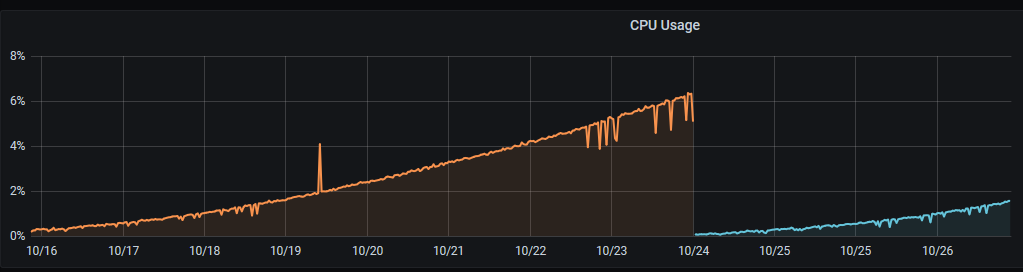
[GH-ISSUE #198] Slow increase in CPU usage over time #162

Closed
opened 2026-02-25 21:31:20 +03:00 by kerem · 18 comments
Owner

Originally created by @thespad on GitHub (Oct 27, 2020).
Original GitHub issue: https://github.com/ciur/papermerge/issues/198

Originally assigned to: @ciur on GitHub.

Description
Brand new install with half a dozen documents uploaded, no automations in place, CPU usage slowly climbs over time without any changes being made.

Expected
CPU usage should not climb over time.

Actual
image

Info:

  • OS: Docker 19.03 on Ubuntu 20.04 LTS
  • Browser: N/A
  • Database: SQLite
  • Papermerge Version: 1.5
Originally created by @thespad on GitHub (Oct 27, 2020). Original GitHub issue: https://github.com/ciur/papermerge/issues/198 Originally assigned to: @ciur on GitHub. **Description** Brand new install with half a dozen documents uploaded, no automations in place, CPU usage slowly climbs over time without any changes being made. **Expected** CPU usage should not climb over time. **Actual** ![image](https://user-images.githubusercontent.com/8425502/97360368-0308c700-1896-11eb-82ae-4241adbf30a9.png) **Info:** - OS: Docker 19.03 on Ubuntu 20.04 LTS - Browser: N/A - Database: SQLite - Papermerge Version: 1.5
Author
Owner

@ciur commented on GitHub (Oct 28, 2020):

@TheSpad, really good catch!

I had this issue in production too, and to be honest, was very annoying :(

The problem is because of "default file based transport of messaging queue" which piles up files in queue folder (in project directory).
You have 2 options:

  • regularly delete all files in queue folder (this folder is created automatically in same directory where manage.py file is).
  • replace file based messaging transport with "in memory one" - e.g. redis.

For latter one, you need to replace following options:

CELERY_BROKER_URL = "filesystem://"
CELERY_BROKER_TRANSPORT_OPTIONS = {
    'data_folder_in': PAPERMERGE_TASK_QUEUE_DIR,
    'data_folder_out': PAPERMERGE_TASK_QUEUE_DIR,
}

with this ones:

CELERY_BROKER_URL = "redis://"
CELERY_BROKER_TRANSPORT_OPTIONS = {}
CELERY_RESULT_BACKEND = "redis://localhost/0"
<!-- gh-comment-id:717712591 --> @ciur commented on GitHub (Oct 28, 2020): @TheSpad, really good catch! I had this issue in production too, and to be honest, was very annoying :( The problem is because of "default **file based** transport of messaging queue" which piles up files in **queue** folder (in project directory). You have 2 options: * regularly delete all files in **queue** folder (this folder is created automatically in same directory where manage.py file is). * replace file based messaging transport with "in memory one" - e.g. redis. For latter one, you need to replace following options: ``` CELERY_BROKER_URL = "filesystem://" CELERY_BROKER_TRANSPORT_OPTIONS = { 'data_folder_in': PAPERMERGE_TASK_QUEUE_DIR, 'data_folder_out': PAPERMERGE_TASK_QUEUE_DIR, } ``` with this ones: ``` CELERY_BROKER_URL = "redis://" CELERY_BROKER_TRANSPORT_OPTIONS = {} CELERY_RESULT_BACKEND = "redis://localhost/0" ```
Author
Owner

@thespad commented on GitHub (Oct 28, 2020):

Is there any risk of data loss from automating deletion of the queue files?

<!-- gh-comment-id:717761478 --> @thespad commented on GitHub (Oct 28, 2020): Is there any risk of data loss from automating deletion of the queue files?
Author
Owner

@ciur commented on GitHub (Oct 28, 2020):

Is there any risk of data loss from automating deletion of the queue files?

@TheSpad,
If data = your documents, then answer is NO.

Files in queue directory contain information about background jobs. If you delete them once a day (e.g. daily at 00:00) and in same time you start an OCR on document it might happen that you might delete that ocr job - means your document will not be OCRed because background job was accidentally deleted - document itself won't be affected at all.

My suggestion is to use redis (with configurations I gave above).
The "filesystem://" is good for small deployments (development env, testing, evaluation) because of its simplicity (no extra things to include).

<!-- gh-comment-id:717776060 --> @ciur commented on GitHub (Oct 28, 2020): > Is there any risk of data loss from automating deletion of the queue files? @TheSpad, If data = your documents, then answer is **NO**. Files in queue directory contain information about background jobs. If you delete them once a day (e.g. daily at 00:00) and in same time you start an OCR on document it might happen that you might delete that ocr job - means your document will not be OCRed because background job was accidentally deleted - **document itself won't be affected at all.** My suggestion is to use redis (with configurations I gave above). The "filesystem://" is good for small deployments (development env, testing, evaluation) because of its simplicity (no extra things to include).
Author
Owner

@alex-phillips commented on GitHub (Oct 28, 2020):

@ciur would it be safe to run something like a cron job that deletes anything in that folder older than a certain time? Or would that still run the risk of lost OCR jobs?

<!-- gh-comment-id:717891996 --> @alex-phillips commented on GitHub (Oct 28, 2020): @ciur would it be safe to run something like a cron job that deletes anything in that folder older than a certain time? Or would that still run the risk of lost OCR jobs?
Author
Owner

@ciur commented on GitHub (Oct 28, 2020):

would it be safe to run something like a cron job that deletes anything in that folder older than a certain time?

@alex-phillips absolutely!
Deleting any file (in queue directory) older than 24 hours is safe - it will not affect any background job.

<!-- gh-comment-id:718077222 --> @ciur commented on GitHub (Oct 28, 2020): > would it be safe to run something like a cron job that deletes anything in that folder older than a certain time? @alex-phillips absolutely! Deleting any file (in queue directory) older than 24 hours is safe - it will not affect any background job.
Author
Owner

@maspiter commented on GitHub (Nov 6, 2020):

Is Redis support still in development because I see django development configuration?

<!-- gh-comment-id:723235911 --> @maspiter commented on GitHub (Nov 6, 2020): Is Redis support still in development because I see django development configuration?
Author
Owner

@amo13 commented on GitHub (Nov 10, 2020):

I don't see where to adjust to configuration to use redis. There is no CELERY_BROKER_URL = "filesystem://" in the papermerge.conf.py template configuration which I could replace with the redis.

<!-- gh-comment-id:724768077 --> @amo13 commented on GitHub (Nov 10, 2020): I don't see where to adjust to configuration to use redis. There is no `CELERY_BROKER_URL = "filesystem://"` in the `papermerge.conf.py` template configuration which I could replace with the redis.
Author
Owner

@maspiter commented on GitHub (Nov 10, 2020):

It is in base.py

<!-- gh-comment-id:724790874 --> @maspiter commented on GitHub (Nov 10, 2020): It is in [base.py](https://github.com/ciur/papermerge/blob/master/config/settings/base.py)
Author
Owner

@amo13 commented on GitHub (Nov 10, 2020):

I can find it in this repo, but I can't find it on my filesystem after after installation... maybe it is due to my packaging attempt on archlinux.
Can you please tell me the relative path of base.py to the papermerge install folder containing core, search, test on your system? Is it actually just `../config/settings/base.py?
Where is the file to be used defined and can I change its location?

<!-- gh-comment-id:724794625 --> @amo13 commented on GitHub (Nov 10, 2020): I can find it in this repo, but I can't find it on my filesystem after after installation... maybe it is due to my packaging attempt on archlinux. Can you please tell me the relative path of base.py to the papermerge install folder containing core, search, test on your system? Is it actually just `../config/settings/base.py? Where is the file to be used defined and can I change its location?
Author
Owner

@maspiter commented on GitHub (Nov 10, 2020):

Could you elaborate what the problem is exactly?

The path is papermerge/config/settings and that is were it should be on install.

<!-- gh-comment-id:724797463 --> @maspiter commented on GitHub (Nov 10, 2020): Could you elaborate what the problem is exactly? The path is papermerge/config/settings and that is were it should be on install.
Author
Owner

@amo13 commented on GitHub (Nov 10, 2020):

Ah, ok, now I have it and it seems to be working fine.
I install papermerge without virtual env and without pip but only with the package manager of arch linux. All dependencies are installed as individual packages which has the advantage of having them all updated together with system updates.
Thanks for the help by the way 👍

<!-- gh-comment-id:724804145 --> @amo13 commented on GitHub (Nov 10, 2020): Ah, ok, now I have it and it seems to be working fine. I install papermerge without virtual env and without pip but only with the package manager of arch linux. All dependencies are installed as individual packages which has the advantage of having them all updated together with system updates. Thanks for the help by the way :+1:
Author
Owner

@amo13 commented on GitHub (Nov 10, 2020):

To my understanding, the suggested replacement of lines to use redis instead of filesystem would have to be repeated after every update, because the base.py file itself might get an update and would in turn replace the modified one from the previous version.
Is there a way to circumvent this?

<!-- gh-comment-id:724863738 --> @amo13 commented on GitHub (Nov 10, 2020): To my understanding, the suggested replacement of lines to use redis instead of filesystem would have to be repeated after every update, because the base.py file itself might get an update and would in turn replace the modified one from the previous version. Is there a way to circumvent this?
Author
Owner

@hactar commented on GitHub (Dec 20, 2020):

So after having my papermerge instance running for a few months now, the cpu usage of an idle papermerge was at 97% - only after researching this I found this ticket. Information on this needs to be included in the documentation for docker, or even better, docker-compose/build needs to be adjusted to either use redis per default, or have a built in cronjob that deletes these files. Multiple people have already fallen into this hole, see issues referencing this one.

This needs a default docker fix please @ciur , I suggest reopening this issue.

<!-- gh-comment-id:748549055 --> @hactar commented on GitHub (Dec 20, 2020): So after having my papermerge instance running for a few months now, the cpu usage of an idle papermerge was at 97% - only after researching this I found this ticket. Information on this needs to be included in the documentation for docker, or even better, docker-compose/build needs to be adjusted to either use redis per default, or have a built in cronjob that deletes these files. Multiple people have already fallen into this hole, see issues referencing this one. This needs a default docker fix please @ciur , I suggest reopening this issue.
Author
Owner

@okoetter commented on GitHub (Dec 23, 2020):

This needs a default docker fix please @ciur , I suggest reopening this issue.

I second this. My CPU usage was >50% until I found this thread.

<!-- gh-comment-id:750092390 --> @okoetter commented on GitHub (Dec 23, 2020): > This needs a default docker fix please @ciur , I suggest reopening this issue. I second this. My CPU usage was >50% until I found this thread.
Author
Owner

@ciur commented on GitHub (Dec 23, 2020):

ok, guys, I reopened the issue and I will update documentation + update document files

<!-- gh-comment-id:750097955 --> @ciur commented on GitHub (Dec 23, 2020): ok, guys, I reopened the issue and I will update documentation + update document files
Author
Owner

@jorisvc commented on GitHub (Dec 27, 2020):

@TheSpad, really good catch!

I had this issue in production too, and to be honest, was very annoying :(

The problem is because of "default file based transport of messaging queue" which piles up files in queue folder (in project directory).
You have 2 options:

  • regularly delete all files in queue folder (this folder is created automatically in same directory where manage.py file is).
  • replace file based messaging transport with "in memory one" - e.g. redis.

For latter one, you need to replace following options:

CELERY_BROKER_URL = "filesystem://"
CELERY_BROKER_TRANSPORT_OPTIONS = {
    'data_folder_in': PAPERMERGE_TASK_QUEUE_DIR,
    'data_folder_out': PAPERMERGE_TASK_QUEUE_DIR,
}

with this ones:

CELERY_BROKER_URL = "redis://"
CELERY_BROKER_TRANSPORT_OPTIONS = {}
CELERY_RESULT_BACKEND = "redis://localhost/0"

Don't forget to install the REDIS server.
On Debian this is

apt install redis-server
systemctl start redis-server
systemctl status redis-server

Then restart your papermerge worker service.

<!-- gh-comment-id:751468612 --> @jorisvc commented on GitHub (Dec 27, 2020): > @TheSpad, really good catch! > > I had this issue in production too, and to be honest, was very annoying :( > > The problem is because of "default **file based** transport of messaging queue" which piles up files in **queue** folder (in project directory). > You have 2 options: > > * regularly delete all files in **queue** folder (this folder is created automatically in same directory where manage.py file is). > * replace file based messaging transport with "in memory one" - e.g. redis. > > For latter one, you need to replace following options: > > ``` > CELERY_BROKER_URL = "filesystem://" > CELERY_BROKER_TRANSPORT_OPTIONS = { > 'data_folder_in': PAPERMERGE_TASK_QUEUE_DIR, > 'data_folder_out': PAPERMERGE_TASK_QUEUE_DIR, > } > ``` > > with this ones: > > ``` > CELERY_BROKER_URL = "redis://" > CELERY_BROKER_TRANSPORT_OPTIONS = {} > CELERY_RESULT_BACKEND = "redis://localhost/0" > ``` Don't forget to install the REDIS server. On Debian this is ``` apt install redis-server systemctl start redis-server systemctl status redis-server ``` Then restart your papermerge worker service.
Author
Owner

@ciur commented on GitHub (Dec 27, 2020):

@hactar, @okoetter, @amo13, @TheSpad,
I changed official docker compose file to use redis as message broker instead of filesystem based one.
Here is the diff.

And here is documentation update which describes how and why to configure redis as broker/message queue.

I also added an entry to know issues which points in its turn the configuration documentation.

<!-- gh-comment-id:751491194 --> @ciur commented on GitHub (Dec 27, 2020): @hactar, @okoetter, @amo13, @TheSpad, I changed official docker compose file to use redis as message broker instead of filesystem based one. Here [is the diff](https://github.com/ciur/papermerge/commit/968f37bfe75793e2563d7daaa46d45fb1d34e715). And here is [documentation update](https://papermerge.readthedocs.io/en/latest/setup/server_configurations.html#broker-messaging-queue-and-their-configuration) which describes how and why to configure redis as broker/message queue. I also added an entry to [know issues](http://localhost:5500/known_issues.html#slow-increase-in-cpu-usage-over-time) which points in its turn the configuration documentation.
Author
Owner

@Haymotion commented on GitHub (Apr 19, 2023):

You must apply the NEW CELERY Code on then papermerge.backend or the papermerge.worker ? or the twice docker ?

and you say on option si to regularly delete all files in queue folder (this folder is created automatically in same directory where manage.py file is). But what is the default name of thos Queue Folder ?

Thanks a lot for your response

<!-- gh-comment-id:1514512440 --> @Haymotion commented on GitHub (Apr 19, 2023): You must apply the NEW CELERY Code on then papermerge.**backend** or the papermerge.**worker** ? or the twice docker ? and you say on option si to regularly delete all files in queue folder (this folder is created automatically in same directory where manage.py file is). But what is the default name of thos Queue Folder ? Thanks a lot for your response
Sign in to join this conversation.
No milestone
No project
No assignees
1 participant
Notifications
Due date
The due date is invalid or out of range. Please use the format "yyyy-mm-dd".

No due date set.

Dependencies

No dependencies set.

Reference
starred/papermerge#162
No description provided.