mirror of
https://github.com/NginxProxyManager/nginx-proxy-manager.git
synced 2026-04-25 17:35:52 +03:00
[GH-ISSUE #108] Creating proxy for nginx-proxy-manager admin interface #96
Labels
No labels
awaiting feedback
bug
cannot reproduce
dns provider request
duplicate
enhancement
enhancement
enhancement
good first issue
help wanted
invalid
need more info
no certbot plugin available
product-support
pull-request
question
stale
troll
upstream issue
v2
v2
v2
v3
wontfix
No milestone
No project
No assignees
1 participant

Notifications
Due date
No due date set.
Dependencies
No dependencies set.
Reference
starred/nginx-proxy-manager-NginxProxyManager#96
Loading…
Add table
Add a link
Reference in a new issue
No description provided.
Delete branch "%!s()"
Deleting a branch is permanent. Although the deleted branch may continue to exist for a short time before it actually gets removed, it CANNOT be undone in most cases. Continue?
Originally created by @cboulanger on GitHub (Mar 25, 2019).
Original GitHub issue: https://github.com/NginxProxyManager/nginx-proxy-manager/issues/108
Hi,
Awesome piece of software, very useful, thank you very much for publishing it.
I am trying to create a proxy for the admin interface on port
9181. Here is what I have:Domain name: proxy.mydomain.de (real domain name here)
scheme: https
Forward host/port: 127.0.0.1:81
SSL certificate: proxy.mydomain.de
Force SSL
It shows status "Online", but when I access proxy.mydomain.de, I get a 502 Bad Gateway.
What am I doing wrong?
@kolbii commented on GitHub (Mar 25, 2019):
Can you make sure the service on port 81 is running?
@cboulanger commented on GitHub (Mar 25, 2019):
Yes, it is, I am trying to use it to proxy itself...
@cboulanger commented on GitHub (Mar 25, 2019):
My bad. nginx-proxy-manager serves http traffic only. when I switched to http, it worked. Closing.
@RosaEinhorn commented on GitHub (Mar 27, 2020):
Can we put the admin interface behind a path? Like: domain.com/npm ? I'm trying it but it won't work. Can't find any info about it.
@miguelwill commented on GitHub (Mar 29, 2020):
nope, npm run only un root of URL host
@GAS85 commented on GitHub (Jan 2, 2023):
This kind of an old issue, but actually it is possible to hide admin panel behind the sub path: https://wiki.sitnikov.eu/doku.php?id=howto:npm#final_npm_configuration
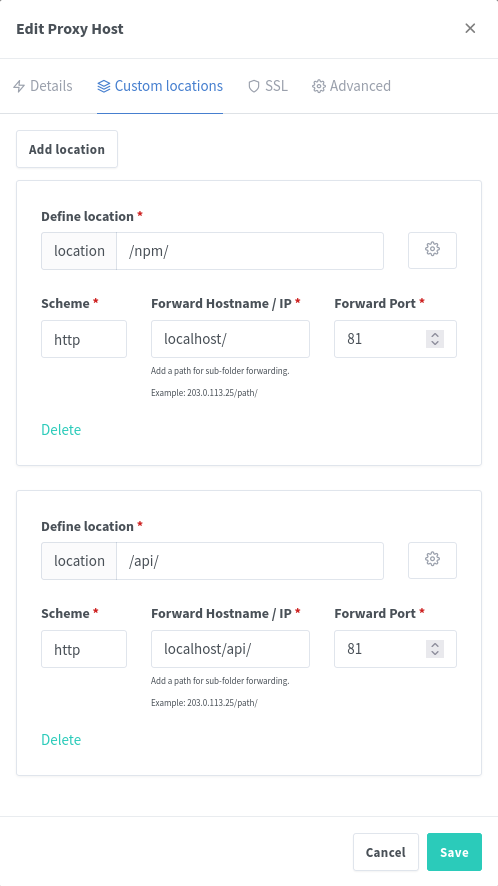
Add 2 locations:
From now there are 2 Options. Even if you combine them, you will not harm anything in NPM:
Option 1
And add Advanced rule:
Replace
npmwith whatever you need in Custom Location and Advanced config.Now you can control TLS configuration for NPM Admin Panel as for #481, #182
Option 2
UPDATE: Option 2 solutions only, you DO NOT NEED TO ADD API endpoint as above in a screenshot.
In "Custom Location" click on "Options" for
/npm/and add there rewrite content rules, so at the end it looks similar to:Also this will be Apache2 Configuration: