[GH-ISSUE #2299] auto miss port #1634

Closed
opened 2026-02-26 07:31:51 +03:00 by kerem · 4 comments
Owner

Originally created by @jack338c on GitHub (Oct 2, 2022).
Original GitHub issue: https://github.com/NginxProxyManager/nginx-proxy-manager/issues/2299

Checklist

  • Have you pulled and found the error with jc21/nginx-proxy-manager:latest docker image?
    • No
  • Are you sure you're not using someone else's docker image?
    • Yes
  • Have you searched for similar issues (both open and closed)?
    • Yes

Hey guys

my router portfoward my lan ip(nas) 10.20.30.180:443 to wan:9876
my domain *.xxx.xx ip =wan ip
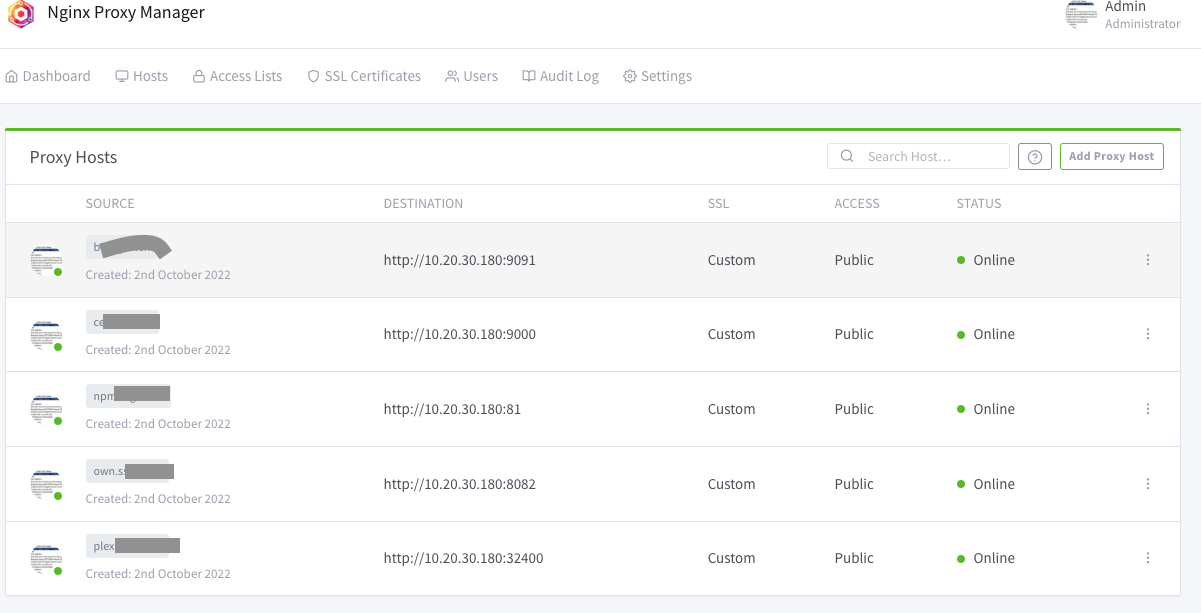
and docker application(installed on nas) can be enable https by Nginx Proxy Manager like following (own=hom),theny have same ssl files and same sub-domain
Screen Shot 2022-10-02 at 4 12 32 PM
but 8082(owncloud) will miss port 9876 while openning page llke following
if open https://hom.xxx.xx:9876/ ,it will go to https://hom.xxx.xx/login like following(auto miss9876 )
f7b935e5404e6a7013ff71938b900e23a3b8e196
if open https://hom.xxx.xx:9876/login.it will go to following ,after login ,it goes to
https://hom.xxx.xx/apps/files/ (auto miss 9876 )
2
3
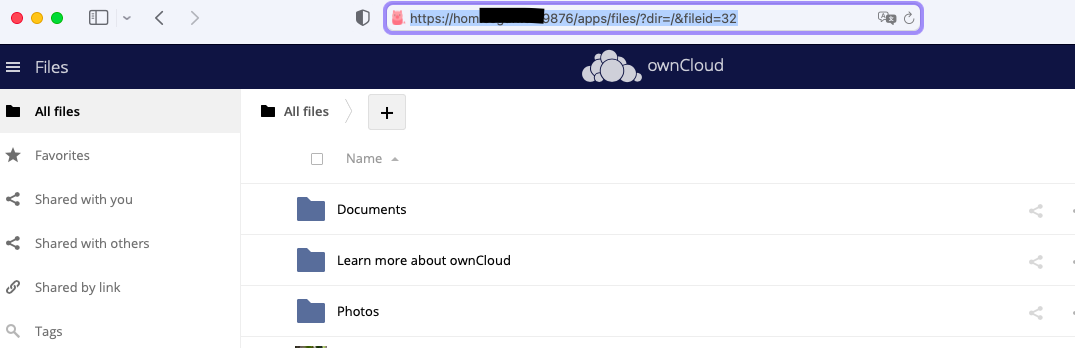
if open https://hom.xxx.xx:9876/apps/files/ it will go to following as normal (own=hom)
4

Screen Shot 2022-10-02 at 4 37 22 PM
Screen Shot 2022-10-02 at 4 37 11 PM

How to solve this,shoud I add someting in advance,please help me,thanks

Originally created by @jack338c on GitHub (Oct 2, 2022). Original GitHub issue: https://github.com/NginxProxyManager/nginx-proxy-manager/issues/2299 <!-- Are you in the right place? - If you are looking for support on how to get your upstream server forwarding, please consider asking the community on Reddit. - If you are writing code changes to contribute and need to ask about the internals of the software, Gitter is the best place to ask. - If you think you found a bug with NPM (not Nginx, or your upstream server or MySql) then you are in the *right place.* --> **Checklist** - Have you pulled and found the error with `jc21/nginx-proxy-manager:latest` docker image? - No - Are you sure you're not using someone else's docker image? - Yes - Have you searched for similar issues (both open and closed)? - Yes Hey guys my router portfoward my lan ip(nas) 10.20.30.180:443 to wan:9876 my domain *.xxx.xx ip =wan ip and docker application(installed on nas) can be enable https by Nginx Proxy Manager like following (own=hom),theny have same ssl files and same sub-domain ![Screen Shot 2022-10-02 at 4 12 32 PM](https://user-images.githubusercontent.com/10782586/193445117-83ececf0-ab9d-41f9-9545-a3ed92632c3f.png) but 8082(owncloud) will miss port 9876 while openning page llke following if open https://hom.xxx.xx:9876/ ,it will go to https://hom.xxx.xx/login like following(auto miss9876 ) ![f7b935e5404e6a7013ff71938b900e23a3b8e196](https://user-images.githubusercontent.com/10782586/193445185-0960a3cd-681f-4d3f-aff4-4d77b03cae44.png) if open https://hom.xxx.xx:9876/login.it will go to following ,after login ,it goes to https://hom.xxx.xx/apps/files/ (auto miss 9876 ) ![2](https://user-images.githubusercontent.com/10782586/193445391-3ba5c963-372e-49e6-ba2f-e947dec462f2.png) ![3](https://user-images.githubusercontent.com/10782586/193445407-a4edd031-2460-408c-a3b1-2a61dc8d878a.png) if open https://hom.xxx.xx:9876/apps/files/ it will go to following as normal (own=hom) ![4](https://user-images.githubusercontent.com/10782586/193445427-e99899e0-9cf8-4ff1-8447-04c58e0ef407.png) ![Screen Shot 2022-10-02 at 4 37 22 PM](https://user-images.githubusercontent.com/10782586/193445579-34fa7ddc-1d49-4c57-bbb2-34c306b92d4e.png) ![Screen Shot 2022-10-02 at 4 37 11 PM](https://user-images.githubusercontent.com/10782586/193445582-4a321479-8a63-449f-bb88-77880afc53fb.png) How to solve this,shoud I add someting in advance,please help me,thanks
kerem 2026-02-26 07:31:51 +03:00
  • closed this issue
  • added the
    stale
    bug
    labels
Author
Owner

@Hurray0 commented on GitHub (Nov 15, 2022):

same problem

<!-- gh-comment-id:1314850591 --> @Hurray0 commented on GitHub (Nov 15, 2022): same problem
Author
Owner

@Hurray0 commented on GitHub (Nov 15, 2022):

I noticed that the url in http (eg: <img src='http://127.0.0.1:8080'>) will automatically change from serverIP:serverPort(eg: http://127.0.0.1:8080) to https://IP(:443) (eg: https://domain.com),but not https://IP:givenPort(eg:https://domain.com:9876)

Is there a method to auto add given port to urls in http pages?

<!-- gh-comment-id:1314853367 --> @Hurray0 commented on GitHub (Nov 15, 2022): I noticed that the url in http (eg: `<img src='http://127.0.0.1:8080'>`) will automatically change from serverIP:serverPort(eg: http://127.0.0.1:8080) to https://IP(:443) (eg: https://domain.com),but not https://IP:givenPort(eg:https://domain.com:9876) Is there a method to auto add given port to urls in http pages?
Author
Owner

@github-actions[bot] commented on GitHub (Feb 8, 2024):

Issue is now considered stale. If you want to keep it open, please comment 👍

<!-- gh-comment-id:1933238335 --> @github-actions[bot] commented on GitHub (Feb 8, 2024): Issue is now considered stale. If you want to keep it open, please comment :+1:
Author
Owner

@github-actions[bot] commented on GitHub (Mar 24, 2025):

Issue was closed due to inactivity.

<!-- gh-comment-id:2746694588 --> @github-actions[bot] commented on GitHub (Mar 24, 2025): Issue was closed due to inactivity.
Sign in to join this conversation.
No milestone
No project
No assignees
1 participant
Notifications
Due date
The due date is invalid or out of range. Please use the format "yyyy-mm-dd".

No due date set.

Dependencies

No dependencies set.

Reference
starred/nginx-proxy-manager-NginxProxyManager#1634
No description provided.