[GH-ISSUE #582] Guidelines on how to set the Register write configuration #526

Closed
opened 2026-02-26 00:32:54 +03:00 by kerem · 9 comments
Owner

Originally created by @ghost on GitHub (Oct 24, 2018).
Original GitHub issue: https://github.com/hirschmann/nbfc/issues/582

There is a guide at https://github.com/hirschmann/nbfc/wiki/Register-write-configuration but with this information I cannot figure out how to determine / probe for the values that I need to set here. Only a few guidelines / directions on how to do this would be appreciated.

I have a HP Zbook Studio G3 and none of the configs that I have tried fix this last problem where the fan just doesn't want to go down to 0% speed (it keeps hovering around 10% for ages which is already an annoying sound).

Originally created by @ghost on GitHub (Oct 24, 2018). Original GitHub issue: https://github.com/hirschmann/nbfc/issues/582 There is a guide at https://github.com/hirschmann/nbfc/wiki/Register-write-configuration but with this information I cannot figure out how to determine / probe for the values that I need to set here. Only a few guidelines / directions on how to do this would be appreciated. I have a HP Zbook Studio G3 and none of the configs that I have tried fix this last problem where the fan just doesn't want to go down to 0% speed (it keeps hovering around 10% for ages which is already an annoying sound).
kerem closed this issue 2026-02-26 00:32:54 +03:00
Author
Owner

@hirschmann commented on GitHub (Oct 27, 2018):

There is a wiki article about how to create a config: https://github.com/hirschmann/nbfc/wiki/How-to-create-a-NBFC-config

The 4th chapter gives you an example of how to setup the RegisterWriteConfigs: https://github.com/hirschmann/nbfc/wiki/Create-a-config-file

<!-- gh-comment-id:433644299 --> @hirschmann commented on GitHub (Oct 27, 2018): There is a wiki article about how to create a config: https://github.com/hirschmann/nbfc/wiki/How-to-create-a-NBFC-config The 4th chapter gives you an example of how to setup the RegisterWriteConfigs: https://github.com/hirschmann/nbfc/wiki/Create-a-config-file
Author
Owner

@ghost commented on GitHub (Oct 28, 2018):

There is a wiki article about how to create a config: https://github.com/hirschmann/nbfc/wiki/How-to-create-a-NBFC-config

The 4th chapter gives you an example of how to setup the RegisterWriteConfigs: https://github.com/hirschmann/nbfc/wiki/Create-a-config-file

Thanks for the response. Those guides are very useful and I've read them. For a big part I understand what it says. However, I believe that it misses a stepping stone for how to determine these values. I am trying every time to figure this out by reading everything 3 times but I simply don't understand how to do it.

https://github.com/hirschmann/nbfc/wiki/Create-a-config-file mentions:

This is a working config, but sometimes you must jump through some extra hoops (like enabling the EC's manual control mode) to make it perfect. This can be achieved via RegisterWriteConfigurations.
How do you in fact enable this manual control mode? Is it by simply creating those 2 entrances in the Register write configuration (the one that is called 'Select thermal zone' and the one that is called 'Fake thermal zone temperature')?

Then my next questions are:
how do you actually determine the values for which you have value 34, 1, 38, 28 in the example?

<!-- gh-comment-id:433733990 --> @ghost commented on GitHub (Oct 28, 2018): > There is a wiki article about how to create a config: https://github.com/hirschmann/nbfc/wiki/How-to-create-a-NBFC-config > > The 4th chapter gives you an example of how to setup the RegisterWriteConfigs: https://github.com/hirschmann/nbfc/wiki/Create-a-config-file Thanks for the response. Those guides are very useful and I've read them. For a big part I understand what it says. However, I believe that it misses a stepping stone for how to determine these values. I am trying every time to figure this out by reading everything 3 times but I simply don't understand how to do it. https://github.com/hirschmann/nbfc/wiki/Create-a-config-file mentions: > This is a working config, but sometimes you must jump through some extra hoops (like enabling the EC's manual control mode) to make it perfect. This can be achieved via RegisterWriteConfigurations. How do you in fact enable this manual control mode? Is it by simply creating those 2 entrances in the Register write configuration (the one that is called 'Select thermal zone' and the one that is called 'Fake thermal zone temperature')? Then my next questions are: how do you actually determine the values for which you have value 34, 1, 38, 28 in the example?
Author
Owner

@erkexzcx commented on GitHub (Oct 30, 2018):

Learn how to convert hex to decimal and vice versa. NBFC uses values from 0 to 255 (in hex - 0x00 to 0xFF). Also google is your friend "Convert 0x56 to decimal".

Also investigate other configs to understand how they are set-up. If you are beginner - first try to get NBFC working on windows, because it has nice config customization tool (GUI). It makes like 100x easier than on Linux.

<!-- gh-comment-id:434268646 --> @erkexzcx commented on GitHub (Oct 30, 2018): Learn how to convert hex to decimal and vice versa. NBFC uses values from 0 to 255 (in hex - 0x00 to 0xFF). Also google is your friend "_Convert 0x56 to decimal_". Also investigate other configs to understand how they are set-up. If you are beginner - first try to get NBFC working on windows, because it has nice config customization tool (GUI). It makes like 100x easier than on Linux.
Author
Owner

@ghost commented on GitHub (Oct 30, 2018):

I have done all this successfully. After some effort I was able to put this off by making proper use of the guide. Using windows, those programs and ecprobe the command line, speed up fans and down and look for the relatable changes, convert hex data to decimal, configure the basic NBFC profile.

What remains is configuring the Register write configuration part: the 0% fan speed override part that I as a configurator need for figure out / analyze / get data for.

I can rephrase my question to: What pattern / information do you look for when probing the necessary information for the Register write configuration?

When asking this question with when looking at the example data at https://github.com/hirschmann/nbfc/wiki/Create-a-config-file, then my question can be translated to, how did these values, 34, 1, 38 and 28 come from? https://github.com/hirschmann/nbfc/wiki/Register-write-configuration does not answer this either.

Right now I am starting to figure out that besides the regular configuration there has to be some other registers that change once the fan go fully off/on (the 34 and 38 register), their values change, which are the 1 and 28. Is my line of thought correct?

<!-- gh-comment-id:434394778 --> @ghost commented on GitHub (Oct 30, 2018): I have done all this successfully. After some effort I was able to put this off by making proper use of the guide. Using windows, those programs and ecprobe the command line, speed up fans and down and look for the relatable changes, convert hex data to decimal, configure the basic NBFC profile. What remains is configuring the Register write configuration part: the 0% fan speed override part that I as a configurator need for figure out / analyze / get data for. I can rephrase my question to: What pattern / information do you look for when probing the necessary information for the Register write configuration? When asking this question with when looking at the example data at https://github.com/hirschmann/nbfc/wiki/Create-a-config-file, then my question can be translated to, how did these values, 34, 1, 38 and 28 come from? https://github.com/hirschmann/nbfc/wiki/Register-write-configuration does not answer this either. Right now I am starting to figure out that besides the regular configuration there has to be some other registers that change once the fan go fully off/on (the 34 and 38 register), their values change, which are the 1 and 28. Is my line of thought correct?
Author
Owner

@erkexzcx commented on GitHub (Oct 30, 2018):

I think you are missing the point here.

Imagine you are driving the car, but instead of pushing pedal, you set number from 0 to 255 in order to change car speed. Once you set 255 - your car does not drive at speed of 255, but instead it slowly accelerates, so engineers decided to put 2 speedometers - one for showing actual speed of the car, and the other one showing target speed of the car.

Same with read and write registers. "Read register" is used to show you actual speed of fans, and "write register" is used to set fan speed target. Once you change target speed - "read register" will softly change to it, since fans as well as cars don't accelerate instantly - they do it slowly.

BTW there are 2 problems you are likely to face (but not necessarily):

  1. Some laptops have different values in "read register" and "write register". E.g. read register shows values between 0 to 50 while write register shows values between 0 to 255. You need to find out if it's true and customize configuration accordingly.
  2. Some laptops have only one register for both "read register" and "write register". In this case you are likely need to spam this register every 100-300ms with preferred speed value and it changes accordingly (see Asus UX430UQ laptop config).

Since NBFC is designed to do all this mess, so you can take control of your fan(s). That's how it works and there is nothing to do about it. Other cases include finding manual control switch to enable/disable fan control through EC register, so you might need to do it as well.

Any more questions? :D

<!-- gh-comment-id:434408579 --> @erkexzcx commented on GitHub (Oct 30, 2018): I think you are missing the point here. Imagine you are driving the car, but instead of pushing pedal, you set number from 0 to 255 in order to change car speed. Once you set 255 - your car does not drive at speed of 255, but instead it slowly accelerates, so engineers decided to put 2 speedometers - one for showing **actual speed of the car**, and the other one showing **target speed of the car**. Same with read and write registers. "Read register" is used to show you actual speed of fans, and "write register" is used to set fan speed target. Once you change target speed - "read register" will softly change to it, since fans as well as cars don't accelerate instantly - they do it slowly. BTW there are 2 problems you are likely to face (but not necessarily): 1) Some laptops have different values in "read register" and "write register". E.g. read register shows values between 0 to 50 while write register shows values between 0 to 255. You need to find out if it's true and customize configuration accordingly. 2) Some laptops have only one register for both "read register" and "write register". In this case you are likely need to spam this register every 100-300ms with preferred speed value and it changes accordingly (see Asus UX430UQ laptop config). Since NBFC is designed to do all this mess, so you can take control of your fan(s). That's how it works and there is nothing to do about it. Other cases include finding manual control switch to enable/disable fan control through EC register, so you might need to do it as well. Any more questions? :D
Author
Owner

@ghost commented on GitHub (Oct 30, 2018):

I think I made this confusing. For the most part, I don't think I'm missing the point. I am able to make this basic configuration (although I haven't perfectly set the minimum and maximum fan speeds I admit).

But youv'e pointed me into the right direction by mentioning the manual control switch. Possibly the topic of this issue is wrong. In the guide it says at https://github.com/hirschmann/nbfc/wiki/Create-a-config-file:

This is a working config, but sometimes you must jump through some extra hoops (like enabling the EC's manual control mode) to make it perfect. This can be achieved via RegisterWriteConfigurations.
As I wanted to enable the EC's manual control mode, I reasoned that I wanted to configure the RegisterWriteConfiguration, hence the topic "Guidelines on how to set the Register write configuration". Possibly I should have called this "Guidelines on how to configure/enable the EC's manual control mode".

However, I've figured out a bit more while messing around and repeating the steps and reading the guide once more, and I am drawing the conclusion that this might not be the problem after all.

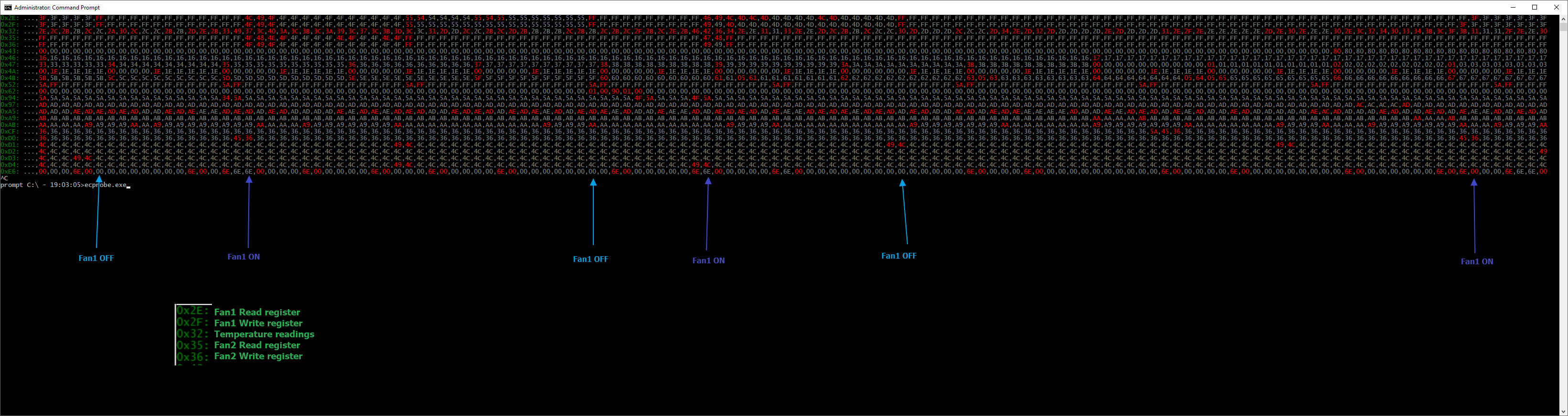
My configuration for my HP Zbook Studio G3 is very very similar to the default config that Stefan describes in his guide for the HP Probook model. It just seems that the fan speeds are a bit off when applied to my pc. For example, in the example config the Min and max speeds of 88 and 48 are used respectively. For my machine it's more like 120 and 40, as these definitely give slower and higher speeds when setting them via the ec-probe.exe command. However, if I configure the configuration like this, it starts to act up unpredictibly.

My main remaing problem however is that as soon as the fan speed is set to 0% correctly, which works well, in various occassions shortly after the PC seems to take over again and ramps up the fan speeds, while there was no change in temperature (it was very low). I simply cannot figure out how to fix this after trying so many options. Other times it does not show this behavior. I am about to give up and simply never buy a similar laptop again.

Thanks for your help until now. It has gotten me closer. If you have more ideas, you are welcome to share them.
laurens-ec-probe-monitoring

<!-- gh-comment-id:434460006 --> @ghost commented on GitHub (Oct 30, 2018): I think I made this confusing. For the most part, I don't think I'm missing the point. I am able to make this basic configuration (although I haven't perfectly set the minimum and maximum fan speeds I admit). But youv'e pointed me into the right direction by mentioning the manual control switch. Possibly the topic of this issue is wrong. In the guide it says at https://github.com/hirschmann/nbfc/wiki/Create-a-config-file: > This is a working config, but sometimes you must jump through some extra hoops (like enabling the EC's manual control mode) to make it perfect. This can be achieved via RegisterWriteConfigurations. As I wanted to enable the EC's manual control mode, I reasoned that I wanted to configure the RegisterWriteConfiguration, hence the topic "Guidelines on how to set the Register write configuration". Possibly I should have called this "Guidelines on how to configure/enable the EC's manual control mode". However, I've figured out a bit more while messing around and repeating the steps and reading the guide once more, and I am drawing the conclusion that this might not be the problem after all. My configuration for my HP Zbook Studio G3 is very very similar to the default config that Stefan describes in his guide for the HP Probook model. It just seems that the fan speeds are a bit off when applied to my pc. For example, in the example config the Min and max speeds of 88 and 48 are used respectively. For my machine it's more like 120 and 40, as these definitely give slower and higher speeds when setting them via the ec-probe.exe command. However, if I configure the configuration like this, it starts to act up unpredictibly. My main remaing problem however is that as soon as the fan speed is set to 0% correctly, which works well, in various occassions shortly after the PC seems to take over again and ramps up the fan speeds, while there was no change in temperature (it was very low). I simply cannot figure out how to fix this after trying so many options. Other times it does not show this behavior. I am about to give up and simply never buy a similar laptop again. Thanks for your help until now. It has gotten me closer. If you have more ideas, you are welcome to share them. ![laurens-ec-probe-monitoring](https://user-images.githubusercontent.com/10318776/47748598-723d8780-dc8b-11e8-8725-f701a7dd025b.png)
Author
Owner

@erkexzcx commented on GitHub (Oct 30, 2018):

Ohh man, check https://github.com/hirschmann/nbfc/issues/526

After doing THAT much of investigations I don't want to get into NBFC configs anymore :D

<!-- gh-comment-id:434463620 --> @erkexzcx commented on GitHub (Oct 30, 2018): Ohh man, check https://github.com/hirschmann/nbfc/issues/526 After doing THAT much of investigations I don't want to get into NBFC configs anymore :D
Author
Owner

@ghost commented on GitHub (Oct 31, 2018):

Alright thanks. You pointed me in the right direction again. I seem to have a similar issue as what is mentioned in that thread; as soon as I start working via an external screen, which forces the laptop to make use of the discrete gpu (a Nvidia Quadro 1000M), and then the NBFC profile the PC just does not listen properly to the NBFC profile anymore, even though the readings/probings are correct / match up well with the configuration.

I will give it another shot when I have time, making good comparisons between running with external screen and without, to see if I can figure out what is different. Thanks for all the help until now.

<!-- gh-comment-id:434666069 --> @ghost commented on GitHub (Oct 31, 2018): Alright thanks. You pointed me in the right direction again. I seem to have a similar issue as what is mentioned in that thread; as soon as I start working via an external screen, which forces the laptop to make use of the discrete gpu (a Nvidia Quadro 1000M), and then the NBFC profile the PC just does not listen properly to the NBFC profile anymore, even though the readings/probings are correct / match up well with the configuration. I will give it another shot when I have time, making good comparisons between running with external screen and without, to see if I can figure out what is different. Thanks for all the help until now.
Author
Owner

@hirschmann commented on GitHub (Oct 31, 2018):

The problem is that NVidia Optimus is conflicting with NBFC: https://github.com/hirschmann/nbfc/wiki/FAQ#why-does-nbfc-stop-working-when-i-start-a-game

<!-- gh-comment-id:434689901 --> @hirschmann commented on GitHub (Oct 31, 2018): The problem is that NVidia Optimus is conflicting with NBFC: https://github.com/hirschmann/nbfc/wiki/FAQ#why-does-nbfc-stop-working-when-i-start-a-game
Sign in to join this conversation.
No milestone
No project
No assignees
1 participant
Notifications
Due date
The due date is invalid or out of range. Please use the format "yyyy-mm-dd".

No due date set.

Dependencies

No dependencies set.

Reference
starred/nbfc-hirschmann#526
No description provided.