[GH-ISSUE #413] Add support for Proxmox VE #158

Closed
opened 2026-02-27 08:15:35 +03:00 by kerem · 13 comments
Owner

Originally created by @compieter-gh on GitHub (Jan 7, 2023).
Original GitHub issue: https://github.com/lldap/lldap/issues/413

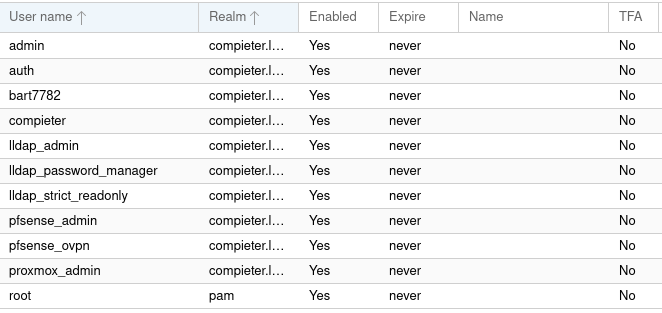
I've been trying to get Proxmox VE with LDAP working and it does work but also would like too have support added here.
I self have been mainly having issues with the group & user filtering. I dont understand LDAP that well.

image
image

Base Domain Name: dc=compieter,dc=local
Bind User: cn=auth,ou=people,dc=compieter,dc=local
User Filter: (&(objectClass=person))
Group Filter: (&(ObjectClass=groupofnames)(cn=proxmox_admin))

I've also tried:

User Filter: (&(memberOf=CN=proxmox_admin,OU=groups,DC=compieter,DC=local))
Group Filter: (&(distinguishedName=CN=proxmox_admin,OU=people,DC=compieter,DC=local))

Which all results in the groups and users getting added to both.
image

If anyone can add support and help with this thanks.

Originally created by @compieter-gh on GitHub (Jan 7, 2023). Original GitHub issue: https://github.com/lldap/lldap/issues/413 I've been trying to get Proxmox VE with LDAP working and it does work but also would like too have support added here. I self have been mainly having issues with the group & user filtering. I dont understand LDAP that well. ![image](https://user-images.githubusercontent.com/34034571/211171299-61f88c9c-c01c-4adc-a1fa-54cbc66ad8b7.png) ![image](https://user-images.githubusercontent.com/34034571/211171304-3290f91c-d80c-445a-94c2-c52997a65824.png) Base Domain Name: dc=compieter,dc=local Bind User: cn=auth,ou=people,dc=compieter,dc=local User Filter: (&(objectClass=person)) Group Filter: (&(ObjectClass=groupofnames)(cn=proxmox_admin)) I've also tried: User Filter: (&(memberOf=CN=proxmox_admin,OU=groups,DC=compieter,DC=local)) Group Filter: (&(distinguishedName=CN=proxmox_admin,OU=people,DC=compieter,DC=local)) Which all results in the groups and users getting added to both. ![image](https://user-images.githubusercontent.com/34034571/211171464-4b466cad-bff3-40e3-8b94-70cdb59cc6ee.png) If anyone can add support and help with this thanks.
kerem 2026-02-27 08:15:35 +03:00
Author
Owner

@nitnelave commented on GitHub (Jan 17, 2023):

Technically the group class is groupOfUniqueNames, but groupOfNames also works. You can use that in the Group classes box above.

Could you link to the LLDAP logs (with --verbose) for when you try the import?

<!-- gh-comment-id:1385121610 --> @nitnelave commented on GitHub (Jan 17, 2023): Technically the group class is groupOfUniqueNames, but groupOfNames also works. You can use that in the `Group classes` box above. Could you link to the LLDAP logs (with --verbose) for when you try the import?
Author
Owner

@pixelrazor commented on GitHub (Mar 21, 2023):

A good a ction item after sorting this out would be making an example_configs page for proxmox

<!-- gh-comment-id:1478624968 --> @pixelrazor commented on GitHub (Mar 21, 2023): A good a ction item after sorting this out would be making an example_configs page for proxmox
Author
Owner

@pixelrazor commented on GitHub (Mar 23, 2023):

Based off reading their docs (and if you could please confirm if this works):

I think this should be the Base Domain Name = ou=people,dc=compieter,dc=local. This may not be needed or may even be incorrect (it's based off information from a screenshot in their docs)

For the sync

User class should just be person i think - i don't think lldap has a user object class. If youur intention is to sync all users, then remove the user filter. did you wanttoo only add users that are in a certain group?

Do you want to sync the lldap groups as well? if not, then definitely remove both group class and group filter. If you want to sync all groups, then remove the group filter and change group class to either groupOfUniqueNames or groupOfNames.

I don't currently see agood reason to use a group filter with lldap in the current state - maybe if groups could be members of groups that would be something for filtering

<!-- gh-comment-id:1481954700 --> @pixelrazor commented on GitHub (Mar 23, 2023): Based off reading their [docs](https://pve.proxmox.com/wiki/User_Management#user-realms-ldap) (and if you could please confirm if this works): I think this should be the Base Domain Name = `ou=people,dc=compieter,dc=local`. This may not be needed or may even be incorrect (it's based off information from a screenshot in their docs) For the sync User class should just be `person` i think - i don't think lldap has a `user` object class. If youur intention is to sync all users, then remove the user filter. did you wanttoo only add users that are in a certain group? Do you want to sync the lldap groups as well? if not, then definitely remove both group class and group filter. If you want to sync all groups, then remove the group filter and change group class to either `groupOfUniqueNames` or `groupOfNames`. I don't currently see agood reason to use a group filter with lldap in the current state - maybe if groups could be members of groups that would be something for filtering
Author
Owner

@compieter-gh commented on GitHub (Mar 25, 2023):

Technically the group class is groupOfUniqueNames, but groupOfNames also works. You can use that in the Group classes box above.

Could you link to the LLDAP logs (with --verbose) for when you try the import?

Idk how to do that i am running it inside a docker

<!-- gh-comment-id:1483885565 --> @compieter-gh commented on GitHub (Mar 25, 2023): > Technically the group class is groupOfUniqueNames, but groupOfNames also works. You can use that in the `Group classes` box above. > > Could you link to the LLDAP logs (with --verbose) for when you try the import? Idk how to do that i am running it inside a docker
Author
Owner

@compieter-gh commented on GitHub (Mar 25, 2023):

Based off reading their docs (and if you could please confirm if this works):

I think this should be the Base Domain Name = ou=people,dc=compieter,dc=local. This may not be needed or may even be incorrect (it's based off information from a screenshot in their docs)

For the sync

User class should just be person i think - i don't think lldap has a user object class. If youur intention is to sync all users, then remove the user filter. did you wanttoo only add users that are in a certain group?

Do you want to sync the lldap groups as well? if not, then definitely remove both group class and group filter. If you want to sync all groups, then remove the group filter and change group class to either groupOfUniqueNames or groupOfNames.

I don't currently see agood reason to use a group filter with lldap in the current state - maybe if groups could be members of groups that would be something for filtering

Well yeah i wanted to apply permission to a specific group with the users in it but it either shows all users and group in both the user and groups of proxmox or only the users on both.

If i sync it with "ou=people,dc=compieter,dc=local" it will show only the users in users and the groups of proxmox
If i sync it just with the base "dc=compieter,dc=local" It will just do all in both. which seems like it isnt working the way it should?

besides that i am thinking maybe just applying the perms to only the users is gonna be the solution here?
I'm new with LDAP in general and kinda learning how the servers and stuff works so sorry if it seems stupid.

<!-- gh-comment-id:1483888633 --> @compieter-gh commented on GitHub (Mar 25, 2023): > Based off reading their [docs](https://pve.proxmox.com/wiki/User_Management#user-realms-ldap) (and if you could please confirm if this works): > > I think this should be the Base Domain Name = `ou=people,dc=compieter,dc=local`. This may not be needed or may even be incorrect (it's based off information from a screenshot in their docs) > > For the sync > > User class should just be `person` i think - i don't think lldap has a `user` object class. If youur intention is to sync all users, then remove the user filter. did you wanttoo only add users that are in a certain group? > > Do you want to sync the lldap groups as well? if not, then definitely remove both group class and group filter. If you want to sync all groups, then remove the group filter and change group class to either `groupOfUniqueNames` or `groupOfNames`. > > I don't currently see agood reason to use a group filter with lldap in the current state - maybe if groups could be members of groups that would be something for filtering Well yeah i wanted to apply permission to a specific group with the users in it but it either shows all users and group in both the user and groups of proxmox or only the users on both. If i sync it with "ou=people,dc=compieter,dc=local" it will show only the users in users and the groups of proxmox If i sync it just with the base "dc=compieter,dc=local" It will just do all in both. which seems like it isnt working the way it should? besides that i am thinking maybe just applying the perms to only the users is gonna be the solution here? I'm new with LDAP in general and kinda learning how the servers and stuff works so sorry if it seems stupid.
Author
Owner

@pixelrazor commented on GitHub (Mar 25, 2023):

When I'm at my computer I think I actually wrapped my head around it and have a clear answer. Until then, if you could just answer some things:
What groups do you want? In your initial post you had a proxmox admin group specified. Did you want other groups with less permissions? Also, did you want to sync ALL users (even ones not in and proxmox groups), or only users that are part of proxmox_admins (and others if you wanted more groups to give other kinds of perms).

If I have that information when I have a spare moment, I think I can write up your config values and walk through/explain each of them

<!-- gh-comment-id:1483926635 --> @pixelrazor commented on GitHub (Mar 25, 2023): When I'm at my computer I think I actually wrapped my head around it and have a clear answer. Until then, if you could just answer some things: What groups do you want? In your initial post you had a proxmox admin group specified. Did you want other groups with less permissions? Also, did you want to sync ALL users (even ones not in and proxmox groups), or only users that are part of proxmox_admins (and others if you wanted more groups to give other kinds of perms). If I have that information when I have a spare moment, I think I can write up your config values and walk through/explain each of them
Author
Owner

@compieter-gh commented on GitHub (Mar 27, 2023):

I would want two groups which is proxmox_admins & proxmox_users and the users that are part of that group.

i would just define the permissions in proxmox to the group itself which makes it easier than too the users individually

<!-- gh-comment-id:1485416661 --> @compieter-gh commented on GitHub (Mar 27, 2023): I would want two groups which is proxmox_admins & proxmox_users and the users that are part of that group. i would just define the permissions in proxmox to the group itself which makes it easier than too the users individually
Author
Owner

@pixelrazor commented on GitHub (Mar 27, 2023):

Okay, (hopefully) correct answers time! It's a bit easier if there's ONE group that determines proxmox membership, and then you can have additional groups to add extra permissions. For example with the two groups you gave:

User Bob is in proxmox_users and has no big permissions.
User Alice is in proxmoc_users and proxmox_admins - the admins group has priveledge.

TL;DR have all proxmox users in proxmox_users, then create extra groups to add permission on top of that. (this isn't a requirement, but just the way i'd personally organize it)

Your General settings look good to me in your initial picture - ignore my previous comments about changing base DN

Now for the sync:

  • Your bind dn looks good (which means the password too) - it's pulling info from LLDAP so the usuer at least exists and appears to have permission to see the users and groups. Bind DN is just the way ldap specifies the user that it will use to connect for the sync
  • Email attribute looks good (mail or email - both work)
  • groupname attr is good (cn)
  • user class can just be person
  • group class should be either groupofuniquenames or groupofnames
  • User filter should be memberOf=cn=proxmox_users,ou=groups,dc=compieter,dc=local
  • Group filter could be one of two things. You can use wildcard to sync all grouups with the proxmox_ prefix, or explicitly list all of them. To sync the prefixed groups: cn=proxmox_* or to sync explicitly: (|(cn=proxmox_admins)(cn=proxmox_users))

I actually didn't understand LDAP for a long time, but i think over the last few days things are starting to click for me. Please give this a shot and let me know how it goes! if there's any issues, let me know and please include some screenshots like the first post. If you have any questions about any of this, i can try my best to explain in more details. Also, note that according to the proxmox docs, your synced groups will be named proxmox_admins-compieter.local and proxmox_users.compieter.local

<!-- gh-comment-id:1485483763 --> @pixelrazor commented on GitHub (Mar 27, 2023): Okay, (hopefully) correct answers time! It's a bit easier if there's ONE group that determines proxmox membership, and then you can have additional groups to add extra permissions. For example with the two groups you gave: User Bob is in proxmox_users and has no big permissions. User Alice is in proxmoc_users and proxmox_admins - the admins group has priveledge. TL;DR have all proxmox users in proxmox_users, then create extra groups to add permission on top of that. (this isn't a requirement, but just the way i'd personally organize it) Your General settings look good to me in your initial picture - ignore my previous comments about changing base DN Now for the sync: - Your bind dn looks good (which means the password too) - it's pulling info from LLDAP so the usuer at least exists and appears to have permission to see the users and groups. Bind DN is just the way ldap specifies the user that it will use to connect for the sync - Email attribute looks good (`mail` or `email` - both work) - groupname attr is good (`cn`) - user class can just be `person` - group class should be either `groupofuniquenames` or `groupofnames` - User filter should be `memberOf=cn=proxmox_users,ou=groups,dc=compieter,dc=local` - Group filter could be one of two things. You can use wildcard to sync all grouups with the `proxmox_` prefix, or explicitly list all of them. To sync the prefixed groups: `cn=proxmox_*` or to sync explicitly: `(|(cn=proxmox_admins)(cn=proxmox_users))` I actually didn't understand LDAP for a long time, but i think over the last few days things are starting to click for me. Please give this a shot and let me know how it goes! if there's any issues, let me know and please include some screenshots like the first post. If you have any questions about any of this, i can try my best to explain in more details. Also, note that according to the proxmox docs, your synced groups will be named `proxmox_admins-compieter.local` and `proxmox_users.compieter.local`
Author
Owner

@pixelrazor commented on GitHub (Mar 27, 2023):

Just a note that the prefix filter with teh wildcard may not work depending on youur lldap version - you might want to use teh explicit filter

<!-- gh-comment-id:1485625767 --> @pixelrazor commented on GitHub (Mar 27, 2023): Just a note that the prefix filter with teh wildcard may not work depending on youur lldap version - you might want to use teh explicit filter
Author
Owner

@compieter-gh commented on GitHub (Mar 27, 2023):

That actually works perfect. Thank you very much.
Indeed the prefix doesn't work with proxmox am just using the explicit groups.

<!-- gh-comment-id:1485811801 --> @compieter-gh commented on GitHub (Mar 27, 2023): > That actually works perfect. Thank you very much. Indeed the prefix doesn't work with proxmox am just using the explicit groups.
Author
Owner

@pixelrazor commented on GitHub (Mar 27, 2023):

Awesome, i'm glad i could help! I'll try to add a proxmox example config to the repo this week. Thanks for bearing with me as i also navigated how the heck lldap works! (and also not wanting to setup a proxmox vm to try myself)

<!-- gh-comment-id:1485831187 --> @pixelrazor commented on GitHub (Mar 27, 2023): Awesome, i'm glad i could help! I'll try to add a proxmox example config to the repo this week. Thanks for bearing with me as i also navigated how the heck lldap works! (and also not wanting to setup a proxmox vm to try myself)
Author
Owner

@nitnelave commented on GitHub (Aug 3, 2023):

Any news on the proxmox configuration? @compieter-gh do you think you could write up a guide/give a sample config?

<!-- gh-comment-id:1664109727 --> @nitnelave commented on GitHub (Aug 3, 2023): Any news on the proxmox configuration? @compieter-gh do you think you could write up a guide/give a sample config?
Author
Owner

@lkmhaqer commented on GitHub (Aug 31, 2023):

Proposed a Proxmox VE example here: https://github.com/lldap/lldap/pull/662

<!-- gh-comment-id:1701817590 --> @lkmhaqer commented on GitHub (Aug 31, 2023): Proposed a Proxmox VE example here: https://github.com/lldap/lldap/pull/662
Sign in to join this conversation.
No milestone
No project
No assignees
1 participant
Notifications
Due date
The due date is invalid or out of range. Please use the format "yyyy-mm-dd".

No due date set.

Dependencies

No dependencies set.

Reference
starred/lldap-lldap#158
No description provided.