mirror of
https://github.com/koel/koel.git
synced 2026-04-25 08:46:00 +03:00
[GH-ISSUE #1156] koel:sync does not update view after changes #667
Labels
No labels
Authentication
Dependencies
Documentation
Feature Request
Flac
Help Wanted
Installation/Setup
Integration
Mobile
PR Welcome
Pending Release
Performance
Playlist
S3
Search
Sync
[Pri] Low
[Pri] Normal
[Status] Keep Open
[Status] Needs Author Reply
[Status] Needs Review
[Status] Stale
[Status] Will Implement
[Type] Blessed
[Type] Bug
[Type] Duplicate
[Type] Enhancement
[Type] Help Request
[Type] Question
[Type] Task
pull-request
No milestone
No project
No assignees
1 participant

Notifications
Due date
No due date set.
Dependencies
No dependencies set.
Reference
starred/koel-koel#667
Loading…
Add table
Add a link
Reference in a new issue
No description provided.
Delete branch "%!s()"
Deleting a branch is permanent. Although the deleted branch may continue to exist for a short time before it actually gets removed, it CANNOT be undone in most cases. Continue?
Originally created by @vmario89 on GitHub (Dec 28, 2019).
Original GitHub issue: https://github.com/koel/koel/issues/1156
Hi,
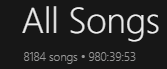
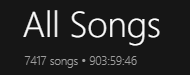
in Koel Browser Application and Desktop application the view does not update if in the background some files changed. I removed ~500 mp3 files. I was able to get an updated view by just reloading. In the browser version this is no problem but in desktop application you need to restart the app itself to have recent changes working.
@phanan commented on GitHub (Jan 9, 2020):
That's expected. Tip: You can "refresh" the desktop app with
Cmd+R(Ctrl+Rin Windows?), just like a browser.@vmario89 commented on GitHub (Jan 9, 2020):
Hi, thanks for the tip. Ctrl + R works. But i think some auto-refresh makes sense. Or maybe some background service which brings up a popup / bar notification to the user with message like "your server admin updated the music library. Please refresh your view to see what changed".