mirror of
https://github.com/koel/koel.git
synced 2026-04-25 00:36:03 +03:00
[GH-ISSUE #1089] Funny track sort order #638
Labels
No labels
Authentication
Dependencies
Documentation
Feature Request
Flac
Help Wanted
Installation/Setup
Integration
Mobile
PR Welcome
Pending Release
Performance
Playlist
S3
Search
Sync
[Pri] Low
[Pri] Normal
[Status] Keep Open
[Status] Needs Author Reply
[Status] Needs Review
[Status] Stale
[Status] Will Implement
[Type] Blessed
[Type] Bug
[Type] Duplicate
[Type] Enhancement
[Type] Help Request
[Type] Question
[Type] Task
pull-request
No milestone
No project
No assignees
1 participant

Notifications
Due date
No due date set.
Dependencies
No dependencies set.
Reference
starred/koel-koel#638
Loading…
Add table
Add a link
Reference in a new issue
No description provided.
Delete branch "%!s()"
Deleting a branch is permanent. Although the deleted branch may continue to exist for a short time before it actually gets removed, it CANNOT be undone in most cases. Continue?
Originally created by @tecosaur on GitHub (Sep 23, 2019).
Original GitHub issue: https://github.com/koel/koel/issues/1089
I may have missed something, but after clicking on an album I see this
I kinda expected to see them in order. This is easily acomplished by clicking on the
#collumn but the initial ordering seems random.Once again I'm running master/HEAD.
@phanan commented on GitHub (Sep 23, 2019):
This is the order of scanning, but you're right, maybe track order is a better, well, order.
@tecosaur commented on GitHub (Sep 23, 2019):
Excellent! One other small consideration, some albums have multiple disks. This doesn't seem to be taken into account at the moment:
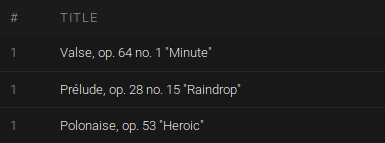
(this is when sorting by
#)@phanan commented on GitHub (Sep 23, 2019):
It does actually.
@tecosaur commented on GitHub (Sep 23, 2019):
I would hope so, unfortunately, this doesn't seem to be the case from what I'm seeing.
For example looking at Valse, op. 64 and Prélude, op. 28 using ffprobe, the Valise is disk 1 track 1, while the Prélude is disk 2 track 1. Hence I'd expect to see the rest of disc 1 inbetween the Valise and Prélude … however, as you can see they're right next to each other.
@jordanb84 commented on GitHub (Sep 27, 2019):
Same issue here. Album has two discs, but instead of being ordered by the songs from disc one then the songs from disc two, the discs are effectively merged together (disc 1 song 1 is followed by disc 2 song 1 rather than disc 1 song 2).
Tags:
@Hyzual commented on GitHub (Apr 5, 2020):
Hi @phanan , @tecosaur. I've been using koel for a couple of years and I have just finished setting up a dev environment to hopefully contribute to it.
This issue has been bothering me for a while too, and it does not look too complicated so I think I'll get started on it !
I'll keep you guys posted !
@BrookeDot commented on GitHub (Jun 20, 2020):
I'm wondering if this was fixed with the changes in v4.4.0?
@Hyzual commented on GitHub (Jun 22, 2020):
I'm running v4.4.0 and the issue still appears when you click on the album's name to browse the album without playing it, they still appear ordered by "scan" instead of track number (not expected order).
When you click on the "play" button (on the album cover) they are however ordered by disk number / tracker number (the expected order)
@phanan commented on GitHub (Jun 22, 2020):
Confirmed. This wasn't on the roadmap for v4.4.0.
@CirnoT commented on GitHub (Nov 10, 2020):
Any update on this? This is really annoying.
@phanan commented on GitHub (Sep 23, 2022):
This should have been fixed in newer versions.