[GH-ISSUE #547] Healthcheck with Started and OK pings goes down if OK hasn't come at one grace period after Started #395

Closed
opened 2026-02-25 23:42:18 +03:00 by kerem · 19 comments
Owner

Originally created by @kaysond on GitHub (Jul 28, 2021).
Original GitHub issue: https://github.com/healthchecks/healthchecks/issues/547

I have a check with a 1 week period and 6 hour grace time. It's a very long borgmatic check operation. As you can see below, it Started at 5am, and at 11am (6 hours later) the check went down because the grace period had elapsed.

This doesn't seem like accurate behavior to me. The operation just isn't done, that doesn't mean it's down.

If I had a check without a Started ping, it would just compare to the OK times, and only if the OK came > 1 period + 1 grace period after the previous OK would it go down.

Sorry if my description is confusing... I can try to clarify further.

image

Originally created by @kaysond on GitHub (Jul 28, 2021). Original GitHub issue: https://github.com/healthchecks/healthchecks/issues/547 I have a check with a 1 week period and 6 hour grace time. It's a very long `borgmatic check` operation. As you can see below, it `Started` at 5am, and at 11am (6 hours later) the check went down because the grace period had elapsed. This doesn't seem like accurate behavior to me. The operation just isn't done, that doesn't mean it's down. If I had a check without a `Started` ping, it would just compare to the `OK` times, and only if the `OK` came > 1 period + 1 grace period after the previous `OK` would it go down. Sorry if my description is confusing... I can try to clarify further. ![image](https://user-images.githubusercontent.com/1147328/127377114-2db4fa18-0fdb-4acf-8c22-2a1b24e71862.png)
kerem closed this issue 2026-02-25 23:42:18 +03:00
Author
Owner

@cuu508 commented on GitHub (Jul 28, 2021):

Hi @kaysond, this is the intended behavior, and it is mentioned in the documentation:

Signaling a start kicks off a separate timer: the job now must signal a success within its configured "Grace Time," or it will get marked as "down."

I would recommend to estimate the maximum time borgmatic check can be expected to take, and adjust the grace time to be a bit above that.

<!-- gh-comment-id:888577157 --> @cuu508 commented on GitHub (Jul 28, 2021): Hi @kaysond, this is the intended behavior, and it is mentioned in [the documentation](https://healthchecks.io/docs/measuring_script_run_time/): > Signaling a start kicks off a separate timer: the job now must signal a success within its configured "Grace Time," or it will get marked as "down." I would recommend to estimate the maximum time `borgmatic check` can be expected to take, and adjust the grace time to be a bit above that.
Author
Owner

@kaysond commented on GitHub (Jul 28, 2021):

If your intention is to track expected run-time, I think it would be much better to have a separate control for that. It seems bad to link the grace period to expected run-time.

Consider a cron job that runs once a week on Sundays, and takes about 1 day to run. Based on what you've said, I would have to set grace period to >1 day. But its a cron job so it should start at the exact same time every Sunday. Ideally I'd want the grace period to be 1hr or less. Having to wait until the next day to get a down notification just because the job takes a long time is a bad thing.

Thoughts?

<!-- gh-comment-id:888600627 --> @kaysond commented on GitHub (Jul 28, 2021): If your intention is to track expected run-time, I think it would be much better to have a separate control for that. It seems bad to link the grace period to expected run-time. Consider a cron job that runs once a week on Sundays, and takes about 1 day to run. Based on what you've said, I would have to set grace period to >1 day. But its a cron job so it should start at the exact same time every Sunday. Ideally I'd want the grace period to be 1hr or less. Having to wait until the next day to get a down notification just because the job takes a long time is a bad thing. Thoughts?
Author
Owner

@cuu508 commented on GitHub (Jul 29, 2021):

It seems bad to link the grace period to expected run-time.

Grace period is the expected run-time.

Consider the case where a job is scheduled using a cron expression and does not make use of the /start signal (the job only sends the success signal when it completes). The cron expression tells when the job is expected to kick off. The grace time tells how long the job is expected to take. So if there is no ping after kickoff time + grace time, the job goes down.

Now consider the case where a job does send the /start signal. The start signal tells when the job kicks off. The grace time tells how long the job is expected to take. If the time since /start exceeds grace time, the job goes down.

I think I understand your problem though. You need a timely alert if a job fails to start, and another alert if it fails to finish 24h or so later. Adding additional configuration options or a rule system could work, but there's a tradeoff between the flexibility and the ease of use. Very long running cron jobs are not common, and the existing implementation works well enough for typical durations (seconds to hours).

Here's one idea – you could track the start and the completion using two separate checks:

  • When the job kicks off, ping a check named "borgmatic check has started". The check would have a short grace time (say, 1 minute)
  • When the job completes, ping a check named "borgmatic check has finished". This check would have the same schedule, but a much longer schedule, (1 day or more).

Now, if the cron job doesn't start at all, you will get alerted within a minute by "borgmatic check has started". And if it does not complete in 1 day, you will get alerted by "borgmatic check has finished".

How does that sound?

<!-- gh-comment-id:888887728 --> @cuu508 commented on GitHub (Jul 29, 2021): > It seems bad to link the grace period to expected run-time. Grace period *is* the expected run-time. Consider the case where a job is scheduled using a cron expression and does not make use of the `/start` signal (the job only sends the success signal when it completes). The cron expression tells when the job is expected to kick off. The grace time tells how long the job is expected to take. So if there is no ping after kickoff time + grace time, the job goes down. Now consider the case where a job does send the `/start` signal. The start signal tells when the job kicks off. The grace time tells how long the job is expected to take. If the time since `/start` exceeds grace time, the job goes down. I think I understand your problem though. You need a timely alert if a job fails to start, and another alert if it fails to finish 24h or so later. Adding additional configuration options or a rule system could work, but there's a tradeoff between the flexibility and the ease of use. Very long running cron jobs are not common, and the existing implementation works well enough for typical durations (seconds to hours). Here's one idea – you could track the start and the completion using two separate checks: * When the job kicks off, ping a check named "borgmatic check has started". The check would have a short grace time (say, 1 minute) * When the job completes, ping a check named "borgmatic check has finished". This check would have the same schedule, but a much longer schedule, (1 day or more). Now, if the cron job doesn't start at all, you will get alerted within a minute by "borgmatic check has started". And if it does not complete in 1 day, you will get alerted by "borgmatic check has finished". How does that sound?
Author
Owner

@kaysond commented on GitHub (Jul 30, 2021):

Ah I see where the confusion is coming from, and part of it is just documentation - I'm using the simple schedule mode. In this case, I correctly expected "grace time" to mean how much time healthchecks waits after a "period" elapses before marking the job as down. This makes sense because you generally expect the ping exactly once every period, but job times can vary.

Grace period is the expected run-time.

This is what caused my confusion. It's called "grace time", and for simple schedule mode, it is actually a "grace" time. For a cron schedule or /start signal, though, you're using it as an expected runtime. Semantically, thats not what I understand to be a "grace" time. "Grace" time to me usually means in addition to a deadline or expectation.

Consider the case where a job is scheduled using a cron expression and does not make use of the /start signal (the job only sends the success signal when it completes). The cron expression tells when the job is expected to kick off. The grace time tells how long the job is expected to take. So if there is no ping after kickoff time + grace time, the job goes down.

Now consider the case where a job does send the /start signal. The start signal tells when the job kicks off. The grace time tells how long the job is expected to take. If the time since /start exceeds grace time, the job goes down.

So you're essentially assuming a 0-length run time for a job, with a potentially very long grace time. This was not immediately clear to me because of the language as mentioned above.


To be honest, I didn't read the documentation for /start signals, and that's obviously my own fault. borgmatic has built-in support for healthchecks, so I figured I could just give it a url and it would just work.

FYI - based on the simple schedule mode in the interface (i.e. "period" and "grace time" explanations), I incorrectly assumed that the /start signal was just used to time the duration of the job, and that healthchecks was comparing ok signal to previous ok signal, just as in normal simple mode.


Some context, if you're not familiar: borgmatic is a backup configuration tool that runs borg-backup using job definitions in various yml files. Because a borg repo can only create one archive at a time, some backup jobs must run sequentially. Also, borgmatic pings one healthcheck url per yml file.

This means that even though I have a cron job set to start the whole process, I can't be sure of when each individual job starts. This is a common scenario for backups. My veeam setup works the same way. Additionally, since my borgmatic jobs are in different files (for different source directories, compression requirements, etc), each job must ping its own url. So I have to use simple mode, and borgmatic will send a start and ok ping. It's slightly further complicated by the fact that incremental backups run fairly quickly, but the periodic full backups are much slower.


there's a tradeoff between the flexibility and the ease of use

Agreed!

Very long running cron jobs are not common

I don't think this is accurate. Backup jobs can be very long, especially offsite ones over the internet.

the existing implementation works well enough for typical durations (seconds to hours).

Sure. It does work well enough. But I think it would be better all around if healthchecks were "smarter" and tracked both the start time and end time of jobs.

Here's one idea – you could track the start and the completion using two separate checks:

Definitely a possibility (I think borgmatic supports arbitrary scripts pre- and post-backup), but then I substantially increase the complexity of the setup. I also lose the job duration tracking which is rather nice.


I realize this got somewhat long, so if you made it this far... thanks! I'm hoping you'll consider 1) improved clarity in the documentation language and UI language, and 2) more advanced behavior for simple scheduling with start pings (or an enhancement that addresses the same issue, like separate job duration and grace time)

<!-- gh-comment-id:889619373 --> @kaysond commented on GitHub (Jul 30, 2021): Ah I see where the confusion is coming from, and part of it is just documentation - I'm using the simple schedule mode. In this case, I correctly expected "grace time" to mean how much time `healthchecks` waits after a "period" elapses before marking the job as down. This makes sense because you generally expect the ping exactly once every period, but job times can vary. > Grace period is the expected run-time. This is what caused my confusion. It's called "grace time", and for simple schedule mode, it is actually a "grace" time. For a cron schedule or `/start` signal, though, you're using it as an expected runtime. Semantically, thats not what I understand to be a "grace" time. "Grace" time to me usually means in addition to a deadline or expectation. > Consider the case where a job is scheduled using a cron expression and does not make use of the /start signal (the job only sends the success signal when it completes). The cron expression tells when the job is expected to kick off. The grace time tells how long the job is expected to take. So if there is no ping after kickoff time + grace time, the job goes down. > Now consider the case where a job does send the /start signal. The start signal tells when the job kicks off. The grace time tells how long the job is expected to take. If the time since /start exceeds grace time, the job goes down. So you're essentially assuming a 0-length run time for a job, with a potentially very long grace time. This was not immediately clear to me because of the language as mentioned above. --- To be honest, I didn't read the documentation for `/start` signals, and that's obviously my own fault. `borgmatic` has built-in support for `healthchecks`, so I figured I could just give it a url and it would just work. FYI - based on the simple schedule mode in the interface (i.e. "period" and "grace time" explanations), I incorrectly assumed that the `/start` signal was just used to time the duration of the job, and that `healthchecks` was comparing `ok` signal to previous `ok` signal, just as in normal simple mode. --- Some context, if you're not familiar: [`borgmatic`](https://torsion.org/borgmatic/) is a backup configuration tool that runs [`borg-backup`](https://borgbackup.readthedocs.io/en/stable/) using job definitions in various yml files. Because a `borg` repo can only create one archive at a time, some backup jobs must run sequentially. Also, `borgmatic` pings one `healthcheck` url per yml file. This means that even though I have a cron job set to start the whole process, I can't be sure of when each individual job starts. This is a common scenario for backups. My veeam setup works the same way. Additionally, since my `borgmatic` jobs are in different files (for different source directories, compression requirements, etc), each job must ping its own url. So I have to use simple mode, and `borgmatic` will send a `start` and `ok` ping. It's slightly further complicated by the fact that incremental backups run fairly quickly, but the periodic full backups are much slower. --- > there's a tradeoff between the flexibility and the ease of use Agreed! > Very long running cron jobs are not common I don't think this is accurate. Backup jobs can be very long, especially offsite ones over the internet. > the existing implementation works well enough for typical durations (seconds to hours). Sure. It does work well enough. But I think it would be better all around if `healthchecks` were "smarter" and tracked both the start time and end time of jobs. > Here's one idea – you could track the start and the completion using two separate checks: Definitely a possibility (I think `borgmatic` supports arbitrary scripts pre- and post-backup), but then I substantially increase the complexity of the setup. I also lose the job duration tracking which is rather nice. --- I realize this got somewhat long, so if you made it this far... thanks! I'm hoping you'll consider 1) improved clarity in the documentation language and UI language, and 2) more advanced behavior for simple scheduling with `start` pings (or an enhancement that addresses the same issue, like separate job duration and grace time)
Author
Owner

@cuu508 commented on GitHub (Aug 3, 2021):

Thanks for the extra explanation and details!

improved clarity in the documentation language and UI language

Yes, happy to improve documentation. Do you have specific suggestions?

I suppose in https://healthchecks.io/docs/measuring_script_run_time/ this lone paragraph could be expanded, it is easy to miss.:

Signaling a start kicks off a separate timer: the job now must signal a success within its configured "Grace Time," or it will get marked as "down."

more advanced behavior for simple scheduling with start pings (or an enhancement that addresses the same issue, like separate job duration and grace time)

I still think the flexibility / complexity tradeoff is not worth it. I had a quick look at production data – the percentage of checks with the last execution time > 24 hours is 0.03%.

<!-- gh-comment-id:891701414 --> @cuu508 commented on GitHub (Aug 3, 2021): Thanks for the extra explanation and details! > improved clarity in the documentation language and UI language Yes, happy to improve documentation. Do you have specific suggestions? I suppose in https://healthchecks.io/docs/measuring_script_run_time/ this lone paragraph could be expanded, it is easy to miss.: _Signaling a start kicks off a separate timer: the job now must signal a success within its configured "Grace Time," or it will get marked as "down."_ > more advanced behavior for simple scheduling with start pings (or an enhancement that addresses the same issue, like separate job duration and grace time) I still think the flexibility / complexity tradeoff is not worth it. I had a quick look at production data – the percentage of checks with the last execution time > 24 hours is 0.03%.
Author
Owner

@kaysond commented on GitHub (Aug 3, 2021):

Yes, happy to improve documentation. Do you have specific suggestions?

I suppose in https://healthchecks.io/docs/measuring_script_run_time/ this lone paragraph could be expanded, it is easy to miss

Yes, definitely there. Also in https://healthchecks.io/docs/configuring_checks/, under Simple Schedules, I think it would be helpful to add a note on how the behavior of "Period"/"Grace Time" changes if your job sends a /start ping.

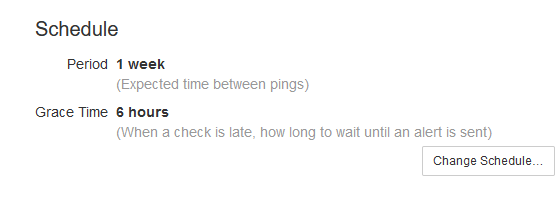
Also it would probably be good to include a note about period/grace time when measuring runtime, on the Simple Schedule UI itself, which currently has very simple descriptions. Probably in the check details page as well:
image

I still think the flexibility / complexity tradeoff is not worth it. I had a quick look at production data – the percentage of checks with the last execution time > 24 hours is 0.03%.

So I just checked and my longest backup jobs are 12-15hrs, but most are 1-6hrs. Out of curiosity, what percentage of checks do you have > 6hrs? > 12hrs?

<!-- gh-comment-id:892080240 --> @kaysond commented on GitHub (Aug 3, 2021): > Yes, happy to improve documentation. Do you have specific suggestions? > I suppose in https://healthchecks.io/docs/measuring_script_run_time/ this lone paragraph could be expanded, it is easy to miss Yes, definitely there. Also in https://healthchecks.io/docs/configuring_checks/, under `Simple Schedules`, I think it would be helpful to add a note on how the behavior of "Period"/"Grace Time" changes if your job sends a `/start` ping. Also it would probably be good to include a note about period/grace time when measuring runtime, on the Simple Schedule UI itself, which currently has very simple descriptions. Probably in the check details page as well: ![image](https://user-images.githubusercontent.com/1147328/128069160-27d40143-56bf-4cc4-ab30-cb35e54d48d3.png) >I still think the flexibility / complexity tradeoff is not worth it. I had a quick look at production data – the percentage of checks with the last execution time > 24 hours is 0.03%. So I just checked and my longest backup jobs are 12-15hrs, but most are 1-6hrs. Out of curiosity, what percentage of checks do you have > 6hrs? > 12hrs?
Author
Owner

@kaysond commented on GitHub (Aug 3, 2021):

Also - if you do use a simple schedule, and the job pings /start, does healthchecks just ignore the period?

<!-- gh-comment-id:892080738 --> @kaysond commented on GitHub (Aug 3, 2021): Also - if you do use a simple schedule, and the job pings `/start`, does `healthchecks` just ignore the `period`?
Author
Owner

@cuu508 commented on GitHub (Aug 6, 2021):

I'm looking into improving the documentation, but every sentence is a struggle – as always :-/

Also - if you do use a simple schedule, and the job pings /start, does healthchecks just ignore the period?

No, the normal rules still apply. But, let's say, if you set period to 30 days, you would have almost that. In that case, the job is free to start "whenever", but when it starts, it must complete within grace time. And it needs to complete at least once every 30 days.

<!-- gh-comment-id:894251948 --> @cuu508 commented on GitHub (Aug 6, 2021): I'm looking into improving the documentation, but every sentence is a struggle – as always :-/ > Also - if you do use a simple schedule, and the job pings /start, does healthchecks just ignore the period? No, the normal rules still apply. But, let's say, if you set period to 30 days, you would have almost that. In that case, the job is free to start "whenever", but when it starts, it must complete within grace time. And it needs to complete at least once every 30 days.
Author
Owner

@cuu508 commented on GitHub (Aug 10, 2021):

Out of curiosity, what percentage of checks do you have > 6hrs? > 12hrs?

On Healthchecks.io,

Total number of checks ~80'000
Checks that track time (last duration is not null) ~13'000
Checks with last duration below 1h ~12'000 (93% of the checks that use time tracking)
Checks with last duration between 1h and 6h ~600 (5% of the checks that use time tracking)
Checks with last duration between 6h and 12h ~100 (0.8% of checks that use time tracking)
Checks with last duration above 12h ~100 (0.8% of checks that use time tracking)
<!-- gh-comment-id:895988244 --> @cuu508 commented on GitHub (Aug 10, 2021): > Out of curiosity, what percentage of checks do you have > 6hrs? > 12hrs? On Healthchecks.io, |||| |-|-:|-| |Total number of checks| ~80'000|| |Checks that track time (last duration is not null)| ~13'000|| |Checks with last duration below 1h| ~12'000|(93% of the checks that use time tracking)| |Checks with last duration between 1h and 6h| ~600|(5% of the checks that use time tracking)| |Checks with last duration between 6h and 12h| ~100|(0.8% of checks that use time tracking)| |Checks with last duration above 12h| ~100|(0.8% of checks that use time tracking)|
Author
Owner

@kaysond commented on GitHub (Aug 10, 2021):

No, the normal rules still apply. But, let's say, if you set period to 30 days, you would have almost that. In that case, the job is free to start "whenever", but when it starts, it must complete within grace time. And it needs to complete at least once every 30 days.

I'm assuming the grace time still applies to the period? Meaning, suppose I have a 6hr daily job. I set the period = 1 day, and grace time = 6hr. It starts Tuesday at 5am and finishes at 11am. The next day, Wednesday, its delayed for some reason and starts at 10:59am. It still wouldn't mark it as down because the grace time hasn't elapsed, correct?

On Healthchecks.io,

Total number of checks ~80'000
Checks that track time (last duration is not null) ~13'000
Checks with last duration below 1h ~12'000 (93% of the checks that use time tracking)
Checks with last duration between 1h and 6h ~600 (5% of the checks that use time tracking)
Checks with last duration between 6h and 12h ~100 (0.8% of checks that use time tracking)
Checks with last duration above 12h ~100 (0.8% of checks that use time tracking)

That's really interesting. I guess there aren't a lot of off-site backups over slow connections 😄

<!-- gh-comment-id:896293242 --> @kaysond commented on GitHub (Aug 10, 2021): > No, the normal rules still apply. But, let's say, if you set period to 30 days, you would have almost that. In that case, the job is free to start "whenever", but when it starts, it must complete within grace time. And it needs to complete at least once every 30 days. I'm assuming the grace time still applies to the period? Meaning, suppose I have a 6hr daily job. I set the period = 1 day, and grace time = 6hr. It starts Tuesday at 5am and finishes at 11am. The next day, Wednesday, its delayed for some reason and starts at 10:59am. It still wouldn't mark it as down because the grace time hasn't elapsed, correct? > On Healthchecks.io, > > Total number of checks ~80'000 > Checks that track time (last duration is not null) ~13'000 > Checks with last duration below 1h ~12'000 (93% of the checks that use time tracking) > Checks with last duration between 1h and 6h ~600 (5% of the checks that use time tracking) > Checks with last duration between 6h and 12h ~100 (0.8% of checks that use time tracking) > Checks with last duration above 12h ~100 (0.8% of checks that use time tracking) That's really interesting. I guess there aren't a lot of off-site backups over slow connections 😄
Author
Owner

@cuu508 commented on GitHub (Aug 11, 2021):

suppose I have a 6hr daily job. I set the period = 1 day, and grace time = 6hr. It starts Tuesday at 5am and finishes at 11am. The next day, Wednesday, its delayed for some reason and starts at 10:59am. It still wouldn't mark it as down because the grace time hasn't elapsed, correct?

Yes.

The run on Tuesday completes at 11am. On Wednesday, at 10:59, it has not yet exceeded its period of 1 day (one minute of time is still left), so its status will be "up" (green checkmark icon).

Let's say there is no "success" ping at all on Wednesday. Here's what would happen next:

  • on Wednesday 11am (exactly 24 hours after the last "success" ping) the check would show as "late" in the dashboard (amber icon). This does not send any alerts out yet.
  • on Wednesday 5pm (24 + 6 hours after the last "success" ping) the check would be marked as "down (red icon), and you would receive an alert

Now, for the sake of example, let's add a "start" signal in the mix:

  • the job sends a success signal at 11am on Tuesday
  • and the job sends a "start" signal at 10am on Wednesday
  • at 11am of Wednesday, the check will start showing up as "late", because full 24 hours have passed with no "success" signal.
  • at 4pm of Wednesday, the check will be marked as "down", because 6 hours have passed since the "start" signal
  • at 5pm of Wednesday, the 24 + 6 hours runs out, but the check is already down, so check's state does not change and there are no additional alerts
<!-- gh-comment-id:896529864 --> @cuu508 commented on GitHub (Aug 11, 2021): > suppose I have a 6hr daily job. I set the period = 1 day, and grace time = 6hr. It starts Tuesday at 5am and finishes at 11am. The next day, Wednesday, its delayed for some reason and starts at 10:59am. It still wouldn't mark it as down because the grace time hasn't elapsed, correct? Yes. The run on Tuesday completes at 11am. On Wednesday, at 10:59, it has not yet exceeded its period of 1 day (one minute of time is still left), so its status will be "up" (green checkmark icon). Let's say there is no "success" ping at all on Wednesday. Here's what would happen next: * on Wednesday 11am (exactly 24 hours after the last "success" ping) the check would show as "late" in the dashboard (amber icon). This does not send any alerts out yet. * on Wednesday 5pm (24 + 6 hours after the last "success" ping) the check would be marked as "down (red icon), and you would receive an alert Now, for the sake of example, let's add a "start" signal in the mix: * the job sends a success signal at 11am on Tuesday * **and the job sends a "start" signal at 10am on Wednesday** * at 11am of Wednesday, the check will start showing up as "late", because full 24 hours have passed with no "success" signal. * at 4pm of Wednesday, the check will be marked as "down", because 6 hours have passed since the "start" signal * at 5pm of Wednesday, the 24 + 6 hours runs out, but the check is already down, so check's state does not change and there are no additional alerts
Author
Owner

@kaysond commented on GitHub (Aug 12, 2021):

Thanks for the explanation. This is helping my understanding but also highlighting why I was confused!

So in the second case (i.e. with "start"), does the check go late/down if "start" takes too long?

  • Tuesday @ 5am - start
  • Tuesday @ 11am - success
  • Wednesday @5:01am - is this late?
  • Wednesday @11:01am - late because of no success; is this down because of no start?
<!-- gh-comment-id:897368680 --> @kaysond commented on GitHub (Aug 12, 2021): Thanks for the explanation. This is helping my understanding but also highlighting why I was confused! So in the second case (i.e. with "start"), does the check go late/down if "start" takes too long? - Tuesday @ 5am - start - Tuesday @ 11am - success - Wednesday @5:01am - **is this late?** - Wednesday @11:01am - late because of no success; **is this down because of no start?**
Author
Owner

@cuu508 commented on GitHub (Aug 12, 2021):

does the check go late/down if "start" takes too long?

No, "start" signals are optional. All that matters is that "success" signals arrive on schedule. But if you do send start signals, the schedule has one extra rule: gaps between "start" and "success" signals must be < grace time.

  • Tuesday @ 5am - start
  • Tuesday @ 11am - success
  • Wednesday @5:01am - it is not late, because 24 hours have not yet passed since the last "success" signal
  • Wednesday @11:01am - it is late because 24 hours have passed since the last "success"

PS. I've updated documentation in a couple places:

You also suggested updating wording in the Period / Grace dialog, and in the Check Details page but I think multi-sentence descriptions would not fit there.

<!-- gh-comment-id:897397157 --> @cuu508 commented on GitHub (Aug 12, 2021): > does the check go late/down if "start" takes too long? No, "start" signals are optional. All that matters is that "success" signals arrive on schedule. But if you *do* send start signals, the schedule has one extra rule: gaps between "start" and "success" signals must be < grace time. * Tuesday @ 5am - start * Tuesday @ 11am - success * Wednesday @5:01am - it is not late, because 24 hours have not yet passed since the last "success" signal * Wednesday @11:01am - it is late because 24 hours have passed since the last "success" PS. I've updated documentation in a couple places: * Added a note in [Configuring checks / Simple Schedules](https://healthchecks.io/docs/configuring_checks/). * In [Measuring script run time](https://healthchecks.io/docs/measuring_script_run_time/), added "Alerting Logic" section so it stands out more. * In [Docs / Introduction](https://healthchecks.io/docs/) page, added a "Concepts" section which also describes Grace Time. You also suggested updating wording in the Period / Grace dialog, and in the Check Details page but I think multi-sentence descriptions would not fit there.
Author
Owner

@kaysond commented on GitHub (Aug 12, 2021):

PS. I've updated documentation in a couple places:

That's much clearer. Thanks.

You also suggested updating wording in the Period / Grace dialog, and in the Check Details page but I think multi-sentence descriptions would not fit there.

I agree, but I bet you could do a single sentence that explains the additional rule. Maybe something like:

Grace Time how long to wait after a check is late, or after a start signal is received, to send an alert

All that matters is that "success" signals arrive on schedule

Ah. So I thought the start signal makes sure the job starts on time, in addition to measuring run time. That's something that would be desirable for the 1% of us that run long jobs, since you could get an earlier alert if the job doesn't even start.

<!-- gh-comment-id:897822075 --> @kaysond commented on GitHub (Aug 12, 2021): > PS. I've updated documentation in a couple places: That's much clearer. Thanks. > You also suggested updating wording in the Period / Grace dialog, and in the Check Details page but I think multi-sentence descriptions would not fit there. I agree, but I bet you could do a single sentence that explains the additional rule. Maybe something like: **Grace Time** how long to wait after a check is late, or after a start signal is received, to send an alert > All that matters is that "success" signals arrive on schedule Ah. So I thought the `start` signal makes sure the job starts on time, in addition to measuring run time. That's something that would be desirable for the 1% of us that run long jobs, since you could get an earlier alert if the job doesn't even start.
Author
Owner

@kaysond commented on GitHub (Aug 12, 2021):

I wonder if a clean way to add some flexibility, without over-complicating the UI, is to add a couple of "advanced" checkbox options under the Schedule section of the check page. This way it doesn't clutter the regular schedule modal, and on launch, no default behavior changes.

[X] Send an alert if the job doesn't finish within a grace time of the start

^default on, behavior while on is unchanged from current behavior. when off, it disables the extra rule that monitors the gap between start and success. there is still the normal "success" rule that will trip if the time between success pings is too long

[ ] Send an alert if the job starts late

^ default off. if on, adds "success"-like monitoring to the "start" that brings it down after 1 period + 1 grace time after the last start

image

<!-- gh-comment-id:897822173 --> @kaysond commented on GitHub (Aug 12, 2021): I wonder if a clean way to add some flexibility, without over-complicating the UI, is to add a couple of "advanced" checkbox options under the **Schedule** section of the check page. This way it doesn't clutter the regular schedule modal, and on launch, no default behavior changes. [X] Send an alert if the job doesn't finish within a grace time of the start ^default on, behavior while on is unchanged from current behavior. when off, it disables the extra rule that monitors the gap between start and success. there is still the normal "success" rule that will trip if the time between success pings is too long [ ] Send an alert if the job starts late ^ default off. if on, adds "success"-like monitoring to the "start" that brings it down after 1 period + 1 grace time after the last start ![image](https://user-images.githubusercontent.com/1147328/129239258-5ee5f808-c0a2-4d96-bf2e-129338a01aab.png)
Author
Owner

@cuu508 commented on GitHub (Aug 18, 2021):

I agree, but I bet you could do a single sentence that explains the additional rule. Maybe something like (...)

That's good point, I've updated the "Change Schedule" dialog:

image

I wonder if a clean way to add some flexibility, without over-complicating the UI, is to add a couple of "advanced" checkbox options under the Schedule section of the check page. This way it doesn't clutter the regular schedule modal, and on launch, no default behavior changes.

The scheduling options logically belong together. Having some inside the modal, and a few others outside it does not make sense to me. But we could probably find or make a place to tuck the additional configuration options in. There would still be the task of documenting these options, and actually implementing them.

I'll leave this as-is for now.

<!-- gh-comment-id:901037869 --> @cuu508 commented on GitHub (Aug 18, 2021): > I agree, but I bet you could do a single sentence that explains the additional rule. Maybe something like (...) That's good point, I've updated the "Change Schedule" dialog: ![image](https://user-images.githubusercontent.com/661859/129888543-1e7141d9-7055-473a-8bd7-6d5b937a94f7.png) > I wonder if a clean way to add some flexibility, without over-complicating the UI, is to add a couple of "advanced" checkbox options under the Schedule section of the check page. This way it doesn't clutter the regular schedule modal, and on launch, no default behavior changes. The scheduling options logically belong together. Having some inside the modal, and a few others outside it does not make sense to me. But we could probably find or make a place to tuck the additional configuration options in. There would still be the task of documenting these options, and actually implementing them. I'll leave this as-is for now.
Author
Owner

@kaysond commented on GitHub (Aug 19, 2021):

That's good point, I've updated the "Change Schedule" dialog:

Nice!

The scheduling options logically belong together. Having some inside the modal, and a few others outside it does not make sense to me

Good point. I agree.

But we could probably find or make a place to tuck the additional configuration options in. There would still be the task of documenting these options, and actually implementing them.

I think so too, and understand that its not necessarily a simple task.

I'll leave this as-is for now.

That's disappointing. I think healthchecks would be more useful and more powerful if grace time and job run time were separated. Just because most checks are short doesn't mean those checks wouldn't use the extra functionality.

Nonetheless, I appreciate your willingness to discuss it.

<!-- gh-comment-id:901577825 --> @kaysond commented on GitHub (Aug 19, 2021): > That's good point, I've updated the "Change Schedule" dialog: Nice! > The scheduling options logically belong together. Having some inside the modal, and a few others outside it does not make sense to me Good point. I agree. > But we could probably find or make a place to tuck the additional configuration options in. There would still be the task of documenting these options, and actually implementing them. I think so too, and understand that its not necessarily a simple task. > I'll leave this as-is for now. That's disappointing. I think healthchecks would be more useful and more powerful if grace time and job run time were separated. Just because most checks are short doesn't mean those checks wouldn't use the extra functionality. Nonetheless, I appreciate your willingness to discuss it.
Author
Owner

@ilanbenb commented on GitHub (Sep 19, 2021):

I agree, but I bet you could do a single sentence that explains the additional rule. Maybe something like (...)

That's good point, I've updated the "Change Schedule" dialog:

image

I wonder if a clean way to add some flexibility, without over-complicating the UI, is to add a couple of "advanced" checkbox options under the Schedule section of the check page. This way it doesn't clutter the regular schedule modal, and on launch, no default behavior changes.

The scheduling options logically belong together. Having some inside the modal, and a few others outside it does not make sense to me. But we could probably find or make a place to tuck the additional configuration options in. There would still be the task of documenting these options, and actually implementing them.

I'll leave this as-is for now.

Hey,
when a check is late, OR has recieved a
I would advise putting the "or" word in bold underlined font to make it crystal clear :)

<!-- gh-comment-id:922436367 --> @ilanbenb commented on GitHub (Sep 19, 2021): > > I agree, but I bet you could do a single sentence that explains the additional rule. Maybe something like (...) > > That's good point, I've updated the "Change Schedule" dialog: > > ![image](https://user-images.githubusercontent.com/661859/129888543-1e7141d9-7055-473a-8bd7-6d5b937a94f7.png) > > > I wonder if a clean way to add some flexibility, without over-complicating the UI, is to add a couple of "advanced" checkbox options under the Schedule section of the check page. This way it doesn't clutter the regular schedule modal, and on launch, no default behavior changes. > > The scheduling options logically belong together. Having some inside the modal, and a few others outside it does not make sense to me. But we could probably find or make a place to tuck the additional configuration options in. There would still be the task of documenting these options, and actually implementing them. > > I'll leave this as-is for now. Hey, `when a check is late, OR has recieved a` I would advise putting the "or" word in bold underlined font to make it crystal clear :)
Author
Owner

@cuu508 commented on GitHub (Sep 20, 2021):

Thanks for the tip, @ilanbenb.
I made "or" bold. I didn't add the underline, I think could be confused with a link then.

<!-- gh-comment-id:922658687 --> @cuu508 commented on GitHub (Sep 20, 2021): Thanks for the tip, @ilanbenb. I made "or" bold. I didn't add the underline, I think could be confused with a link then.
Sign in to join this conversation.
No milestone
No project
No assignees
1 participant
Notifications
Due date
The due date is invalid or out of range. Please use the format "yyyy-mm-dd".

No due date set.

Dependencies

No dependencies set.

Reference
starred/healthchecks#395
No description provided.