mirror of
https://github.com/floccusaddon/floccus.git
synced 2026-04-25 22:26:06 +03:00
[GH-ISSUE #131] Floccus v3 beta phase #123
Labels
No labels
browser-specific
bug
correctness issues
enhancement
feature: Google Drive
feature: Linkwarden
feature: git
feature: nextcloud-bookmarks
feature: tabs
feature: webdav
help wanted
native-app
priority: high
priority: low
priority: medium
pull-request
question
question
stale
upstream
waiting for more information
wontfix
🙁 Not following issue template
No milestone
No project
No assignees
1 participant

Notifications
Due date
No due date set.
Dependencies
No dependencies set.
Reference
starred/floccus#123
Loading…
Add table
Add a link
Reference in a new issue
No description provided.
Delete branch "%!s()"
Deleting a branch is permanent. Although the deleted branch may continue to exist for a short time before it actually gets removed, it CANNOT be undone in most cases. Continue?
Originally created by @marcelklehr on GitHub (Jul 2, 2018).
Original GitHub issue: https://github.com/floccusaddon/floccus/issues/131
Hey there,
it's been a little quiet the last few weeks, but @jlbprof and I have been working to improve your sync experience
Highlights of the upcoming release include more stable UI code, a completely revamped sync process which is much faster, a new optional WebDAV/XBEL backend to store bookmarks without the Nextcloud bookmarks app (big thanks for this one, julian!), and also (finally) support for bookmarking the same URL twice in both the WebDAV and the nextcloud bookmarks adapter.
What is left to do before the release? Testing and feedback! :)
Try out the beta and leave your feedback here in the comments! Anything is welcome: UI, UX, but of course also bugs and anything else that comes to mind.
Update: Beta 9 is available, now.
How to install the beta
Chrome/Chromium
*.crxfilecrxin yourchrome://extensions/pageAlternatively, since this might not work for everybody:
*.zipfilechrome://extensions/Load unpackedand select the previously unpacked floccs folderFirefox
*.zipfileabout:debuggingLoad temporary addonselectmanifest.jsonin the previously downloaded folder fileCheers!
@TeutonJon78 commented on GitHub (Jul 3, 2018):
I tried the Chrome version, and using it to sync to a Nextcloud via WebDAV. All I get when I try to sync is:
Network Error: Unable to determine status of lock file bookmarks.xbel.lockAnd if I remember correctly, we can't sync directly the whole tree, we have to sync bookmarks toolbar and the "Other bookmarks" separately if we want cross browser syncting. Correct?
Chrome also throws up this extensions error on the extensions console:
Unrecognized manifest key 'applications'.I installed via the unpackged method as dragging and dropping wasn't working.@marcelklehr commented on GitHub (Jul 3, 2018):
Ah, I forgot to specify that you need to enter the complete WebDAV url for nextcloud, i.e.
https://<nextcloud-server>/remote.php/webdav/Yes, that's still applicable.
@TeutonJon78 commented on GitHub (Jul 4, 2018):
Ok, I looked up in the Nextloud manual, and for 13 it's
https://<nextcloud-server>/remote.php/dav/files/USERNAME/Then they sync'ed correctly. It might be nice to have a future feature where floccus has it's own internal representation for the toolsbar and the internal folders so that it could be done in one step. Then the plugin side could determine where to stick them since they know which browser they're in.
For the Nextcloud option, you might have to clarify the text that it's for "Nextcloud Booksmarks App" or something so people don't think they can just select that for the XBEL version.
@jlbprof commented on GitHub (Jul 4, 2018):
If you use the nextcloud server, it works better if you do as follows:
https:///remote.php/webdav/
This is what is displayed in the lower left corner of you nextcloud files
page under settings/webdav. Displayed in clear text so you can cut and
paste it. The url you list may not work as well as the one listed in the
settings page.
On Tue, Jul 3, 2018 at 8:27 PM TeutonJon78 notifications@github.com wrote:
@TeutonJon78 commented on GitHub (Jul 4, 2018):
Both seem to work -- strange that they put a different path in the user manual vs. the actual software.
@aktentasche commented on GitHub (Jul 5, 2018):
Doing a fresh sync right now, looks good! I had the wrong URL entered before, corrected, now the sync runs but the error message is still there. I think this is a bit confusing from a UX point of view.
Also, I needed to create a WebDAV account before a click on "new nextcloud" account worked.
Are you planning to have a log windows or something? Would be nice to see what is synced.
@marcelklehr commented on GitHub (Jul 8, 2018):
@aktentasche Thanks for your feedback! The UX issue is a good point! I just fixed it. The account creation not working is also fixed, now -- thanks!
Regarding the log: That's a good idea. Although, the browser console already has a logs for debugging purposes, the normal user might want to see logs as well -- without jumping through hoops to get there.
@TeutonJon78 commented on GitHub (Jul 11, 2018):
Note: I'm testing this is Chrome.
UX Issues: When adding an account, perhaps it might be good to add it to the bottom of the list rather than the top. Maybe default to copying the settings from a previous account as well (or provide a duplicate account option or something).
UI/UX Issue: When you go to the use directory selector for the bookmark directory (in Chrome), the check box for the directory is hard to see/know to select. It's the same color as the as the currently selected directory. Also, the box is slightly offset from the bar by a few pixels. Maybe it better to just click to select rather than have the checkbox?
UX Issue: Is there a way to "save" the account settings rather than save them as your typing? It's hard to know when you're "done" setting up the account what you should do, or the edge of case of it decides to sync WHILE you're setting up the account (not sure of the triggers for syncing).
UX Issue: If there is are two accounts syncing and one finishes, it clears the system icon from the extension icon even if one is still syncing.
@bernd-wechner commented on GitHub (Jul 13, 2018):
OK, I tried the beta on Firefox 61.0 on Linux Mint 19 and got this result:
Not a good result. So I openned the debug console and clicked Sync Now and nabbed this:
@bernd-wechner commented on GitHub (Jul 13, 2018):
It's real hard copying the output from the debug console BTW. If there's an easier more complete way let me know. But I notice that collapsed items are copied only as the collapsed item, meaning I can drill down into the items in the copy above in the console, but the content of the message is not in the copy above. That of course and that I have to do a some global replaces on my personal details to like account and password and server.
@marcelklehr commented on GitHub (Jul 16, 2018):
@TeutonJon78 Thanks for the valuable input!
@bernd-wechner I'll see what I can do to simplify error reporting. Perhaps an in-app log view is indeed in order. The bug you described should be fixed in the new beta version, I just released.
@bernd-wechner commented on GitHub (Jul 17, 2018):
Just tried the beta 3. No luck. When I got about:debugging, I then remove floccus and add it again using the beta 3 xpi. Then the floccus properties are displayed. So far so good. But the following observations:
It has the Sync Now, Reset and Choose Folder buttons disabled, it displays Syncing ... next to the Options button, the Options button works (collapses and expands the options), but the Delete this account button does not respond in any way though it looks enabled.
It seems to stay Syncing ... for a long time, longer than I've waited so far, but lets say tens of minutes at least. So I'm suspecting something wrong which is why I want to delete the account and re-configure it. But can't do. Only way I can do that is removing floccus then adding again only I can't as it starts up Syncing... again ...
The toolbar menu drops down but shows no accounts. But it has a little run tests link and if I click it tests the link and all tests pass! All the while the properties page still shows Syncing ....
Next thing I'll try is a FF restart I guess. But reporting this now.
@bernd-wechner commented on GitHub (Jul 17, 2018):
OK FF restart and I observe the following:
Sync worked (was slow but worked). Tick.
Alas when I click Sync Now on the options page, nothing seems to happen.
If I look at the toolbar drop down it says Syncing...
Conclusion, the status is not being updated on the options page when I click Sync Now.
So I started a Sync from the Toolbar menu, and same deal, Toolbar menu displays Syncing... the Options page only shows "all good".
Finally, I specified options as above (just the Bookmarks Menu configuration). Oddly on nextcloud I now see a load of Bookmarks that are NOT in the floccus:>BookmarksMenu, that clearly come from my toolbar, for example foccus:>Cloud and flocuss:>Tools which are toolbar bookmark folders I have. I wonder if there's a bug there and how to test that. But here we tap into an uncertainty I have that would be nice to clarify in the help or UI or somewhere easily spotted. Namely what happens if I delete all my nextcloud bookmarks? More generally what is the logic flocuss follows when browser and nextcloud disagree? There are many options here and it would be nice to know which are in place. Consider:
Bookmark exists in browser and not in Nextcloud
Option 1: Add it to Nextcloud
Option 2: Remove it from Browser
Bookmark exists in nextcloud and not in Browser
Option 1: Add it to browser
Option 2: Remove it from nextcloud
which one is the master and when? Is it consistently one or the other, based on timestamps somehow?
I'm, nervous because Xmarks trashed all my bookmarks several times and only local backups saved me.
@bernd-wechner commented on GitHub (Jul 17, 2018):
Also there is a selector beside Add Account for choosing Bookmarks or WebDAV. Wanted to try the latter. But if I select WebDAV on either the options page or the toolbar drop down, it doesn't take, it continues to display Bookmarks. Odd.
@marcelklehr commented on GitHub (Jul 17, 2018):
If you specify a server path, floccus doesn't touch any bookmarks that are not in subdirectories of that path, so as I understand your description, this is intended behavior.
The sync algorithm works as follows:
You can remove the cache of what used to exist and thus trigger a sync from scratch which causes floccus to merge browser and server, regardless of what used to exist, by resetting the local sync folder.
Update:
Fixed in beta.4 ;)
@bernd-wechner commented on GitHub (Jul 17, 2018):
Can you clarify what you mean by "trigger a sync from scratch" as point 4 is exactly what I worry about, that if I empty my Nextcloud store to test a clean start up and sync to it with no legacy data there, that it might instead erase all my browser bookmarks ;-).
On the first point I'm confused. I have specified a Server Folder of /BookmarksMenu and a Sync Folder of "/Bookmarks Menu" which I selected from:
And so I see loads of bookmarks with this tag:
which I expect, but why would I expect bookmarks with this tag:
Those bookmarks are on the Bookmarks Toolbar not in the Bookmarks Menu. I'm a tad puzzled.
@marcelklehr commented on GitHub (Jul 17, 2018):
A sync from scratch basically merges the upstream and the local bookmarks while never deleting anything and avoiding the creation of duplicates. You can trigger it by setting a new local sync folder (you can also re-select the same one from the folder picker). This will clear floccus' cache and cause a sync from scratch on the next sync run. You can also delete your account in floccus and recreate it. This probably feels safer, but has the same effect and is more tedious.
Is it possible that those bookmarks are still there from an earlier sync? If that is the case, and you have set your server path to 'BookmarksMenu' then floccus won't touch anything not in that path.
UPDATE: (Edited the explanation for sync from scratch.)
@jlbprof commented on GitHub (Jul 17, 2018):
Marcel
Just a suggestion, perhaps the person with the problem would be willing to
send you a bookmarks.html file that you could install on a blank copy of
the browser and maybe you would see the same issues?
Just a thought.
Julian
On Tue, Jul 17, 2018 at 2:39 PM Marcel Klehr notifications@github.com
wrote:
@bernd-wechner commented on GitHub (Jul 17, 2018):
Possibly easiest test is to backup my browser bookmarks. Delete Nextcould bookmarks. The load browser bookmarks again. Will try later in the day perhaps, no time now. Alas I'm still not clear on what a "sync from scratch" means or how I can ask floccus for on. The bookmarks I have on nextcloud all bear a time stamp and were all timestamped form the last sync (more or less, that day, hour and a credible minute) and no legacy alas. I had the thought that they might be legacy which is why I want to clear the nextcloud bookmarks. But I need to remove risk of losing all my browser bookmarks to do it ;-). Will do that and report back.
Julian, I could share a bookmarks.html file, sure but it's not a first port of call for anyone, I suspect neither myself nor Marcel. It falls into the category of personal data. Now there's probably nothing sensitive there in all honesty, but unless a specific bookmark were suspected all tests are possible without relevance to the exact bookmarks. In fact I can back mine up, then create some new ones, toolbar, menu and more and test ... if that worked and my saved bookmarks didn't then maybe we'd start asking about specific marks I guess.
@skewty commented on GitHub (Jul 18, 2018):
I got a completed sync using beta4 but I got some partial folders with duplicate names in my Firefox browser. Now I will have to inspect every folder to determine how to manually merge and cleanup what I am left with.
Is there perhaps a duplicate detection regression in beta4? There doesn't seem to be any merging going on.
@marcelklehr commented on GitHub (Jul 22, 2018):
@skewty oh no! That's what point 0. is for :S -- Beta.5 fixes a bug that caused duplicates, hopefully that fixes things for you (probably not the duplicates you already have, though, I'm not sure about that).
@bernd-wechner yup, I'd also rather avoid collecting personal data from people whenever possible.
@skewty commented on GitHub (Jul 23, 2018):
@marcelklehr I am pleased to help with getting this fixed for everybody else; I have no lingering anger related to the duplicate entries :) Thank you for all your work towards this extension.
So I tried the Beta 5 build and the Add-on icon shows the red [!] but the dialog that is still up in my [chrome://extensions] tab still shows "↻ Syncing..." and "Last synchronized: never". It would be nice if they could agree on a state. :)
Interesting.. I just looked up and it is trying to Sync again (the red [!] is gone). Perhaps it has reached its periodic sync interval? Perhaps when an error occurs you could include the error / exception in the Add-on dialog somehow?
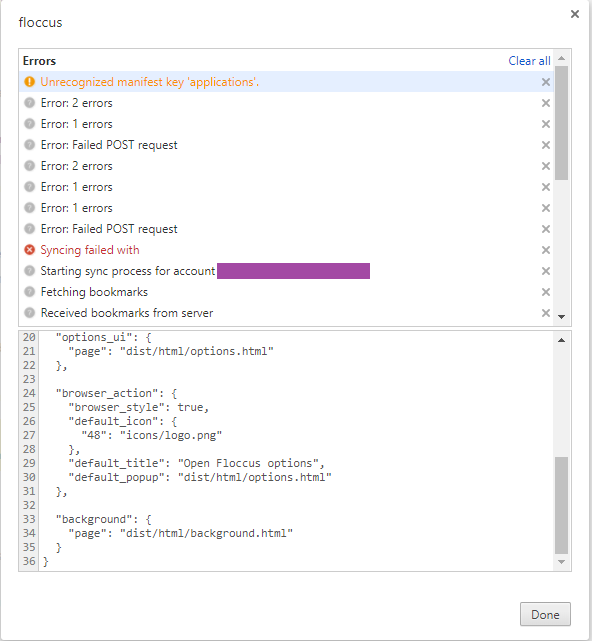
I created a new chrome://extensions tab and noticed that floccus 3.0.0 had a red "(X) Errors" just below where it says "Sync your bookmarks with nextcloud". Clicking on it showed me:
@marcelklehr commented on GitHub (Jul 23, 2018):
Any errors during syncing should be displayed in the status details (e.g. where it normally says
last synchronized: xxx minutes ago)When it says "↻ Syncing..." after updating / restarting then it probably was interrupted during the last sync. You'll have to remove the account and create it again. This is a known bug that I'll fix soon-ish (see #121 )
@marcelklehr commented on GitHub (Jul 24, 2018):
@TeutonJon78 This is something I've been meaning to do for a while and with the UI code refactoring this was now more or less trivial. So, beta.5 comes with a separate account editing view that also allows you to cancel editing and makes the overview look much cleaner, IMO.
@bernd-wechner commented on GitHub (Jul 29, 2018):
OK, tried the beta5. Not bad. The UI changed. I have to admit even though I've used it a fair bit and been here a while that after a short break confronted with the UI I am again lost as to what Server Folder is. Empirically it turns out to define the first breadcrumb in the Bookmarks tag of each item. Guess I can't think of a better term that you're using easily. Though given it's NextCloud specific perhaps "NextCloud Folder" is an improvement?
The options are all now in the pop up and it has a rather smallish size by default, be nice if it were bigger.
I did a sync it sort of seemed to work better than any before. Heaps more diagnostics on the console, lots and lots and lots.
Then it finished with a fail. But bookmarks looked all right on a cursory inspection of NextCloud. Then some while later it went and deleted all my local bookmarks. Thought they are still on NextCloud. Go figure. Good thing I have backups.
Here is stiff from the console (though still hard to share, and wonder if there's a nicer way we can do this, a log file for example):
Loads of errors and erroneous "bookmark was moved" conclusions.
@marcelklehr commented on GitHub (Aug 3, 2018):
I think I'll simply add a description to avoid confusion. :)
definitely agreed.
There always is! :) I've just implemented a custom logger component and the ability to download the last 5000 log messages as a text file from the UI. Will be in the next beta when the problems you were hit with have been ironed out.
@marcelklehr commented on GitHub (Aug 4, 2018):
Say hello to beta.6 🚨
Note that floccus doesn't work in Chrome v68 at the moment, due to #138
@skewty commented on GitHub (Aug 4, 2018):
What branch is beta.6 in? master is showing last update in
src/was 2 months ago. development?@marcelklehr commented on GitHub (Aug 4, 2018):
@skewty The master branch contains the last stable release. Development happens in the aptly named develop branch ;)
@bernd-wechner commented on GitHub (Aug 8, 2018):
Finally trying the beta 6. Will report results soon. For now I note that it says Syncing and is very slow with no sign of progress. So I'm going to retire and check it in the morning ;-). I do have a lot of bookmarks but still .. we shall see. My thought is that a progress bar might be nice but perhaps not needed in general. I mean deltas are likely to be very small on standard syncs, but perhaps it still has merit. Non trivial to do accurately of course but as the science has determined even rough progress bars are comforting to end users. For example if a rough count of local bookmarks is available or can be calculated far more quickly than a sync, and a server side count is also cheaply calculable (technically easy, a simple query on the Nextcloud database, but I'd be surprised if the Bookmarks app delivered such a count).
I may try WebDAV later.
@marcelklehr commented on GitHub (Aug 8, 2018):
v3.0.0-beta.7 has been released with the fix for #138
@bernd-wechner commented on GitHub (Aug 8, 2018):
Was still syncing this morning, according to the about:addons page but couldn't really be, so I refreshed the page and saw it wasn't. Did a Sync Now and it was complete in a fairly short time. Not instant but not more than a minute.
As an aside, probably a NextCloud issue, I notice that I can't log into the NextCloud web interface while floccus is syncing.
Given the bookmarks app on NextCloud is a tad lame pending the possible implementation of:
https://github.com/nextcloud/bookmarks/issues/514
I'm curious about the WebDAV implementation too and will look at that later.
@marcelklehr commented on GitHub (Aug 10, 2018):
@bernd-wechner
Uh. What happens if you do?
I know.
Since having web frontend accessible bookmarks collection is still kind of nice, I've been thinking of adding a feature that adds all your folder names as individual tags to the bookmarks as well, so it's a tad nicer in nextcloud. What do you folks think?Actually, strike that. It's a bad idea as there's no way to manage these tags consistently in the bookmarks app.@marcelklehr commented on GitHub (Aug 13, 2018):
🚨
v3.0.0-beta.8v3.0.0-beta.9 has been released. Now with support for simple cross-browser-vendor root folder syncing and a minor path conversion issue fixed. As always: Backups are strongly recommended.@bernd-wechner commented on GitHub (Aug 14, 2018):
Catch up time again. When I try to log in to NextCloud during a Sync, basically it doesn't, log in that it is, just lands me back at the login prompt. Bizarre but not a crisis as sync times should be rather tiny part of total time in standard operation.
Also I noticed one of the possible causes of bizarre issues I reported above is I had floccus installed on my work PC of some unknown version, doh! And it was doing stuff while I was testing at home. Fixed, it's now only on my home PC. And as time permits I'll try beta 9! And possibly with WebDav given I find the bookmarks app a tad useless (it really needs folder structure).
@Ra72xx commented on GitHub (Aug 20, 2018):
As of now, using the Nextcloud bookmark app (instead of plain WebDAV) is the only way to access synchronized bookmarks from an Android device, do I see it right? So unfortunately I think that in this use case you have to cope with the shortcomings of Nextcloud bookmarks.
For me right now, syncing with the current beta9 simply never stops :-(. I emptied my existing Nextcloud bookmarks and tried to do a clean sync from Chromium. Running the test gives the following result (I try to sync root folder to root folder, if that matters):
@marcelklehr commented on GitHub (Aug 20, 2018):
@Larx uh. Which browser (version)? Could you run the tests again and afterwards attach a screenshot and the log file here (with sensitive information removed, of course)?
@Ra72xx commented on GitHub (Aug 21, 2018):
I user Chromium Version 68.0.3440.75 (openSUSE Build) (64-Bit). The extension is the latest beta9, the Nextcloud app is still 0.11 and not the beta, maybe this is the problem?
I also have the problem that, when trying to remove and re-add the nextcloud account, always the dummy/example account seems to get in the way: Right now my real account has disappeared and floccus tries to sync with bob@example.com?!
@marcelklehr commented on GitHub (Aug 21, 2018):
@Larx
That should not be a problem.
Normally accounts don't disappear. It could be that you removed the wrong account because of the way they are ordered. You can simply click on options and change the settings, so it'll sync with the correct server.
Could you run the tests again and afterwards attach a screenshot and the log file here (with sensitive information removed, of course)?
@Ra72xx commented on GitHub (Aug 21, 2018):
If I remove the account and try to re-add, I seem not to be able to save it at the first attempt (pressing "save" does simply not react). If I then close the pop up window and re-enter it (as there is no other way), I always have this example account. In earlier attempts I could somehow persuade floccus to accept my real account data after several attempts, right now I don't even manage to do that. I cannot add another account and I cannot change the values of the example account :-( . So I don't even get close to syncing to get some logs :-( ...
@marcelklehr commented on GitHub (Aug 21, 2018):
@Larx In that case, could you open the options, change them, click the save button and afterwards, when that hasn't worked as you describe:
@marcelklehr commented on GitHub (Aug 21, 2018):
btw, this is currently the last blocker for v3 :)
@Ra72xx commented on GitHub (Aug 22, 2018):
Ok, this puts some pressure on me :-) . I'll look in it this evening.
Btw, is there an easy way to remove all entries in the bookmark app? After lots of unsuccessful sync attempts I'm kind of tired of removing dozens of bookmarks one after another, always with a confirmation prompt for each single entry :-( .
@marcelklehr commented on GitHub (Aug 22, 2018):
Oh. It wasn't meant like that! :)
You could directly remove them from the database with SQL, or you can install the latest release candidate of the bookmarks app which has a 'remove all bookmarks' button in the settings.
@Ra72xx commented on GitHub (Aug 22, 2018):
So, here is the console:
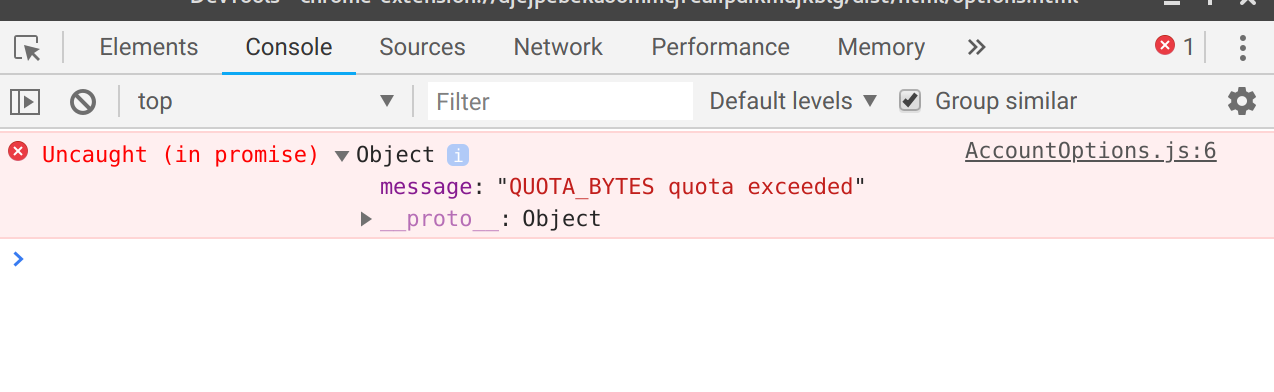
I use my own nextcloud server without any quota. However, I suspect this is not a nextcloud quota, but something else.
@ytf4425 commented on GitHub (Aug 22, 2018):
I use the WebDav in nutstore(English version is available)
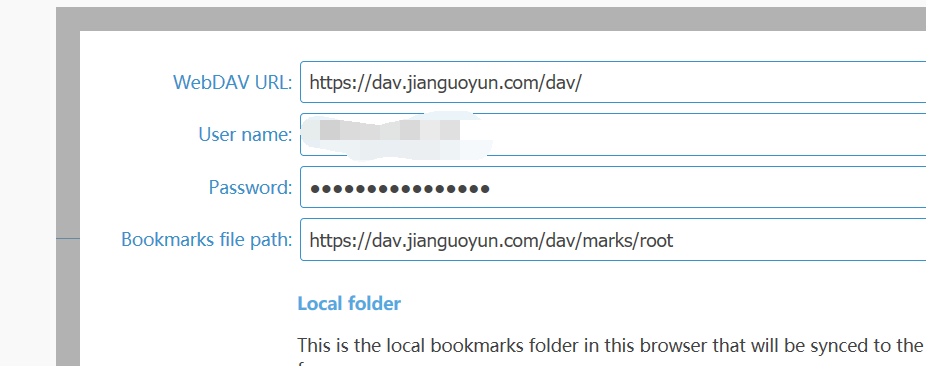
and I use complete WebDAV url but it still warns "Network Error: Unable to determine status of lock file XXX.xbel.lock"
yes it warns this whether I use complete WebDAV url
(PS: if you want to sign up one account, please create a new folder and try their WebDav in your windows explorer first)
Thanks

@marcelklehr commented on GitHub (Aug 22, 2018):
@ytf4425 The bookmarks file path needs to be a path to a file (including the file), relative to the WebDAV URL you specified. I.e. in your case it probably should simply be
marks/root.xbel@marcelklehr commented on GitHub (Aug 22, 2018):
@Larx aha! That's quite helpful. The extension has ran into chrome's storage limit. Probably because it didn't used to remove the associated cache data when deleting an account. I've fixed this in the code already. You should be able to solve this by reinstalling the extension.
@ytf4425 commented on GitHub (Aug 22, 2018):
@marcelklehr

well,still doesn't work..
@marcelklehr commented on GitHub (Aug 22, 2018):
@ytf4425 Ah. Do those folders exist already on the server? The WebDAV adapter doesn't create them for you, afaik. I'll make this more clear in the UI.
@ytf4425 commented on GitHub (Aug 22, 2018):
@marcelklehr
yes it exists and now problem has been solved
you are right that I just need to fill it with relative path rather than a complete WebDAV url
(for me it is marks/root/root.xbel rather than https://dav.jianguoyun.com/dav/marks/root/root.xbel)
@Ra72xx commented on GitHub (Aug 22, 2018):
Concerning my problem, I now have the first sync completed successfully.
@ytf4425 commented on GitHub (Aug 22, 2018):
Oh where's my updated comment..?
Thanks for providing such a good WebExtension for me to replace the dead xmarks
Two little advice:
history version recovery (you can add the date to file names)
change the file encoding format to UTF-8 or something else (I can not use wordpad.exe or notepad2 to show the xbel file correctly because there are many Chinese characters in my bookmarks)
Thanks and Best Wishes
@marcelklehr commented on GitHub (Aug 22, 2018):
ah, good point!
That's an interesting one. I'll put this in a new issue :)
Thanks for your feedback!
@marcelklehr commented on GitHub (Aug 22, 2018):
Thanks for all your help, folks! ❤️
(Now, I can close a few issues 🎉)
@github-actions[bot] commented on GitHub (Mar 21, 2023):
This issue has been automatically locked since there has not been any recent activity after it was closed. Please open a new issue for related bugs.