mirror of
https://github.com/ahmadawais/chartli.git
synced 2026-04-26 09:15:50 +03:00
CLI that turns plain numbers into terminal charts. ascii, spark, bars, columns, heatmap, unicode, braille, svg.
|
|
||
|---|---|---|
| .commandcode/taste | ||
| .github | ||
| examples | ||
| rust | ||
| skills/chartli | ||
| src | ||
| tests | ||
| .gitignore | ||
| biome.json | ||
| CHANGELOG.md | ||
| package.json | ||
| pnpm-lock.yaml | ||
| README.md | ||
| tsconfig.json | ||
| tsup.config.ts | ||
| vitest.config.ts | ||

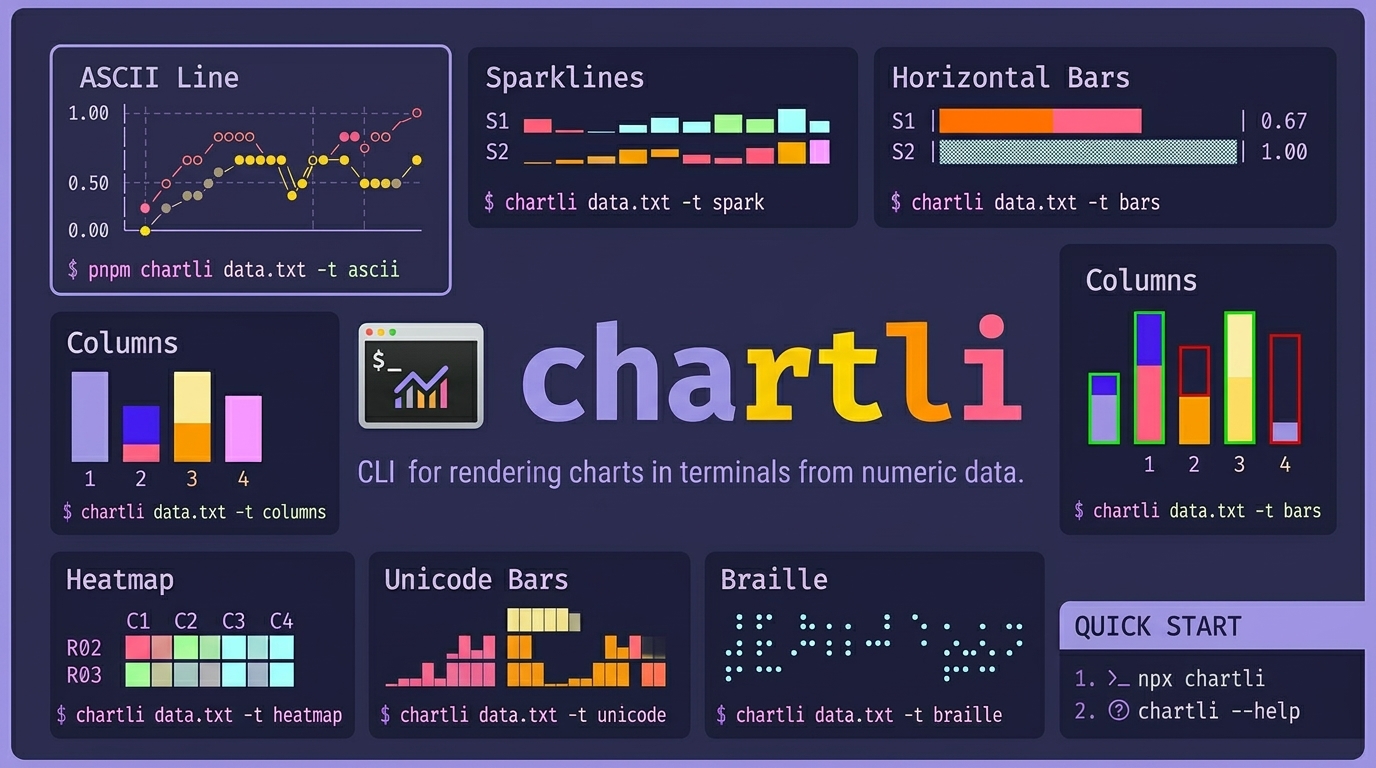
chartli
CLI for rendering charts in terminals from numeric text data. chartli turns plain numbers into terminal charts. ascii, spark, bars, columns, heatmap, unicode, braille, svg.
Install
Run instantly:
npx chartli --help
Or install globally:
npm i -g chartli
Agent skill install
Install the repository skill for agents:
npx skills add ahmadawais/chartli
Quick start:
npx chartli
npx chartli --help
Usage
npx chartli [file] [options]
Usage: chartli [options] [file]

Render terminal charts from numeric data

Arguments:
  file                   Input file (reads from stdin if not provided)

Options:
  -v, --version          Output the version number
  -t, --type <type>      Chart type: svg, ascii, unicode, braille, spark, bars,
                         columns, heatmap (default: "ascii")
  -w, --width <number>   Chart width
  -h, --height <number>  Chart height
  -m, --mode <mode>      SVG mode: circles or lines (default: "circles")
  --x-axis-label <label> Title to render for the x-axis
  --y-axis-label <label> Title to render for the y-axis
  --x-labels <labels>    Comma-separated labels for x-axis ticks or row labels
  --series-labels <labels>
                         Comma-separated labels for plotted series or categories
  --data-labels          Show raw values near plotted data when supported
  --first-column-x       Treat the first numeric column as x labels instead of a
                         plotted series
  --help                 Display help for command
Labels and metadata
- Use
--x-axis-labeland--y-axis-labelto add axis titles. - Use
--x-labelsfor explicit tick labels. - Use
--series-labelsto replace generic labels likeS1andC1. - Use
--data-labelsto print raw values on or near the plotted data where the renderer supports it. - Use
--first-column-xwhen the first numeric column is a domain likeday,month, oryear.
With --first-column-x, chartli will:
- use the first numeric column as x-axis labels
- use the first header cell as the x-axis title when a header row exists
- use the remaining header cells as series labels
- use the second header cell as the y-axis title for common two-column data
Example:
pnpm chartli examples/assets/core-single-series.txt -t ascii -w 24 -h 8 --first-column-x --data-labels
pnpm chartli examples/assets/core-multi-series.txt -t columns -h 8 --first-column-x --series-labels sales,costs,profit --x-axis-label Metrics --y-axis-label Value --data-labels
Labeled chart examples
ASCII line with inferred axis labels and data labels
pnpm chartli examples/assets/weekly-signups.txt -t ascii -w 28 -h 8 --first-column-x --data-labels
        signups
    91 │                      ●   87
       │                     91    ●
       │            73
       │             ●   68
  66.5 │   58             ●
       │    ●   49
       │42       ●
    42 │●
       └────────────────────────────
        1   2    3   4    5   6    7
                    day
Columns with explicit axis titles and inferred series names
pnpm chartli examples/assets/weekly-metrics.txt -t columns -h 8 --first-column-x --x-axis-label Metrics --y-axis-label Count --data-labels
Count
 176     29     10


  █
  █
  █
  █
  █      ▓      ▒
  █      ▓      ▒
────────────────────
visits trials  paid
      Metrics
SVG with axes, x labels, and point labels
pnpm chartli examples/assets/weekly-signups.txt -t svg -m lines -w 320 -h 120 --first-column-x --data-labels | sed -n '/^<?xml/,$p' > examples/assets/output/weekly-signups-chart.svg
This writes examples/assets/output/weekly-signups-chart.svg.
Types
asciisparkbarscolumnsheatmapunicodebraillesvg
Example data files
examples/assets/core-single-series.txtexamples/assets/core-multi-series.txtexamples/assets/image-data.txtexamples/assets/image-single-series.txtexamples/assets/image-columns-variant.txtexamples/assets/weekly-signups.txtexamples/assets/weekly-metrics.txt
Image chart set (text diagrams)
ASCII Line
pnpm chartli examples/assets/image-data.txt -t ascii -w 24 -h 8
      day=●  sales=○  costs=◆  profit=◇
1.00 │                       ○
     │
     │             ◇         ◇
     │                  ◆    ●
0.50 │                  ●    ◆
     │    ◇    ◆   ●
     │         ○   ◆
0.00 │◇   ◆    ◇        ◇
     └────────────────────────
Sparklines
pnpm chartli examples/assets/image-data.txt -t spark
day    ▁▂▃▄▅▆
sales  ▁▄▂▇▅█
costs  ▁▂▄▃▆▅
profit ▁▄▂▇▂▇
Horizontal Bars
pnpm chartli examples/assets/image-data.txt -t bars -w 28
day    |███████████████████         | 0.67
sales  |▓▓▓▓▓▓▓▓▓▓▓▓▓▓▓▓▓▓▓▓▓▓▓▓▓▓▓▓| 1.00
costs  |▒▒▒▒▒▒▒▒▒▒▒▒▒▒▒             | 0.53
profit |░░░░░░░░░░░░░░░░░░░░░░░     | 0.83
Columns
pnpm chartli examples/assets/image-data.txt -t columns -h 8
         ▓
         ▓             ░
         ▓             ░
  █      ▓             ░
  █      ▓      ▒      ░
  █      ▓      ▒      ░
  █      ▓      ▒      ░
  █      ▓      ▒      ░
───────────────────────────
 day   sales  costs  profit
Columns (Variant)
pnpm chartli examples/assets/image-columns-variant.txt -t columns -h 8
         ▓             ░
  █      ▓             ░
  █      ▓             ░
  █      ▓      ▒      ░
  █      ▓      ▒      ░
  █      ▓      ▒      ░
───────────────────────────
 day   sales  costs  profit
Heatmap
pnpm chartli examples/assets/image-data.txt -t heatmap
    day sales costs profit
R01
R02 ░ ▒ ░ ▒
R03 ░ ░ ▒ ░
R04 ▒ ▓ ░ ▓
R05 ▒ ▒ ▓ ░
R06 ▓ █ ▒ ▓
Unicode Bars
pnpm chartli examples/assets/image-data.txt -t unicode
 day    sales   costs   profit
             █
           ▃ █             ▅ ▅
     ▃     █ █      ▃      █ █
    ▂█     █▆█      █▂     █ █
   ▂██   ▂ ███    ▂ ██   ▃ █ █
  ▁███   █ ███    █▁██   █ █ █
 ▁████   █▅███   ▁████   █▁█▁█
 █████   █████   █████   █████
Braille
pnpm chartli examples/assets/image-data.txt -t braille -w 16 -h 6
profit

⠀⠀⠀⠀⠀⠀⠀⠀⠀⠀⠀⠀⠀⠀⠀⠀
⠀⠀⠀⠀⠀⠀⠀⠀⠀⠁⠀⠀⠀⠀⠀⠈
⠀⠀⠀⠀⠀⠀⠀⠀⠀⠀⠀⠀⠀⠀⠀⠀
⠀⠀⠀⠄⠀⠀⠀⠀⠀⠀⠀⠀⠀⠀⠀⠀
⠀⠀⠀⠀⠀⠀⠀⠀⠀⠀⠀⠀⠀⠀⠀⠀
⡀⠀⠀⠀⠀⠀⠁⠀⠀⠀⠀⠀⠁⠀⠀⠀
SVG Chart
pnpm chartli examples/assets/image-data.txt -t svg -m lines -w 320 -h 120 | sed -n '/^<?xml/,$p' > examples/assets/output/image-chart.svg
<?xml version='1.0'?>
<svg xmlns='http://www.w3.org/2000/svg' width='650' height='120' version='1.1'>
  <polyline ... />
  <polyline ... />
  <polyline ... />
  <polyline ... />
</svg>

Examples
All examples are data-file driven from examples/assets/.
Data files
examples/assets/core-single-series.txtexamples/assets/core-multi-series.txtexamples/assets/image-data.txtexamples/assets/image-single-series.txtexamples/assets/image-columns-variant.txtexamples/assets/weekly-signups.txtexamples/assets/weekly-metrics.txtexamples/assets/output/
Core commands
pnpm chartli examples/assets/core-single-series.txt -t ascii -w 24 -h 8pnpm chartli examples/assets/core-multi-series.txt -t sparkpnpm chartli examples/assets/core-multi-series.txt -t bars -w 28pnpm chartli examples/assets/core-multi-series.txt -t columns -h 8pnpm chartli examples/assets/core-multi-series.txt -t heatmappnpm chartli examples/assets/core-multi-series.txt -t unicodepnpm chartli examples/assets/core-single-series.txt -t braille -w 16 -h 6pnpm chartli examples/assets/core-multi-series.txt -t svg -m lines -w 320 -h 120 | sed -n '/^<?xml/,$p' > examples/assets/output/core-chart.svg
Image commands
pnpm chartli examples/assets/image-data.txt -t ascii -w 24 -h 8pnpm chartli examples/assets/image-data.txt -t sparkpnpm chartli examples/assets/image-data.txt -t bars -w 28pnpm chartli examples/assets/image-data.txt -t columns -h 8pnpm chartli examples/assets/image-columns-variant.txt -t columns -h 8pnpm chartli examples/assets/image-data.txt -t heatmappnpm chartli examples/assets/image-data.txt -t unicodepnpm chartli examples/assets/image-data.txt -t braille -w 16 -h 6pnpm chartli examples/assets/image-data.txt -t svg -m lines -w 320 -h 120 | sed -n '/^<?xml/,$p' > examples/assets/output/image-chart.svg
Labeled commands
pnpm chartli examples/assets/weekly-signups.txt -t ascii -w 28 -h 8 --first-column-x --data-labelspnpm chartli examples/assets/weekly-metrics.txt -t columns -h 8 --first-column-x --x-axis-label Metrics --y-axis-label Count --data-labelspnpm chartli examples/assets/weekly-signups.txt -t svg -m lines -w 320 -h 120 --first-column-x --data-labels | sed -n '/^<?xml/,$p' > examples/assets/output/weekly-signups-chart.svg
Run grouped examples
pnpm run example:kitchen-sinkpnpm run example:image-set:kitchen-sinkpnpm run example:labeled:kitchen-sinkpnpm run example:all-kitchen-sink
Run all examples
Image-set chart run:
pnpm run example:image-set:kitchen-sink
Core + image run:
pnpm run example:all-kitchen-sink
License
Apache-2.0 by Ahmad Awais built with Command Code.