mirror of
https://github.com/brentvollebregt/auto-py-to-exe.git
synced 2026-04-25 19:55:49 +03:00
[GH-ISSUE #56] Python process frozen after cancel select a script #57

Loading…
Add table
Add a link
Reference in a new issue
No description provided.
Delete branch "%!s()"
Deleting a branch is permanent. Although the deleted branch may continue to exist for a short time before it actually gets removed, it CANNOT be undone in most cases. Continue?
Originally created by @gainskills on GitHub (May 27, 2019).
Original GitHub issue: https://github.com/brentvollebregt/auto-py-to-exe/issues/56
Python 3.7.3
OS: MAC 10.14.5
version of auto-py-to-exe and its dependencies: Eel-0.10.4 altgraph-0.16.1 auto-py-to-exe-2.5.3 bottle-0.12.16 bottle-websocket-0.2.9 future-0.17.1 gevent-1.4.0 gevent-websocket-0.10.1 greenlet-0.4.15 macholib-1.11 pefile-2019.4.18 pyinstaller-3.4 whichcraft-0.5.
Step:
Run cmd:
autopytoexe script.py
Try to select a script with 'Script location'
In the file browser window, it failed to locate .py file and the program frozen after I click the 'Cancel' button of the browser window (From activity manager, the status of Python process is 'No response').
Issue is replicable on my laptop.
Thanks,
@brentvollebregt commented on GitHub (May 28, 2019):
In step 3, what do you mean by it failing to locate your .py file? It should be able to see all files it has permission to see; you can also change what file types are being searched for (in the selection dialog).
I tried these steps on Windows 10 and everything that occurred was expected; a blank script location was inserted after canceling (no freeze).
I don't have access to a Mac to test this but I have seen something like this occur before in my own testing and it had something to do with privileges and threads on Mac. If you give the script elevated privileges, does this still occur?
@gainskills commented on GitHub (May 28, 2019):
@brentvollebregt , thanks for your follow up.
'failling to locate the .py file' means in the selection window, I can't select a .py file, that's why I have to click 'Cancel' button and report this issue.
Could you please let me know if any log can be collect for analysis?
Thanks,
@brentvollebregt commented on GitHub (May 28, 2019):
If it is occurring in the file selection then this has something to do with tkinter. If you open up IDLE (or create a new file) and execute:
Try to select a python file using the dialog that appears, what occurs?
@gainskills commented on GitHub (May 31, 2019):
yes, I agree that the issue is caused by tkinter

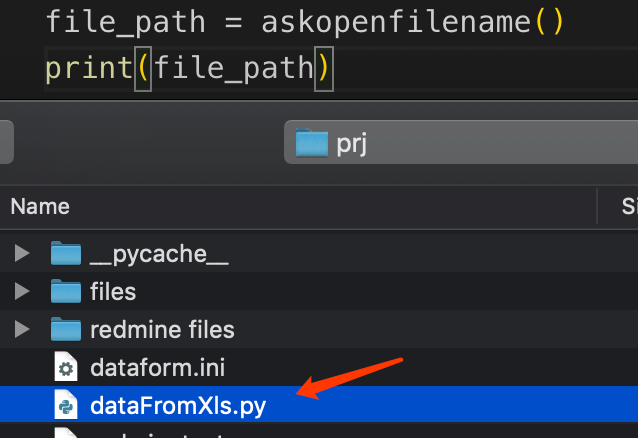
here is the screenshot wuth the code:
the py file is unable to be selected
@gainskills commented on GitHub (May 31, 2019):
I would say https://stackoverflow.com/a/19284439/2701959 figure the issue out, about
should be:
file_path = askopenfilename()I tested it and it works:
Here is another link about open file window frozen:
https://stackoverflow.com/questions/51662441/python-tkinter-askopenfilename-not-responding
Thanks,
@brentvollebregt commented on GitHub (May 31, 2019):
Oh right, this is a MacOS issue; I didn't realise there is no file type drop down in MacOS. I'll add some checks to leave out filetypes on MacOS.
@brentvollebregt commented on GitHub (May 31, 2019):
Cool, i've just made a fix and put it on the master branch. If you try this out and it works, I can deploy to PyPI with a new version.
Thanks heaps by the way, I am never able to test on MacOS but I know a lot of this is supported there.
@gainskills commented on GitHub (Jun 1, 2019):
Thanks for your update.
I created a pull request (https://github.com/brentvollebregt/auto-py-to-exe/pull/57) for the file type and frozen issue, could you please review it? ( I have ran the testing on MAC and win2012)
Thanks again,
@brentvollebregt commented on GitHub (Jun 1, 2019):
Issue resolved in #57. I'll deploy to PyPI later when I get a chance.