[GH-ISSUE #287] conversion to .exe unsuccessful, bootloader error #250

Closed
opened 2026-02-26 12:20:57 +03:00 by kerem · 4 comments
Owner

Originally created by @mayankdhami on GitHub (Jul 19, 2022).
Original GitHub issue: https://github.com/brentvollebregt/auto-py-to-exe/issues/287

Hi @brentvollebregt :)

I have a tkinter GUI based app in a single .py file, but when I am trying to convert it to .exe using 'Console mode' in auto-py-to-exe, it runs but it is just giving me a flashing command prompt for 1 sec. I tried making .exe in 'Window mode' which I read is ideal for GUI apps, it gives me this error:

image

Any ideas what could be going wrong?

Originally created by @mayankdhami on GitHub (Jul 19, 2022). Original GitHub issue: https://github.com/brentvollebregt/auto-py-to-exe/issues/287 Hi @brentvollebregt :) I have a tkinter GUI based app in a single .py file, but when I am trying to convert it to .exe using 'Console mode' in auto-py-to-exe, it runs but it is just giving me a flashing command prompt for 1 sec. I tried making .exe in 'Window mode' which I read is ideal for GUI apps, it gives me this error: ![image](https://user-images.githubusercontent.com/47538145/179748276-61a17f25-dbfb-4c27-a804-9005f69cc833.png) Any ideas what could be going wrong?
kerem closed this issue 2026-02-26 12:20:58 +03:00
Author
Owner

@brentvollebregt commented on GitHub (Jul 19, 2022):

Have you read the help page and followed the debugging steps - what did you find from that?

Also did you follow the link that is in your screenshot to investigate the missing bootloader? I imagine you took a look before creating this issue, what issues did you run into?

<!-- gh-comment-id:1189007289 --> @brentvollebregt commented on GitHub (Jul 19, 2022): Have you read the help page and followed the debugging steps - what did you find from that? Also did you follow the link that is in your screenshot to investigate the missing bootloader? I imagine you took a look before creating this issue, what issues did you run into?
Author
Owner

@mayankdhami commented on GitHub (Jul 19, 2022):

Thanks for replying! I did follow the steps in debugging, and tried checking in cmd. It generates the executable, but when I run it, it gives me this error in the very first import.

image

From there, I moved to debug step:
ModuleNotFoundError: No module named x / ImportError: No module named x

  • Adding package name 'matplotlib' to --hidden-import did not work, above error repeats.
  • I tested on two different machines as far as the issue of "installing auto-py-to-exe in one Python environment (a single installation or venv) and installed your dependent package in a different Python environment". Same error on both.

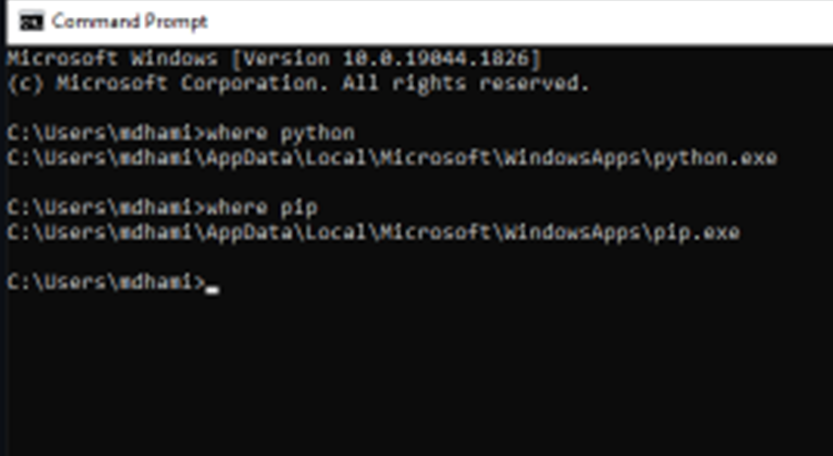
Machine 1:
image

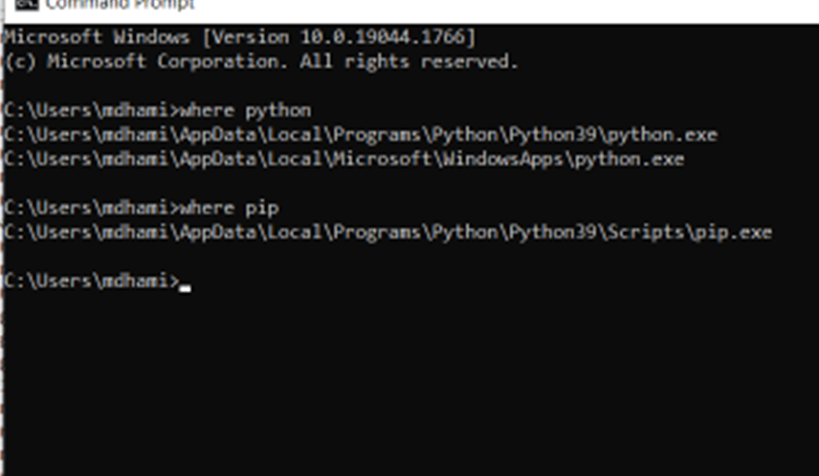
Machine 2:
image

Sorry for bad image quality!

<!-- gh-comment-id:1189293823 --> @mayankdhami commented on GitHub (Jul 19, 2022): Thanks for replying! I did follow the steps in debugging, and tried checking in cmd. It generates the executable, but when I run it, it gives me this error in the very first import. ![image](https://user-images.githubusercontent.com/47538145/179797441-6848b1bc-0cd2-4779-8a13-e69636db8e8f.png) From there, I moved to debug step: ModuleNotFoundError: No module named x / ImportError: No module named x - Adding package name 'matplotlib' to --hidden-import did not work, above error repeats. - I tested on two different machines as far as the issue of "installing auto-py-to-exe in one Python environment (a single installation or venv) and installed your dependent package in a different Python environment". Same error on both. Machine 1: ![image](https://user-images.githubusercontent.com/47538145/179800061-0a321829-33d6-4bc1-a98a-6e72b2f35dce.png) Machine 2: ![image](https://user-images.githubusercontent.com/47538145/179799921-8b0c55c5-137f-42a1-9f90-a9665ed34be0.png) Sorry for bad image quality!
Author
Owner

@brentvollebregt commented on GitHub (Jul 20, 2022):

Can you validate for me that auto-py-to-exe and matplotlib are installed in the Python installation you expect.

You can run these to show me:

where auto-py-to-exe
pip list

You can paste the full output here.

Just a note; I highly recommend adding debugging steps you have tried next time creating an issue - that ModuleNotFoundError screenshot would have been helpful at the start.

<!-- gh-comment-id:1189862587 --> @brentvollebregt commented on GitHub (Jul 20, 2022): Can you validate for me that auto-py-to-exe and matplotlib are installed in the Python installation you expect. You can run these to show me: ``` where auto-py-to-exe pip list ``` You can paste the full output here. > Just a note; I highly recommend adding debugging steps you have tried next time creating an issue - that `ModuleNotFoundError` screenshot would have been helpful at the start.
Author
Owner

@mayankdhami commented on GitHub (Jul 20, 2022):

I got this when I run these!
Sorry, I had this problem for a while and I lost the documentation of screens which I made last time. So, I did it again and it took some time.

image

Thanks for helping out.

  • With your help, I actually solved this problem using cmd in this machine where paths looked proper. I guess that was the issue and installing some other packages using pip, not conda install.

My .exe works, thanks a ton!

<!-- gh-comment-id:1190071416 --> @mayankdhami commented on GitHub (Jul 20, 2022): I got this when I run these! Sorry, I had this problem for a while and I lost the documentation of screens which I made last time. So, I did it again and it took some time. ![image](https://user-images.githubusercontent.com/47538145/179952338-212f8106-9504-4caf-aaec-cf8b5ae85f81.png) Thanks for helping out. - With your help, I actually solved this problem using cmd in this machine where paths looked proper. I guess that was the issue and installing some other packages using pip, not conda install. ![](https://user-images.githubusercontent.com/47538145/179799921-8b0c55c5-137f-42a1-9f90-a9665ed34be0.png) My .exe works, thanks a ton!
Sign in to join this conversation.
No milestone
No project
No assignees
1 participant
Notifications
Due date
The due date is invalid or out of range. Please use the format "yyyy-mm-dd".

No due date set.

Dependencies

No dependencies set.

Reference
starred/auto-py-to-exe#250
No description provided.