[GH-ISSUE #1027] Unable to update to 2.35 from 2.34.1 inside app - error code 2711 #778

Closed
opened 2026-02-26 09:32:35 +03:00 by kerem · 7 comments
Owner

Originally created by @darkred on GitHub (Dec 24, 2021).
Original GitHub issue: https://github.com/NickeManarin/ScreenToGif/issues/1027

Originally assigned to: @NickeManarin on GitHub.

Using ScreenToGit 2.34.1 in windows 11 Pro x64 fully updated.

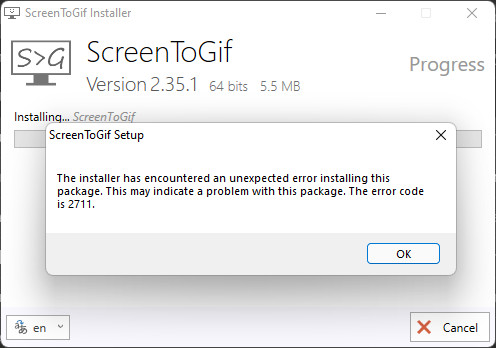
I got the notification inside app for the new 2.35 version, so I clicked it, then clicked Install, confirmed the UAC prompt, but unfortunately I got the following error:

The installer has encountered an unexpected error installing this package.
This may indicate a problem with this package. The error code is 2711.

2021-12-24_205834
2021-12-24_205547
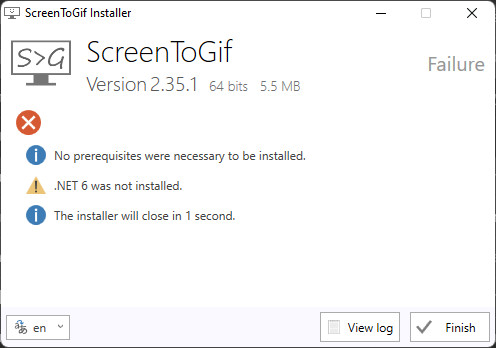
and the final page was:
2021-12-24_210014

I repeated the installation multiple times, but the installer/update never completes.

Do I have to manually install .NET 6 for the installer to work? (if yes, using what executable?)
Shouldn't the installer install it as a prequisite for me?

Originally created by @darkred on GitHub (Dec 24, 2021). Original GitHub issue: https://github.com/NickeManarin/ScreenToGif/issues/1027 Originally assigned to: @NickeManarin on GitHub. Using ScreenToGit 2.34.1 in windows 11 Pro x64 fully updated. I got the notification inside app for the new 2.35 version, so I clicked it, then clicked Install, confirmed the UAC prompt, but unfortunately I got the following error: > The installer has encountered an unexpected error installing this package. > This may indicate a problem with this package. The error code is 2711. ![2021-12-24_205834](https://user-images.githubusercontent.com/723651/147369579-813a9255-000b-4c67-9725-40610cfe1a9d.jpg) ![2021-12-24_205547](https://user-images.githubusercontent.com/723651/147369582-c4dfaaa4-050b-4d62-84ec-6842f56369a5.jpg) and the final page was: ![2021-12-24_210014](https://user-images.githubusercontent.com/723651/147369584-0e20e34c-9323-46dd-836b-5c7dfd37b77b.jpg) I repeated the installation multiple times, but the installer/update never completes. Do I have to manually install .NET 6 for the installer to work? (if yes, using what executable?) Shouldn't the installer install it as a prequisite for me?
kerem 2026-02-26 09:32:35 +03:00
Author
Owner

@NickeManarin commented on GitHub (Dec 24, 2021):

The issue at play here is that one feature was removed from the installer (SharpDx) and from the feature set.
If you update manually by downloading the and running the installer from outside the app, it should work normally.

I'll release v2.35.1 shortly to fix that issue.
Thanks for the quick feedback!

<!-- gh-comment-id:1000919161 --> @NickeManarin commented on GitHub (Dec 24, 2021): The issue at play here is that one feature was removed from the installer (SharpDx) and from the feature set. If you update manually by downloading the and running the installer from outside the app, it should work normally. I'll release v2.35.1 shortly to fix that issue. Thanks for the quick feedback!
Author
Owner

@NickeManarin commented on GitHub (Dec 24, 2021):

And yes, the installer will download .NET 6 and install for you.

<!-- gh-comment-id:1000919227 --> @NickeManarin commented on GitHub (Dec 24, 2021): And yes, the installer will download .NET 6 and install for you.
Author
Owner

@darkred commented on GitHub (Dec 24, 2021):

Thank you for the quick response.
So, I just tried updating to 2.35.1 version (from 2.34.1) inside the app, but it's still the exact same error:
2021-12-24_220800
2021-12-24_220819

I also include the log if it helps:

log:
Info: === Logging started: 24/12/2021  22:08:31 ===
CommonData: Message type: 0, Argument: 1033
CommonData: Message type: 1, Argument: ScreenToGif
ActionStart: Action 22:08:31: INSTALL. 
Info: Action start 22:08:31: INSTALL.
CommonData: 1: 0 2: 1033 3: 1252 
CommonData: 1: ScreenToGif
Info: === Logging started: 24/12/2021  22:08:32 ===
CommonData: Message type: 0, Argument: 1033
CommonData: Message type: 1, Argument: ScreenToGif
ActionStart: Action 22:08:32: INSTALL. 
Info: Action start 22:08:32: INSTALL.
InstallStart: 1: ScreenToGif 2: {83FB3F7E-CF99-4466-8AC8-F061D12869F6} 
ActionStart: Action 22:08:32: FindRelatedProducts. Searching for related applications
Info: Action start 22:08:32: FindRelatedProducts.
ActionData: Found application: {E32A6F6C-5240-4749-97D5-4C350D9F94DC}
Info: Action ended 22:08:32: FindRelatedProducts. Return value 1.
ActionStart: Action 22:08:32: WixSharp_InitRuntime_Action. 
Info: Action start 22:08:32: WixSharp_InitRuntime_Action.
Info: SFXCA: Extracting custom action to temporary directory: C:\Users\Kostas\AppData\Local\Temp\MSI55F5.tmp-\
Info: SFXCA: Binding to CLR version v4.0.30319
Info: Calling custom action WixSharp!WixSharp.ManagedProjectActions.WixSharp_InitRuntime_Action
Info: Action ended 22:08:32: WixSharp_InitRuntime_Action. Return value 1.
ActionStart: Action 22:08:32: AppSearch. Searching for installed applications
Info: Action start 22:08:32: AppSearch.
ActionData: Property: NETFRAMEWORK45, Signature: NetFramework45
Info: Action ended 22:08:32: AppSearch. Return value 1.
ActionStart: Action 22:08:32: LaunchConditions. Evaluating launch conditions
Info: Action start 22:08:32: LaunchConditions.
Info: Action ended 22:08:32: LaunchConditions. Return value 1.
ActionStart: Action 22:08:32: ValidateProductID. 
Info: Action start 22:08:33: ValidateProductID.
Info: Action ended 22:08:33: ValidateProductID. Return value 1.
ActionStart: Action 22:08:33: CostInitialize. Computing space requirements
Info: Action start 22:08:33: CostInitialize.
Info: Action ended 22:08:33: CostInitialize. Return value 1.
ActionStart: Action 22:08:33: FileCost. Computing space requirements
Info: Action start 22:08:33: FileCost.
Info: Action ended 22:08:33: FileCost. Return value 1.
ActionStart: Action 22:08:33: CostFinalize. Computing space requirements
Info: Action start 22:08:33: CostFinalize.
Info: DEBUG: Error 2711:  The specified Feature name ('SharpDX') not found in Feature Table.
Info: Action ended 22:08:34: CostFinalize. Return value 3.
Info: Action ended 22:08:34: INSTALL. Return value 3.
InstallEnd: 1: ScreenToGif 2: {83FB3F7E-CF99-4466-8AC8-F061D12869F6} 3: 3 
CommonData: 1: 2 2: 0 
CommonData: 1: 2 2: 1 
Info: Action ended 22:08:34: INSTALL. Return value 3.

Isn't possible the update procedure inside the app to download and install .NET 6.0 automatically?
Do I have to run the installer manually?

<!-- gh-comment-id:1000925220 --> @darkred commented on GitHub (Dec 24, 2021): Thank you for the quick response. So, I just tried updating to 2.35.1 version (from 2.34.1) inside the app, but it's still the exact same error: ![2021-12-24_220800](https://user-images.githubusercontent.com/723651/147371164-b4e0666e-d566-4931-8dd3-4d088abe82dd.jpg) ![2021-12-24_220819](https://user-images.githubusercontent.com/723651/147371168-4ee36af8-8c3c-4c79-9874-6edf533d1399.jpg) I also include the log if it helps: <details> <summary>log:</summary> ``` Info: === Logging started: 24/12/2021 22:08:31 === CommonData: Message type: 0, Argument: 1033 CommonData: Message type: 1, Argument: ScreenToGif ActionStart: Action 22:08:31: INSTALL. Info: Action start 22:08:31: INSTALL. CommonData: 1: 0 2: 1033 3: 1252 CommonData: 1: 0 2: 1033 3: 1252 CommonData: 1: ScreenToGif Info: === Logging started: 24/12/2021 22:08:32 === CommonData: Message type: 0, Argument: 1033 CommonData: Message type: 1, Argument: ScreenToGif ActionStart: Action 22:08:32: INSTALL. Info: Action start 22:08:32: INSTALL. InstallStart: 1: ScreenToGif 2: {83FB3F7E-CF99-4466-8AC8-F061D12869F6} ActionStart: Action 22:08:32: FindRelatedProducts. Searching for related applications Info: Action start 22:08:32: FindRelatedProducts. ActionData: Found application: {E32A6F6C-5240-4749-97D5-4C350D9F94DC} Info: Action ended 22:08:32: FindRelatedProducts. Return value 1. ActionStart: Action 22:08:32: WixSharp_InitRuntime_Action. Info: Action start 22:08:32: WixSharp_InitRuntime_Action. Info: SFXCA: Extracting custom action to temporary directory: C:\Users\Kostas\AppData\Local\Temp\MSI55F5.tmp-\ Info: SFXCA: Binding to CLR version v4.0.30319 Info: Calling custom action WixSharp!WixSharp.ManagedProjectActions.WixSharp_InitRuntime_Action Info: Action ended 22:08:32: WixSharp_InitRuntime_Action. Return value 1. ActionStart: Action 22:08:32: AppSearch. Searching for installed applications Info: Action start 22:08:32: AppSearch. ActionData: Property: NETFRAMEWORK45, Signature: NetFramework45 Info: Action ended 22:08:32: AppSearch. Return value 1. ActionStart: Action 22:08:32: LaunchConditions. Evaluating launch conditions Info: Action start 22:08:32: LaunchConditions. Info: Action ended 22:08:32: LaunchConditions. Return value 1. ActionStart: Action 22:08:32: ValidateProductID. Info: Action start 22:08:33: ValidateProductID. Info: Action ended 22:08:33: ValidateProductID. Return value 1. ActionStart: Action 22:08:33: CostInitialize. Computing space requirements Info: Action start 22:08:33: CostInitialize. Info: Action ended 22:08:33: CostInitialize. Return value 1. ActionStart: Action 22:08:33: FileCost. Computing space requirements Info: Action start 22:08:33: FileCost. Info: Action ended 22:08:33: FileCost. Return value 1. ActionStart: Action 22:08:33: CostFinalize. Computing space requirements Info: Action start 22:08:33: CostFinalize. Info: DEBUG: Error 2711: The specified Feature name ('SharpDX') not found in Feature Table. Info: Action ended 22:08:34: CostFinalize. Return value 3. Info: Action ended 22:08:34: INSTALL. Return value 3. InstallEnd: 1: ScreenToGif 2: {83FB3F7E-CF99-4466-8AC8-F061D12869F6} 3: 3 CommonData: 1: 2 2: 0 CommonData: 1: 2 2: 1 Info: Action ended 22:08:34: INSTALL. Return value 3. ``` </details> Isn't possible the update procedure inside the app to download and install .NET 6.0 automatically? Do I have to run the installer manually?
Author
Owner

@NickeManarin commented on GitHub (Dec 24, 2021):

Ohh, that's weird.
I tested in here and it worked.
Thanks, I'll need more time to analyze properly.

Isn't possible the update procedure inside the app to download and install .NET 6.0 automatically?Isn't possible the update procedure inside the app to download and install .NET 6.0 automatically?

If you try to open an app made with .NET 6 (without having .NET 6), a warning message from the OS appears, stating that you need to download .NET 6.

Do I have to run the installer manually?
If you want to update to 2.35.X, you'll need to run manually until I fix this.

<!-- gh-comment-id:1000926573 --> @NickeManarin commented on GitHub (Dec 24, 2021): Ohh, that's weird. I tested in here and it worked. Thanks, I'll need more time to analyze properly. > Isn't possible the update procedure inside the app to download and install .NET 6.0 automatically?Isn't possible the update procedure inside the app to download and install .NET 6.0 automatically? If you try to open an app made with .NET 6 (without having .NET 6), a warning message from the OS appears, stating that you need to download .NET 6. > Do I have to run the installer manually? If you want to update to 2.35.X, you'll need to run manually until I fix this.
Author
Owner

@NickeManarin commented on GitHub (Dec 24, 2021):

Fixed.
If still doesn't work, erase v2.35.2 from this folder:

%temp%\ScreenToGif\Updates

<!-- gh-comment-id:1000938130 --> @NickeManarin commented on GitHub (Dec 24, 2021): Fixed. If still doesn't work, erase v2.35.2 from this folder: %temp%\ScreenToGif\Updates
Author
Owner

@darkred commented on GitHub (Dec 24, 2021):

Erasing v2.35.2 from %temp%\ScreenToGif\Updates fixes the issue.

Thank you, and Merry Christmas !

<!-- gh-comment-id:1000940735 --> @darkred commented on GitHub (Dec 24, 2021): Erasing v2.35.2 from `%temp%\ScreenToGif\Updates` fixes the issue. Thank you, and Merry Christmas !
Author
Owner

@NickeManarin commented on GitHub (Dec 24, 2021):

Thank you, for you too!

The initial file of v2.35.2 was not working, then I replaced it 1 min afterwards.
It should work for other users.

<!-- gh-comment-id:1000940937 --> @NickeManarin commented on GitHub (Dec 24, 2021): Thank you, for you too! The initial file of v2.35.2 was not working, then I replaced it 1 min afterwards. It should work for other users.
Sign in to join this conversation.
No milestone
No project
No assignees
1 participant
Notifications
Due date
The due date is invalid or out of range. Please use the format "yyyy-mm-dd".

No due date set.

Dependencies

No dependencies set.

Reference
starred/ScreenToGif#778
No description provided.