[GH-ISSUE #660] How to remove black frames or prevent them #537

Closed
opened 2026-02-26 09:31:48 +03:00 by kerem · 25 comments
Owner

Originally created by @brunobola on GitHub (May 26, 2020).
Original GitHub issue: https://github.com/NickeManarin/ScreenToGif/issues/660

Originally assigned to: @NickeManarin on GitHub.

How to remove black frames or prevent them :(

HOW_REMOVE_BLACK_FRAMES

Originally created by @brunobola on GitHub (May 26, 2020). Original GitHub issue: https://github.com/NickeManarin/ScreenToGif/issues/660 Originally assigned to: @NickeManarin on GitHub. How to remove black frames or prevent them :( ![HOW_REMOVE_BLACK_FRAMES](https://user-images.githubusercontent.com/10889019/82878350-4a7bd780-9f33-11ea-9ac6-799be5fb7c18.png)
kerem 2026-02-26 09:31:48 +03:00
Author
Owner

@yarecky1 commented on GitHub (May 26, 2020):

@brunobola, @NickeManarin I see the same error in version 2.24.2. In 5 secs clip (24 frames/sec) I had one black frame! This is new. I've been using this application for a very long time and never had such a glitch.

<!-- gh-comment-id:634075100 --> @yarecky1 commented on GitHub (May 26, 2020): @brunobola, @NickeManarin I see the same error in version 2.24.2. In 5 secs clip (24 frames/sec) I had one black frame! This is new. I've been using this application for a very long time and never had such a glitch.
Author
Owner

@NickeManarin commented on GitHub (May 26, 2020):

I can't explain what's happening yet. This isn't new, it happened with a few users a few years ago.

Are you recording with BitBlt or DirectX?

<!-- gh-comment-id:634077550 --> @NickeManarin commented on GitHub (May 26, 2020): I can't explain what's happening yet. This isn't new, it happened with a few users a few years ago. Are you recording with BitBlt or DirectX?
Author
Owner

@brunobola commented on GitHub (May 26, 2020):

I always use 60FPS.

<!-- gh-comment-id:634077593 --> @brunobola commented on GitHub (May 26, 2020): I always use 60FPS.
Author
Owner

@brunobola commented on GitHub (May 26, 2020):

I see it regardless of "BitBlt" or "DirectX".
But, because I've bee using several screens with 4K can't use Direct-X :(

<!-- gh-comment-id:634078180 --> @brunobola commented on GitHub (May 26, 2020): I see it regardless of "BitBlt" or "DirectX". But, because I've bee using several screens with 4K can't use Direct-X :(
Author
Owner

@brunobola commented on GitHub (May 26, 2020):

Perhaps if some function like "remove black/invalid" frames would help a lot.

<!-- gh-comment-id:634078658 --> @brunobola commented on GitHub (May 26, 2020): Perhaps if some function like "remove black/invalid" frames would help a lot.
Author
Owner

@NickeManarin commented on GitHub (May 26, 2020):

Can you tell me more about your computer?

Which version of ScreenToGif are you using?
Which windows version + build are you running?
Which graphics card do you have? Are you running the latest driver?

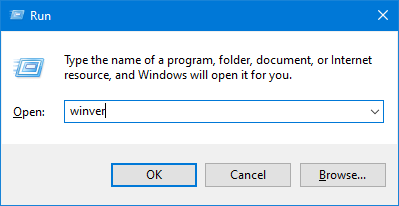
Type Win+R and winver to get the version.
image

<!-- gh-comment-id:634080409 --> @NickeManarin commented on GitHub (May 26, 2020): Can you tell me more about your computer? Which version of ScreenToGif are you using? Which windows version + build are you running? Which graphics card do you have? Are you running the latest driver? Type Win+R and `winver` to get the version. ![image](https://user-images.githubusercontent.com/14798947/82916380-5756f600-9f48-11ea-8470-8e263266c6ec.png)
Author
Owner

@brunobola commented on GitHub (May 26, 2020):

Here is the info.

Screenshot_4

<!-- gh-comment-id:634085437 --> @brunobola commented on GitHub (May 26, 2020): Here is the info. ![Screenshot_4](https://user-images.githubusercontent.com/10889019/82917260-1d4b1b80-9f6b-11ea-84cb-199cc1451db8.png)
Author
Owner

@yarecky1 commented on GitHub (May 26, 2020):

Ok, I think I can add two cents to the issue. I tried 4 the same low size clips and all was ok. Then I tried 1 clip with higher resolution (1347 x 688 x 200 frames x 25 fr/sec) and found a black frame in second frame. I use Bitblt.

I switched to DirectX and made 5 high resolution clips (1347 x 688). All was ok.

Then I switched back to BitBlt and again second frame in 217 frames clip was black.

<!-- gh-comment-id:634099557 --> @yarecky1 commented on GitHub (May 26, 2020): Ok, I think I can add two cents to the issue. I tried 4 the same low size clips and all was ok. Then I tried 1 clip with higher resolution (1347 x 688 x 200 frames x 25 fr/sec) and found a black frame in second frame. I use Bitblt. I switched to DirectX and made 5 high resolution clips (1347 x 688). All was ok. Then I switched back to BitBlt and again second frame in 217 frames clip was black.
Author
Owner

@yarecky1 commented on GitHub (May 26, 2020):

The same Windows version and compilation. Old built-in graphic card Intel HD Graphics Family. Driver from 10-06-2017, version 20.19.15.4835. I don't think the problem is hidden here.

View

<!-- gh-comment-id:634103071 --> @yarecky1 commented on GitHub (May 26, 2020): The same Windows version and compilation. Old built-in graphic card Intel HD Graphics Family. Driver from 10-06-2017, version 20.19.15.4835. I don't think the problem is hidden here. ![View](https://user-images.githubusercontent.com/28206604/82920359-78830b00-9f77-11ea-818d-2b4022d1a0ac.jpg)
Author
Owner

@generic-user commented on GitHub (Jul 7, 2020):

I had the same issue, but if I turn off compression, when using memory cache, it stops adding black frames to the stack ...

<!-- gh-comment-id:654853909 --> @generic-user commented on GitHub (Jul 7, 2020): I had the same issue, but if I turn off compression, when using memory cache, it stops adding black frames to the stack ...
Author
Owner

@NickeManarin commented on GitHub (Jul 7, 2020):

I fixed the issue with BitBlt. I can detect, during recording, when the frame was dropped and ignored it later.
With, or without compression.

I'm going to release a new version, v2.26.1.

Now, what about DirectX? For DirectX, it should already be dropping frames when the capture fails.
Are you people still having issues with it?

<!-- gh-comment-id:654884737 --> @NickeManarin commented on GitHub (Jul 7, 2020): I fixed the issue with BitBlt. I can detect, during recording, when the frame was dropped and ignored it later. With, or without compression. I'm going to release a new version, v2.26.1. Now, what about DirectX? For DirectX, it should already be dropping frames when the capture fails. Are you people still having issues with it?
Author
Owner

@NickeManarin commented on GitHub (Jul 7, 2020):

Try out version 2.26.1

<!-- gh-comment-id:654920846 --> @NickeManarin commented on GitHub (Jul 7, 2020): Try out version 2.26.1
Author
Owner

@yarecky1 commented on GitHub (Jul 7, 2020):

It seems to work now in all options: BitBlt, DirectX (tested first time now), Memory Cache (also first time now) and Save to file. So far so good :)

<!-- gh-comment-id:654944667 --> @yarecky1 commented on GitHub (Jul 7, 2020): It seems to work now in all options: BitBlt, DirectX (tested first time now), Memory Cache (also first time now) and Save to file. So far so good :)
Author
Owner

@NickeManarin commented on GitHub (Jul 7, 2020):

@yarecky1 Nice :)

@brunobola Can you check on your end?

<!-- gh-comment-id:654956992 --> @NickeManarin commented on GitHub (Jul 7, 2020): @yarecky1 Nice :) @brunobola Can you check on your end?
Author
Owner

@generic-user commented on GitHub (Jul 8, 2020):

@NickeManarin I just tried the update, it did not fix it for me.

This Setting

When using these settings it gives me black frames. 60fp/s

Image of settings
<!-- gh-comment-id:655402528 --> @generic-user commented on GitHub (Jul 8, 2020): @NickeManarin I just tried the update, it did not fix it for me. ## This Setting When using these settings it gives me **black frames**. **60fp/s** <details> <summary>Image of settings</summary> <img src="https://user-images.githubusercontent.com/1516035/86901394-d70dde00-c10c-11ea-9018-885022608943.png" /> </details>
Author
Owner

@brunobola commented on GitHub (Jul 8, 2020):

I'll test it today and report feedback.

<!-- gh-comment-id:655422866 --> @brunobola commented on GitHub (Jul 8, 2020): I'll test it today and report feedback.
Author
Owner

@NickeManarin commented on GitHub (Jul 8, 2020):

@generic-user I tried a few times, without getting black frames.

Version: 2.26.1
BitBlt, MemCache, 200Mb, No compression.
60 fps, fullscreen (1080p).

<!-- gh-comment-id:655495780 --> @NickeManarin commented on GitHub (Jul 8, 2020): @generic-user I tried a few times, without getting black frames. Version: 2.26.1 BitBlt, MemCache, 200Mb, No compression. 60 fps, fullscreen (1080p).
Author
Owner

@yarecky1 commented on GitHub (Jul 8, 2020):

@generic-user I also tried your settings few times and didn't get black frames.
Version: 2.26.1
BitBlt, MemCache, 200Mb, No compression.
60 fps, fullscreen (1080p).

<!-- gh-comment-id:655584218 --> @yarecky1 commented on GitHub (Jul 8, 2020): @generic-user I also tried your settings few times and didn't get black frames. Version: 2.26.1 BitBlt, MemCache, 200Mb, No compression. 60 fps, fullscreen (1080p).
Author
Owner

@generic-user commented on GitHub (Jul 9, 2020):

Just tested again, and it appears to add black frames whenever there is nothing happening on the screen.
I attached the project here: black_2.zip.

Version: 2.26.1
BitBlt, MemCache, 200Mb, No compression.
60 fps, area.

<!-- gh-comment-id:656000278 --> @generic-user commented on GitHub (Jul 9, 2020): Just tested again, and it appears to add black frames **whenever there is nothing happening on the screen**. I attached the project here: [black_2.zip](https://github.com/NickeManarin/ScreenToGif/files/4895572/black_2.zip). Version: 2.26.1 BitBlt, MemCache, 200Mb, No compression. 60 fps, area.
Author
Owner

@brunobola commented on GitHub (Jul 9, 2020):

Just test it and confirm that it continues to add black frames.

<!-- gh-comment-id:656005862 --> @brunobola commented on GitHub (Jul 9, 2020): Just test it and confirm that it continues to add black frames.
Author
Owner

@yarecky1 commented on GitHub (Jul 9, 2020):

@generic-user @brunobola
I don't confirm it. Used the same settings as above and no black frames.

<!-- gh-comment-id:656201859 --> @yarecky1 commented on GitHub (Jul 9, 2020): @generic-user @brunobola I don't confirm it. Used the same settings as above and no black frames.
Author
Owner

@generic-user commented on GitHub (Jul 10, 2020):

Just tried again, had to make 15 different recordings before getting black frames. So it's not so easy to reproduce it seems ...

Here is the example of that clip.
<!-- gh-comment-id:656576192 --> @generic-user commented on GitHub (Jul 10, 2020): Just tried again, had to make 15 different recordings before getting black frames. So it's not so easy to reproduce it seems ... <details> <summary>Here is the example of that clip. </summary> <img src="https://user-images.githubusercontent.com/1516035/87139037-a14d2e80-c29f-11ea-99c5-6401b5c31600.gif" /> </details>
Author
Owner

@brunobola commented on GitHub (Jul 10, 2020):

Even in your gif you got black frames.

Please open it in gimp for instance and see for yourself…

<!-- gh-comment-id:656593235 --> @brunobola commented on GitHub (Jul 10, 2020): Even in your gif you got black frames. Please open it in gimp for instance and see for yourself…
Author
Owner

@generic-user commented on GitHub (Jul 10, 2020):

Even in your gif you got black frames.

Indeed, that's exactly my point. Sorry if it was not clear. English is not my mother language.

<!-- gh-comment-id:656658908 --> @generic-user commented on GitHub (Jul 10, 2020): > Even in your gif you got black frames. Indeed, that's exactly my point. Sorry if it was not clear. English is not my mother language.
Author
Owner

@NickeManarin commented on GitHub (Aug 13, 2020):

An option was added to prevent the insertion of black frames when capturing with BitBlt + frame cache.
It's optional because it adds a little overhead in the capture process.

<!-- gh-comment-id:673179069 --> @NickeManarin commented on GitHub (Aug 13, 2020): An option was added to prevent the insertion of black frames when capturing with BitBlt + frame cache. It's optional because it adds a little overhead in the capture process.
Sign in to join this conversation.
No milestone
No project
No assignees
1 participant
Notifications
Due date
The due date is invalid or out of range. Please use the format "yyyy-mm-dd".

No due date set.

Dependencies

No dependencies set.

Reference
starred/ScreenToGif#537
No description provided.