mirror of
https://github.com/NickeManarin/ScreenToGif.git
synced 2026-04-26 07:35:54 +03:00
[GH-ISSUE #648] Default filename and some jingy thingy #531
Labels
No labels
copy cats
duplicated
future feature
pull-request
⬜ Accepted
⬜ Completed
⬜ Help Wanted 💪
⬜ In Progress
⬜ Missing Details
⬜ Pending
⬜ Waiting For Answer ⏳
🆕 feature preview
🔷 Bug 🐛
🔷 Out Of Scope
🔷 Out Of Scope
🔷 Question
🔷Enhancement
🔷Enhancement
🔷Invalid / External
🔷Knowledge Base
🔷Won't Fix
🕑 High
🕑 High
🕑 High
🕕 Medium
🕙 Low
🕛 Critical
No milestone
No project
No assignees
1 participant

Notifications
Due date
No due date set.
Dependencies
No dependencies set.
Reference
starred/ScreenToGif#531
Loading…
Add table
Add a link
Reference in a new issue
No description provided.
Delete branch "%!s()"
Deleting a branch is permanent. Although the deleted branch may continue to exist for a short time before it actually gets removed, it CANNOT be undone in most cases. Continue?
Originally created by @jaysonragasa on GitHub (May 4, 2020).
Original GitHub issue: https://github.com/NickeManarin/ScreenToGif/issues/648
I added a way to have a default filename as date and time. Is this possible to be implemented in the official version?
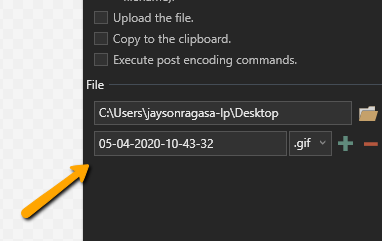
What about adding a thing like Jing does? I don't mind having another thing like this and if this is implemented. I will totally ditch jing for the rest of my life. I have been using Jing for like 4 years now I think. LOL
-- your fan since version 2.14.1
@NickeManarin commented on GitHub (May 4, 2020):
Hi, you can use the date format by typing a date format between two questions marks: '?'.
If you move your cursor on top of the filename text box, you'll see that information.
https://docs.microsoft.com/en-us/dotnet/standard/base-types/custom-date-and-time-format-strings
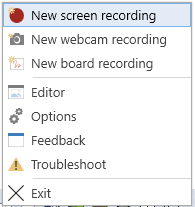
You can right click on the system tray icon to launch the recording, or use keyboard shortcuts set in Options > Shortcuts.
@jaysonragasa commented on GitHub (May 6, 2020):
gotcha
Yes that should be great. I think I will re-create Jing floating blob
@jaysonragasa commented on GitHub (May 6, 2020):
closing this issue now! Great work as always!!