mirror of
https://github.com/NickeManarin/ScreenToGif.git
synced 2026-04-26 07:35:54 +03:00
[GH-ISSUE #823] Suggestion: The frame list: Please allow to change the selected frame by moving the horizontal scrollbar #648
Labels
No labels
copy cats
duplicated
future feature
pull-request
⬜ Accepted
⬜ Completed
⬜ Help Wanted 💪
⬜ In Progress
⬜ Missing Details
⬜ Pending
⬜ Waiting For Answer ⏳
🆕 feature preview
🔷 Bug 🐛
🔷 Out Of Scope
🔷 Out Of Scope
🔷 Question
🔷Enhancement
🔷Enhancement
🔷Invalid / External
🔷Knowledge Base
🔷Won't Fix
🕑 High
🕑 High
🕑 High
🕕 Medium
🕙 Low
🕛 Critical
No milestone
No project
No assignees
1 participant

Notifications
Due date
No due date set.
Dependencies
No dependencies set.
Reference
starred/ScreenToGif#648
Loading…
Add table
Add a link
Reference in a new issue
No description provided.
Delete branch "%!s()"
Deleting a branch is permanent. Although the deleted branch may continue to exist for a short time before it actually gets removed, it CANNOT be undone in most cases. Continue?
Originally created by @schittli on GitHub (Apr 11, 2021).
Original GitHub issue: https://github.com/NickeManarin/ScreenToGif/issues/823
Good evening
Thank you very much for sharing your great and very useful work!
I have just tested it and noted that it's sometimes hard to find the right frames because the frame list preview images are too small. Therefore It would be great if we could slide the horizontal scrollbar and this action automatically changes the current selected frame:
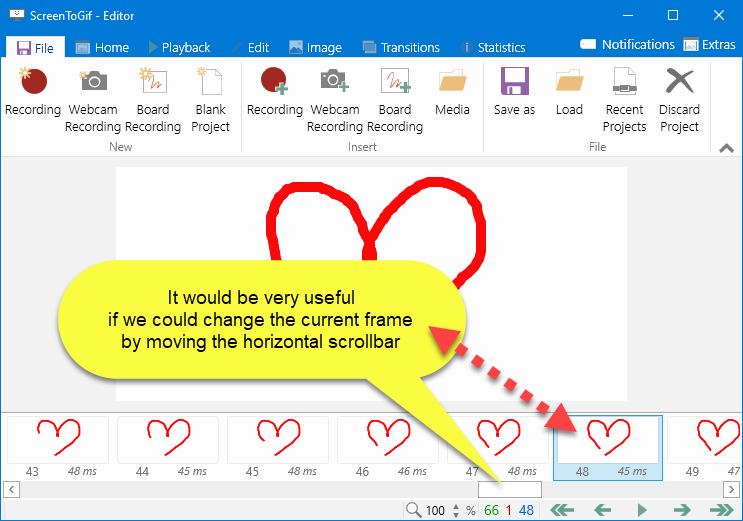
btw.: I know we can use the mouse wheel, but it's soooooooo slow if one has more than about 50 frames.
Thanks a lot, kind regards,
Thomas
@joekingTheThird3 commented on GitHub (Apr 27, 2021):
Keyboard shortcuts - win - left arrow, right arrow, home to go to first frame, end to go to last frame, page up, page down is like arrows. Strange focus issues. Click outside the main pasteboard frame and the the keyboard shortcuts don't work. Cntrl and right arrow moves the select rectangle and not the actual frame selection.
@schittli commented on GitHub (May 1, 2021):
Keyboard Shortcuts are nice, but annoying in this case
Thank you, @joekingTheThird3 for your notes!,
Please don't use
WinKeyboard Shortcuts - or at least, let the user change them.Especially the
win - cursor left / right / up / downkeyboard shortcuts are ideal for window managers, so on our computers, these keys are already occupied.