[GH-ISSUE #473] Looking frames starts to slowdown #396

Open
opened 2026-02-26 09:31:16 +03:00 by kerem · 18 comments
Owner

Originally created by @guichazan on GitHub (Apr 2, 2019).
Original GitHub issue: https://github.com/NickeManarin/ScreenToGif/issues/473

Originally assigned to: @NickeManarin on GitHub.

Hi,

Imagine a great product... i love ScreenToGif! A wonderful piece of software.

I have an issue that, when i create a record of more than 1000 frames, as i go through the frames using the right key from the keyboard, at start it is very fast, and as it approaches to 500, 600 and so, it starts to be VERY slow. When it reaches 1000, is almost 2 frames per second. If i go back to the start (using home key) it keeps the slowdown. Looks like if its keeping things on memory and the .net GC is working too much... not sure.

I don't think this is a hd issue, as i have a very fast ssd (nvme), and 16gb of ram (IconToGif takes only 150mb), in a Core I7.

thanks

guich
Originally created by @guichazan on GitHub (Apr 2, 2019). Original GitHub issue: https://github.com/NickeManarin/ScreenToGif/issues/473 Originally assigned to: @NickeManarin on GitHub. Hi, Imagine a great product... i love ScreenToGif! A wonderful piece of software. I have an issue that, when i create a record of more than 1000 frames, as i go through the frames using the right key from the keyboard, at start it is very fast, and as it approaches to 500, 600 and so, it starts to be VERY slow. When it reaches 1000, is almost 2 frames per second. If i go back to the start (using home key) it keeps the slowdown. Looks like if its keeping things on memory and the .net GC is working too much... not sure. I don't think this is a hd issue, as i have a very fast ssd (nvme), and 16gb of ram (IconToGif takes only 150mb), in a Core I7. thanks guich
Author
Owner

@NickeManarin commented on GitHub (Sep 24, 2019):

I can reproduce this bug, but not as slow.

<!-- gh-comment-id:534345295 --> @NickeManarin commented on GitHub (Sep 24, 2019): I can reproduce this bug, but not as slow.
Author
Owner

@pawlos commented on GitHub (Apr 19, 2021):

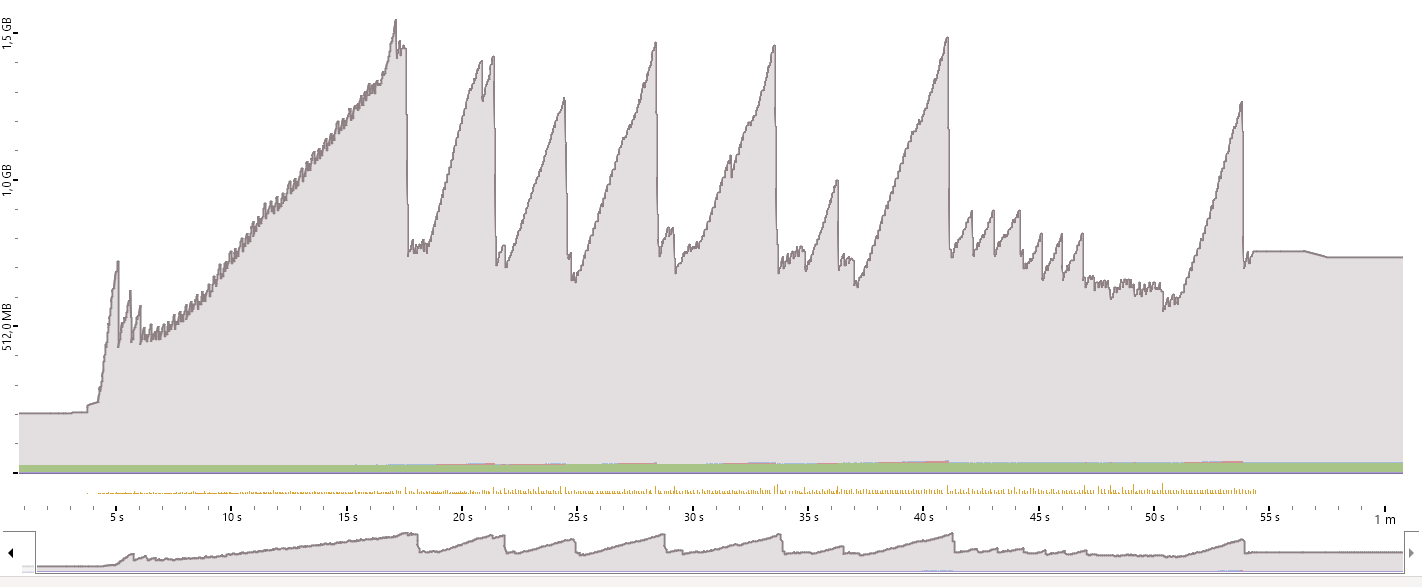
I did observe some similar issues recently on 2.27.3 when working on #825 and run dotMemory. Did the quick dotMemory run and allocations look quite worrying imho
image

It looks like parts of memory are being released when the limit is reached but the speed of allocations done and amount of GCs could influence the performance of the application when the amount of frames is big enough.

<!-- gh-comment-id:822518661 --> @pawlos commented on GitHub (Apr 19, 2021): I did observe some similar issues recently on 2.27.3 when working on #825 and run dotMemory. Did the quick dotMemory run and allocations look quite worrying imho ![image](https://user-images.githubusercontent.com/1296768/115253973-359cc980-a12d-11eb-987b-701b7cddc90d.png) It looks like parts of memory are being released when the limit is reached but the speed of allocations done and amount of GCs could influence the performance of the application when the amount of frames is big enough.
Author
Owner

@NickeManarin commented on GitHub (Apr 20, 2021):

The current implementation is quite bad.

For v3 I intend in going low level, by not dealing with files, but with byte caches and by directly accessing a back buffer to display the data (WriteableBitmap).

<!-- gh-comment-id:822971410 --> @NickeManarin commented on GitHub (Apr 20, 2021): The current implementation is quite bad. For v3 I intend in going low level, by not dealing with files, but with byte caches and by directly accessing a back buffer to display the data (WriteableBitmap).
Author
Owner

@mabakay commented on GitHub (Jun 6, 2021):

I took a look at it and it seems to me to be a UI rather than a file management issue. There is a ListView called FrameListView and defined mainly by style Style.ListView.Frames. In this style we can see

image

So virtualization is on. But looking at the debug tree it doesn't seem to work (screenshot after playing 600 frames).

image

Further investigation led us to declaration of source items.

image

In Microsoft docs - https://docs.microsoft.com/en-us/dotnet/desktop/wpf/advanced/optimizing-performance-controls?view=netframeworkdesktop-4.8

Among other conditions

`The following is a list of conditions that disable UI virtualization.

Item containers are added directly to the ItemsControl. For example, if an application explicitly adds ListBoxItem objects to a ListBox, the ListBox does not virtualize the ListBoxItem objects.`

Sticking to this definition ListViewItem will not work with ListView, etc. So first thought I changed inherited class to some other - ListBoxItem. And hey! Look at that.

After playing 600 frames.

image

Before change

image

And after

image

Overall interface operations related to the change of frames, e.g. with arrows, tend to be more smooth if there are multiple frames loaded.

So why didn't I post a pull request? :-) Not so easy. It seems that the application code is using the properties of the containers that are associated with these elements, such as IsSelected, IsFocused, IsVisible there is quite a lot of this in code and in XAML. When virtualization begins to work, the containers associated with the objects are created by the ListView object itself, and this is not the same class as the objects in the Items source.

image

Yee we can do something like that

image

But elements like IsSelected, IsFocused, IsVisible or XAML definitions

image

Need to be rewritten I suppose?

<!-- gh-comment-id:855461161 --> @mabakay commented on GitHub (Jun 6, 2021): I took a look at it and it seems to me to be a UI rather than a file management issue. There is a ListView called FrameListView and defined mainly by style Style.ListView.Frames. In this style we can see ![image](https://user-images.githubusercontent.com/1766645/120938762-d7479c80-c714-11eb-9012-c340f16716db.png) So virtualization is on. But looking at the debug tree it doesn't seem to work (screenshot after playing 600 frames). ![image](https://user-images.githubusercontent.com/1766645/120938848-44f3c880-c715-11eb-9890-564bf5d546cd.png) Further investigation led us to declaration of source items. ![image](https://user-images.githubusercontent.com/1766645/120938966-c64b5b00-c715-11eb-95e3-74d5883163c4.png) In Microsoft docs - https://docs.microsoft.com/en-us/dotnet/desktop/wpf/advanced/optimizing-performance-controls?view=netframeworkdesktop-4.8 Among other conditions `The following is a list of conditions that disable UI virtualization. Item containers are added directly to the ItemsControl. For example, if an application explicitly adds ListBoxItem objects to a ListBox, the ListBox does not virtualize the ListBoxItem objects.` Sticking to this definition ListViewItem will not work with ListView, etc. So first thought I changed inherited class to some other - ListBoxItem. And hey! Look at that. After playing 600 frames. ![image](https://user-images.githubusercontent.com/1766645/120939145-dd3e7d00-c716-11eb-9116-033b4e496601.png) Before change ![image](https://user-images.githubusercontent.com/1766645/120939174-00692c80-c717-11eb-810e-0818c2d757b3.png) And after ![image](https://user-images.githubusercontent.com/1766645/120939188-0fe87580-c717-11eb-9718-8352a030eb14.png) Overall interface operations related to the change of frames, e.g. with arrows, tend to be more smooth if there are multiple frames loaded. So why didn't I post a pull request? :-) Not so easy. It seems that the application code is using the properties of the containers that are associated with these elements, such as IsSelected, IsFocused, IsVisible there is quite a lot of this in code and in XAML. When virtualization begins to work, the containers associated with the objects are created by the ListView object itself, and this is not the same class as the objects in the Items source. ![image](https://user-images.githubusercontent.com/1766645/120939531-c567f880-c718-11eb-9b49-f69d74875f7b.png) Yee we can do something like that ![image](https://user-images.githubusercontent.com/1766645/120939582-f7795a80-c718-11eb-9bba-50dd8a67697f.png) But elements like IsSelected, IsFocused, IsVisible or XAML definitions ![image](https://user-images.githubusercontent.com/1766645/120939669-60f96900-c719-11eb-849b-bc85eca2af42.png) Need to be rewritten I suppose?
Author
Owner

@NickeManarin commented on GitHub (Jun 11, 2021):

@mabakay Superb analysis, thank you!

I'm going to try tackling this issue during the weekend.

<!-- gh-comment-id:859192684 --> @NickeManarin commented on GitHub (Jun 11, 2021): @mabakay Superb analysis, thank you! I'm going to try tackling this issue during the weekend.
Author
Owner

@NickeManarin commented on GitHub (Jun 14, 2021):

@mabakay I believe it's working as intended now.
If someone could test it (branch bugfix/473), it would be nice.
Anyway, I'm going to test during the following days.

<!-- gh-comment-id:860809022 --> @NickeManarin commented on GitHub (Jun 14, 2021): @mabakay I believe it's working as intended now. If someone could test it (branch bugfix/473), it would be nice. Anyway, I'm going to test during the following days.
Author
Owner

@pawlos commented on GitHub (Jun 15, 2021):

@NickeManarin I did run few tests on the mentioned branch and although the memory pressure seems to be lower than before, I still do get an experience that frames starts to slow down after getting to a higher numbers.

<!-- gh-comment-id:861823776 --> @pawlos commented on GitHub (Jun 15, 2021): @NickeManarin I did run few tests on the mentioned branch and although the memory pressure seems to be lower than before, I still do get an experience that frames starts to slow down after getting to a higher numbers.
Author
Owner

@NickeManarin commented on GitHub (Jun 15, 2021):

@pawlos For me it's overall the same speed. A bit slower than expected, but consistent.
I'm going to try with bigger resolutions and more frames.

Btw, I found some issues with the MoveLeft/MoveRight, Yoyo, TitleFrame, Transitions.
So, I still need to fix that.

<!-- gh-comment-id:861825744 --> @NickeManarin commented on GitHub (Jun 15, 2021): @pawlos For me it's overall the same speed. A bit slower than expected, but consistent. I'm going to try with bigger resolutions and more frames. Btw, I found some issues with the MoveLeft/MoveRight, Yoyo, TitleFrame, Transitions. So, I still need to fix that.
Author
Owner

@mabakay commented on GitHub (Jun 16, 2021):

I still do get an experience that frames starts to slow down after getting to a higher numbers.

Hmm, sometimes solution needs few steps but none can be omitted.

<!-- gh-comment-id:862074392 --> @mabakay commented on GitHub (Jun 16, 2021): > I still do get an experience that frames starts to slow down after getting to a higher numbers. Hmm, sometimes solution needs few steps but none can be omitted.
Author
Owner

@pawlos commented on GitHub (Jun 16, 2021):

I still do get an experience that frames starts to slow down after getting to a higher numbers.

Hmm, sometimes solution needs few steps but none can be omitted.

Yes @mabakay . That's probably the case here.

@NickeManarin
Performance analyzer, (dotTrace) shows that the hot part is this method

public static BitmapSource SourceFrom(this string fileSource, int? size = null)
{
          using (var stream = new FileStream(fileSource, FileMode.Open, FileAccess.Read, FileShare.ReadWrite))
          {
              var bitmapImage = new BitmapImage();
              bitmapImage.BeginInit();
              bitmapImage.CacheOption = BitmapCacheOption.OnLoad;

              if (size.HasValue)
                  bitmapImage.DecodePixelHeight = size.Value;

              bitmapImage.StreamSource = stream;
              bitmapImage.EndInit();
              bitmapImage.Freeze(); //Just in case you want to load the image in another thread
              return bitmapImage;
          }
   }

in particular. the .EndInit(). I wonder if in such a case (holding down the key to move quickly through the frames) the particular code should only be executed when the key is released, instead of all the time (as frames got created and disposed).

<!-- gh-comment-id:862430738 --> @pawlos commented on GitHub (Jun 16, 2021): > > I still do get an experience that frames starts to slow down after getting to a higher numbers. > > Hmm, sometimes solution needs few steps but none can be omitted. Yes @mabakay . That's probably the case here. @NickeManarin Performance analyzer, (dotTrace) shows that the hot part is this method ``` public static BitmapSource SourceFrom(this string fileSource, int? size = null) { using (var stream = new FileStream(fileSource, FileMode.Open, FileAccess.Read, FileShare.ReadWrite)) { var bitmapImage = new BitmapImage(); bitmapImage.BeginInit(); bitmapImage.CacheOption = BitmapCacheOption.OnLoad; if (size.HasValue) bitmapImage.DecodePixelHeight = size.Value; bitmapImage.StreamSource = stream; bitmapImage.EndInit(); bitmapImage.Freeze(); //Just in case you want to load the image in another thread return bitmapImage; } } ``` in particular. the `.EndInit()`. I wonder if in such a case (holding down the key to move quickly through the frames) the particular code should only be executed when the key is released, instead of all the time (as frames got created and disposed).
Author
Owner

@NickeManarin commented on GitHub (Jun 16, 2021):

@pawlos But that's a key feature (to use arrows to display the next frames).
Removing that would not be beneficial to the users. :/

So far, the only idea that I have is to migrate to using a hybrid memory+disk frame cache (like the one that the recorder uses) and using a WriteableBitmap back buffer to receive the pixels to display them in the editor.

The recorder would save to the frame cache and the editor would simply read it, without having to parse an image file.
This will increase the complexity of the frame manipulation methods, due to having to work with array buffers instead of discrete PNG files.

<!-- gh-comment-id:862553773 --> @NickeManarin commented on GitHub (Jun 16, 2021): @pawlos But that's a key feature (to use arrows to display the next frames). Removing that would not be beneficial to the users. :/ So far, the only idea that I have is to migrate to using a hybrid memory+disk frame cache (like the one that the recorder uses) and using a `WriteableBitmap` back buffer to receive the pixels to display them in the editor. The recorder would save to the frame cache and the editor would simply read it, without having to parse an image file. This will increase the complexity of the frame manipulation methods, due to having to work with array buffers instead of discrete PNG files.
Author
Owner

@pawlos commented on GitHub (Jun 16, 2021):

@NickeManarin I didn't say removing it. What I was saying is, if user press & hold the arrow, the new bitmap should only be created when the holding is stopped (so key up event).

On the other hand, it might be bad idea.

<!-- gh-comment-id:862563395 --> @pawlos commented on GitHub (Jun 16, 2021): @NickeManarin I didn't say removing it. What I was saying is, if user press & hold the arrow, the new bitmap should only be created when the holding is stopped (so key up event). On the other hand, it might be bad idea.
Author
Owner

@NickeManarin commented on GitHub (Jun 17, 2021):

@pawlos I was citing that, pressing and holding the arrow keys to move the selection and so display the selected frame. :)

I found another slowdown inside a non-visible element that was being re-rendered each time the selection changed (TextPath).
But yes, the SourceFrom() method is currently the bottleneck.

<!-- gh-comment-id:862877244 --> @NickeManarin commented on GitHub (Jun 17, 2021): @pawlos I was citing that, pressing and holding the arrow keys to move the selection and so display the selected frame. :) I found another slowdown inside a non-visible element that was being re-rendered each time the selection changed (TextPath). But yes, the `SourceFrom()` method is currently the bottleneck.
Author
Owner

@mabakay commented on GitHub (Jun 17, 2021):

So far, the only idea that I have is to migrate to using a hybrid memory+disk frame cache (like the one that the recorder uses) and using a WriteableBitmap back buffer to receive the pixels to display them in the editor.

We have removed native image caching...

bitmapImage.CacheOption = BitmapCacheOption.OnLoad;

...to end up with implementing our own ;-)

<!-- gh-comment-id:863426066 --> @mabakay commented on GitHub (Jun 17, 2021): > So far, the only idea that I have is to migrate to using a hybrid memory+disk frame cache (like the one that the recorder uses) and using a `WriteableBitmap` back buffer to receive the pixels to display them in the editor. We have removed native image caching... `bitmapImage.CacheOption = BitmapCacheOption.OnLoad;` ...to end up with implementing our own ;-)
Author
Owner

@mabakay commented on GitHub (Jun 17, 2021):

Btw, I found some issues with the MoveLeft/MoveRight, Yoyo, TitleFrame, Transitions.

Playing preview moves selection between frames by doesn't move horizontal scroller.
image

<!-- gh-comment-id:863442942 --> @mabakay commented on GitHub (Jun 17, 2021): > Btw, I found some issues with the MoveLeft/MoveRight, Yoyo, TitleFrame, Transitions. Playing preview moves selection between frames by doesn't move horizontal scroller. ![image](https://user-images.githubusercontent.com/1766645/122449244-f1e80400-cfa5-11eb-95d0-1194f4b15484.png)
Author
Owner

@mabakay commented on GitHub (Jun 17, 2021):

I still do get an experience that frames starts to slow down after getting to a higher numbers.

@pawlos, if you press right arrow key on keyboard to scroll through all the frames and look at Live Visual Tree you will see that until key released virtualization will not cleanup containers.

From decompiled code of VirtualizingStackPanel

_cleanupOperation = base.Dispatcher.BeginInvoke(DispatcherPriority.Background, new DispatcherOperationCallback(OnCleanUp), null);

It looks like the cleanup operation is enqueued with priority lower that input. This may explain why releasing the key allows this operation to be performed.

<!-- gh-comment-id:863485791 --> @mabakay commented on GitHub (Jun 17, 2021): > I still do get an experience that frames starts to slow down after getting to a higher numbers. @pawlos, if you press right arrow key on keyboard to scroll through all the frames and look at Live Visual Tree you will see that until key released virtualization will not cleanup containers. From decompiled code of VirtualizingStackPanel `_cleanupOperation = base.Dispatcher.BeginInvoke(DispatcherPriority.Background, new DispatcherOperationCallback(OnCleanUp), null);` It looks like the cleanup operation is enqueued with priority lower that input. This may explain why releasing the key allows this operation to be performed.
Author
Owner

@NickeManarin commented on GitHub (Jun 19, 2021):

Playing preview moves selection between frames by doesn't move horizontal scroller.
image

Fixed.

<!-- gh-comment-id:864451062 --> @NickeManarin commented on GitHub (Jun 19, 2021): > Playing preview moves selection between frames by doesn't move horizontal scroller. > ![image](https://user-images.githubusercontent.com/1766645/122449244-f1e80400-cfa5-11eb-95d0-1194f4b15484.png) Fixed.
Author
Owner

@NickeManarin commented on GitHub (Jun 20, 2021):

Part of the fix will be available with v2.32.

<!-- gh-comment-id:864569052 --> @NickeManarin commented on GitHub (Jun 20, 2021): Part of the fix will be available with v2.32.
Sign in to join this conversation.
No milestone
No project
No assignees
1 participant
Notifications
Due date
The due date is invalid or out of range. Please use the format "yyyy-mm-dd".

No due date set.

Dependencies

No dependencies set.

Reference
starred/ScreenToGif#396
No description provided.