mirror of
https://github.com/iamromulan/QuecDeploy.git
synced 2026-04-25 09:05:59 +03:00
No description
- PowerShell 100%
| .obsidian | ||
| images | ||
| linux | ||
| windows | ||
| CHANGELOG.md | ||
| ISSUES.md | ||
| LICENSE | ||
| README.md | ||

QuecDeploy: Quickly Install/Deploy Quectel Software/Firmware
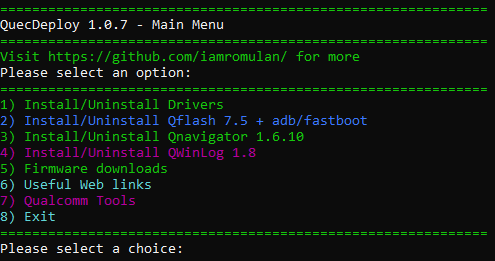
Download
To download visit the Releases Section scroll down to assets and download the exe
Issues Downloading?
Visit the Known Issues Readme
Prefer to browse the files I have?
Take a look at my MEGA Public Directory. That's where QuecDeploy gets everything from.
Features:
-
Megatools.exe integrated for downloads from mega.nz
-
Download and install the following drivers easily:
- NDIS Driver 2.8 (For AT+QCFG="usbnet",0 mode)
- ECM Driver 1.0 (For AT+QCFG="usbnet",1 mode)
- Note: After installing driver must be manually selected in Device Manager
- Note: NDIS Driver must also be installed to access ports
- MBIM Driver 1.3 (For AT+QCFG="usbnet",2 mode)
- RNDIS Driver 1.1 (For AT+QCFG="usbnet",3 mode)
⚠️ Only have one of these drivers installed at once. The ECM driver is the exception to this rule. NDIS + ECM is recommended.
-
Download and install Qflash 7.5 to C:\Quectel\Qflash\
- adb and fastboot are included with Qflash 7.5 and automatically added to the system path
- Desktop and Start Menu shortcuts are automatically created for Qflash 7.5 and old ones are removed
-
Download and install Qnavigator 1.6.10 to C:\Quectel\Qflash\
- Desktop and Start Menu shortcuts are automatically created for Qnavigator and old ones are removed
-
Download and install QWinLog 1.8 to C:\Quectel\QWinLog\
- Desktop and Start Menu shortcuts are automatically created for QWinLog and old ones are removed
-
Download and Unzip firmware (Saves to C:\Quectel\firmware<modem><type><firmware_version>) for the following modems:
- RM502Q-AE
- RM520N-GL
- RM521F-GL
- RM550V-GL (AA and AB)
- RM551E-GL
-
View Helpful Links:
- Open iamromulan's Cellular Modem wiki
- Browse/view/download iamromulan's files on MEGA
- Visit the QuecDeploy releases page
- Visit the toolkit repo
- Visit iamromulan's YouTube Channel
Planed additions/hopes for future versions:
- Integrate a COM port communication method for direct AT commands from QuecDeploy
- Automatic modem detection, AT commands, and modem setup wizard.
- Flash a modem via an integrated firehose flash tool.
- Add more modem firmware and tools (always ongoing)