[GH-ISSUE #102] when installed Proxyman my command+f failed to work everywhere! #97

Closed
opened 2026-03-03 19:15:15 +03:00 by kerem · 9 comments
Owner

Originally created by @wunshine on GitHub (Apr 3, 2019).
Original GitHub issue: https://github.com/ProxymanApp/Proxyman/issues/102

Which Proxyman version are you using? (Ex. Proxyman 0.5 (200))

What OS Version are you using? (Ex. mac 10.13)

Steps to reproduce this issue

Screenshots (optional)

when installed Proxyman, i just found that my command+f failed in Xcode and chrome,and then my command+f was not work everywhere.
After uninstalled Proxyman ,everything workes well again.

Originally created by @wunshine on GitHub (Apr 3, 2019). Original GitHub issue: https://github.com/ProxymanApp/Proxyman/issues/102 ### Which Proxyman version are you using? (Ex. Proxyman 0.5 (200)) ### What OS Version are you using? (Ex. mac 10.13) ### Steps to reproduce this issue ### Screenshots (optional) when installed Proxyman, i just found that my command+f failed in Xcode and chrome,and then my command+f was not work everywhere. After uninstalled Proxyman ,everything workes well again.
kerem 2026-03-03 19:15:15 +03:00
  • closed this issue
  • added the
    bug
    label
Author
Owner

@NghiaTranUIT commented on GitHub (Apr 3, 2019):

Hey @wunshine

This issue is known-issues and it was fixed in Proxyman 1.3.2 (https://github.com/ProxymanApp/Proxyman/issues/45)

If you're using old version. It's time to upgrade it to Proxyman 1.3.4 at https://github.com/ProxymanApp/Proxyman/releases/tag/1.3.4

<!-- gh-comment-id:479400214 --> @NghiaTranUIT commented on GitHub (Apr 3, 2019): Hey @wunshine This issue is known-issues and it was fixed in Proxyman 1.3.2 (https://github.com/ProxymanApp/Proxyman/issues/45) If you're using old version. It's time to upgrade it to Proxyman 1.3.4 at https://github.com/ProxymanApp/Proxyman/releases/tag/1.3.4
Author
Owner

@NghiaTranUIT commented on GitHub (Apr 3, 2019):

I can't reproduce it in OS 10.14. If you don't mind, which macOS are you using 🤔

I would like to take a look on it, when it's annoying bug 🥺

<!-- gh-comment-id:479400658 --> @NghiaTranUIT commented on GitHub (Apr 3, 2019): I can't reproduce it in OS 10.14. If you don't mind, which macOS are you using 🤔 I would like to take a look on it, when it's annoying bug 🥺
Author
Owner

@wunshine commented on GitHub (Apr 3, 2019):

─>🤓 brew cask install proxyman
==> Satisfying dependencies
==> Downloading https://github.com/ProxymanApp/Proxyman/releases/download/1.3/Pr
==> Downloading from https://github-production-release-asset-2e65be.s3.amazonaws
######################################################################## 100.0%
==> Verifying SHA-256 checksum for Cask 'proxyman'.
==> Installing Cask proxyman
==> Moving App 'Proxyman.app' to '/Applications/Proxyman.app'.
🍺 proxyman was successfully installed!

Mac os version 10.14.4.

<!-- gh-comment-id:479409370 --> @wunshine commented on GitHub (Apr 3, 2019): ─>🤓 brew cask install proxyman ==> Satisfying dependencies ==> Downloading https://github.com/ProxymanApp/Proxyman/releases/download/1.3/Pr ==> Downloading from https://github-production-release-asset-2e65be.s3.amazonaws ######################################################################## 100.0% ==> Verifying SHA-256 checksum for Cask 'proxyman'. ==> Installing Cask proxyman ==> Moving App 'Proxyman.app' to '/Applications/Proxyman.app'. 🍺 proxyman was successfully installed! Mac os version 10.14.4.
Author
Owner

@NghiaTranUIT commented on GitHub (Apr 3, 2019):

Hey thank for the log ️,

For some reasons, your brew cask repository is out of date. From the log you sent, you're installing Proxyman 1.3, not 1.3.4 (https://github.com/Homebrew/homebrew-cask/pull/61222)

Can you try to upgrade your cask?

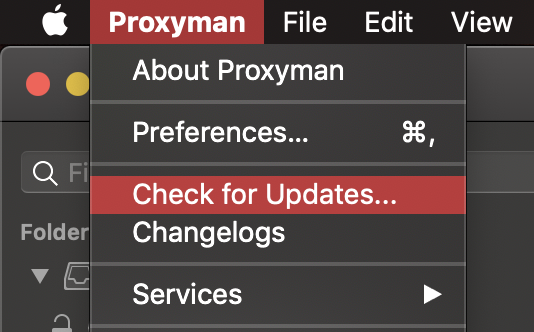
Or just open the Proxyman -> Check for Update...
Screen Shot 2019-04-03 at 16 35 56

Thank for bounding 😁

<!-- gh-comment-id:479415667 --> @NghiaTranUIT commented on GitHub (Apr 3, 2019): Hey thank for the log ⚡️, For some reasons, your brew cask repository is out of date. From the log you sent, you're installing Proxyman **1.3**, not **1.3.4** (https://github.com/Homebrew/homebrew-cask/pull/61222) Can you try to upgrade your cask? Or just open the Proxyman -> **Check for Update...** <img width="267" alt="Screen Shot 2019-04-03 at 16 35 56" src="https://user-images.githubusercontent.com/5878421/55468907-97fdfc80-562e-11e9-974a-20d0b5f49d4f.png"> Thank for bounding 😁
Author
Owner

@NghiaTranUIT commented on GitHub (Apr 3, 2019):

@wunshine The output of brew cask should have 1.3.4

For instance,

❯ brew cask install proxyman                                                                                                                         ✭
==> Satisfying dependencies
==> Downloading https://github.com/ProxymanApp/Proxyman/releases/download/1.3.4/Proxyman_1.3.4.dmg
==> Downloading from https://github-production-release-asset-2e65be.s3.amazonaws.com/142885098/46604100-5479-11e9-9ce5-7c6963e6c771?X-Amz-Algorithm=AWS
######################################################################## 100.0%
==> Verifying SHA-256 checksum for Cask 'proxyman'.
==> Installing Cask proxyman
==> Moving App 'Proxyman.app' to '/Applications/Proxyman.app'.
🍺  proxyman was successfully installed!
<!-- gh-comment-id:479416291 --> @NghiaTranUIT commented on GitHub (Apr 3, 2019): @wunshine The output of brew cask should have `1.3.4` For instance, ``` ❯ brew cask install proxyman ✭ ==> Satisfying dependencies ==> Downloading https://github.com/ProxymanApp/Proxyman/releases/download/1.3.4/Proxyman_1.3.4.dmg ==> Downloading from https://github-production-release-asset-2e65be.s3.amazonaws.com/142885098/46604100-5479-11e9-9ce5-7c6963e6c771?X-Amz-Algorithm=AWS ######################################################################## 100.0% ==> Verifying SHA-256 checksum for Cask 'proxyman'. ==> Installing Cask proxyman ==> Moving App 'Proxyman.app' to '/Applications/Proxyman.app'. 🍺 proxyman was successfully installed! ```
Author
Owner

@NghiaTranUIT commented on GitHub (Apr 3, 2019):

Hey @wunshine

Here is the hot-fix for your issue 🔥 https://www.dropbox.com/s/a6jbgzstgefp5uv/Proxyman_1.3.4.dmg?dl=0

Thank you for using Proxyman 👍

<!-- gh-comment-id:479475367 --> @NghiaTranUIT commented on GitHub (Apr 3, 2019): Hey @wunshine Here is the hot-fix for your issue 🔥 https://www.dropbox.com/s/a6jbgzstgefp5uv/Proxyman_1.3.4.dmg?dl=0 Thank you for using Proxyman 👍
Author
Owner

@wunshine commented on GitHub (Apr 3, 2019):

ok, thank you
I'll try to update my cask and install again

<!-- gh-comment-id:479501470 --> @wunshine commented on GitHub (Apr 3, 2019): ok, thank you I'll try to update my cask and install again
Author
Owner

@NghiaTranUIT commented on GitHub (Apr 3, 2019):

Awesome man 😍

<!-- gh-comment-id:479505775 --> @NghiaTranUIT commented on GitHub (Apr 3, 2019): Awesome man 😍
Author
Owner

@NghiaTranUIT commented on GitHub (Apr 7, 2019):

I actually refactor the logic of HotKey in Proxyman 1.3.4.1.

Technically, I removed completely the Global Hotkey, and replacing with Hot key with First Responder, so the other will never be conflicted. This approach seems to be better than the last one.

Thank you guys 🥺

<!-- gh-comment-id:480606333 --> @NghiaTranUIT commented on GitHub (Apr 7, 2019): I actually refactor the logic of HotKey in [Proxyman 1.3.4.1](https://github.com/ProxymanApp/Proxyman/releases/tag/1.3.4.1). Technically, I removed completely the Global Hotkey, and replacing with Hot key with First Responder, so the other will never be conflicted. This approach seems to be better than the last one. Thank you guys 🥺
Sign in to join this conversation.
No milestone
No project
No assignees
1 participant
Notifications
Due date
The due date is invalid or out of range. Please use the format "yyyy-mm-dd".

No due date set.

Dependencies

No dependencies set.

Reference
starred/Proxyman#97
No description provided.