[GH-ISSUE #676] [Bug]: mouse input becomes unresponsive consistently after certain in-game actions #320

Closed
opened 2026-03-03 18:56:50 +03:00 by kerem · 8 comments
Owner

Originally created by @FlyMeToTheMoonAndLetMePlayAmongTheStars on GitHub (Jan 4, 2023).
Original GitHub issue: https://github.com/PlayCover/PlayCover/issues/676

Describe the bug

playcover: 2.0.2 (203)
macOS: 13.1
iOS device: M2 iPad
Resolution: auto

sometimes the mouse input that allows you to move/pan the camera stops working, while other keymap like the WASD pad, LMB, RMB, and individual key inputs still work fine

for genshin impact (global), it always happens when using elemental burst in combat, or after teleporting to a new area. once the input/camera gets stuck, i found out you can make it work properly again by releasing the cursor, drag the screen to move camera manually, and then lock the cursor

noticed this happens in genshin impact and honkai impact 3rd, likely affects other games as well

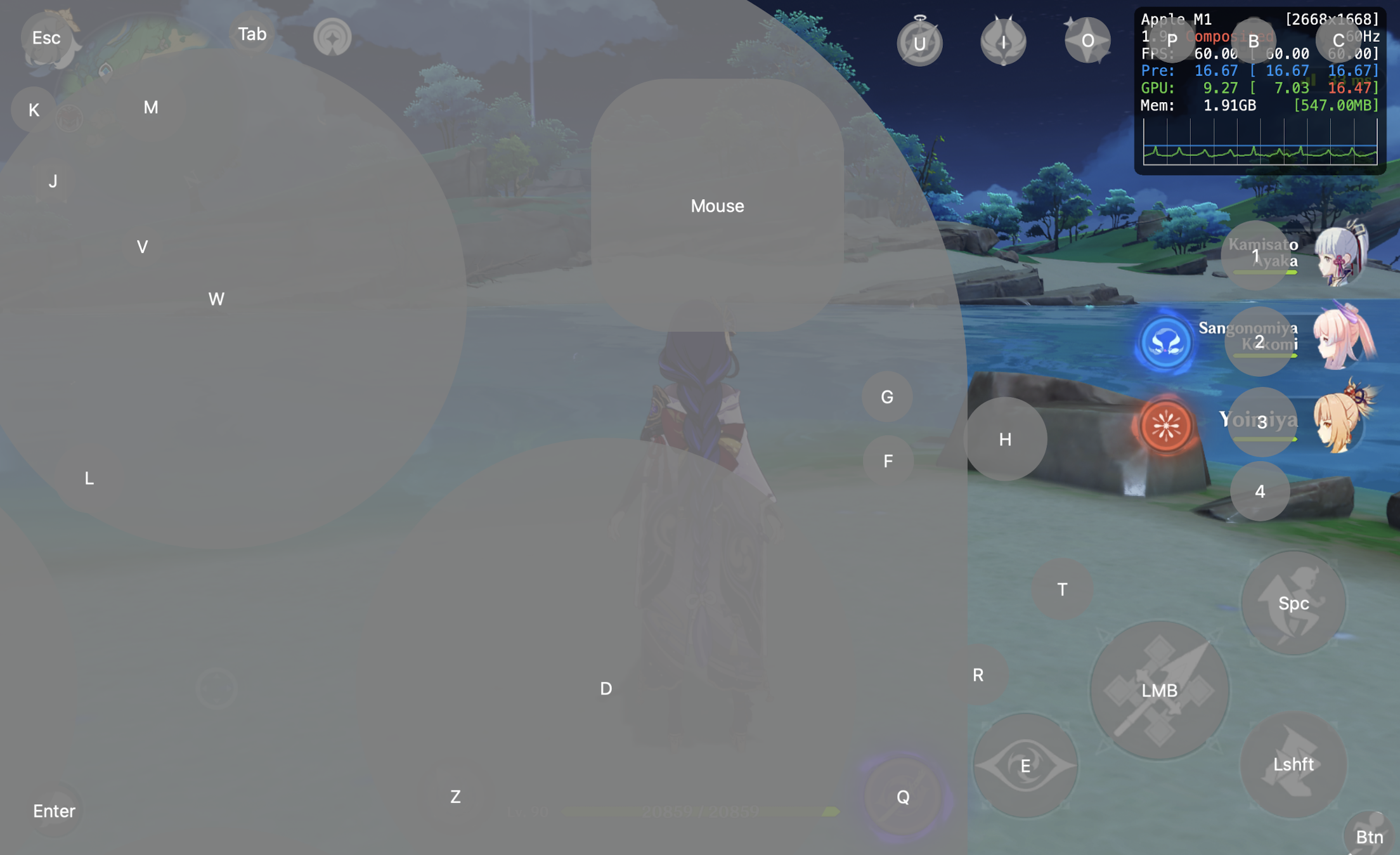
this is what my keymaps looks like for reference, you can download it urself to try
Screenshot 2023-01-04 at 1 58 30 PM

here's a recording of the bug in action: im deliberately moving the camera rapidly back and forth throughout the entire video, but as you can see after using yoimiya's burst, the camera is no longer responsive to my input

update 1: i went back to v2.0.0 (185) and the bug is still present, but going way back to playcover 1.1.1 everything works fine (tho i had to create a keymap from scratch since newer version ones were not compatible)

update 2: on 1.1.1 camera doesn't freeze after elemental burst, but input occasionally stops being responsive after teleporting if you immediately press option to lock cursor after choosing a teleport point

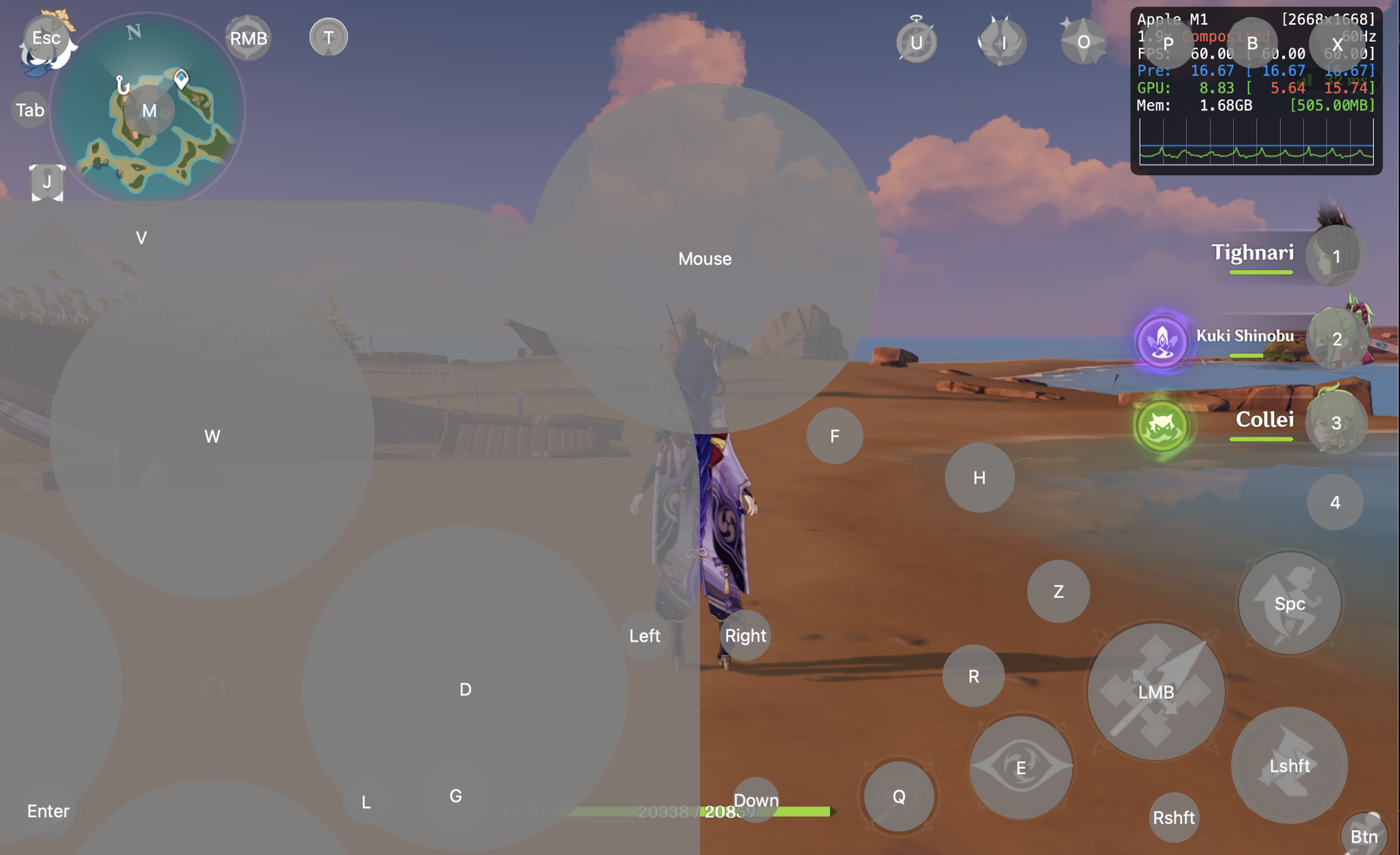
update 3: re-installed the latest nightly build (204), and used the same keymap I had made on playcover 1.1.1. I got a pop-up asking if I wanted to convert legacy keymaps and I clicked on convert. So far the issue has not happened, the only difference I can tell is instead of a rounded square mouse map, its a circle, maybe the bug is related to this part? idk
Screenshot 2023-01-05 at 12 14 33 PM
(also worth mentioning i used A12Z iPad identifier when i downgraded to 1.1.1, still used the same model after installing nightly build 204)

Steps to reproduce

for genshin: (prob should also install my keymap above for consistent conditions)

  1. open the game
  2. run around and spin the camera to verify it works as intended
  3. find a group of mobs to fight and use ur character's skills and bursts (bug occurs almost every time after using elemental burst in combat provided that it shows the cinematic animation)
  4. mid combat or after combat the camera will get stuck (maybe u don't even have to be in combat, just use elemental burst on a 5 star char and it bugs out)

if the above does not work:

  1. open the game
  2. run around and spin the camera to verify keymaps work normally
  3. open the world map then release cursor
  4. choose a location teleport to and immediately lock the cursor again (if you don't lock the cursor until after you finished teleporting, the bug seems to not occur)
  5. now camera/mouse movement will be unresponsive, press other keys to see that they still work
  6. release cursor and manually drag to move the camera slightly
  7. lock cursor to return to keymap and camera spins normally again as you move the mouse

Expected behaviour

mouse/camera not losing responsiveness randomly

Crash log

no crash

What version of PlayCover are you using?

Nightly/beta

What version of macOS are you using?

Ventura (macOS 13)

Issue Language

  • Yes my issue is written in English
Originally created by @FlyMeToTheMoonAndLetMePlayAmongTheStars on GitHub (Jan 4, 2023). Original GitHub issue: https://github.com/PlayCover/PlayCover/issues/676 ### Describe the bug playcover: 2.0.2 (203) macOS: 13.1 iOS device: M2 iPad Resolution: auto sometimes the mouse input that allows you to move/pan the camera stops working, while other keymap like the WASD pad, LMB, RMB, and individual key inputs still work fine for genshin impact (global), it always happens when using elemental burst in combat, or after teleporting to a new area. once the input/camera gets stuck, i found out you can make it work properly again by releasing the cursor, drag the screen to move camera manually, and then lock the cursor noticed this happens in genshin impact and honkai impact 3rd, likely affects other games as well this is what my keymaps looks like for reference, you can [download](https://files.catbox.moe/v7ee0u.playmap) it urself to try <img width="1104" alt="Screenshot 2023-01-04 at 1 58 30 PM" src="https://user-images.githubusercontent.com/78054566/210631072-4bee5340-6bd4-43a0-bbe4-ad80926af8d9.png"> here's a [recording](https://files.catbox.moe/4o87ry.mov) of the bug in action: im deliberately moving the camera rapidly back and forth throughout the entire video, but as you can see after using yoimiya's burst, the camera is no longer responsive to my input update 1: i went back to v2.0.0 (185) and the bug is still present, but going way back to playcover 1.1.1 everything works fine (tho i had to create a keymap from scratch since newer version ones were not compatible) update 2: on 1.1.1 camera doesn't freeze after elemental burst, but input occasionally stops being responsive after teleporting if you immediately press option to lock cursor after choosing a teleport point update 3: re-installed the latest nightly build (204), and used the same keymap I had made on playcover 1.1.1. I got a pop-up asking if I wanted to convert legacy keymaps and I clicked on convert. So far the issue has not happened, the only difference I can tell is instead of a rounded square mouse map, its a circle, maybe the bug is related to this part? idk <img width="1104" alt="Screenshot 2023-01-05 at 12 14 33 PM" src="https://user-images.githubusercontent.com/78054566/210840769-256447a7-ce39-4d03-b6bc-dbd51e7ac6c8.png"> (also worth mentioning i used A12Z iPad identifier when i downgraded to 1.1.1, still used the same model after installing nightly build 204) ### Steps to reproduce for genshin: (prob should also install my keymap above for consistent conditions) 1. open the game 2. run around and spin the camera to verify it works as intended 3. find a group of mobs to fight and use ur character's skills and bursts (bug occurs almost every time after using elemental burst in combat provided that it shows the cinematic animation) 4. mid combat or after combat the camera will get stuck (maybe u don't even have to be in combat, just use elemental burst on a 5 star char and it bugs out) if the above does not work: 1. open the game 2. run around and spin the camera to verify keymaps work normally 3. open the world map then release cursor 4. choose a location teleport to and immediately lock the cursor again (if you don't lock the cursor until after you finished teleporting, the bug seems to not occur) 6. now camera/mouse movement will be unresponsive, press other keys to see that they still work 7. release cursor and manually drag to move the camera slightly 8. lock cursor to return to keymap and camera spins normally again as you move the mouse ### Expected behaviour mouse/camera not losing responsiveness randomly ### Crash log ```shell no crash ``` ### What version of PlayCover are you using? Nightly/beta ### What version of macOS are you using? Ventura (macOS 13) ### Issue Language - [X] Yes my issue is written in English
kerem 2026-03-03 18:56:50 +03:00
  • closed this issue
  • added the
    bug
    label
Author
Owner

@FlyMeToTheMoonAndLetMePlayAmongTheStars commented on GitHub (Jan 4, 2023):

after looking thru some past issues, i believe this might be related to https://github.com/PlayCover/PlayCover/issues/609

<!-- gh-comment-id:1371346430 --> @FlyMeToTheMoonAndLetMePlayAmongTheStars commented on GitHub (Jan 4, 2023): after looking thru some past issues, i believe this might be related to https://github.com/PlayCover/PlayCover/issues/609
Author
Owner

@williamhCode commented on GitHub (Jan 23, 2023):

can confirm also happens to me

<!-- gh-comment-id:1399909351 --> @williamhCode commented on GitHub (Jan 23, 2023): can confirm also happens to me
Author
Owner

@quxn734 commented on GitHub (Feb 9, 2023):

it seems to be fixed in Ventura 13.2 - PlayCover nightly build 252. I used with 1000Hz Viper mini mouse.

<!-- gh-comment-id:1423759139 --> @quxn734 commented on GitHub (Feb 9, 2023): it seems to be fixed in Ventura 13.2 - PlayCover nightly build 252. I used with 1000Hz Viper mini mouse.
Author
Owner

@kamui545 commented on GitHub (Feb 9, 2023):

Nightly build 252 is even worse for me

<!-- gh-comment-id:1423900343 --> @kamui545 commented on GitHub (Feb 9, 2023): Nightly build 252 is even worse for me
Author
Owner

@TheMoonThatRises commented on GitHub (Feb 22, 2023):

Using the circular mouse area fixes the problem on the nightlies.

<!-- gh-comment-id:1440739248 --> @TheMoonThatRises commented on GitHub (Feb 22, 2023): Using the circular mouse area fixes the problem on the nightlies.
Author
Owner

@EnesPINAR commented on GitHub (May 4, 2024):

Sorry for commenting a completed task but using the circular mouse area did not fix the problem on nightly 729.

<!-- gh-comment-id:2094362089 --> @EnesPINAR commented on GitHub (May 4, 2024): Sorry for commenting a completed task but using the circular mouse area did not fix the problem on nightly 729.
Author
Owner

@FrankXu999 commented on GitHub (Jan 16, 2025):

This issue persists in the latest version, notably with elemental burst. The camera scroll with the mouse is unresponsive after bursts, fixating on the previous direction for about 4-5s then it works as normal again.

<!-- gh-comment-id:2596346567 --> @FrankXu999 commented on GitHub (Jan 16, 2025): This issue persists in the latest version, notably with elemental burst. The camera scroll with the mouse is unresponsive after bursts, fixating on the previous direction for about 4-5s then it works as normal again.
Author
Owner

@fastfading commented on GitHub (Mar 21, 2025):

The mouse is not very sensitive, after a few clicks , one click, will always hit the center of the screen

<!-- gh-comment-id:2743381424 --> @fastfading commented on GitHub (Mar 21, 2025): The mouse is not very sensitive, after a few clicks , one click, will always hit the center of the screen
Sign in to join this conversation.
No milestone
No project
No assignees
1 participant
Notifications
Due date
The due date is invalid or out of range. Please use the format "yyyy-mm-dd".

No due date set.

Dependencies

No dependencies set.

Reference
starred/PlayCover#320
No description provided.