mirror of
https://github.com/PlayCover/PlayCover.git
synced 2026-04-27 00:35:52 +03:00
[GH-ISSUE #573] [Bug]: FPS of Genshin is lower using 2.0.0 than 2.0.0-beta #276
Labels
No labels
UI
app-support
bug
bug
documentation
duplicate
enhancement
game-support
good first issue
help wanted / caution
inactive
invalid
macos-beta
pull-request
question
wontfix
No milestone
No project
No assignees
1 participant

Notifications
Due date
No due date set.
Dependencies
No dependencies set.
Reference
starred/PlayCover#276
Loading…
Add table
Add a link
Reference in a new issue
No description provided.
Delete branch "%!s()"
Deleting a branch is permanent. Although the deleted branch may continue to exist for a short time before it actually gets removed, it CANNOT be undone in most cases. Continue?
Originally created by @krmst on GitHub (Dec 13, 2022).
Original GitHub issue: https://github.com/PlayCover/PlayCover/issues/573
Describe the bug
2.0.0-beta can run Genshin at 120 fps.
I updated to 2.0.0 yesterday. but found Genshin run at 90 fps or lower.
If I reinstall 2.0.0-beta Genshin will run at 120 fps again.
※ I didn't do any other changes except using different playcover version.
My pc spec:
Apple M1 Pro
Steps to reproduce
Expected behaviour
2.0.0 should run at 120 fps
Crash log
No response
What version of PlayCover are you using?
Nightly/beta
What version of macOS are you using?
Ventura (macOS 13)
Issue Language
@ohaiibuzzle commented on GitHub (Dec 13, 2022):
I don't see an issue here, they were built using the same configuration. You should probably look around to see if there is anything that may be using the GPU.
The fact that the framerate did go beyond 60 FPS is already a clear sign that PlayCover did not capped it in any way
@krmst commented on GitHub (Dec 13, 2022):
@ohaiibuzzle
I closed all other application. But the problem still remains.
I just noticed something new which may help you investigate this.
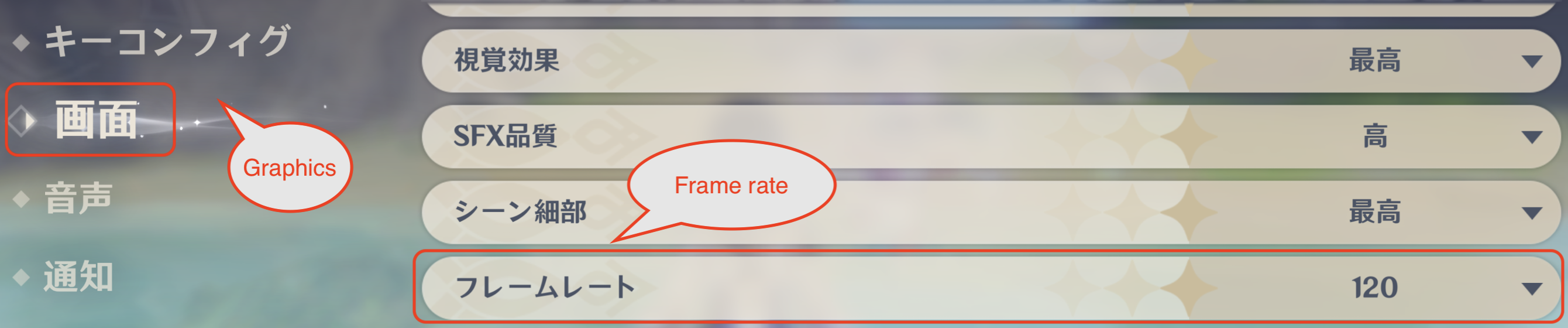
As you see, with only changing the setting of the game. my pc is not able to run at 60 fps even though it can ran at 90 fps.
If I focus on safari( I am wring this) the fps is higher than focus on. ⬅️This behavior is some how strange.
⬇️ 60 fps setting, 120 fps setting stands for the following setting in game.
@ashran commented on GitHub (Dec 13, 2022):
This issue started with a version of nightly build. I can see that the CPU time increases significantly, resulting in a lower frame rate. Even in some cases, it will drop from 110+ fps to 80 fps. In addition, I cannot get stable 120 fps as before. The fps fluctuates around 115. I'm M1 Max, macOS 13.1.
@macvip commented on GitHub (Dec 16, 2022):
The same problem here.
To get a better performance, we could use newer playcover to install games, while older beta playcover to start games.
@macvip commented on GitHub (Dec 17, 2022):
After almost every nightly build was tested, PlayCover_nightly_168.dmg was found the first version caused "CPU time increases significantly, resulting in a lower frame rate". @ashran @ohaiibuzzle @krmst
Just stay with PlayCover_nightly_167.dmg
@ashran commented on GitHub (Dec 17, 2022):
Thank you. It works for me!
@krmst commented on GitHub (Dec 18, 2022):
Thank you for taking the time to do this. it works perfect for me.
@FlyMeToTheMoonAndLetMePlayAmongTheStars commented on GitHub (Dec 20, 2022):
I downgraded from nightly 183 to 167, genshin (and i assume other games as well) runs noticeably better now. @macvip
thank you so much for testing different builds and finding out where the issue started ❤️
@IsaacMarovitz commented on GitHub (Dec 29, 2022):
Resolved in PlayCover 2.0.2