mirror of
https://github.com/PlayCover/PlayCover.git
synced 2026-04-27 00:35:52 +03:00
[GH-ISSUE #353] [Feature]: #152
Labels
No labels
UI
app-support
bug
bug
documentation
duplicate
enhancement
game-support
good first issue
help wanted / caution
inactive
invalid
macos-beta
pull-request
question
wontfix
No milestone
No project
No assignees
1 participant

Notifications
Due date
No due date set.
Dependencies
No dependencies set.
Reference
starred/PlayCover#152
Loading…
Add table
Add a link
Reference in a new issue
No description provided.
Delete branch "%!s()"
Deleting a branch is permanent. Although the deleted branch may continue to exist for a short time before it actually gets removed, it CANNOT be undone in most cases. Continue?
Originally created by @656747794 on GitHub (Sep 17, 2022).
Original GitHub issue: https://github.com/PlayCover/PlayCover/issues/353
Is your feature request related to a problem?
I hope the resolution can be automatically displayed in full screen as before.
Describe the solution you'd like
Can automatically adapt to stretching full screen.
Anything else?
No more
Issue Language
@ZhichGaming commented on GitHub (Sep 17, 2022):
Do you mean in nightlies?
@656747794 commented on GitHub (Sep 17, 2022):
@ZhichGaming commented on GitHub (Sep 17, 2022):
iPad model does not influence screen size. Did you enable auto screen resize/adaptive display? If you have those on, the app will fill the screen if you full screen it. If you disable it, there is custom resolution you can put. What version of PlayCover are you on?
@656747794 commented on GitHub (Sep 17, 2022):
It is version 1.1.1.I've tried all these, and there are all kinds of problems.Can't perfect full screen.
<img width="1728" alt="截屏2022-09-17 22 23 55" src="https://user
-images.githubusercontent.com/95347363/190861923-49298ade-c085-4360-b4d6-d92195074b98.png">
@ZhichGaming commented on GitHub (Sep 17, 2022):
What model MacBook are you using? 14 inch? If yes then uncheck adapt ive display and enter a custom resolution. This is not a feature request so I will be closing it.
@656747794 commented on GitHub (Sep 17, 2022):
@ZhichGaming commented on GitHub (Sep 17, 2022):
Please do the things mentioned above.
@656747794 commented on GitHub (Sep 17, 2022):
https://user-images.githubusercontent.com/95347363/190863549-675515ab-82c5-4a92-a0e0-003a81b2c617.mp4
@ZhichGaming commented on GitHub (Sep 17, 2022):
@656747794 commented on GitHub (Sep 17, 2022):
https://user-images.githubusercontent.com/95347363/190863955-5ac6d3e1-3bfc-45c1-b34f-8b4e7cdf0e1f.mp4
@Araide commented on GitHub (Sep 17, 2022):
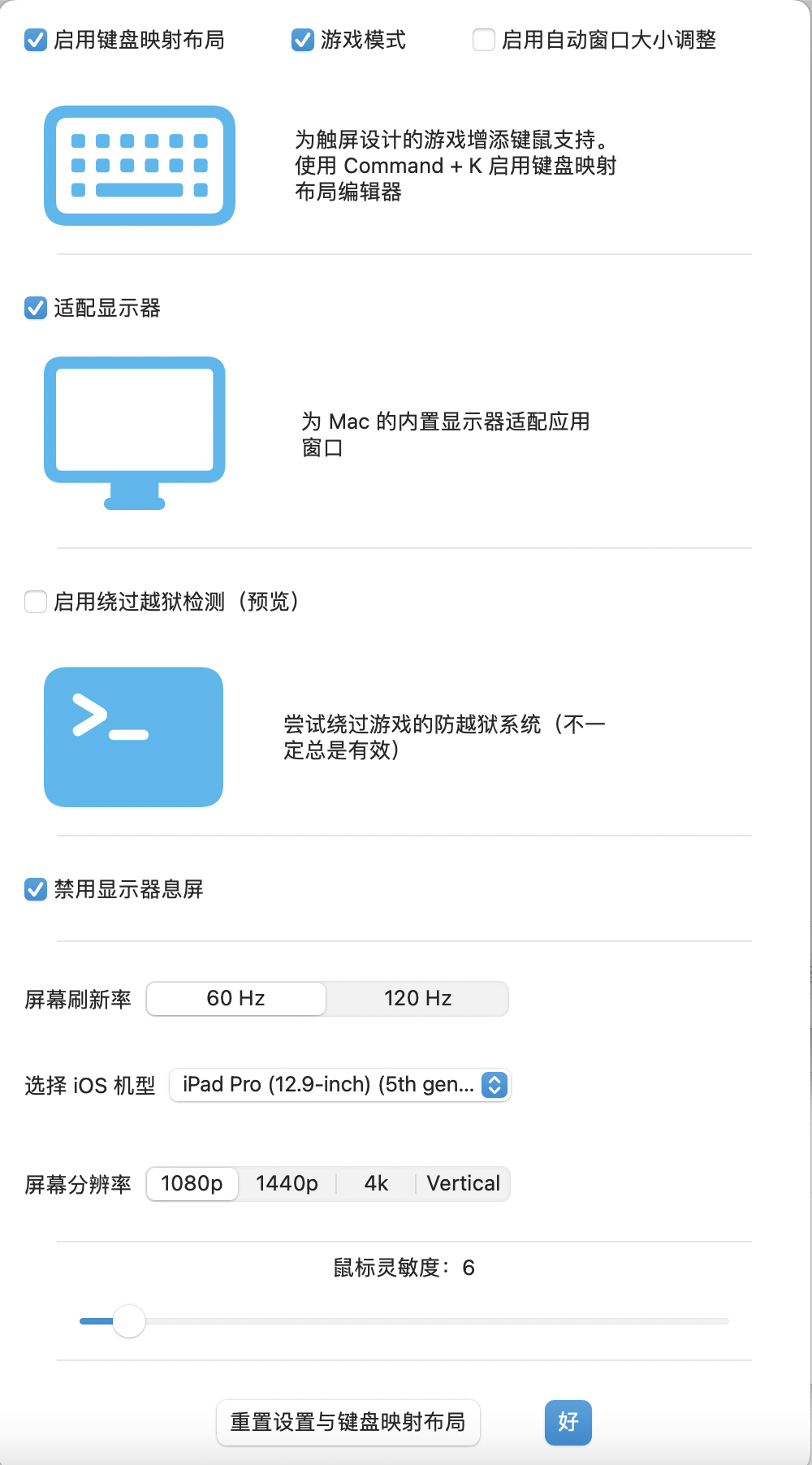
刚才Zhich有提到你的电脑是14英寸的电脑。你先把“适配显示器”这个选项关掉,然后就可以在这里输入自定义分辨率。(见图二)
Zhich just mentioned that your computer is a 14 inch one. First, you wanna uncheck this "Adaptive resolution" box, then you can put in custom resolution values. (Check the second image)
或者... 你可以勾选这个"启用自动窗口大小调整"的选项。(见图一)
Or... you can click on this "Enable custom window size option" checkbox. (Check out the first image)

@656747794 commented on GitHub (Sep 17, 2022):
My mac is 16 inch,After turning off the "Adaptive Display", I don't see that I can input a custom resolution.
@Araide commented on GitHub (Sep 17, 2022):
Ok, final try. Enable the Adaptive Display, and enable the "Enable custom window size option" checkbox.
@ZhichGaming commented on GitHub (Sep 17, 2022):
I'm sorry, I got confused. You have to enable adaptive display and turn on custom window resize.
@656747794 commented on GitHub (Sep 17, 2022):
https://user-images.githubusercontent.com/95347363/190864761-5cfad21c-1759-4003-9329-f3993e481169.mp4
@656747794 commented on GitHub (Sep 17, 2022):
Sorry, I can't find anywhere to customize the window size.
@Araide commented on GitHub (Sep 17, 2022):
@656747794 commented on GitHub (Sep 17, 2022):
It's the same as yours, but it still doesn't work
https://user-images.githubusercontent.com/95347363/190865011-8badaf37-1688-466d-80a9-772975f4a37f.mp4
@ZhichGaming commented on GitHub (Sep 17, 2022):
Use this build instead. Please be aware that bugs may occur and we do not support it.
@656747794 commented on GitHub (Sep 17, 2022):
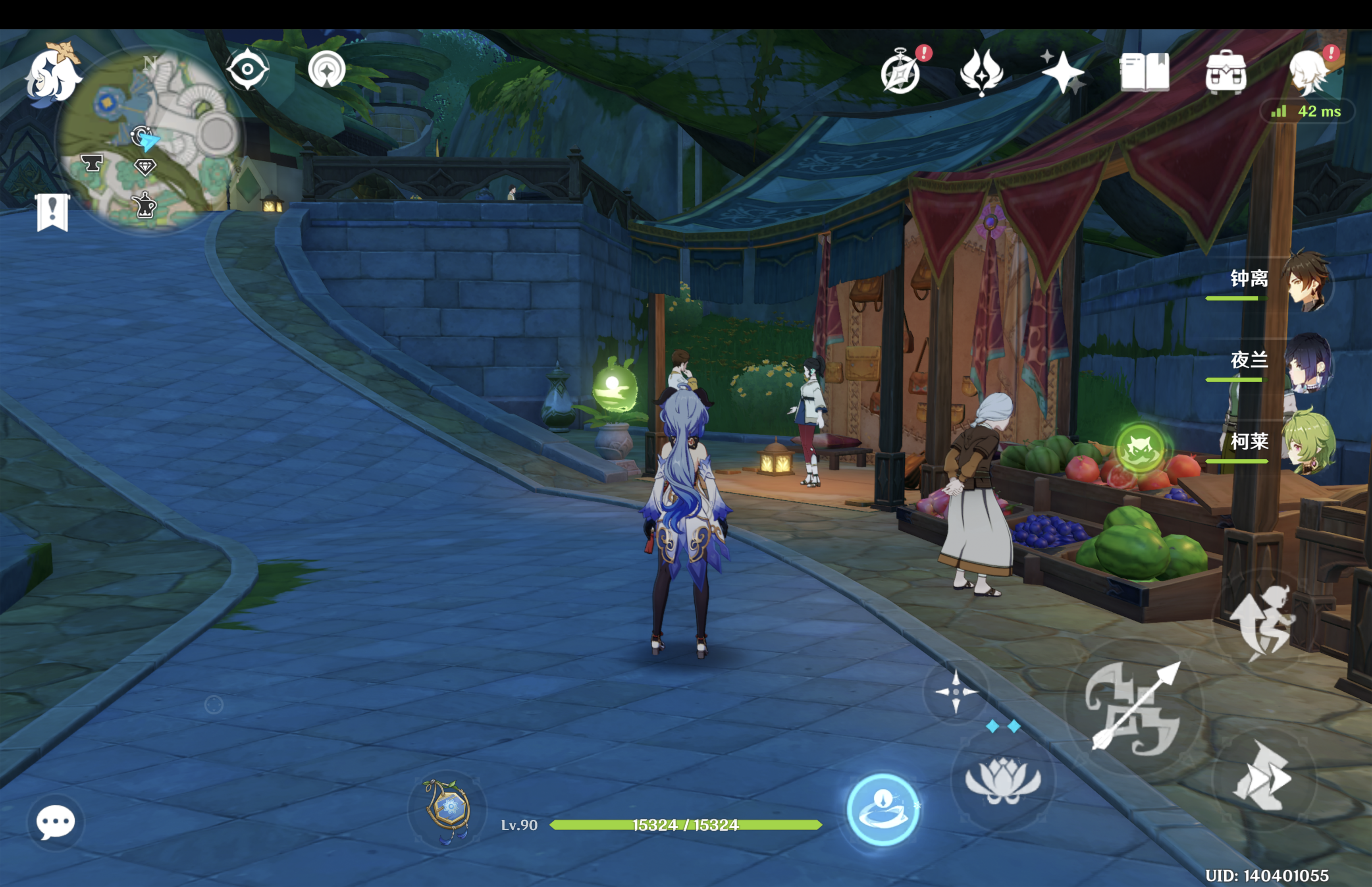
Thank you, There is no problem using this installation package.Although sometimes mistakes are reported.
<img width="904" alt="截屏2022-09-18 00 04 43" src="https://user-images.githubusercontent.com/95347363/190866059-92f72901-418b-4d6b-93bc-147542456e0
e.png">