mirror of
https://github.com/PlayCover/PlayCover.git
synced 2026-04-26 08:15:56 +03:00
[GH-ISSUE #338] [Bug]: Version 1.1.1 (36) on macOS 12.6 shows "PlayTools are not installed! Please move PlayCover.app into Applications!" #143
Labels
No labels
UI
app-support
bug
bug
documentation
duplicate
enhancement
game-support
good first issue
help wanted / caution
inactive
invalid
macos-beta
pull-request
question
wontfix
No milestone
No project
No assignees
1 participant

Notifications
Due date
No due date set.
Dependencies
No dependencies set.
Reference
starred/PlayCover#143
Loading…
Add table
Add a link
Reference in a new issue
No description provided.
Delete branch "%!s()"
Deleting a branch is permanent. Although the deleted branch may continue to exist for a short time before it actually gets removed, it CANNOT be undone in most cases. Continue?
Originally created by @iF2007 on GitHub (Sep 13, 2022).
Original GitHub issue: https://github.com/PlayCover/PlayCover/issues/338
Describe the bug
Device: M1 Pro Macbook Pro.
I updated to macOS 12.6 today and open an app in PlayCover prompts "PlayTools are not installed! Please move PlayCover.app into Applications!"
Works perfectly before update to macOS 12.6.
Also my Xcode updated to 14.
Version 1.1.1 (36)
Steps to reproduce
Open PlayCover.app
Open an APp
Expected behaviour
App runs perfectly
Crash log
No response
What version of PlayCover are you using?
1.1.1
What version of macOS are you using?
Monterey (macOS 12)
Issue Language
@iF2007 commented on GitHub (Sep 13, 2022):
@amirsaam commented on GitHub (Sep 13, 2022):
Read this
@ZhichGaming commented on GitHub (Sep 13, 2022):
If @amirsaam's instructions do not work, please remove command line tools and update it with these two commands:
@amirsaam commented on GitHub (Sep 14, 2022):
Btw, this can caused by CLT being updated, and it will not get update from
xcode-select --install, you need to update it from Mac's System Preferences@linfansh commented on GitHub (Sep 14, 2022):
Go to Mac preferences > software updates and update xclt.
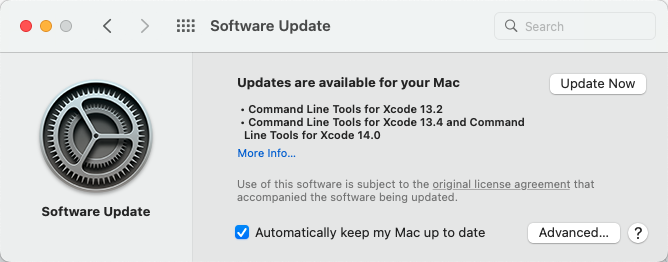
After that, open Xcode and accept Apple ToS (pops up when you open Xcode after update or install, a window that has an "agree" button.
@ZhichGaming commented on GitHub (Sep 14, 2022):
Oh yeah, I forgot that that was the way to update command line tools.
@iF2007 commented on GitHub (Sep 15, 2022):
Works perfectly. Thanks.
swiftlint: disablestatements #1483