mirror of
https://github.com/KelvinTegelaar/CIPP.git
synced 2026-04-25 08:16:01 +03:00
[GH-ISSUE #91] Bug: List Sharepoint/Onedrive site names #57
Labels
No labels
API
Feature
NotABug
NotABug
Planned
Sponsor Priority
Sponsor Priority
bug
documentation
duplicate
enhancement
needs more info
no-activity
no-priority
not-assigned
pull-request
react-conversion
react-conversion
roadmap
security
stale
unconfirmed-by-user
unconfirmed-by-user
wontfix
No milestone
No project
No assignees
1 participant

Notifications
Due date
No due date set.
Dependencies
No dependencies set.
Reference
starred/CIPP#57
Loading…
Add table
Add a link
Reference in a new issue
No description provided.
Delete branch "%!s()"
Deleting a branch is permanent. Although the deleted branch may continue to exist for a short time before it actually gets removed, it CANNOT be undone in most cases. Continue?
Originally created by @freezscholte on GitHub (Oct 20, 2021).
Original GitHub issue: https://github.com/KelvinTegelaar/CIPP/issues/91
Describe the bug
Sharepoint site names show up as group ID's strings instead of display names, this is also occuring when looking in the List Onedrive section
To Reproduce Sharepoint
Steps to reproduce the behavior:
To Reproduce Onedrive
Steps to reproduce the behavior:
Expected behavior
It would be more readable if the ID string is the actual display name
Screenshots
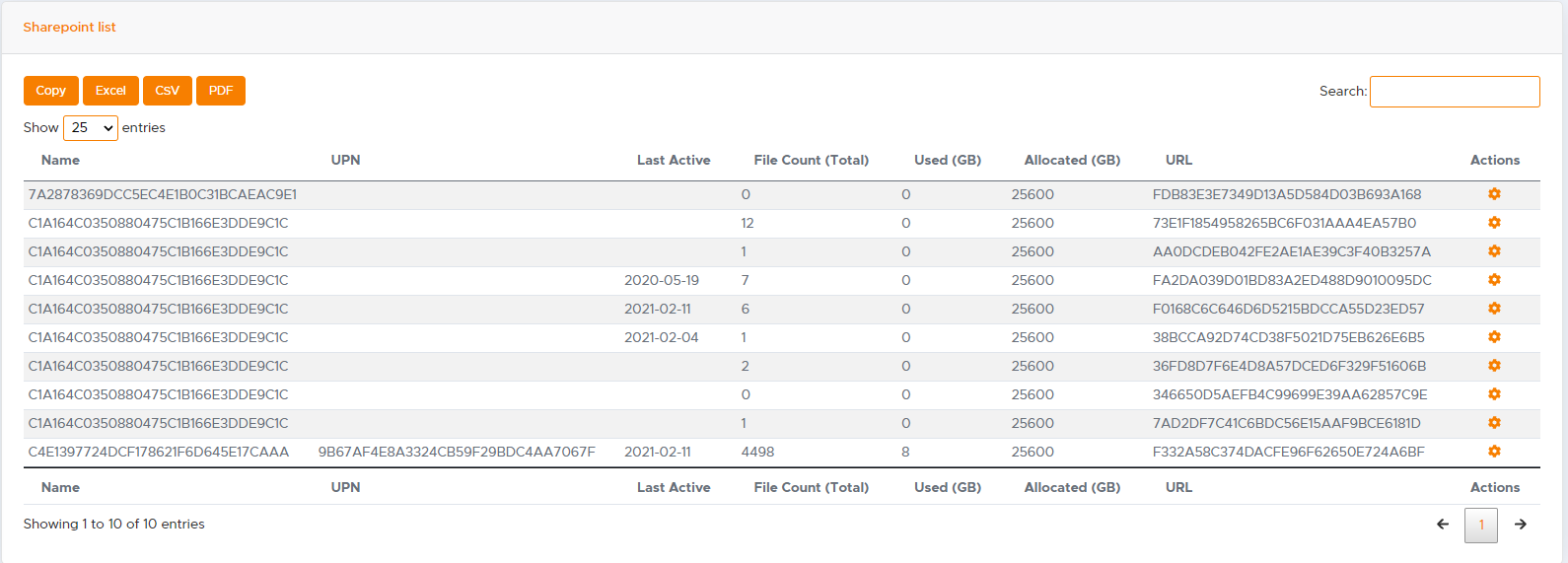
Desktop (please complete the following information):
@KelvinTegelaar commented on GitHub (Oct 20, 2021):
Please check the documentation to resolve this: https://github.com/KelvinTegelaar/CIPP/blob/master/Documentation/Onedrive.md
@freezscholte commented on GitHub (Oct 20, 2021):
Sorry my bad Kelvin, looked for it in the closed issue's but overlook this one. Did notice the link is dead https://github.com/KelvinTegelaar/CIPP/blob/master/Documentation/standards.md
Guess it should be this one right -> https://github.com/KelvinTegelaar/CIPP/blob/master/Documentation/Standards.md
The S of standards is not uppercase in the first link and that one give me a dead page.