[GH-ISSUE #960] [BUG] URL preferences not remembered between pages #593

Closed
opened 2026-02-25 20:36:06 +03:00 by kerem · 2 comments
Owner

Originally created by @brokoler on GitHub (Feb 20, 2023).
Original GitHub issue: https://github.com/benbusby/whoogle-search/issues/960

Describe the bug
Hi, I'm using a public Whoogle instance in france and changed the country to United Kingdom and the interface language to English, this works fine during my browser sessions. Since I work mostly without cookies, I had to adjust this setting multiple times a day.

Because of that I added my preferences string to the URL bar, the URL now looks like this:
https://whoogle.hostux.net/search?preferences=RANDOMSTRING&q=%s
After entering my search term in the URL bar, I get the correct settings and the correct language without any cookies set.

As soon I switch from page 1 to a different page (e.g. page 2), all settings get lost.
After switching pages, the interface language is wrong and the search results are based on french content.
After switching the page, it seems the preferences settings is removed from the URL:
https://whoogle.hostux.net/search?q=RANDOMSTRING&start=10

It seems like the preferences settings in the URL are not remembered when changing pages.
The error happens on all devices (Windows, iOS, Android)

To Reproduce
Steps to reproduce the behavior:

  1. Make the Whoogle configuration which suites your needs
  2. Search for something
  3. Copy the whole URL and add it as a search engine to your browser
  4. Paste the URL and see that the configuration is recognized (Try in Icognito mode to have an independent session)
  5. Switch to page 2 and see that all settings configured are ignored from now on, the preferences string is missing after switching pages

Deployment Method

Version of Whoogle Search

  • Latest build from [source] (i.e. GitHub, Docker Hub, pip, etc)
  • Version 0.8.1
  • Not sure

Desktop (please complete the following information):

  • OS: Windows
  • Browser Firefox
  • Version 110

Smartphone (please complete the following information):

  • Device: iOS
  • OS: Safari
  • Browser Safari
  • Version 16.3.1
Originally created by @brokoler on GitHub (Feb 20, 2023). Original GitHub issue: https://github.com/benbusby/whoogle-search/issues/960 **Describe the bug** Hi, I'm using a public Whoogle instance in france and changed the country to United Kingdom and the interface language to English, this works fine during my browser sessions. Since I work mostly without cookies, I had to adjust this setting multiple times a day. Because of that I added my preferences string to the URL bar, the URL now looks like this: https://whoogle.hostux.net/search?preferences=RANDOMSTRING&q=%s After entering my search term in the URL bar, I get the correct settings and the correct language without any cookies set. As soon I switch from page 1 to a different page (e.g. page 2), all settings get lost. After switching pages, the interface language is wrong and the search results are based on french content. After switching the page, it seems the preferences settings is removed from the URL: https://whoogle.hostux.net/search?q=RANDOMSTRING&start=10 It seems like the preferences settings in the URL are not remembered when changing pages. The error happens on all devices (Windows, iOS, Android) **To Reproduce** Steps to reproduce the behavior: 1. Make the Whoogle configuration which suites your needs 2. Search for something 3. Copy the whole URL and add it as a search engine to your browser 4. Paste the URL and see that the configuration is recognized (Try in Icognito mode to have an independent session) 5. Switch to page 2 and see that all settings configured are ignored from now on, the preferences string is missing after switching pages **Deployment Method** - [ ] Heroku (one-click deploy) - [ ] Docker - [ ] `run` executable - [ ] pip/pipx - [x] Other: Using a public instance: https://whoogle.hostux.net **Version of Whoogle Search** - [ ] Latest build from [source] (i.e. GitHub, Docker Hub, pip, etc) - [x] Version 0.8.1 - [ ] Not sure **Desktop (please complete the following information):** - OS: Windows - Browser Firefox - Version 110 **Smartphone (please complete the following information):** - Device: iOS - OS: Safari - Browser Safari - Version 16.3.1
kerem 2026-02-25 20:36:06 +03:00
  • closed this issue
  • added the
    bug
    label
Author
Owner

@N0-W4RN1NG commented on GitHub (Feb 21, 2023):

Wow what a coincidence, I have been having this issue for the last week using whoogle and came to post it.

Setting the search string as the whoogle settings string seems to work, but unfortunately Firefox Desktop doesn't have this feature anymore (aside: In firefox desktop, %s in saved URLs messed with their API. Instead of fixing their API, they removed the feature of adding custom search engines manually using a search string).

I am using whoogle on Firefox Android and Windows. I have disabled all privacy plugins completely for whoogle.hostux.net.

Steps to reproduce on Firefox desktop:

  1. Go to whoogle.hostux.net

  2. Under Configuration: set Interface Language and Search Language to English. Also set Country to United States (for good measure).

  3. Select Apply.

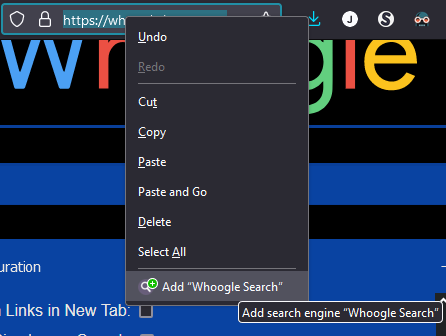
  4. Right click the address bar in firefox, and select Add "Whoogle Search"
    Whoogle Firefox
    Above: Adding Whoogle Search to Firefox
    4a. Optional: go to "about:preferences#search" or navigate to search settings and set Whoogle as default.

  5. Search using address bar.
    Expected result:
    Whoogle maintains location and language settings.
    Actual result:
    Interface and search results are in french (see "next" button at bottom of page.)

  6. Click on Whoogle icon to go to homepage. Look at Configuration.
    Expected Result
    Whoogle maintains configuration set earlier.
    Actual result
    Configuration is reset. Country and Language settings are blank.

  7. Type "whoogle.hostux.net" in the address bar. Notice that Configuration has reverted to previous country and language settings set in Step 2.

<!-- gh-comment-id:1437766038 --> @N0-W4RN1NG commented on GitHub (Feb 21, 2023): Wow what a coincidence, I have been having this issue for the last week using whoogle and came to post it. Setting the search string as the whoogle settings string seems to work, but unfortunately Firefox Desktop doesn't have this feature anymore (aside: In firefox desktop, %s in saved URLs messed with their API. Instead of fixing their API, they removed the feature of adding custom search engines manually using a search string). I am using whoogle on Firefox Android and Windows. I have disabled all privacy plugins completely for whoogle.hostux.net. **Steps to reproduce on Firefox desktop:** 1. Go to whoogle.hostux.net 2. Under Configuration: set Interface Language and Search Language to English. Also set Country to United States (for good measure). 3. Select Apply. 4. Right click the address bar in firefox, and select Add "Whoogle Search" ![Whoogle Firefox](https://user-images.githubusercontent.com/43396592/220228201-d41190e2-d049-4f1d-a25e-6c82241214ba.PNG) Above: Adding Whoogle Search to Firefox 4a. Optional: go to "about:preferences#search" or navigate to search settings and set Whoogle as default. 5. Search using address bar. **_Expected result:_** Whoogle maintains location and language settings. **_Actual result:_** Interface and search results are in french (see "next" button at bottom of page.) 7. Click on Whoogle icon to go to homepage. Look at Configuration. **_Expected Result_** Whoogle maintains configuration set earlier. **_Actual result_** Configuration is reset. Country and Language settings are blank. 9. Type "whoogle.hostux.net" in the address bar. Notice that Configuration has reverted to previous country and language settings set in Step 2.
Author
Owner

@benbusby commented on GitHub (Feb 21, 2023):

This should be fixed now, but I don't know how often the whoogle.hostux.net instance is updated (i.e. if it follows the latest beta builds or if it only is updated when a new version is released). If it seems to be the latter, I'll push a new version sometime this week.

<!-- gh-comment-id:1438813750 --> @benbusby commented on GitHub (Feb 21, 2023): This should be fixed now, but I don't know how often the whoogle.hostux.net instance is updated (i.e. if it follows the latest beta builds or if it only is updated when a new version is released). If it seems to be the latter, I'll push a new version sometime this week.
Sign in to join this conversation.
No milestone
No project
No assignees
1 participant
Notifications
Due date
The due date is invalid or out of range. Please use the format "yyyy-mm-dd".

No due date set.

Dependencies

No dependencies set.

Reference
starred/whoogle-search#593
No description provided.