[GH-ISSUE #908] [BUG] Results renders HTML elements #564

Closed
opened 2026-02-25 20:36:02 +03:00 by kerem · 1 comment
Owner

Originally created by @prashantrahul141 on GitHub (Dec 15, 2022).
Original GitHub issue: https://github.com/benbusby/whoogle-search/issues/908

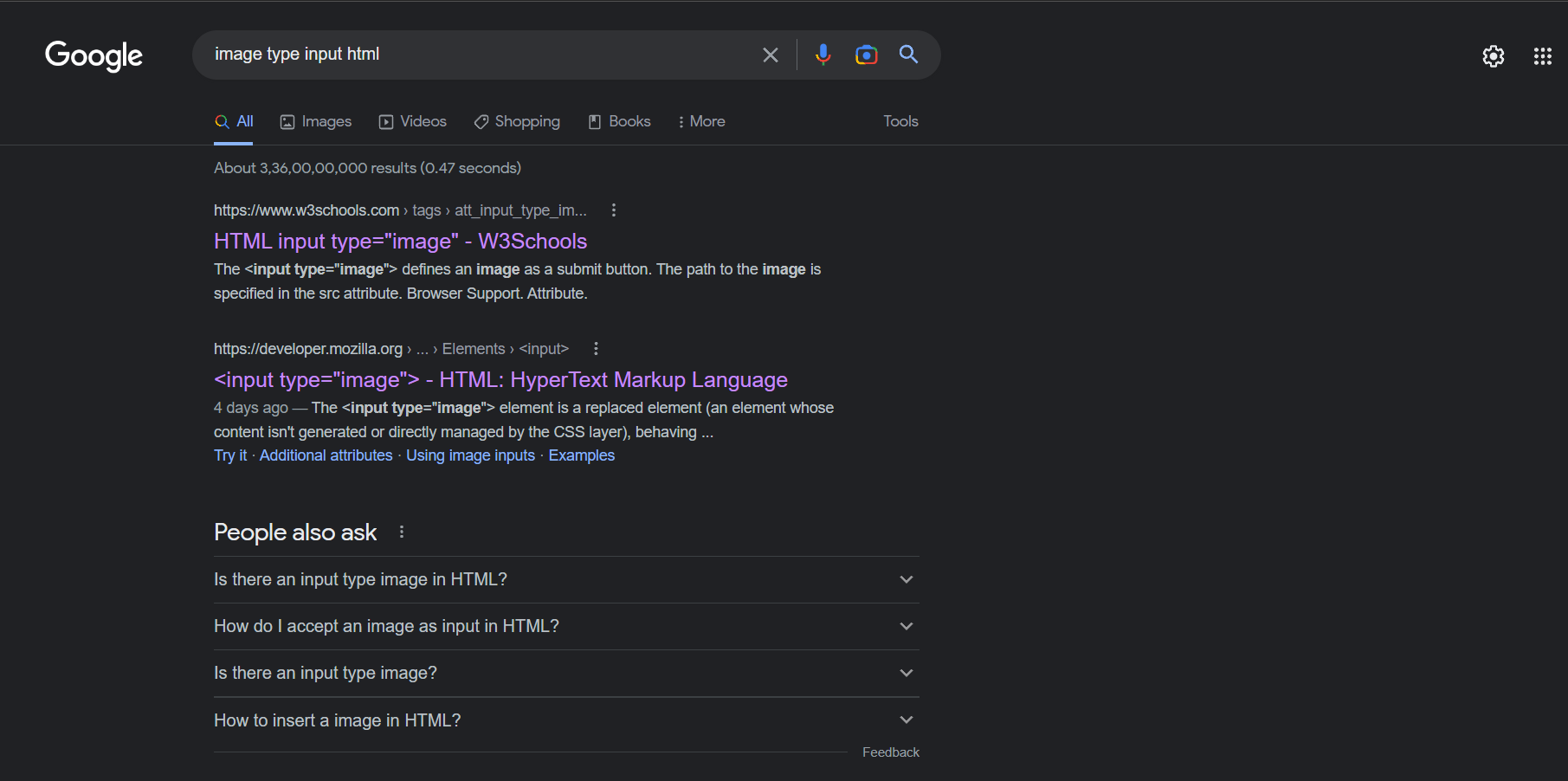
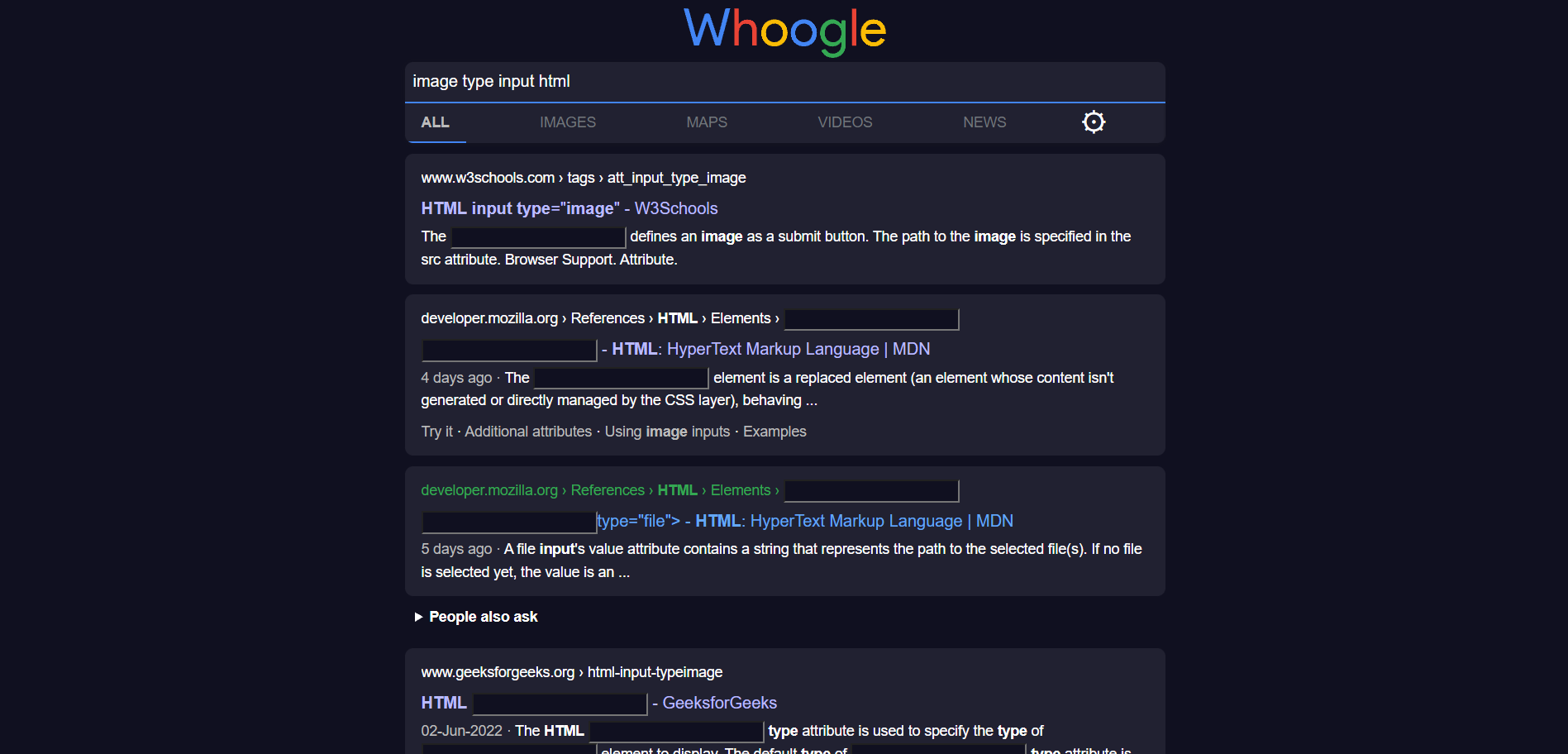
when searching for any type of html element ( like input ) if the results contains something like <input/> it gets rendered on the results page.

Steps to reproduce the behavior:

  1. search html elements
    example: https://www.whoogle.click/search?q=image+type+input+html

Version of Whoogle Search

  • the latest one whoogle.click is using.

Desktop:

  • OS: Windows
  • Browser Brave
  • Version 1.46.140

Example:
On Google:
google

On Whoogle:
whoogle

whoogle1

Originally created by @prashantrahul141 on GitHub (Dec 15, 2022). Original GitHub issue: https://github.com/benbusby/whoogle-search/issues/908 when searching for any type of html element ( like input ) if the results contains something like `<input/>` it gets rendered on the results page. Steps to reproduce the behavior: 1. search html elements example: https://www.whoogle.click/search?q=image+type+input+html **Version of Whoogle Search** - the latest one whoogle.click is using. **Desktop:** - OS: Windows - Browser Brave - Version 1.46.140 **Example:** On Google: ![google](https://user-images.githubusercontent.com/59825803/207822561-405a1669-a248-4a85-bf4e-fd3d99396c51.png) On Whoogle: ![whoogle](https://user-images.githubusercontent.com/59825803/207822632-2c68012a-ab19-4de1-b1aa-cc1e252d68c6.png) ![whoogle1](https://user-images.githubusercontent.com/59825803/207823283-e3a670fb-12a1-4b31-b7db-36df3beb56f4.png)
kerem 2026-02-25 20:36:02 +03:00
  • closed this issue
  • added the
    bug
    label
Author
Owner

@ahmad-alkadri commented on GitHub (Dec 22, 2022):

Reproduced the bug from Whoogle on Docker by typing in <Input> on the search bar:

Screenshot 2022-12-22 at 11 54 32

Browser: Brave v1.46.144 107.0.1
OS: MacOS 13.1
Machine: Macbook Pro, M1 Pro chip

By inspecting the element, I can see that the problem is that the escape check/functionality is not applied there. I'm not sure without delving into the details, but I think, to fix this, simply adding an escape feature for the text passed into the HTML template would be sufficient.

Personally, it's a bit surprising to see this bug though; I've been using Whoogle for a while and never noticed this.


<!-- gh-comment-id:1362703351 --> @ahmad-alkadri commented on GitHub (Dec 22, 2022): Reproduced the bug from Whoogle on Docker by typing in `<Input>` on the search bar: <img width="1465" alt="Screenshot 2022-12-22 at 11 54 32" src="https://user-images.githubusercontent.com/22837764/209119855-d0937049-5b86-4f50-8a74-e37d8951ff81.png"> > **Browser**: Brave v1.46.144 107.0.1 > **OS**: MacOS 13.1 > **Machine**: Macbook Pro, M1 Pro chip By inspecting the element, I can see that the problem is that the escape check/functionality is not applied there. I'm not sure without delving into the details, but I think, to fix this, simply adding an escape feature for the text passed into the HTML template would be sufficient. Personally, it's a bit surprising to see this bug though; I've been using Whoogle for a while and never noticed this. ---
Sign in to join this conversation.
No milestone
No project
No assignees
1 participant
Notifications
Due date
The due date is invalid or out of range. Please use the format "yyyy-mm-dd".

No due date set.

Dependencies

No dependencies set.

Reference
starred/whoogle-search#564
No description provided.