mirror of
https://github.com/benbusby/whoogle-search.git
synced 2026-04-25 12:15:50 +03:00
[GH-ISSUE #901] Social media alternative redirects no longer working #560
Labels
No labels
Fixed (Pending PR Merge)
Stale
bug
enhancement
enhancement
good first issue
help wanted
keep-open
needs more info
pull-request
question
theme
unfortunate
No milestone
No project
No assignees
1 participant

Notifications
Due date
No due date set.
Dependencies
No dependencies set.
Reference
starred/whoogle-search#560
Loading…
Add table
Add a link
Reference in a new issue
No description provided.
Delete branch "%!s()"
Deleting a branch is permanent. Although the deleted branch may continue to exist for a short time before it actually gets removed, it CANNOT be undone in most cases. Continue?
Originally created by @Deviantgit on GitHub (Dec 6, 2022).
Original GitHub issue: https://github.com/benbusby/whoogle-search/issues/901
My self-hosted docker deployment of Whoogle has been working flawlessly with me for the past year or so, apart from the occasional rate limit. However, since the latest Docker image was updated, social media redirects no longer work as intended all of a sudden. I am using other self-hosted services (Nitter, Libreddit, and Invidious) which I access through local domain names (e.g., nitter.local.domain).
To Reproduce
Steps to reproduce the behavior:
Deployment Method
runexecutableVersion of Whoogle Search
Desktop (please complete the following information):
Smartphone (please complete the following information):
Additional context
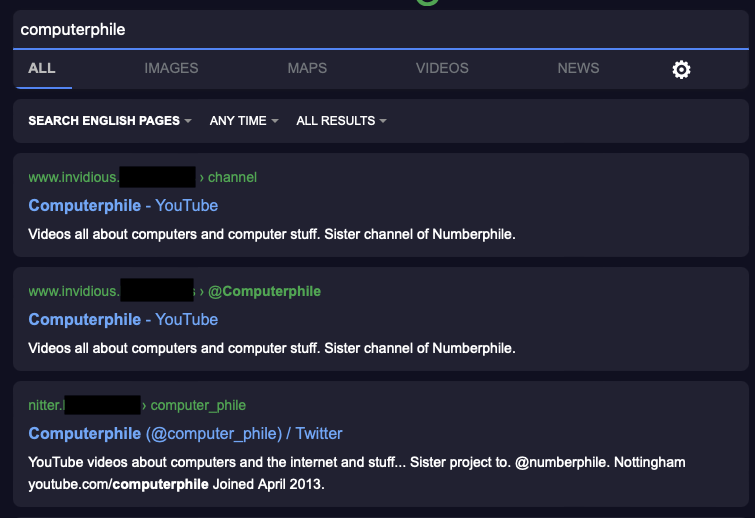
I've noticed that in the search results page, Nitter, which works as intended, shows the preview URL as "nitter.local.domain". YouTube and Reddit have www prepended (e.g. www.invidious.local.domain, www.libreddit.local.domain). I have not changed hostnames in my router, nor have I changed the environment file from Whoogle (which was working, and has them listed as nitter.local.domain). Screenshot is attached.
Edit: I’ve noticed this also appears to be occurring with Wikipedia, Instagram, and Medium (which I’ve set in my environment variables to redirect to farside.link, so it would seem that it’s unrelated to some of my services being self-hosted)
@benbusby commented on GitHub (Dec 8, 2022):
Thanks for reporting -- this should be fixed now.
@Deviantgit commented on GitHub (Dec 8, 2022):
Appreciate the quick fix, and thanks for all you do with this fantastic project!
@Deviantgit commented on GitHub (Dec 8, 2022):
Unfortunately, I’ve realized that the issue is still persisting—thought it was fixed but it turns out I was using another Whoogle instance because I got rate limited.
The same sites are still not redirecting to my internal domains (invidious.local.domain, libreddit.local.domain, etc.), or farside.link. Are there any details I can provide that’d be of assistance?
@benbusby commented on GitHub (Dec 8, 2022):
@Deviantgit can you provide a sample search query that you're seeing the issue persist with? When I perform your search from your original post, I'm seeing the correct redirects for each result:
Edit:
Just verified with the
latestDocker tag as well and am still seeing the correct behavior, from what I can tell.I don't personally use Docker for any of the instances that I run, but I've had people in the past report that their image doesn't actually get fully updated with the latest changes and have to remove + redownload the image to get bug fixes to appear. Not sure if it's the case here, but figured it might be worth mentioning.
@Deviantgit commented on GitHub (Dec 9, 2022):
Solved it by updating my docker image a second time! I’m guessing that the initial docker update I did this morning was likely to a recent but not quite latest version—it’s working as intended now. Sorry for the false alarm
@Kirk1984 commented on GitHub (Dec 16, 2022):
Hello,
So I'm really lazy, so i don't have have domains but local IP Adresses linked as alternatives to my local docker setup. So invidious for example is "192.168.168.X00:8011". that worked before, but after not doing Updates for some time i too get the www (www.192.168.168.X00:8011) after finally updating to the latest whoogle docker.
So now none of my local alternatives work with whoogle.