mirror of
https://github.com/benbusby/whoogle-search.git
synced 2026-04-25 12:15:50 +03:00
[GH-ISSUE #754] [BUG] Wrong serch result at second page of result of search #477
Labels
No labels
Fixed (Pending PR Merge)
Stale
bug
enhancement
enhancement
good first issue
help wanted
keep-open
needs more info
pull-request
question
theme
unfortunate
No milestone
No project
No assignees
1 participant

Notifications
Due date
No due date set.
Dependencies
No dependencies set.
Reference
starred/whoogle-search#477
Loading…
Add table
Add a link
Reference in a new issue
No description provided.
Delete branch "%!s()"
Deleting a branch is permanent. Although the deleted branch may continue to exist for a short time before it actually gets removed, it CANNOT be undone in most cases. Continue?
Originally created by @navhawk80 on GitHub (May 11, 2022).
Original GitHub issue: https://github.com/benbusby/whoogle-search/issues/754
Hello. On firefox if I right click highlighted text and hit "Search Whoogle for ..." all goes well and I have a page with result of search but it adds '&cookies_disabled=1' into address bar 'https://<whogle.example.com>/search?cookies_disabled=1'. If I push the 'second page' at the bottom of the search page with resulf of search it will redirect to page 'https://<whogle.example.com>/search?q=gAAAAABiez8uMkjVi7T6kSFVm5WCBrWbP8IJDJfcjbUWK2WvI9FvL5K8J0rGCoiuAb7U0oK3sqVyzGqnn8yNq4-cqvLBV2xWIQ==&start=10' and 'no results were found for gAAAAABiez8uMkjVi7T6kSFVm5WCBrWbP8IJDJfcjbUWK2WvI9FvL5K8J0rGCoiuAb7U0oK3sqVyzGqnn8yNq4-cqvLBV2xWIQ==&start=10' as an example.
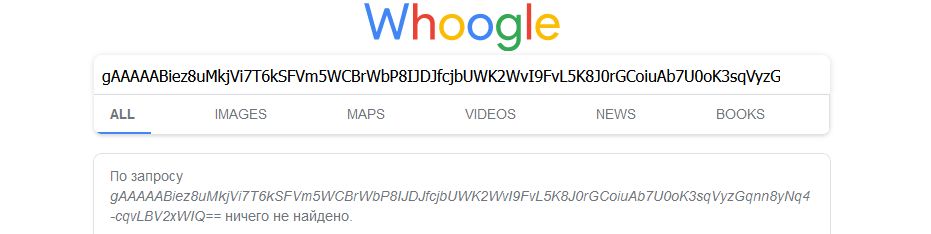
I use docker latest at the moment version 0.7.2 on xpenology behind reverse proxy with Let'sencrypt sertificate. Problem came since 0.7.0 version.
Update: just checked in google chrome. The same issue.
@DUOLabs333 commented on GitHub (May 11, 2022):
Yeah, it seems to be an error with cryptography decrypting. If you go back to the first page and reload, it usually works.
@navhawk80 commented on GitHub (May 14, 2022):
For me it doesn't work. If I go to the first page and reload it will show me clean start page of whoogle. Continue to use 0.6.0 at the moment where all works well.
@DUOLabs333 commented on GitHub (May 14, 2022):
Just ancedotal --- once I pulled from git, I never had a problem.
@navhawk80 commented on GitHub (Jun 5, 2022):
Which version do you use? On latest 0.7.3 I still have this issue.
@DUOLabs333 commented on GitHub (Jun 5, 2022):
Interesting
@navhawk80 commented on GitHub (Jun 24, 2022):
The issue was solved when I added "GET Requests Only" into the docker container and re-add the search engine. https://github.com/benbusby/whoogle-search#using-with-firefox-containers Now all works well.