[GH-ISSUE #639] [BUG] If specified blocked sites, the "-site:" show up if you misspell something in the correction element #409

Closed
opened 2026-02-25 20:35:40 +03:00 by kerem · 0 comments
Owner

Originally created by @DUOLabs333 on GitHub (Feb 4, 2022).
Original GitHub issue: https://github.com/benbusby/whoogle-search/issues/639

Describe the bug
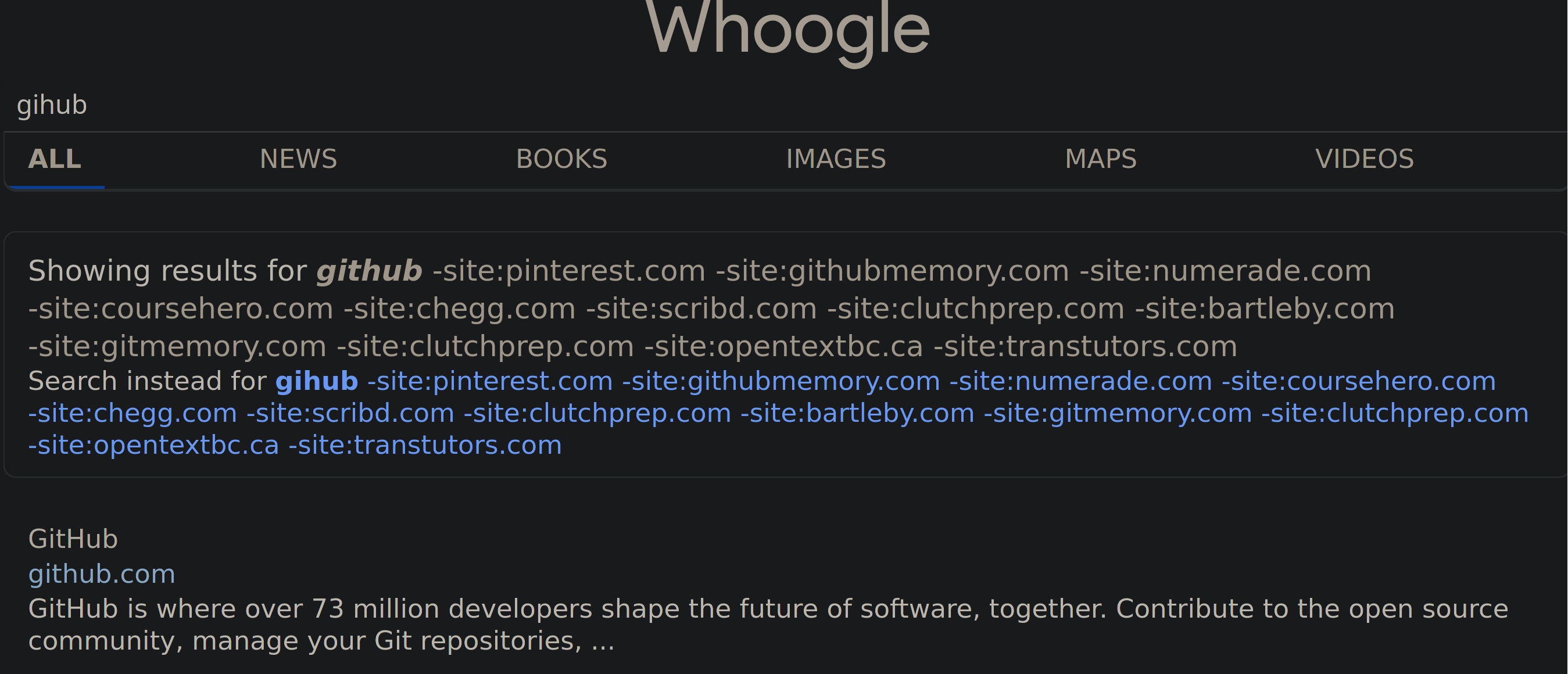
Similar to #638. If you have sites blocked and search, if you misspell something in the correction element.
To Reproduce
Steps to reproduce the behavior:

  1. Specify blocked sites in whoogle.env
  2. Search for "gihub"
  3. See the error in the element saying "Showing results for"

Deployment Method

  • Heroku (one-click deploy)
  • Docker
  • run executable
  • pip/pipx
  • Other: [describe setup]

Version of Whoogle Search

  • Latest build from [source] (i.e. GitHub, Docker Hub, pip, etc)
  • Version [version number]
  • Not sure

Desktop (please complete the following information):

  • OS: [e.g. iOS] Arch Linux
  • Browser [e.g. chrome, safari] Firefox
  • Version [e.g. 22] 88

Smartphone (please complete the following information):

  • Device: [e.g. iPhone6]
  • OS: [e.g. iOS8.1]
  • Browser [e.g. stock browser, safari]
  • Version [e.g. 22]

Additional context
Add any other context about the problem here.
image

This is just a matter of applying clean_query to that section -- is there a way to find where it happens in filter.py?

Originally created by @DUOLabs333 on GitHub (Feb 4, 2022). Original GitHub issue: https://github.com/benbusby/whoogle-search/issues/639 **Describe the bug** Similar to #638. If you have sites blocked and search, if you misspell something in the correction element. **To Reproduce** Steps to reproduce the behavior: 1. Specify blocked sites in whoogle.env 2. Search for "gihub" 3. See the error in the element saying "Showing results for" **Deployment Method** - [ ] Heroku (one-click deploy) - [ ] Docker - [x] `run` executable - [ ] pip/pipx - [ ] Other: [describe setup] **Version of Whoogle Search** - [x] Latest build from [source] (i.e. GitHub, Docker Hub, pip, etc) - [ ] Version [version number] - [ ] Not sure **Desktop (please complete the following information):** - OS: [e.g. iOS] Arch Linux - Browser [e.g. chrome, safari] Firefox - Version [e.g. 22] 88 **Smartphone (please complete the following information):** - Device: [e.g. iPhone6] - OS: [e.g. iOS8.1] - Browser [e.g. stock browser, safari] - Version [e.g. 22] **Additional context** Add any other context about the problem here. ![image](https://user-images.githubusercontent.com/49244768/152460118-5316a0cf-43da-4bea-bbd3-5ef42ea15a49.png) This is just a matter of applying `clean_query` to that section -- is there a way to find where it happens in `filter.py`?
kerem 2026-02-25 20:35:40 +03:00
  • closed this issue
  • added the
    bug
    label
Sign in to join this conversation.
No milestone
No project
No assignees
1 participant
Notifications
Due date
The due date is invalid or out of range. Please use the format "yyyy-mm-dd".

No due date set.

Dependencies

No dependencies set.

Reference
starred/whoogle-search#409
No description provided.