[GH-ISSUE #629] [BUG] (Android) search suggestions don't appear on result page #400

Closed
opened 2026-02-25 20:35:39 +03:00 by kerem · 5 comments
Owner

Originally created by @posta246 on GitHub (Jan 27, 2022).
Original GitHub issue: https://github.com/benbusby/whoogle-search/issues/629

Describe the bug
Hi,
I have a problem with autocomplete, seems different from bug #181: it works in a strange way, delete words or char etc, but only in the search box that you have in whoogle app after you have done the first search (no the first page, the second...). Do know how to explain, will try in the step below. In the closed #181 bug you say it is due to firefox... but same search box of google works (read below to understand which box I refer to).

To Reproduce
Steps to reproduce the behavior:

  1. Go to your whoogle istance via firefox mobile on Android
  2. Insert "something" to search and click search, a page with both the search box and results' list will appear
  3. try to edit the "something" to search you see now in the seach box, adding more than one words, deleting some chars etc
  4. the search box responses in a strange way, sometime does not write anything, something delete the word you insert...

Deployment Method

  • [ X ] Docker

Version of Whoogle Search
it happens on 0.7.0 and 0.7.1 too

Smartphone (please complete the following information):

  • OS: [Android]
  • Browser [firefox]
  • Version [latest]
Originally created by @posta246 on GitHub (Jan 27, 2022). Original GitHub issue: https://github.com/benbusby/whoogle-search/issues/629 **Describe the bug** Hi, I have a problem with autocomplete, seems different from bug #181: it works in a strange way, delete words or char etc, but only in the search box that you have in whoogle app after you have done the first search (no the first page, the second...). Do know how to explain, will try in the step below. In the closed #181 bug you say it is due to firefox... but same search box of google works (read below to understand which box I refer to). **To Reproduce** Steps to reproduce the behavior: 1. Go to your whoogle istance via firefox mobile on Android 2. Insert "something" to search and click search, a page with both the search box and results' list will appear 3. try to edit the "something" to search you see now in the seach box, adding more than one words, deleting some chars etc 4. the search box responses in a strange way, sometime does not write anything, something delete the word you insert... **Deployment Method** - [ X ] Docker **Version of Whoogle Search** it happens on 0.7.0 and 0.7.1 too **Smartphone (please complete the following information):** - OS: [Android] - Browser [firefox] - Version [latest]
kerem 2026-02-25 20:35:39 +03:00
  • closed this issue
  • added the
    bug
    label
Author
Owner

@benbusby commented on GitHub (Jan 28, 2022):

I'll try to look into this soon, but since I don't have access to an Android device at the moment, it might be a while before I can accurately test it.

If anyone else reading this has an Android and is willing to contribute, I'm happy to help with debugging.

<!-- gh-comment-id:1024434422 --> @benbusby commented on GitHub (Jan 28, 2022): I'll try to look into this soon, but since I don't have access to an Android device at the moment, it might be a while before I can accurately test it. If anyone else reading this has an Android and is willing to contribute, I'm happy to help with debugging.
Author
Owner

@DUOLabs333 commented on GitHub (Feb 11, 2022):

@posta246 Does it work on Chrome or Vivaldi?

<!-- gh-comment-id:1036337080 --> @DUOLabs333 commented on GitHub (Feb 11, 2022): @posta246 Does it work on Chrome or Vivaldi?
Author
Owner

@Martin555 commented on GitHub (Feb 16, 2022):

I'll try to look into this soon, but since I don't have access to an Android device at the moment, it might be a while before I can accurately test it.

If anyone else reading this has an Android and is willing to contribute, I'm happy to help with debugging.

I can reproduce this problem on an Android 10 device with Firefox Beta 98.0.0 since Whoogle 0.7.0.
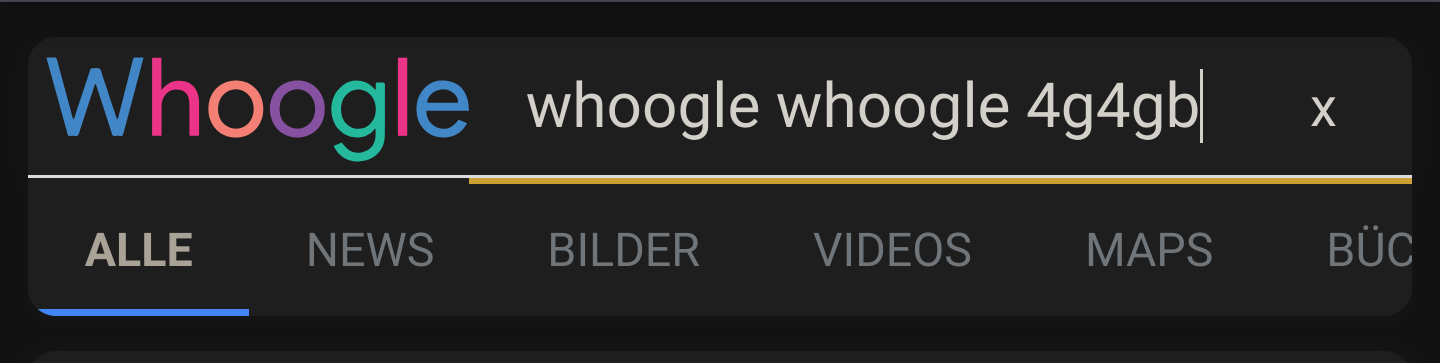
In this example, I typed whoogle whoogle 4gb and it got:
Screenshot_20220215-230442_(1)

So I used the Firefox remote debugging via USB to investigate, but the only warnings I found were:
console

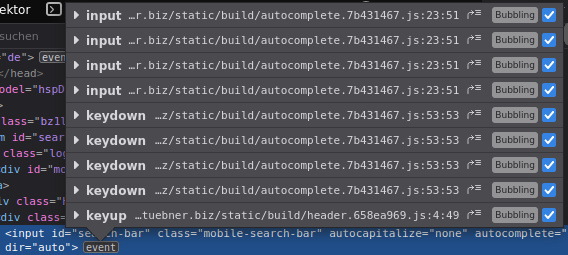
I also noticed, that on every character, you type in the search bar, one more input and keydown event listener is added to the input (mobile version). Those might fight each other under certain circumstances:
Bildschirmfoto_2022-02-16_10-26-29

If you could give me a hint, what I can check specifically, I would be glad to help debugging.

<!-- gh-comment-id:1041290122 --> @Martin555 commented on GitHub (Feb 16, 2022): > I'll try to look into this soon, but since I don't have access to an Android device at the moment, it might be a while before I can accurately test it. > > If anyone else reading this has an Android and is willing to contribute, I'm happy to help with debugging. I can reproduce this problem on an Android 10 device with Firefox Beta 98.0.0 since Whoogle 0.7.0. \ In this example, I typed `whoogle whoogle 4gb` and it got: ![Screenshot_20220215-230442_(1)](https://user-images.githubusercontent.com/9485113/154233240-c71113fb-7b00-4537-8741-1da54b2bdb22.png) So I used the Firefox remote debugging via USB to investigate, but the only warnings I found were: ![console](https://user-images.githubusercontent.com/9485113/154233585-04bb64cb-63b3-4eba-9eb1-7c26ea734f49.JPG) I also noticed, that on every character, you type in the search bar, one more `input` and `keydown` event listener is added to the input (mobile version). Those might fight each other under certain circumstances: ![Bildschirmfoto_2022-02-16_10-26-29](https://user-images.githubusercontent.com/9485113/154235078-8cab96bc-89ec-471a-9b84-abfbc1227fbd.png) If you could give me a hint, what I can check specifically, I would be glad to help debugging.
Author
Owner

@bruvv commented on GitHub (Jun 5, 2022):

Can this be related? https://github.com/benbusby/whoogle-search/issues/370

<!-- gh-comment-id:1146751445 --> @bruvv commented on GitHub (Jun 5, 2022): Can this be related? https://github.com/benbusby/whoogle-search/issues/370
Author
Owner

@benbusby commented on GitHub (Jun 7, 2022):

This should be fixed now -- I got a hold of an Android tablet to test with, and also ran a quick test in an Android sim. The search suggestion front-end code has been refactored and shouldn't have the bug where a new event listener is attached for all input events (I believe that's what was causing the problem).

If anyone continues to see this happening on their Android device, please re-open the issue and I'll dig a bit more to see if there's a deeper issue here.

<!-- gh-comment-id:1148937046 --> @benbusby commented on GitHub (Jun 7, 2022): This should be fixed now -- I got a hold of an Android tablet to test with, and also ran a quick test in an Android sim. The search suggestion front-end code has been refactored and shouldn't have the bug where a new event listener is attached for all input events (I believe that's what was causing the problem). If anyone continues to see this happening on their Android device, please re-open the issue and I'll dig a bit more to see if there's a deeper issue here.
Sign in to join this conversation.
No milestone
No project
No assignees
1 participant
Notifications
Due date
The due date is invalid or out of range. Please use the format "yyyy-mm-dd".

No due date set.

Dependencies

No dependencies set.

Reference
starred/whoogle-search#400
No description provided.